Problems? See this thread at archive.org.
think it's this one. Clevo W870CU
there's a thread on upgrading the w860cu (no usb 3.0) which is the same but 15" http://forum.notebookreview.com/sag...w860cu-hd-7970m-7950m-upgrade-am-i-crazy.html
i wanted to provide the bios files as they will probably need working on, yes mxm 3b psu is the li shin brick output is 20v 6a
thanks laptopnut, i'll checkout the chap you suggest
-
Adrenaline!

It feels a little bit like placing your bid on eBay during the last ten seconds of the auction...
-
I have bought used notebook M67SU (Product code M670SU). On the sticker it is written that it is "Hyunday NB NOT01142" also but I believe that it was made by Clevo.
I'd like to check if there is BIOS update for it but can not find any information...
Current BIOS revision on my nb is 1.01.03HY.
Could somebody here to check is it the recent revision and provide me with link to the recent one?
Thanks in advance!
![[IMG]](images/storyImages/IMG_20120512_073752_resize.jpg)
![[IMG]](images/storyImages/IMG_20120509_164333.jpg)
-
I currently have an AMD 6990m in my Eurocom Racer 1.0 (P150HM). I was hoping the 7970m was fully compatible with my laptop with a BIOS update I have as of November 2011? Or will I need an update? I know the P150HM is EOL but I read that it's the same slot that my 6990m uses. Any thoughts?
-
It may be possible to use a 7970M, but it's best you contact your reseller.
-
Any new BIOS out for NP8150?
I currently have BIOS V 1.01.14 & EC/KBC V 1.00.13 -
Nope, your system is up to date.
-
cool, thanks!
-
-
unfortunately thats not the correct bios info,better go straight into the bios and see what it says under bios and ec version. the files on the first page of this thread are up to date for ur laptop,btw.
cheers
Sent from my GT-I9001 using Tapatalk 2 -
JB is right, but I can already tell you that the latest bios is dated:
08/09/2011
So if you have non 3D screen version, then just use this to update and you are good:
Download -
Maybe somebody could help me with M670SU ( please have a look at my previous post)?
-
hi all,
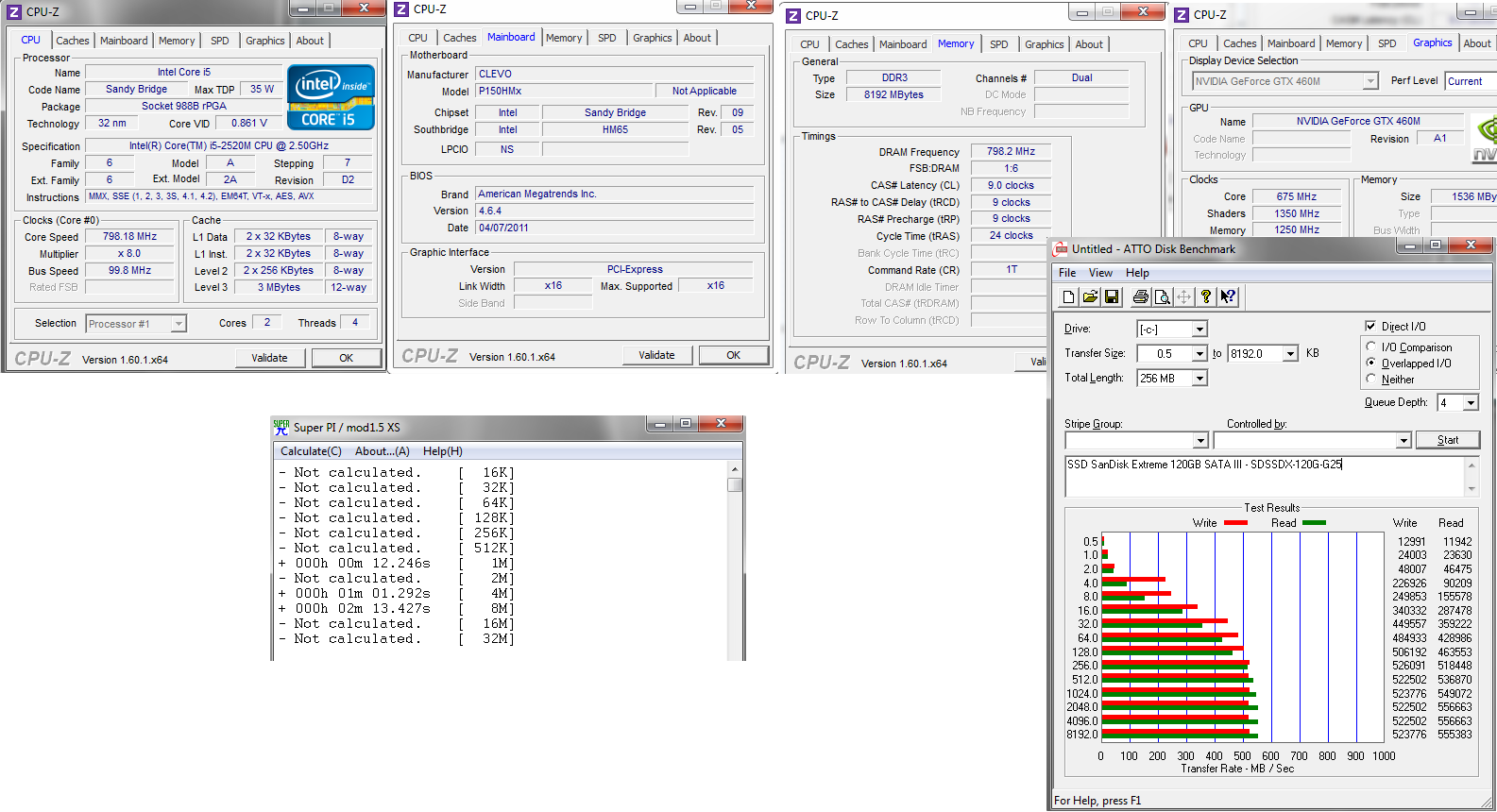
possible i update my processor, new 3 generation ex: i7-3720QM ? and my video card possible update 6990m or 7970m ?
my bios is the last version ?
sorry if bad english. i speak portuguese.. -
if i discern this correctly u have a 2nd gen i5 right? (im on mobile so pic is pretty small). if thats the case then u cannot upgrade to an IB cpu,thats just possible with the z6x desktop chipsets. upgrading from 6990m to 7970m shouldnt be a biggie,u can even reuse ur heatsink and x bracket. bios info should be read out in the bios itself since cpu-z doesnt show u the specific version number,just the type and generation of bios.
cheers
Sent from my GT-I9001 using Tapatalk 2 -
my BIOS date (04/07/2011), model P150hmx.
Comparar produtos Intel®
which compatibility with my laptop ??? -
all 2xxx series cpus are compatible with ur laptop mate, but not the 3xxx series chips
newest P150HM BIOS: BIOS_114.zip
newest P150HM EC: P150HM_EC_13.zip
cheers -
i extract the file (first P150HM_EC_1 3 and click update.bat) + (next BIOS_114 and click update.bat)
using boot loader windows 7 ?
using usually windows 7 , user administrator ?
or after click in update.bat the program make boot in my usb flashdrive ?
maybe iso file more easy boot from cd... make (iso 1 EC) and (iso 2 bios) ? -
u gotta format a usb drive with a DOS environmant, make it bootable, put the two unzipped folders on it and then make sure that ur first boot priority in the BIOS is with this (connected) usb drive.
once u boot up with it in DOS, u just go into the respective folders and run the update.bat files make sure to flash EC first, then BIOS.
using iso files from a bootable CD is also an option of course
cheers -
![[IMG]](images/storyImages/Fk3Oz.png)
yehaaaa HoT !! new bioss.... thanks jaybee 08/09/2011 -
Hi guys
I have the 170 EM (Ivy bridge) model and my bios is version 4.6.5 (04/09/12). Is this the latest version? If there is a newer one can you please tell me where I can find it? I can´t see it in Clevo´s site and even if I saw it I probably couldn´t download it because it gives me an ftp error... :s
Thanks for the help -
I have a Sager NP8170 (P170HMx), BIOS version 1.01.05LS2, EC 1.00.03, AMI 4.6.4 I hadn't touched it since buying it last year. I noticed Prima's link to the August 9 BIOS, and just wanted to ask for peace of mind if my BIOS needs to be updated and if that one would be safe.
-
if everything works to ur satisfaction theres no real "need" to do that but i figure it cant hurt to always have the newest one installed right?
and sure, as long as u follow the instructions of the first page it should be quite safe. havent had any probs so far updating my bios/ec.
Sent from my GT-I9001 using Tapatalk 2 -
Hi,
I have just registered to the site and am not sure if this is the right place, anyway i have a Clevo M360C laptop and i wanted to update the bios, but i couldn't find it after searching in google for 2 hours!, so if anybody could give a link for the latest bios, it will be greatly appriciated.
Thanks -
any update for a W150HRM (Sager NP5165) running bios 1.01.03 and kbc/ec 1.00.015A by chance?
-
Would there be a location I can download the BIOS and EC flash for a Clevo NP9150/Sager P150EM ? The one I have is not responding to the F2 request to enter BIOS and continues on with system Post. My current BIOS version, as reported in the POST screen is 4.6.5.1 with a date of 03-06-2012.
-
Hello Friends,
How nice to see a BIOS support forum for the Clevo
I just bought an "Exper" branded laptop which is actually a Clevo W170HN
Bios : 1.01.12 TEX
KBC/EC: 1.00.02
Now I want to ask you what is the latest version of BIOS and KBC/EC firmwares that suitable for my W170HN?
And also where can I download them? FTP site of the Clevo doesn't show anything for the bios files anymore I think.
I tried to contact with the vendor and also tech support of the brand regarding the bios update but interesting that they didn't want to help me
Please help me
Thank you very much. -
can anyone dump clevo hd 7970m vbios ?
thanks -
Today Sager has made an official post on this forum regarding Clevo's BIOS policy. While I understand Clevo's BIOS policy and their concerns regarding this topic and I have also included it in the initial post of this thread, I would like to add this this policy is still defective.
The reason I say this is because, while Sager may answer their costumers queries regarding BIOS updates without a problem, many other smaller resellers don't do that. Also there are a number of people who are unable to contact their reseller because their reseller went out of business (this is my case, which why I made this thread in the first place).
So while Clevo's policy may work well for some users, there are still a significant number of users who will never receive BIOS support due to this policy. It is for those users that this threads exists. -
Hello all,
I've been creeping around this forum for quite some time now but have been unable to find answers to a few questions I have regarding the P151EM1.
Some background - I received this laptop approximately one month ago. When purchased, it was an unbranded, barebones chassis from RJTech.com. I have since installed an i7-2929XM ES (unlocked), 16GB DDR3L-1600 (4x4GB, ADATA, 1.35v, XMP), an Intel 6235 WiFi+Bluetooth card, and a 128GB Samsung SSD 830. When I originally purchased this machine, I was under the impression that it would support XMP memory profiles as well as Intel XTU for overclocking. I have since discovered that only the P170EM supports Intel XMP / XTU.
Due to this fact, I have been unable to get my memory to operate at 1600MHz as there are no BIOS options to allow for memory speed / timing adjustments (currently it is running at 1333MHz - CLEVO?!?!!).
After several weeks of research, I have discovered tools such as AMIBCP and MMTOOL.
A few questions:
1. I have heard that AMIBCP can sometimes corrupt the BIOS when saving - is this still true of the P1xxEMx series and version 4.53.0050 of AMIBCP? To word this question another way - if I hardcode the memory speed value with AMIBCP, save, and then flash the edited BIOS, will I end up with a brick?
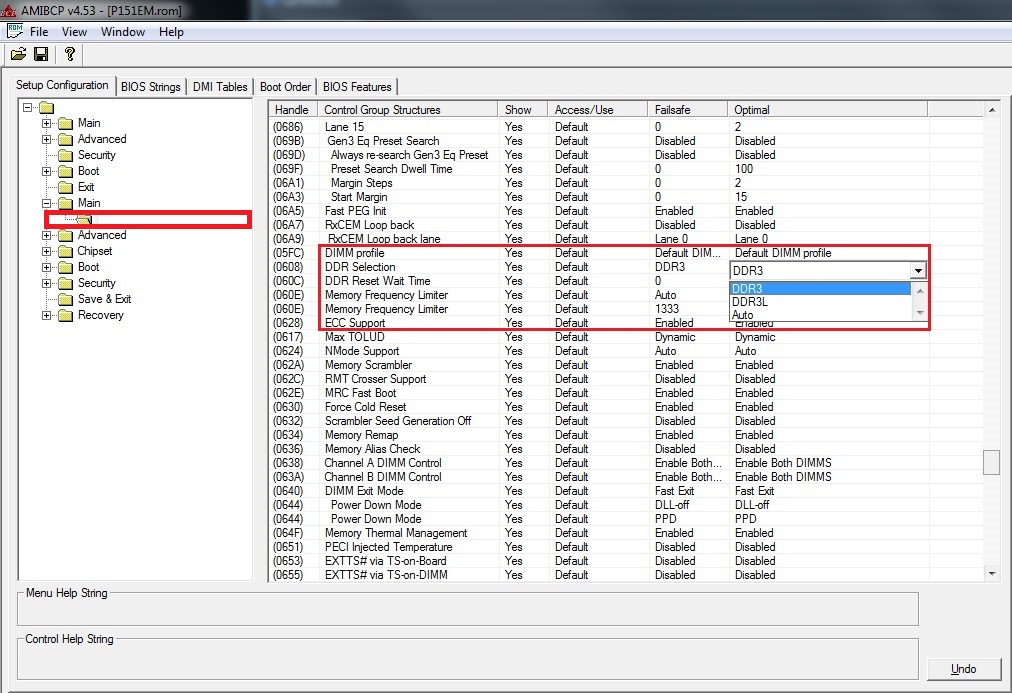
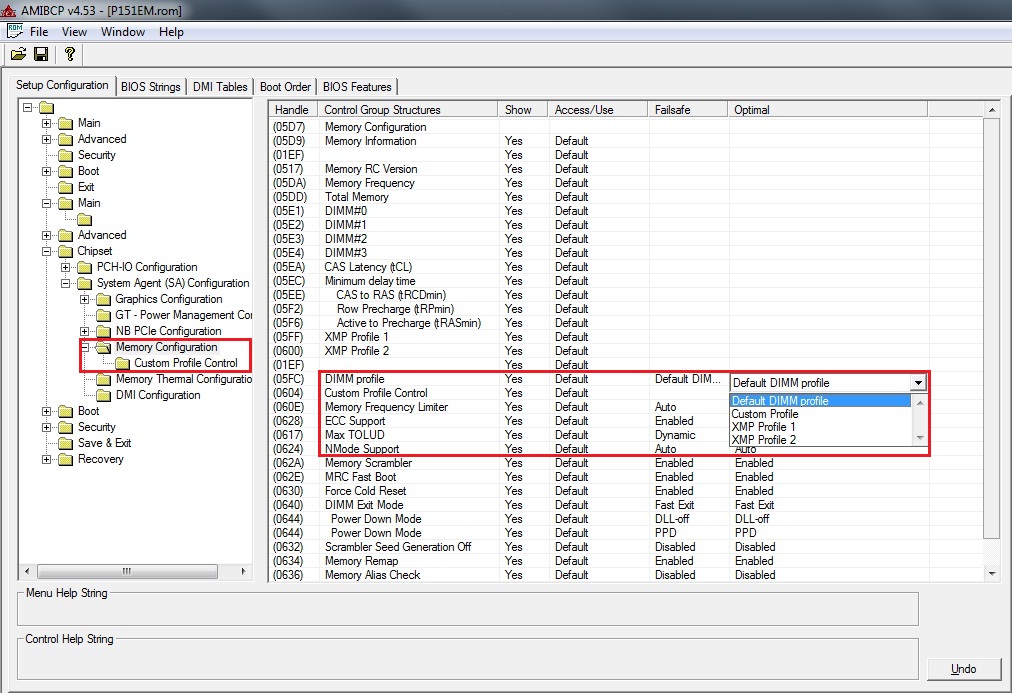
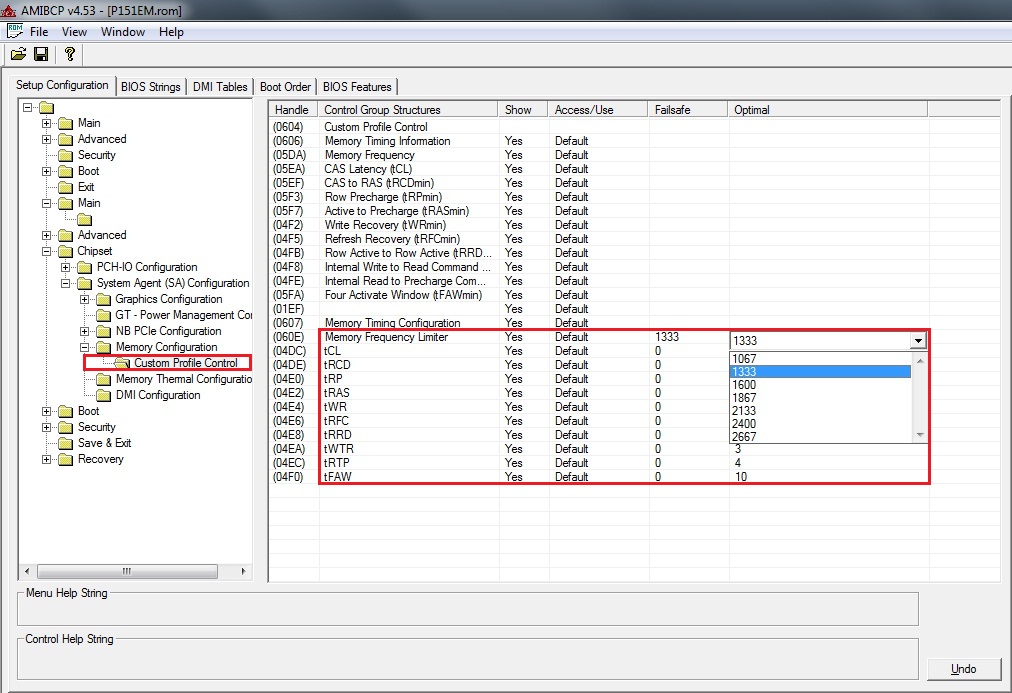
2. There seem to be multiple places within the P151EM1 BIOS and AMIBCP where memory values are stored. Of the attached images, which values should I change (‘Main.jpg’, ‘Memory Configuration.jpg’, ‘Custom Profile.jpg’?
'Main.jpg’ – seems to allow for changes to ‘DIMM profile’ (Default DIMM profile, Custom Profile, XMP Profile 1, XMP Profile 2), ‘DDR Selection’ (DDR3, DDR3L), and ‘Memory Frequency Limiter’.
‘Memory Configuration.jpg’ – seems to allow for changes to ‘DIMM profile’ (Default DIMM profile, Custom Profile, XMP Profile 1, XMP Profile 2) and ‘Memory Frequency Limiter’.
This section does NOT provide an option for ‘DDR Selection’ (DDR3, DDR3L)!?
‘Custom Profile.jpg’ – seems to allow for changes to ‘Memory Frequency Limiter’ and memory timings.
This section does NOT provide an option for ‘DDR Selection’ (DDR3, DDR3L)!?
If ‘Custom Profile Control’ is used, I am assuming that I will need to change the ‘DIMM profile’ combo box in either ‘Main.jpg’ or ‘Memory Configuration.jpg’ to ‘Custom Profile’?
3. If I just change the ‘DIMM profile’ combo box to ‘XMP Profile 1’ on either ‘Main.jpg’ or ‘Memory Configuration.jpg’ (which one?!), will the machine simply revert to the proper XMP profile set by the RAM?
That’s it for now!
Just wanted to point out a few other things, in case someone here didn’t already know – looking at differences between the P170EM and the P151EM1 BIOS, it would seem that they are almost identical aside from the following ADDITIONAL modules within MMTOOL (see attached: P170EM_0404.txt vs. P151EM1_0404.txt).
P170EM_0404 has these additional modules:
Setup (Volume 02:01-00, Index D4) (both BIOS have this module but the P170EM one has some significant differences!)
PerfTuneDxe (Volume 02:01-00, Index 84)
PerfTuneSmm (Volume 02:01-00, Index 85)
PerfTunePei (Volume 03, Index 00)
Hopefully we'll soon see some overclocking action on our P15xEMx's!!
Attached Files:
-
-
I'm concerned about this, I'm buying the NP9130 (= P151EM1) from XoticPC with the i7-3720QM and 16GB DDR3 1600MHz of RAM. Will I have problem with the memory not working at the speed I paid for too?
-
I would assume that XoticPC has tested their memory modules in order to ensure compatibility with their notebooks - but you may want to follow up with the reseller just to confirm.
Those of us who build outside of that specification, however, are left with little choice. To be honest, I can't say that I'm surprised - although this is the first notebook I've ever built, almost every desktop I've built has required manual input in order to properly set memory speed and timings. -
1.I have heard that AMIBCP can sometimes corrupt the BIOS when saving - is this still true of the P1xxEMx series and version 4.53.0050 of AMIBCP? To word this question another way - if I hardcode the memory speed value with AMIBCP, save, and then flash the edited BIOS, will I end up with a brick?
Maybe (depends on bios)
2. There seem to be multiple places within the P151EM1 BIOS and AMIBCP where memory values are stored. Of the attached images, which values should I change (‘Main.jpg’, ‘Memory Configuration.jpg’, ‘Custom Profile.jpg’?
I can do that for you, but be aware that once set to XMP the failsafe doesn't revert back to regular pofile (even if set to do that). Your machine will refuse to boot without an existing XMP profile on the RAM. Neither clearing CMOS nor pulling RAM will help.
I would strongly suggest to change the RAM instead of the bios, just like for the other user here:
http://forum.notebookreview.com/sager-clevo/667253-ddr3-1600-xmp-p150em.html#post8566297
Just wanted to point out a few other things, in case someone here didn’t already know – looking at differences between the P170EM and the P151EM1 BIOS, it would seem that they are almost identical aside from the following ADDITIONAL modules within MMTOOL (see attached: P170EM_0404.txt vs. P151EM1_0404.txt).
P170EM_0404 has these additional modules:
Setup (Volume 02:01-00, Index D4) (both BIOS have this module but the P170EM one has some significant differences!)
PerfTuneDxe (Volume 02:01-00, Index 84)
PerfTuneSmm (Volume 02:01-00, Index 85)
PerfTunePei (Volume 03, Index 00)
[EXPERIENCE]If you put those modules into the one without, you will have a total brick[/EXPERIENCE]
-
both the HM and the EM series laptops support ALL plug n play RAM modules u install in them, up to the max. available of 1866 Mhz (at the moment). the only modules that WONT work at 1333+ speeds are XMP modules, so when u do an aftermarket upgrade please watch out that u buy PnP and NOT XMP modules!
aside from that, unless XoticPC dont have any idea what theyre doing and not testing their machines before sending them off, u should be totally fine, no worries (especially since i dont really expect the just mentioned statements to be true about them ^^ )
@Akira: why bother with the whole BIOS fiddling and the risk of bricking ur machine if u can just use SPDTool or ThaiphoonBurner (paid version approx. 25 bucks) in order to reflash ur XMP to PnP modules? ^^
aside from that, it would probably be best and cheapest if u had told ur reseller about it right away instead of trying to figure it out urself the way i see it, they put in the wrong modules, cuz every reseller should KNOW the difference between XMP and PnP compatibility on the EM series machines
cheers! -
Thanks for clarifying that.
-
Really nobody knows what's the latest bios and ec/kbc firmware revisions for the Clevo W170HN (W1x0HNx series)?
-
Thank you all for the quick replies!
@jaybee83 and Prema - Great suggestions, I never thought of reflashing the RAM profiles. I will investigate this possibility! -
Without trawling through 224 pages, which EC/KBC and BIOS are the most up-to-date for my Clevo P150HM?
The first post in this thread needs updating as it lists 1.00.08 as the latest EC/KBC... I already have 1.00.11 and know that to be old. -
Actually the latest EC/KBC on the first page is 1.00.13
-
Hey. Yesterday i did update EC/KBC nad BIOS in my P170HMx. I still have wrong EC/KBC (old one). I know what i did wrong (flashed BIOS first, then EC/KBC). Is there any option to flash it again to have new one?
-
Try again flashing the new EC/KBC.
If it doesn't work, flash an older BIOS or the BIOS you used to have and than flash the new EC/KBC and new BIOS. -
Hy everybody!
I would like to ask for the latest bios for Clevo M660S.
My current Bios version is 1.00.03
KBC/EC version 1.00.03
I tryed the older links above, but they aren't working now. Thank your for your help in advance!
Norbert -
does anyone have clevo hd 5870m vbios ?
thanks -
Hi guys, I noticed that in the front page, there are no links to the bios files of the clevo P1xxEM series of laptops. I have the link at hand from clevo's site but I don't know if posting is allowed.
Anyway, I wanted to change the boot splash from my own bios (P151EM1) which I extracted with AFUWINx64 for Aptio, but I have no clue on how to do it with efi bioses. Any tips, guides or something on how to proceed?
Thanks in advance. -
You can PM me if you wish.
-
Apparently I can't PM, maybe it's because I'm new. Dunno. In any case, PM you what, the Clevo URL?
-
Links that you feel should not be made public, that's all.
Just make 3 more random posts and you will be able to PM.
-
10characters
-
Can I PM you too? You look like the one, who could help me with my bios update problem
-
I suppose you can, but if you have a problem it's better to solve it in the forums so that other people experiencing similar problems will get theirs fixed without our help.
-
I posted a comment:
But nobody replyed so far. Can you give me a dowload link?
Clevo BIOS Thread
Discussion in 'Sager and Clevo' started by Blacky, Sep 11, 2009.