 Problems? See this thread at archive.org.
So, for my Clevo P170EMx i should use file P170EM.10 from P170EMB10EC08.zip file and ECP170EM.09 from P170EM_EC09.zip ile, right? Flash first EC09 and then P170EM.10, right?
-
-
Contact your reseller. And when they send you the EC/BIOS they will include instructions. That's the easiest and safest way to do it.
-
Does anyone know how to get the files off an ISO and be able to use them from a bootable USB? I don't have access to my USB optical drives and don't have one in my computer for the next week, and wanted to upgrade to Windows 8. I got the latest EC + BIOS from my reseller, and they gave me USB compatible EC and an ISO for the BIOS. I asked specifically if they had a USB version and was told no. I'd really like to install Windows 8 and have the whole thing up and running while I'm on this short little break.
-
You can use Daemon Tools to mount the ISO and copy the files to USB. Or if you have WinRAR, just open the ISO with it, then "extract" the files.
FYI, one of the best features in Windows 8 is you can directly mount an ISO by right-clicking on it :thumbsup: -
Thanks, +rep. I think I've tried the daemon tools way before and the ISO always shows up blank. I don't know how to make daemon tools show me hidden stuff, does it follow the normal windows settings as far as hidden/visible files? Regardless, I'll try the WinRAR method, I much prefer that program anyways.
-
Ask again. Both the EC and BIOS are already extracted and ready for USB boot. This is for both Sager and MySN's BIOS/EC.
-
Guys IF YOU ARE NOT HAVING ANY PROBLEMS, THEN DONT FLASH!
You could end up screwing your laptop up. -
Hi guys. I have a P150EM. Have no real BIOS problems, only 7970m problems :-(
Shall i upgrade the BIOS? -
well, it depends on what sort of nature ur gpu problems are of
-
Hi,
someone can tell me if the motherboard have two bios chips or only one? I found a spi under battery 16mbit, is there any other? i am with a p150em bricked and i tried by the way all things to reanimate it. So i am thinking in replace the bios chip. If someone have a suggestion i will be glad. -
So I ended up tearing out and using the DVD drive from another computer I had in my house. After finally updating the EC and then BIOS I was given directly from Sager (LS1 for the BIOS and LS7 for the EC), the system now won't stay powered on. I hold the power button and the boot screen comes up, shows the Sager BIOS splash, then the computer loses power. This happens both on AC with the battery in, out, and just on battery power (not plugged into AC). Does anyone know what to do? Currently I have the computer next to me with the CMOS unplugged, disconnected from AC, and with the battery out. It's been that way for several minutes, so hopefully eveything has reset to defaults that can.
How do i solve this problem? I got the new BIOS/EC from Sager because I wanted the ones they released for Windows 8, and I was told specifically that these are the correct files. I can upload them (I think we can do .zip) if anyone wants to see.
EDIT: Here they are - http://www.filedropper.com/win8ec-bios
EDIT2: I can get into the BIOS setup menu with 1 of my 4 sticks of RAM in and neither optical bay filled. This is the information:
MB Series: P150EMx (this is correct for a Sager NP9150, I believe)
ME FW Version 8.1.0.1248
BIOS Revision: 1.02.14LS1
KBC/EC firmware Revision: 1.00.07SA
That is all the info I can get right now. Resetting to defaults doesn't seem to affect it, and yeah... This is quite unfortunate. -
Acording to sager, the new Windows 8 Firmware Revisions for NP9150 should match as this:
BIOS Revision: 1.02.14LS1
KBC/EC Firmware Revision: 1.02.11SA
I believe that you got a corrupt EC file, take a look to the file hash, mine is at the right and top of the list:

This could be sagers fault at the moment of uploading the files, or yours at the moment of downloading the file. -
Does the KBC/EC deal with the SATA ports? I got the computer to turn on and even boot into my Win8 installer USB, but I keep getting hard drive related errors when I try to install. I get something along the lines of "hard drive is locked," or "cannot access selected drive" every time. To get this far though, I had to take out all but one stick of RAM.
Also I do see that you have a newer version than I do. I was not given the 1.02.11 EC. when did you get yours? Mine are from November 18. -
As far as I know, the KBC/EC deals with all the electrical components, so it could be the source of the power loss and SATA malfunction.
I got the files from sager support in October 31, I'll give you the files in case you want to try a new flash, check the file hash, you dont want to get another broken download:
SAGER NP9150 KBC/EC 1.02.11SA- File: 915ec07.zip
- CRC32: E63D5D84
- MD5: 356D6F235EB6ABB3E5778CA62C8622A8
- SHA-1: 6CC8B97C78E64A2548782046277DFCC4A91FB5CA
SAGER NP9150 BIOS 1.02.14LS1- File: 915bv14ls1.7z
- CRC32: B5A4ECBF
- MD5: 365BC650EC664171EEFEDE8577A4065A
- SHA-1: 2BA49A81F99D7719D11118364144C34D8D2328E9
NOTES- Hashes are for the .zip and .7z files respectively, not the ones inside.
- Windows key will be swapped with Fn key.
DETAILS- MB Series ........................ P150EMx
- ME FW Revision ............... 8.1.0.1248
- BIOS Revision .................. 1.02.14LS1
- KBC/EC Firmware Revision 1.02.11SA
- CMOS Setup version ......... 2.15.1227
-
Thank you so much, I will try these out and hopefully report back quickly with a success. I don't mean to be a bother, but how can I extract the ISO for the EC for use on a DOS booting USB? When I try with WinRAR I get an empty folder which says 0 bytes, when clearly the ISO is 7something.
-
hmm, I dont know about that, I was trying right now to use the "Write bootable disk" option in Ultra ISO and it didn't work with my USB, also Ultra ISO doesn't show any files that can be extracted.
-
I was able to get at them with ISO Buster. Thanks for all your help though. Now I'm back at the proper Sager BIOS like I should be with their EC and everything all matched up.
-
So, in my case (Clevo P170EMx), i should use ECP170EM.09 file from P170EM_EC09.zip and P170EM.10 from P170EMB10EC08.zip. Is this correct??? -
Just ask your reseller for latest version and then try reading the instructions that come with them...
-
Won't they will tell me that if i update the BIOS that warranty will void?
I have already read the instructions... I just need to know if those are the correct files for my Clevo... -
hulawafu77, what BIOS and EC revision are you using with your UEFI + SecureBoot install of Windows 8?
-
The ones sent to me by my reseller.
-
You can't just answer the question man? I have been trying to follow your guide on the Win8 UEFI install and seem to have some problem with the EC 1.02.11SA it always throws strange errors about memory that can't be written.
-
And these versions are?
-
I'm running
1.02.14LSI Bios
1.02.11SA EC
if that helps. -
Hello,
I have buyed a Notebook from XMG by Clevo and i have no Bios settings they are interesting for me.
exist there a Bios version for the P170EMx with Overclocking Options, Dram timing options, Energy management options?
I hope anyone can show me a link to a Mod Bios or something else.
mfg -
short answer: no
long answer: u dont need the bios for that anyways, since the p170em supports intel's extreme tuning utility. with that u can easily oc cpu and ram without having to fiddle around in bios settings. the gpu is ocable by tools like msi afterburner, amd overdrive or nvidia inspector, just to name a few (and depending on what kinda gpu u have)
cheers
Sent from my Galaxy Nexus using Tapatalk 2 -
Hey,
There is nothing i can do....

I had unlocked the MSI Afterburner inoffical OC mode but this programm dosen't read temps clock etc...
There must be something i can do with this ****** i7-3630QM! -
Yea remember the 3630QM has no ability to be OC'ed at all.. You have to have a 3720QM+ to be able to overclock it at all.
-
aaah well, theres ur problem

-
I hate this ***** Intel.... But there is no AMD notebook with so much Power on the Market.... .... Tons of Euros for Tons of Crap...
-
lol, its not that bad! u can still maximize ur turbo boost via xtu so that the cpu doesnt throttle. also, u can oc the ram and ur gpu. all in all, im sure u can squeeze out around 20% extra power
Sent from my Galaxy Nexus using Tapatalk 2 -
How should i maximize the cpu clock? how can i configurate that it allways works with full pwoer or what did you mean?
-
You should look at the MSI then that has the AMD Trinity + 7970M that doesn't have any issues. For gaming and even graphics work, the Trinity is powerful enough, no bottleneck issues.
-
The Quality of MSI cant reach the Quality of XMG my friend. I have looked for so many Notebooks. But XMG was the best Quality price Calculation.
I have tried to set my Ram Timing couse i cant modify the frequenz. But the tested 7-7-7-21 from PCGH for the Corsair Vengance i have installed were not stable. Also the 8-8-8-21 timings.
I had tried to Overclock my HD 7970, i use the trick to engage the Inofficial MSIA OC mode. But after reboot all my settings were resettet and i cant overclock again....
Now i have tried to Overclock the HD4000. That was the only thing that has worked. Im @ 1600Mhz and +0,4258V thats okey and stable.
Can anyone tell me how i can activate the Performance Tab in my ATi Driver settings? The must be any Trick ! pls help me -
Here you can see my XTU settings...
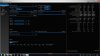
If anyone has some ideas to get some more power for my Notebook. pls tell me -
I still can't get my bios flashed. I flashed the ec to the one listed on the OP. If I try to use this method I get:
"ROM file ROMID Is not compatible with existing BIOS ROMID."
Anyone? -
if you have that /x parameter in there it will bypass the check for compatibility.
-
Just have to agree to disagree. MSI come with quality build, good steel series keyboard, standard anti-reflective screen, without any AMD issues, reputable audio, sata 3 msata ports and IMO the best price/performance I have ever seen.
-
I have a Horize-branded P150EM which came with the 1.00.05TLO BIOS and 1.00.05 EC/KBC, which I want to upgrade to 1.02.14.
It appears that due to a mix up in the BIOS update package, the EC image has been flashed as a BIOS image
i.e. "AFUDOS.exe %BIOS.ROM% /p /b /n /x %1", not "AFUDOS %EC.ROM% /e /shutdown /x".
(From Tyranids post above, if the batch file didn't use the "/x" parameter, the flash may have failed?)
I now have a new boot logo, and the BIOS now has a Windows 8/Others OS option. The BIOS version is reported as 1.02.14TLO, but the EC/KBC is still 1.00.05... This is not supposed to work, but despite some initial glitches, I can still boot into Windows.
How can I get my BIOS/EC back to a sane state without bricking the laptop? Should I flash back to the 1.00.05TLO BIOS first, or proceed with flashing the new EC and BIOS using the correct AFUDOS parameters?
Cheers! -
id definitely NOT recommend flashing back the bios once u have the newest version installed. the best thing u can do now is to upgrade ur ec to the newest version as well and leave it at that.
cheers
Sent from my Galaxy Nexus using Tapatalk 2 -
HI guys, I want to upgrade my EC and BIOS to whatever works best for the sager p9170em. I bought my laptop from Xotic pc so I was hoping they would give me the link for what works best. It was shipped around august. Derek at Xotic pc emailed me and wrote to check this forum. There is just too many versions of BIOS for me to make an informed choice. What is the best version for my laptop and what is the download link?
-
How about the latest? EC 1.02.12 / Bios 1.02.14. A new version is suppose to correct bugs from older versions, and make the bios ready for new functionality. The latest version supports Windows 8, I'm sure it has been properly tested. No one likes crashing Windows 8 PC's. Of course you can use that bios with Windows 7 too. In principle you should always use the latest version, unless there are known problems with that version.
-
Maybe not for all versions, but I did flash my 150EM back to bios .10 and ec .07, from the newest 2.14 and 2.11. Keep in mind that when you upgrade the ec and bios, always at one point you have a new ec and old bios working together, so I flashed back the bios first, and then the ec.
If you're all asking "why", well the newest ones actually brought me more problems, while fixing none of the existent (at least to my knowledge). -
Ähm sorry its not in English but watch @ the lists .@ the bottom .... 1 = Great -----6= bad
MSI GX60: Gaming-Notebook mit Radeon HD 7970M im ersten Test
And here the handy on test from PCHJ of the Schenker XMG P502 (Clevo)
Hands-on-Test: Schenker XMG P502 Pro mit Geforce-Flaggschiff GTX 675M - aber ohne Kepler
Schenker XMG P502 Pro: Fazit
Die Leistung des XMG P502 Pro ist überzeugend, auch wenn es sich bei der Nvidia GT- 675M-Grafikkarte laut den technischen Daten und unseren Praxisergebnissen um ein einfaches Rebranding der Nvidia GTX 580M handelt - sprich keine Kepler-Architektur, sondern Fermi. Leider sind die Materialien die für das Gehäuse verwendet wurden sowie die gesamte Verarbeitungsqualität des Notebooks nicht auf einem ähnlich hohen Niveau. Auch der Aspekt der Mobilität ist nur zum Teil in das Mainboard-Konzept eingearbeitet worden. Ein Gewicht von 3,2 Kilogramm sowie eine deutlich eingeschränkte Spieleleistung ohne Netzbetrieb sprechen eine klare Sprache. Dabei handelt es sich allerdings um ein weit verbreitetes Phänomen unter Gaming-Notebooks der Mobilität wird von den wenigsten Herstellern Beachtung geschenkt. Da wir aktuell noch keine Informationen zum Preis und Veröffentlichungstermin des XMG P502 Pro haben, verzichten wir an dieser Stelle auf eine Wertung aus Preis-Leistungs-Sicht.
MSI is an conveyor product. My Laptop was Build with Hands. Schenker is the Highest Quality producer i ever seen! -
You do know that my Sager is the exact same notebook that Schenker makes? You're preaching to the choir, but this isn't the thread to talk further about it. I just think you're being naive about your Schenker. It's made on a conveyer belt just like an MSI. The HDD, LCD, or whatever else on a MSI like Clevo was put together with hands. And far as I can tell from the reviews and pictures I've seen, MSI quality seems superior to Clevo. The case seems to be built better. The audio outputs, the speakers, the keyboard, the dual mSATA (SATA 3) are all superior to what Clevo offers.
-
Is this BIOS the same for the 170em as well as the 150em and is it a sager branded BIOS? I seen where 150em owners use it but not 170em.
-
EC 1.02.12 / Bios 1.02.14. the bios is secure 100%?changelog?
-
Ask your reseller?
-
I asked mine (xotic pc) for an update and they told me to try here. That was not really nice of them since the wrong bios will brick your pc.
Clevo BIOS Thread
Discussion in 'Sager and Clevo' started by Blacky, Sep 11, 2009.


