 Problems? See this thread at archive.org.
Hi, i have a Clevo W950TU and i need to update BIOS (that is UEFI now). I ve read this post but never found anything about this model. I know this thread because i ve found this article: W95xTU Series
where there is a link to here.
When i try to follow istructions of the bios file that i ve downloaded, something goes wrong. Can someone explain me better how to upgrade this bios?
And overall, what is EC/KBC and how to upgrade it, too?
Of course CLEVO doesnt give anymore BIOS downloads
Thanks to everyone for helping me!
-
Hi everyone...
I need BIOS update files to my Clevo P170-EM and I can't see it in the site... Only for P170-SM. -
First post :
FOR OLDER CLEVO MODELS (RELEASED AFTER 2012) WHICH HAVE BEEN DISCONTINUED AND THUS NO LONGER RECEIVE BIOS UPDATES YOU SHOULD CHECK THIS THREAD: http://forum.notebookreview.com/sag...-bios-older-models-released-after-2012-a.html -
Soon I will be back to update this thread. Thing is... it seems to me the forums have become much more quieter than they used to be. Back in the days when I bought my M570TU there was so much knowledge on these forums, so many people willing to help you and try all sort of crazy software and hardware mods.
-
those were the days! good ol' times
-
Prema has released the Bios for P15XSM-A P17XSM-A P370SM-A P375SM that officially bring the GTX980M and GTX970M support.
[BIOS & MODS] Prema Mod / Latest stock BIOS - Page 203Marecki_clf likes this. -
Any chances for such BIOS for P1x0EM Clevos?
-
This bios are ofiicial ... You can't expect official support for clevo on your P1XXEM anymore.
Prema modded bios will bring Gtx9X0M support on the first release P1XXSM but i don't know about the older model like P1xxEM -
Kind of sucks that there is no P377SM-A release. I'll blow my top if I can't upgrade to the new GPUs after all, being the only SM-A that didn't get an official upgrade....
Sent from my HTC One_M8 using Tapatalk -
Hello
I own a laptop with a W350SKQ motherboard. The thing is that a month ago I upgraded the EC/KBC firmware to 1.03.02 after following the instructions the dealer gave me. The installation was successful but since then from time to time my laptop suddenly shuts down (no blue screen, sudden shutdown), I am not sure if it is due to this update. The thing is that the System BIOS is at 1.00.03 and I am wondering if the fact that the version of the BIOS is much older could be a problem. I am using Windows 8.1, and I have already checked that is not an HD, RAM, Power Supply neither a heating problem. I am not writing this post expecting a solution, I'd just know if someone is aware if that difference in the BIOS version and the EC/KBC could cause that problems. I have already contacted my dealer but they had only tested it with the BIOS version 1.03.01. -
You have the original system bios on your laptop, there are plenty of correction in the newer system bios
The EC and Bios for your laptop can be found here W350SKQ/W370SK Series
Like you can see, in the System Bios 1.03.01 changelog : - Add Winodows 8.1 support.
System Bios 1.03.02 changelog : - Solve ¡§sometimes system hangs at POST¡¨ issue.
System Bios 1.03.03 seem to correct minor things but i recommand you to go with the latest System Bios (no need to check EC/KBC because you already have the last one)
I can't guarantee it will solve your shutdown problem. -
Prema stated over at TI that Clevo is cross flashing the bios for your machine so you should be covered my friend.Ethrem likes this.
-
Yeah that was old, I meant to update it but I guess I spaced it. He literally said that it was in progress a little while later
Sent from my HTC One_M8 using Tapatalk -
No worries man. I am catching up and I should have noted the post date.
-
Hello there.
i have a clevo W35xET/W37xET Series model
and i would like to update the bios.
From this webpage ( W35xET/W37xET Series) i see the bios files.
Can i just go to the latest bios update and install only that?
Will this work?
Looking forward to hearing from you
Pan -
As promised I updated the initial post with the latest BIOS and EC for the models I have there.
If you see anything that it's not right let me know, I will fix it ASAP.
Enjoy!
P.S. I haven't completely abandoned this thread. I am still around. -
Yes. It should work without a problem.
-
Hey, I'm pretty new here, and I wasn't into laptop work until recently. I've been doing all sorts of mods on a new netbook, but I've only now thought to update the bios on my older Sager NP8130 / Clevo P151HM1.
This bios is OLD. 08/09/2011
Clevo P150HMx
Intel Sandy Bridge chipset
Current BIOS from AMI, version 4.6.3
Reading some older posts it seems I'll have to update one bios before another? I really just don't want to mess anything up... -
That is exactly what i want to learn.
Should we install all bios one after the other or only the last update?
Blacky has answered to me in the previous post, but i am not 100% sure.
Thank you -
For some laptops you need to have a certain BIOS before you update. This is usually written in the history of the BIOS files for that laptop. If this is not specified, normally you should be able to update directly to the latest BIOS and EC. No need to go one after the other.
But read very carefully the instructions and make sure there are no prerequisite EC/BIOS in order to update to the latest.
Good luck! -
Hi there !
I've just updated my mirror.
New BIOSes for :
- P1xxSM-A
- P37xSM-A
- W130SV
- W330SU2
- W510TU
- W54xKU
- W54xKW
- W650SF
- W650SR
- W650SZ
- W670SFQ
- W670SRQ
- W670SZQ
- W94xTU-L
- W970KLQ
- W970SUW
- W9xxKL
- W9xxKY
- W9xxKW
That's quite a long list, enjoy.
Clevo mirror -
I am trying to update the BIOS of my W350SKQ/W370SK.
I have updated the EC to 1.03.02 without any problems and I can see in the BIOS that it's updated.
I am having a problem with the actual BIOS update though.
No matter what I did, I can't get it updated. I tried different versions on palkeo's mirror (huge thanks by the way), but none worked so far.
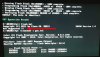
I run meset.exe first and after the reboot I run flashme.bat. The fpt part runs OK, but when it gets to call flash.bat, and when it gets to gmsdm.exe, I get an error message saying "Not supported !!", then it gets back to the rest of flashme.bat to finish the operation.
I've attached a screenshot of the problem. I'm pretty sure my laptop is supported, since EC update ran without any problems. Any ideas why gmsdm.exe says unsupported?
-
Hello guys,
i have a clevo W370ET laptop.i was running the 1.02.22 version(08/19/2013) which i found here W35xET/W37xET Series which is an official clevo bios if i understand correctly. I was running this version just fine.
However recently i found about premabios mods, and i thought i'd give that a try. So i installed the latest premamod version for my W370ET and specifically this one: Prema Mod v3 W370ET/NP6370 which can be found here: W370ET/NP6370 | Prema Mod.
With this version i have a problem. The laptop fun is always on, and this is disturbing me. I would like to put again the version 1.02.22 version(08/19/2013).
Is that possible?
I am asking because premamod says that one should NOT downgrade, or his computer will be bricked.
Also in the premamod forum there are stock bios for my model i.e. W370ETx BIOS 21 & EC 13 ( STOCK BIOS & EC | Prema Mod) but i havent tested that.
So my question is, can i put again the 1.02.22 version(08/19/2013) from here W35xET/W37xET Series ? or will i brick the system?
Looking forward to hearing from you
Kind regards
Panos -
Only Prema can answer that. I have never experienced with his modded BIOS.
-
This thread currently supports:
Clevo P570WM / P570WM3
Clevo P370SM / P370SM3 / P375SM
Clevo P170SM / P177SM
Clevo P150SM / P157SM / P151SM1
Clevo W350ST / W350STQ / W3570ST
Clevo W230ST
Can someone please tell me what models are being phased out and what other models are replacing them ?
I want to update the list and archive the old models.
Thank youjaybee83 likes this. -
hm i think u can slowly include the P650 and P670, but not sure if the SE/SG variants have differing bios versions. also, are the listed SM series the SM or SM-A? the w230st have been replace by the w230ss afaik. no idea about the w35x series...
Blacky likes this. -
Ok. So We have 2 new models P 650 and P 670
SM series have all SM types so that's ok
I will archives W230st and replace with W230ss.
Thanks -
Get ready to welcome the ZM series soon
-
Just got my P17SM-A and it has:
BIOS: 1.03.08RLS1
KBC/EC: 1.03.08 -
Hi everyone,
I'm also having issues updating my BIOS and this might be related to the same problem as the one mentioned by StrAC. I have a rebranded Clevo W650SR (I asked the vendor - this model is technically identical to the original Clevo model). The initial EC version was 1.00.01, the initial BIOS version was 1.00.01. Using the repository provided by palkeo ( W650SR Series) I was able to update the EC successfully to the latest version 1.03.02 (palkeo also offers a version 1.03.03 - at least according to the description. I also installed this one, but it turned out to be version 1.00.03, so I went back to version 1.03.02 ----> I assume that this is just a mistake in the description of the update) and the BIOS to version 1.00.02.
Any further attempts to upgrade the BIOS failed with the following message:
"4 - Error: ROM file ROMID is not compatible with existing BIOS ROMID."
1) Is it necessary to update the BIOS in small intermediate steps (one version after another, instead of updating immediately to the newest one)? I have never seen such a behaviour, but I thought this might be true in the case of my notebook, as the only successfull BIOS update was the one from version 1.00.01 to 1.00.02. If so, is someone here, who could provide me with version 1.00.03 (on palkeo's website the next version, that is provided, is 1.00.04)?
2) As far as I can tell, the problem results from the version control system of the new BIOS, which does not recognize my notebook. I've heard that it is possible to overcome this version control system by starting the update program with the parameters "/x" or "/nr" or "/n". Is someone here, who can confirm this/has done this? What exactly did you do? Is it something, that you would recommend doing?
3) Are there any other people with the same notebook or the same problem, who were able to solve the problem? If so, what did you do?
Thank you for any help in advance!
Best wishes,
Ykwtu -
all I can say is that te 1.03.03 EC version on palkeo's repo is actually 1.00.03 .
As for the rest, I am too tired right now to figure out, maybe later. -
Hi Blacky,
yes, it is indeed - however, it is just the EC version, not the BIOS and thus doesn't directly apply to my case. Or did you just want to confirm my statement regarding this EC version?
In any case, thank you for your quick reply. I'm eager to hear your opinion about the other problems! -
Anyone here have a stock Sager (not Clevo) NP7338 BIOS and EC?
-
Yeah, just confirming what you said.
Yes, there should be a way to force flash.
https://www.bios-mods.com/forum/Thread-AMI-Bios-flash-tool-AFUDOS-EXE
http://www.ecs.com.tw/extra/flashutl/afuusb.pdf
Some ideas.
You will just have to try and see what works.
FOUND THEM:
Borland C++ - Copyright 1991 Borland Intl.
/u -> plugged USBOFF tool. as USBOFF.exe
/cx -> wait x(0~9) second(s) to do Coldboot.
/hx -> wait x(0~9) second(s) to do sHutdown.
/s -> update Special ROM type, as MXIC
/i -> don't check EC ID code.
/ad -> Autoload Disable
/an -> Autoload oN
/af -> Autoload oFF
/p -> stay in DOS
OMG this has been compiled with Borland C++. Can't believe they are still using that.
-
@Ykwtu
Clevo's 1.03.03 EC is broken...use this to update your system:
https://mega.co.nz/#!WM0lxYrZ!4AF8iRLXnmKxoWn5hNflbNMXfvhcrC8T_vCMh8mqZ6c
PW: premamod.com -
Hi Prema,
thank you very much. I used the BIOS (and EC) you provided and the upgrade worked flawlessly! Thank you very much!
Also thanks to Blacky for the information on this topic!
Best wishes,
YPrema likes this. -
Will this thread also support any P6xx series soon?
-
sure, as soon as any P6xx owners share their bios and ec here
-
Eventually yes. I am still around, but I have limited time, that's all.
When I will find a free weekend I will start changing stuff. -
Hello! There is a P177SM Clevo notebooks. The problem did not start that included the gtx 780mm. Blue screen of death is constantly. Can you help? There's bios?
-
I can't understand you... sorry.
-
released System BIOS 1.03.09 and EC Firmware 1.03.08 for P15xSM-A
-
Initial post has been updated. I didn't have the latest BIOS 09 for the P15SM-A. Will update later.
Added the P6xxSG and P6xxSE to the list.
If I made any mistakes or I need to correct download links let me know.
Enjoy!jaybee83 likes this. -
thanks as always for your continuous work on this thread blacky, much appreciated
just in case ure missing any current stock bios files, u can always refer to this post by prema over at TI:
[BIOS/vBIOS - MODS] Prema Mod & StockBlacky likes this. -
Hi guys. Where i can find information about this update? Some issue resolved?
Thanks. -
Does anyone know if the clevo bios for P150SM-A has been released? (Version 1.03.09)
-
Clevo resellers ... most of which are here on this forum.
-
Initial thread updated. P7xxZM series have been added. Enjoy.
Older P series have also been updated. -
Hi. Can someone help to find the bios chip on the board? Model- sager np9377 or clevo p377sm-a.
Clevo BIOS Thread
Discussion in 'Sager and Clevo' started by Blacky, Sep 11, 2009.


