Problems? See this thread at archive.org.
Tell me, tell me
-
You only get to break an NDA once....
-
Hello, do you think Clevo will continue with desktop based configurations after X79?
-
I hope Clevo will pay attention to this:
Asus launches 15.6-incher with Retina class display -
Memory: up to 64GB; DDR3-1866/1600/1333; 4 RAM sockets
Why is this generation even thicker than the old one?
-
I guarantee you that is suicide for gaming with current tech. You wouldn't be able to max anything fairly recent with a single GPU at that res. It might be nice if you aren't a gamer, but I cannot stress to you how annoying it is to run games at a lower resolution or in windowed mode because your card can't handle em at native. And it's even worse if that lower resolution is 1080p, when that fills about 2/3 of your screen or somesuch, because it then STILL requires an ultra powerful card just to run lower resolutions. It's.. it's not ready yet. Not for the gamers of the mobile market. If someone wants to get two or three 680s or two 690s or two or more Titans, then let em. But until mobiles hit that level of power? Nope.jpg
-
Why is it a suicide? You don't have to run games in native res, they will upscale quite nicely. Higher native res = less quality loss due to upscaling.
-
Exactly!
I have 1920x1200 and I usually run at 1920x1080 - which allows me to always have the taskbar visible and quickly switch between things.
I also run more demanding games at 1650x1080 - but due to high pixel density the visual loss is barely noticeable.
Laptops are not just for gaming, me as well as my friends who own Clevos use their machines for gaming only casually, we do a lot of work on them, like research, programming and visual editing. I cannot stress enough the importance of having a high resolution for productivity.
A long time ago, when I got my machine, I wanted to have 1650x1080 because I thought exactly like D2 Ultima, fortunately for me, my reseller only had high-resolution screens so I had no choice and got the 1920x1200 screen. To be honest, this is the best aspect of my laptop and the only reason I am not upgrading. I am currently looking into getting a refurbished M17x R2 since they can take a 680M or a 780M without a problem and still offer me 1920x1200 resolution. -
I would expect to see one, they have the current one for Ivy Bridge, tried to make one for Sandy bridge but ran into motherboard design issues, and they had the NP7280 for the first gen. No way of knowing for sure until the actual computer is released though.
-
I think you are a little confused, the current X79 CPUs ARE sandy, we are getting ivy later.
-
Indeed, I always forget that.
-
It's ok, i'll always be there to remind you
*evil laugh*
-
So true, I dont think its the first time either
-
No it's not
But it's ok, I forgive you
-
No no, I said running at 1920 x 1080 to take up approximately 2/3 of the screen. I have run games fullscreen at 1680 x 1050 and let them upscale to 1920 x 1200, but it still has a bit of a stretched look to me. But any lower than that and there's a problem, like 1366 x 768 fullscreen (how I had to run metro 2033) was blatantly white-filtered (that's the best way I could describe it). I COULD have windowed the game, and I did. I preferred it in a window than upscaled to fullscreen, but it still holds true to the fact that you have to run it in a window. If you want to run all your games in a window that's fine, or if you don't mind upscaling a little that's fine too. But I and a lot of other people find that a huge upscale isn't worth it for fullscreen. It doesn't look right.
What I mean is if you were to throw that screen res out there and you wanted to play stuff at high-max settings, you'd need a flagship mobile GPU and most likely you'd still have to run at 1920 x 1080 and upscale, or simply throw it in a window. And again, you must remember that even though the resolution is high, the screen is not large. It'll be 15 or 17 inch, maybe 18 if you're lucky. To run at current standard HD resolutions where the highest end desktop setups STILL have problems maxing games without using two or more cards at once, and being on a mobile device is already a sign to run stuff not maxed. And while that's fine, sure, I don't need ALL the anti-aliasing or super sampling or ubersampling or divine god-like shadows or something, but I do like my eye candy, and I do like 60fps or more if I can, and with the 120Hz screen I'm planning to get with my next upgrade, 120Hz or so would be even better =D. Plus there's always texture mods etc for the single player games like Fallout, Elder Scrolls, Crysis 2, what have you.
Like I said, if you aren't a gamer (or you're a casual gamer) then that's fine and go ahead and enjoy, but for the people who want good framerates and hate windowed mode etc, it's a problem.
Also, you said you run things not at native res and upscale. Please run a game at 1280 x 720 and upscale to 1920 x 1200 fullscreen. That'll be what you'd get if you run a game at 1920 x 1080 (or x 1200) and upscale to 2880 x 1620. -
That is partially true, because as you said. It'll be 15 or 17 inch, maybe 18 if you're lucky. So the key to all this is "pixel density".
You can check some reviews on gaming on retina and up-scaling: Retina MacBook Pro review • Reviews • Eurogamer.net
I don't think it's that bad as you present it.
But until some real gamers do some real testing on high-resolution displays, it's all theoretical. -
Well it's not really theoretical as far as I see it. There's a monumental difference between 1366 x 768 (or 1280 x 720 for that matter) resolution and even 1600 x 900, far less 1680 x 1050 or 1920 x 1080/1920 x 1200. My 280M for some games can max at 1366 x 768 or run at medium at 1200p. It can be a large difference. What I was saying is, as the current gen of tech currently is, with single mobile cards not able to max a lot of recent games (far less the ones that come after their release) at 1080p, getting a screen at that resolution NOW with current tech and running your games at native will be a large problem for a lot of recent games. Even if you could handle the game's upscale or the running of a game in a window taking up 2/3 of your screen (how I play killing floor, black ops 1, black ops 2, cod 4, BF:3 etc, though I MUCH rather windowed fullscreen/fullscreen), the 2/3 of your screen option would be at 1080p. Which as we said would mostly be just high settings, not maxing out.
This is not to say that the screen isn't a good thing to vie for; don't get me wrong. But at the CURRENT level of tech that we're at? It'd do more harm than good to a gamer. Maybe when maxwell comes out (or maxwell's successor, if maxwell doesn't die shrink to 20nm) and there's another large jump in power and games at 1080p aren't any sort of threat, then a transition from 1920 x 1080 60Hz screens to a choice between 2880 x 1620 retina or 1920 x 1080 120Hz screens would be a very, VERY welcome addition. But you've got to be sure that the tech can keep up. The laptop you linked me too has a GTX 650M. That runs most games medium-high in 1080p; I doubt you could run anything at native with it, and you won't have the option of going windowed at a low resolution like I listed above (720p-esque) because it'd quite frankly be utterly tiny on your screen.
I read the article there, and they do say upscaling works nicely, but non-native apps look blurry. And he even mentioned, they were surprised they got skyrim running at 30fps at native; but it was at medium settings (my 1/2 strength 280M can do it at 1200p at high and go above 30). It just doesn't seem feasible to the gamer for me. Not YET anyway. But for the multitasking purposes they listed it's a dream; I won't deny that fact. I can't say use a second monitor because you can take that anywhere and do your work, and doing it with a second screen? You might've as well bought a desktop instead. So I understand that point. But the only group I'm talking about is the gamers and current tech =D.
Hope that cleared things up. Meow. -
Wow. Big post. Yes, that clears it up, no problem. I get your point now.
-
Excuse me, what games can the GTX 680M not max at 1080p?
-
With good fps? Probably both metros, the witcher 2, crysis 3, afaik.
Though really you could just turn down a few settings and hit 60fps easy. -
Does anyone think backlit keyboards will be offered on the smaller laptops this year? I don't want a 9150 just to type/game in the dark.
-
Sorry, when I said max I meant max with 60fps minimum. And I did mean MAX, not "max minus anti aliasing and SSAO etc" (even though i know those directly destroy GPU performance)
EDIT: oh, and Crysis 2 DX11, Crysis 3, Far Cry 3 & Blood Dragon, Skyrim (especially with extra mods), Tomb Raider with TressFX, Runescape 3 (trolololol), Sleeping Dogs, The Secret World, Hitman Absolution, Borderlands 2 with PhysX, Guild Wars 2 (again, if I remember correctly), Battlefield 3, etc.
If I'm wrong on any of the above, do let me know. I don't mean to sound arrogant or anything, I just really hate being wrong, so I'll know not to speak about them in the future XD. -
Well, the whole discussion about higher resolution screens ... is well...
I have never implied that high-resolution screen should be standard on Clevos. I mean for years we had to choose between different screen resolutions, why not offer a higher resolution screen for those who are more work oriented ? -
Typically the smaller machines are hitting tighter price points so that's one of the things they cut.
-
Minecraft...
with some graphic mods.
-
Crisis 3 for one, though by 1080p max out do you mean connected to an external 120hz display?
-
No, whatever your native screen is, but I did mean max out at 60fps, sorry if I wasn't clearer on that fact earlier. I also don't want to include extraordinary OCs on the cards, as it's got to be something everyone can safely get and use if you're gonna call an OC clock that it may work for one of the above games (or even more games I may not have remembered to call out.
-
Also, Blacky, offering that caliber of screen I suppose is still a choice that Clevo/etc could make, but to be honest I'm not sure how many users buy Clevo machines more for multitasking than gaming. I don't know if it'd be more of a hassle to make their machines compatible with/offer the screens than they would make back the money from it (though I could be 1000% wrong). Just my opinion there.
-
If any of the resellers could provide alternate res screens, I'd put my money on Mythlogic.. they pioneered several of the nicer screen options on several models if I recall correctly.
-
I would like the Next Gen Clevo to be like the Asus Transformer Book (only with a powerful graphic card in the docking).
I want to pull the screen off and use it as a tablet (with built-in i7). -
that actually might be interesting, the problem is that that is in no way usable. You would have to have a low power cpu in there, then you are going to dock to a high end gpu, GX60 all over again. If not the battery life would be abysmal on the tablet form
there are some long strides to be made, but its a very interesting concept, much like an egpu with kb and other goodies built in -
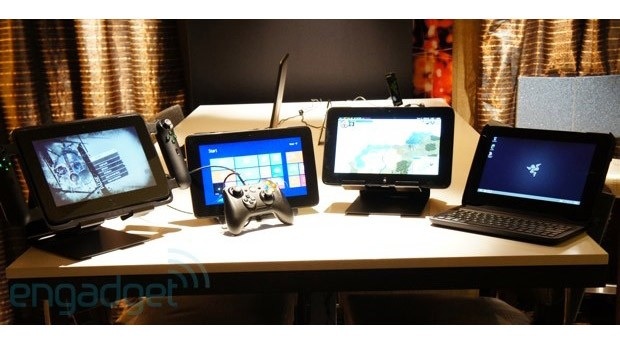
Closest thing that comes to that is the RAZER EDGE™. Problem is it's not a great tablet and only half way decent for gaming. Neat but not quite there yet.
Attached Files:
-
-
i think the best thing we can right now is a get thin and light notebook with a decent quad cpu, with tons of battery life and when you arrive at home just plug an egpu to it
-
Actually you want that concept that lets you grab work and "throw" it onto another device with a gesture....
-
thats also another want in my list
-
shouldnt be that hard tho to realize a highperformance covertible laptop/tablet. just put the i7 quad and the 100w gpu in the dock and include a separate SoC inside the display, just enough to power either an integrated android or win8 system
Sent from my Galaxy Nexus using Tapatalk 2 -
problematic, you are going to have to shutdown to actually work on it, or to make any use of that powerful hardware
-
problematic, you are going to have to shutdown to actually work on it, or to make any use of that powerful hardware
-
Why? Take the new ASUS AIO design.
ASUS - ASUS Transformer AiO P1801
Basically, it's a full computer, but you can release for an Android tablet or remote desktop control. It's like undoing a DVI cable and taking your monitor with you.
You could EASILY create a high powered laptop similar to it. Take the 375SM, remove the screen, add a half inch behind the keyboard, put a DisplayPort plug in there (w/ proprietary adapter), and snap on hinges for proper close/open. Put the guts of a $200 tablet in the screen. Attach for awesome, pull off for Android+Remote Desktop.
I bet you could even do this DIY-style, using one of those Android TV Sticks and a thin smartphone battery for the tablet guts. -
because its a dumb design. to have the idea of a portable, i dont need all this pc, the transition has to be seamless, and that is very far from seamless. So i want to go into table mode, i have to stop what im doing, shut down, turn on, and get back to what im doing if I can, because its a win rt tablet. But lets say I cant, to go back to work I need to shut down the tablet, turn on, and start all over again.
The idea of the design is to have a seamless transition, that this implementation doesnt provide at all. Its not something like, Im doing some work here, I want to take a stroll and clear the air, but i need to get this done, and simply remove the tablet part and continue doing that, while walking in the park.
I cant stress this enough the whole point is to never stop what you are doing in this kind of design, and this doesnt provide -
It is a seamless transition. You hit a switch, pull the tablet off the stand, and move. 5 seconds or less. They're connected, so if you're working on files saved in the tablet's memory, you can seamlessly move from one to the other. Or, you could switch the tablet into a remote desktop mode. 5 seconds, you're moving, and still connected to your computer.
Also, it's Android 4.1, not Windows RT. Why do you think it has to shut down and turn on each time? Watch a demo, don't assume. https://www.youtube.com/watch?v=XJF2go1hj5o
And this should be adaptable to a 17 or 18 inch laptop form rather easily, because it's basically just a monitor with a tablet built in, and a slim RDC client. -
Add battery, slow response lcd, storage, touch screen layer, edge to edge glass (no screen swapping), another style of connector to break with a huge 15.6 inch tablet, thickness and weight to the machine.
Or just buy a tablet and use a cloud for your work documents. -
so its even more useless to productivity
that is far from what I call seamless -
Look at the demo, and tell me that's not seamless.
-
its not. look at my examples, its even worse than what i said. at least with win rt you would have a measure of productivity now its only good for content consumption, they cripple themselves
-
I was wondering if anyone had more info on the 370ST, or is this all we know so far?
W370ST: This is an update to the ever popular W370ET model. This will feature a new smaller and slimmer power adapter for portability and now will sport an mSATA drive and refreshed nVidia graphics. ETA April.
I wonder what gpu it will offer, probably 760m, is there any hope for a 765m or 770m? or maybe for a backlight on the keyboard this time around? I am wondering because I have seen the older 350ET and 370ET along side the 150EM and 170EM and I really got the impression the ET models were waaaay better quality, the plastic used looked way nicer and felt more solid, the keyboard also looked way nicer, and I am under the impression That the ET's did not suffer the same speaker/sound issues as the 150EM and 170EM, what are your opinions? -
im sure it will come to be at some point or another
Sent from my Galaxy Nexus using Tapatalk 2 -
Not in this market, not enough volume to support a niche like that.
-
Incoming monster resolutions: Samsung hyping new 3200x1800 LCD display for future notebooks - Neowin
-
13.3 inch display at THAT res, dayum
@meaker: cmon, let a guy dream a bit
Sent from my Galaxy Nexus using Tapatalk 2
Next Gen Clevo
Discussion in 'Sager and Clevo' started by BBoBBo, Jan 23, 2013.