Problems? See this thread at archive.org.
Ok Thanks to Uncleweb's hardwork. Now I'm using throttleStop 5.00. And the GPU clock suddenly went up to 915/2497 instead of 893/2497 when benching.
Generic VGA video card benchmark result - Intel Core i7-3610QM Processor,CLEVO P15xEMx score: P7373 3DMarks
![[IMG]](images/storyImages/3dmark11corereal915mem2.jpg)
P7373, graphic score: 7493, combined score: 6117 <<=== changes the most after started using throttleStop 5.00.
-
-
WOW does throttleStop has a similar eeffect on the 7970m ? (5.0 version ?)
I will definately use it once my laptop arives next week. -
And yes only 5.00
Might be: check out this thread http://forum.notebookreview.com/sager-clevo/674516-post-your-p170em-7970m-temps-benches.html -
Oh no, those are necessary for it to work. Besides, I don't make crazy experiments unless I know the user can recover from a brick

Now that's good news, now the GPU behaves as I expected. -
The only recovery way I know is blinding flashing, but I think that isn't enough unless I know how to do ISP programming
Hurray!!
-
Soooo....how's that Skyrim download goin'?
/jk
You really squeeze every ounce of juice out of that poor card, aren't you?
By the way, have you encountered any other crashes or issues with the 680M by now?
Any issues with Optimus not recognizing games?
Have you also tried the nVIDIA's FXAA settings in the tested games yet? Does the FXAA work OK?
Thanks again! -
The only game that's making the driver crash at the moment is FFXIV(I play this the most lol...)
FXAA works correctly when turned on, I use it in metro 2033 too, the skyrim dl is only 55% done Gonna take a while.
-
By the way, there is a confirmed issue with Civ 5 in DX11 mode with the 7970M, so if you have that game it might be worth checking as well.
LOL, listen to me, I'm trying to make you run a QA for nVIDIA, here...
Ignore me
-
Skyrim 80% finished, I don't have Civ 5 tho.
And when I fire up BF3 the clock when back to 893/2497 again. Weird thing happens sometimes.
-
Congrats on the purchase and thanks for sharing, +rep.
Eager to see how far you can manage to push your card.
-
Thanks.
OK at this point the stock voltage probably isn't enough to feed the the clock.
I just ran 3DMark11 and inspect the first 10 sec in the ocean scene:
MSI afterburner core clock setting 915MHz = Actual clock 893.8MHz = Unstable fps 46 > 30 > 45
MSI afterburner core clock setting 910MHz = Actual clock 888.4MHz = Unstable fps 45 > 38 > 45
MSI afterburner core clock setting 905MHz = Actual clock 883.6MHz = Stable fps 45 > 45 > 44
MSI afterburner core clock setting 900MHz = Actual clock 879.8MHz = Stable fps 45 > 44 > 44
So on my GTX680M at stock voltage the maximum stable clock is around 883.6/2497.5, which is 905/2500 on the msi afterburner setting. -
That is some hellacious overclocking, Hackness!
-
Yep, about 22.9% on core clock and 38.7% on the mem clock.
-
u sure the memory clock is the bottleneck and not the 3610qm? trying to decide whether 3720qm would be better for overclocking or not
much of a big deal. -
Yes it's the memory, The memory controller load is 100% at 915/2500. And the stock clock's memory controller load is only 77%. Also if you can get 3720QM, get a 3720QM.
-
@amirfoox
Now dling the 2k HD packs. -
@ hackness definantly do the foil tape mode, i dropped nearly 20c and was able to oc an extra 12% for a 27% overclock... beastly.
-
Can you recommend any good foil tape? I saw the post, was thinking of doing it
-
@amirfoox,
I've just tried running Skyrim without any mod, just the high texture pack, and game freezed 3min into New game Not a good sign.
-
You should have tried running it before applying any UNOFFICIAL mod.
-
It was without any unofficial mod, just the game's defaulted files. I just tired Skyrim against without FXAA enabled, the crashing stopped, looks like GTX680M has compatibility issue if you turn on FXAA in skyrim.
-
According to the guru3d forums the FXAA issue of the 304.79 is being investigated
-
Looks like the GPU core is holding back improved performance. I am able to clock my vRAM +620MHz (2420MHz)
with zero anomalies, no tearing, sparkles, lockups, nothing. But 3DMark11 results in less than 70 points higher, P7196 vs P7122 same for X score of X2475 vs X2403.
Perhaps my vRAM can't really run that fast though as it's likely just idling more waiting on the GPU. -
i use nashua aluminum tape from home depot Nashua Tape322 1-57/64 in. x 150 ft. Aluminum Foil Tape-3220020500 at The Home Depot
i assume it can be found at your local hardware store as well. and its waterproof haha, you can apply it under water.
and its good to 162 celcius, and can be applied at up to 93 Celcius haha. -
Does the 680M GDDR5 come as ECC like the 7970M? This could be the result in the vRAM re-sending information because of corruption, due to the overclocked speed.
-
I do not know.
-
Really? I should try 302.71 then.
What's the memory controller load on yours? It's 100% at my OC'd clock. -
thanks for this.
and when benching vantage...you need a faster cpu...if you were able to run at lets say...4.5 ghz...your gpu score would go up by like 1k points....
he doesn't have enough voltage to bring up the cpu speed.
this could be cause by a few things..memory is running to hot or not enough memory or over all voltage.
no, it's not just that...
is there a link to this??
you need to switch up...vantage and 3dmark11 use different clocks for optimal performance...
example...vantage gpu test 2 uses a higher memory over clock while gpu test 1 uses a higher core over clock.
example...to much of a memory over clock can bring down the gpu score. higher core overclock for 3dmark11 -
How do you explain the Memory controller load 100% then? If it's not bottlenecking.
-
i can't really explain that...since your using 100 percent of 281 mb dedicated memory. and your dedicated memory is 2 gb to 4 gb. not even sure how that calculates to 100 percent, actually.
my cards only use about 65 percent on memory and they are over clocked to max...so i don't have an answer for you there. -
Well it's the bandwidth, all 160GB/s are in use.
-
ummm, ok....
-
thank you for all your results hackness
can you do a benchmark of the games on max stable oc?
also if possible bench Alien vs predator, lost planet 2, alan wake, witcher 2 ultra, metro 2033 and crysis 2, crysis wahead -
If I can get it to 99% on the Memory controller load then nothing is bottlenecked, but right now the core was able to max out all 160GB/s, hence why the GTX670 and 680 are on the level of 192GB/s.
Sure, after I finish Skyrim benches
-
I'll look into it
-
yeah, not really true my friend...been benching cards for quite some time now..and cards with lower bandwidth can do better numbers in different test and or situations. it boils down to who is doing the benching....all you need to do is go colder and you will start to understand...
-
The thing is the core is able to max out the given bandwidth If the bandwidth is limiting, the core can only process that much of work.
-
let me give you and example which you already answered...
you cant go above 910 stable because you... "dont have enough voltage"
if you drop the cards operating temps by 20C you can probably get 920 core stable without adding voltage.
you have a monster over clocking going now, but it's more ...your out of volts to go higher.
sorry, but that bandwidth goes a bit higher than where you are at now. that is a fact. but you need optimal conditions to get there.... are you understanding?
you have already done great things thus far...but to see what your max is....you need to do quite a few more things and have an extreme cpu with an unlocked bios to boot.... which you do not have....yet.
but again....this is only advice and information and not a "what you should do" scenario.
to give you an idea how much the cpu over clock matters with the same exact bandwidth...
4 ghz to 4.5 ghz
![[IMG]](images/storyImages/p3092441x4100mhz800l900.th.jpg)
![[IMG]](images/storyImages/p3092442x4200mhz800l900.th.jpg)
![[IMG]](images/storyImages/p3092443x4300mhz800l900.th.jpg)
![[IMG]](images/storyImages/p3092444x4400mhz800l900.th.jpg)
![[IMG]](images/storyImages/p3092445x4500mhz800l900.th.jpg)
-
You were right on this. And I knew that the voltage wasn't enough to feed the gpu at such clock. But the bottlenecking here I meant wasn't for the core clock's value, what I wanted to say was that if I was able to pull the mem clock higher until it's lowered to 99%, then the bottleneck issue related to bandwidth will be gone.
-
Isn't that SLi enabled?
-
ill ask one of my teammates about this....but i dont remember them even bringing this up in any discussion on over clocking the memory on vga cards. and ill let you know what they say.
also...you are pulling far less bandwidth than the 7970m's but yet your scores are higher..will use everyone favorite. 3dmark11..well not so much a favorite after you started benching it...
edit:
yes, it's sli but it's still the same concept. which is...the cpu speed matters allot when trying to keep up with the gpus or....make them run optimal.
this is your 100 (exaggerated) percent bottleneck...3dmark11...not so much so. -
Thanks, it seems pretty rare that people actually ask about this, please let me know the outcome.
-
Yes the concept is the same but doesn't that mean the bandwidth is doubled? What was the Memory controller load on both GPU after running 3DMark11?
-
my memory load never got to 100 percent..not even now.
and that is on both cards....
im checking it again now. -
Could you run 3DMark11 and post the Memory controller load for both cards? Maybe we can work out how much bandwidth was in use when running 3DMark11 on yours, you have 230.4GB/s... far more than mine.
-
sure..ill run it now.
edit:
give me a sec to find out which test actually runs the controller the highest...then we can test that test only.
edit:
so far im only running one card and it's max is 45.
last edit:
mine does not go above 45 percent on load. -
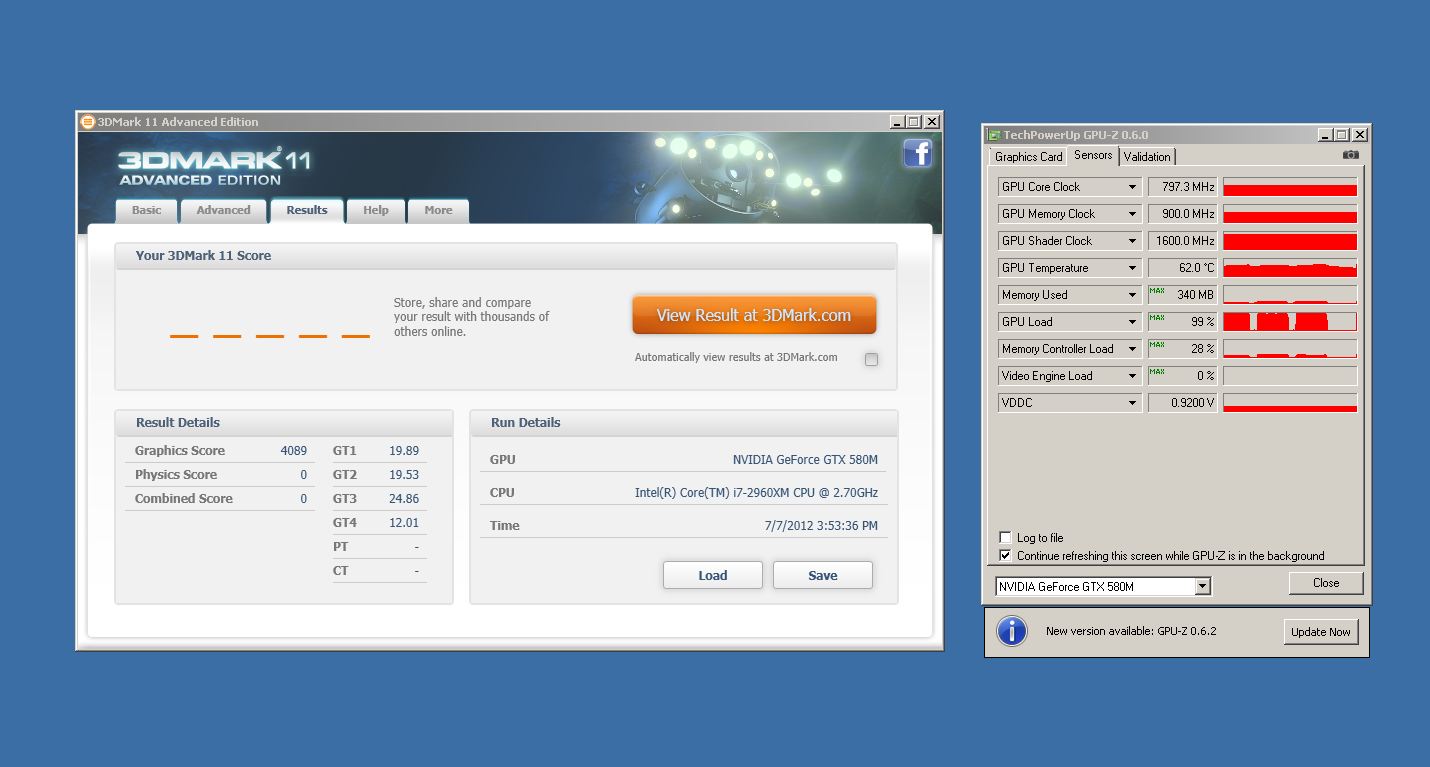
So the bandwidth in use was 51.84GB/s when you run only on 1 card, could you run it again in Sli mode and see how both cards performance please?
-
here is a dx11 run.
no, 51.84 is not in use.Attached Files:
-
-
You might want to open 2 GPU-Z and each one monitor one of the cards and run the tests that are in the basic version, sorry for making so many requests but it'd be great if we can work out how much bandwidth was used above P7000.
P150EM Upgrading from 675M to 680M!
Discussion in 'Sager and Clevo' started by hackness, Jun 28, 2012.


![[IMG]](http://imageshack.us/photo/my-images/580/p3092441x4100mhz800l900.jpg/)
![[IMG]](http://imageshack.us/photo/my-images/849/p3092442x4200mhz800l900.jpg/)
![[IMG]](http://imageshack.us/photo/my-images/403/p3092443x4300mhz800l900.jpg/)
![[IMG]](http://imageshack.us/photo/my-images/688/p3092444x4400mhz800l900.jpg/)
![[IMG]](http://imageshack.us/photo/my-images/703/p3092445x4500mhz800l900.jpg/)