 Problems? See this thread at archive.org.
Thanks!
But now I'm having problems making Wind8 UEFI bootable pen drive, because of the 4GB limit of Fat32...
The wind8 I have is ~6GB.
Is there a APP that will do everything for me, or a very simple trick??? (Have seen tons of different tutorials, that don't even know which to stick to)
Keep Cool
-
You need to format in NTFS...
Simple Win8 USB tool:
codigobit apps: Windows 8 USB Installer Maker -
I tried other release that had less than 4GB in GPT UEFI.
Windows8 for me is like going a step back. No thanks, I'm going back to windows7 .
.
I'm sorry for asking too many questions here, but, Can I disable CSM and UEFI and just simply install windows7 ( or CSM enabled is better???)
ps: Thanks again. -
You can install Win7 in UEFI mode (with the Mod).
Win 8 is a mess, I am also still using 7... considering the 8.1 for the near future.. -
thats weird then, i find win8 not worse then 7 in any way here. its a bit the same perhaps with a different look, think it wont matter what version ya use ... it will always be windows with all its issues
-
This is exactly how I feel. I actually have grown to like Win8 a bit more as I find it more responsive than Win 7 on my desktop. Only reason I haven't converted that over is dreading reinstalling all my programs. I use both identically.
-
exactly
Downloading v8.1 from Technet...let's see
-
I love Win 8 for my tablet and my W110, but at my desktop I perfer 7 (I have to admit though, that I can't upgrade to 8 due to issues with compability - still there is no real need to upgrade).
However I am so used to the guesture for shutdown that I often find myself waving the mouse around in the right corner of the screen to popup the charmsbar, except it won't because I am on win 7.
Sry for OT -
Lol, with a few tweaks windows 8 feels like home and has run well for me.
-
Well... I never ever understood the APPLE vs M$ WAR saying M$ copy the mac design...
NEVER EVER COULD SEE ANY SIMILAR THING BETWEEN WINDOWS DESIGN VS MAC DESIGN.
But actually now on windows 8, the visuals are like 10x times worse than on windows7 and kinda remembers MAC OS for the first time.
What I hate in windows 8:
- Step back visuals;
- Start menu made for TABLET's only (who the heck want to use that on Desktop.... Yeah KIDS will love it);
- Menu full of huge icons, that are far more old looking than even the good Windows XP that I still use;
- Process explorer is another big step-down on information, better to disable it and download a propper process explorer;
This is how a propper OS should look like:
![[IMG]](images/storyImages/2lo0x2w.png)
ps: Only really liked the UEFI wind8 startup. I don't even like wind7 start menu, and icon arrangement...
Keep Cool -
How is your Win8 install 6GB? It should only be 3GB or so, plenty left for any drivers you want.
Won't EFI only recognize FAT32? -
The tool I linked him to requires NTSF as prep-work...
-
He probably wants to install a version with integrated updates then the size of some .wim file will be larger then 4gb
i never choose such versions here either. just do a clean install and then update windows
im using KUC W8 UpdateChecker to update my windows. i like that program here
if you want to try it as well its available here: Index of /download -
Any chance for great Prema bios on Clevo W350ST (Sager 7352)
Sent from my XT925 using Tapatalk 2 -
I have the Wind8 All-in-one version... I tried removing every version and rebuild the ISO, but just the Win8 Enterprise X64 was getting around 4.3GB (but they are sure to be OFFICIAL M$ Windows, it was made trough the DVD's for a tracker of my country, but he only made the AIO version)...
But still couldn't find any Windows 8 PT-PT (portuguese) Enterprise X64 only with less than 4GB to download...
I just downloaded a Windows 8 pro (with 3GB and something) and prepared the USB drive to GPT UEFI launch.
ps: However I'm back at Wind7... Wind8, not even in a million years. Waiting for windows 9 if Microsoft even try to make a proper DESKTOP OS and not a bloody Tablet OS. Wasn't it better to have Windows Mobile running in your desktop???? (Yeah Right...)
Keep Cool -
Hey guys! I dont know i understand it correct on w110er there is no prema bios with cpu oc (3820qm) undervoltet/overvoltet nv gpu and changeable mem clocks & timings?
-
Bump +1
Sent from my DROID RAZR using Tapatalk 2 -
You can have all those things but mem oc on the v3.
For that you will need to use the v1.6, (when I find time), but it will not have Win 8 compatibility as it is based an old BIOS where mem oc still worked... -
Do you have the 1.5 BIOS available anywhere for those of us who want memory control? (My ram only uses 1.35V and its rated speed using the XMP profile 2 and the current BIOS auto loads XMP 1)
-
I put the W11 v1.5 links back up for you on the blog...
-
Thank you, this will tide me over till you find a way to get 1.6 working.
-
Hello, everyone not sure if I did not word my search properly or if I missed the information I'm looking for..... Is there a detailed set of instructions as to how the Perma Bios settings for the Clevo W110ER work? For example what settings overclock/underclock the CPU and/or a list of settings that users have found to be optimal? I just got my Clevo W110ER, flashed the Perma bios, and upgraded various parts on it. I just need some help with the bios settings. Any help would be appreciated!
-
Greetings fellow modders,
Yesterday I tried the Prema BIOS V3 for my Clevo W110ER.
Before doing so, I updated the Intel video driver, checked if I got the last version of the nVidia video Driver (had 320.49 so it was OK) and if I had the good version of the Intel ME driver (had 8.1.0.1263 so it was OK too).
Then I updated the ME firmware as it was on the Prema website... I don't know if it was of any use and don't know what version I had.
Then, as I want a cool and quite laptop but wanted the turbo mode while using the dGPU, I tried the Prema Bios UV v3.
All was fine, got turbo (saw it in CPU-Z) and lower VDDC for GT650M (Saw it in GPU-Z)
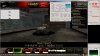
After a few minutes (10-20), the game (World of Tanks) started to glitch.
Got back to normal Prema Bios v3 (without UV)
Still got turbo but no lower VDDC as expected but still the glitching issue in the game.
Tried to reinstall nVidia Driver but still same issue.
Got back to stock BIOS... issue resolved.
What could be wrong?
My specs:
Intel Core i7-3540M (TWO cores, yes, two even if it is an i7, CPU-Z reports it as an i5 though, 3Ghz stock speed, turbo 1 core, 3.7Ghz, turbo 2 cores, 3.5Ghz), Most the game I play do not even use two full cores as they are badly multi-threaded, so I got for the fastest clock speed possible while keeping the 35W requirement.
8GB G-Skill F3-12800CL9D-8GBSK (2*4GB DDR3-1600 CL9-9-9-28)
GeForce GT650M (GK107) 2GB DDR3 VRAM
Windows 7 Home Premium
I also use RivaTunerStatisticServer to limit the framerate at 30 FPS (cooler and quiter laptop) so, of course, the GT650M is far from being overheated when the glitch occurs (64°C at most, usually around 60)
I hope you can help me with this issue, thank you. -
What exactly do you mean by glitch? Stuttering? Tearing? Artifacts?
Also how old is your W11? Clevo changed the dgpu vRAM chips during its last production cycle and we use an older vBIOS because Clevo's newer vBIOS doesn't clock well at all with the vRAM from all earlier versions. -
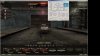
I said glitch because the effects varies from time to time and game to game, sometimes I have flashing textures or random polygons (sometimes permanent, sometimes only one frame), I also got messed up textures or what looked like low res one... (as most games are played in window mode, I can assure you that it only affects the game, nothing else)
My clevo is two to three months old, if the issue is about the vRAM and vBIOS, is there a way to still get the turbo mode activated with dGPU active without changing anything about the vBIOS?
I do not need the UV (although I found it a good thing for me), but the lack of turbo is quite bad. -
The vRAM change resulted in artifacts, what you are seeing is different/new. I have seen many problems with revisions of the 320 driver which resulted in glitches, please try these driver with the non UV v3 Mod:
http://developer.download.nvidia.co...ok_win8_winvista_win7_64bit_international.exe -
I'll test it right now and come back either in a few hours if it doesn't work (Maybe I'll be able to screen the results as I don't know what exactly artifacts are, and thus, if it might not be my case... English is not my native language so technical terminology is not easy for me), either in one or two days if it works to be able to test it over a long period of time.
-
Unfortunately it did not work but I don't know why, it needed much more time to start glitching.
Here is what I got in World of Tanks:
And what it is supposed to look like:
And to show that it also affects OpenGL games, here is an example in Minecraft:

-
Can you run either G80 CUDA memtest or CUDA memtest? this will positively ID if there is a problem with your vRAM since texture issues are usually caused by faulty vRAM or poor drivers. Issues with the GPU will usually result in a hard crash, black screen though it can very rarely cause the symptoms you describe.
-
Sorry, but I won't do anymore test with the Prema BIOS to prevent any damage, especially a memory intensive test. If I got these results with the Prema BIOS and never with the stock BIOS, the hardware has not to be faulty, on the other hand, this mean that the Prema BIOS modified the way the hardware had to work and is not compatible with this hardware (as it was said before, the vRAM in the newer version of the W110ER are much more touchy).
I will still try to run these tests with the stock BIOS just to be sure although it will most likely reveal nothing... but who knows?
Edit:
The only program I could find compatible with Windows was OCCP. After several tests each of 15+min (low/high usage of memory, small/big shaders) I got no errors at all althoug my GPU reached temps I never saw in GPU-Z (72°C) -
Don't worry the Mod can't damage anything as it isn't the reason for the glitches...
Clevos original older vBIOS simply doesn't work well with last production cycle W110ERs and their newer vBIOS doesn't work well with all older production cycles.
Since the majority of people have the older vRAM W110ERs the Mod is based upon the older vBIOS and Thisusernameisvalid's system seems to be the first/only one to create memory errors on stock clocks with it...some people had it the other way round they updated to the latest stock BIOS and got artifacts on stock clocks with stock Clevo BIOS on their older W110ER...
If you want I can make you a Mod version with the newer vBIOS, do you want UV or stock voltage? -
That's very kind of you to create a specific BIOS just for me, myself and my ego (and maybe some other ones who did not bother posting their issue ^^). I'd say the UV version, but as it mean it will change something about vRAM, I might have memory errors again. Then I'd better choose the stock voltage for security.
If it is not hard work for you, having both would be best, as I could try the UV then switch to stock if it doesn't work. So, either stock voltage or both, do as you prefer, I'm already very happy that you offer me these BIOS mods.
Thank you in advance. -
So not to hijack the conversation but I guess that means I have the "newer" W110ERs because I use the latest UV Mod AND I overclock and it's been rock solid since I upgraded. Do I assume right?
-
It would mean that you either have the older vRAM or have a newer one without problems, as of now "Thisusernameisvalid" is the only one having this problem...
-
For your information (or for investigation purpose) here is what's written on my vRAM:
SAMSUNG 252
K4W2G1646E-BC11
K4EZK0779F
I might also add, the fact that I have these artefacts/glitches whatever you may call it, could it be because I do not use my laptop in the way other do?
I mean, who limits its games at 30fps (while at stock speed it can reach around 60 or even a few hundreds in some case) AND do not overclock in your users? I don't know what's in the new clevo bios for this kind of scenario not what are the différences with the new and old one but maybe you will find something. Do you also change the vRAM voltage or only the dGPU voltage? -
The standard W11 Mod (not UV, OV or UOV) changes nothing in vBIOS except that you can move the overclocking slider in software higher if you so desire...so you want a working Mod just for your system or not?
-
Yes, of course I'd like to have a working mod... It is why I came here the first place, to correct the turbo mode.
But if you think I could also UV then I'd like it too... it is just that I don't want you to work for nothing, just in case it doesn't work and so you would need to create the standard mod too...
On the other hand, I have absolutely no idea the amount of work it represents, it is why I said you may choose between standard mod (knowing it will surely work) or both (knowing the UV may not work). As long as I have a working solution, it suits me
-
I made the Mod for you...check your PM.
-
^How about a custom W230st BIOS?
-
Will sure do, beta tester are already rocking the Mod since over a month...I am waiting for my own W230ST to finalize it...
-
Prema has all the fun files
-
Sounds like Prema is doing in awesome job for the Clevo-computers!
I have a W350ET (i7-3630QM, Geforce 660M) and was thinking of trying the BIOS-mod, but I find a list of what it enables quite lacking. The first post hasn't been updated for a year and the changelogs I've managed to find in the thread contains lots of other stuff not in the first post. So, is there a newer list somewhere of what it enables?
-
Jocke, check here; W350ETx / W370ET Changelog | Prema Mod v3 is the latest.
-
Just to let you know: I ran games for hours without any glitches right now (the UV version). Seems you got it right, I will continue testing for a few days and report to you.
You made a very good job and thank you again. Did I already say thank you? Two thanks are still cheap for the work you did
-
You can always send him a small donation if two thanx are to cheap well worth it if ya ask me cause these mods are truly amazing
-
So, now I have read through all changelogs and are more up to date with this great mod. While it's great to be able to switch things off and on to ones convenience it's mainly increased performance that I am interested in. There are a few things I would like to ask about.
- Fixed CPU Turbo being disabled while dGPU is active “bug”
With this I presume the CPU won't disable Turbo Boost anymore while using the Nvidia GPU? Cooling should be sufficient, but I wonder how the power supply handles it? I also wonder if there will be any actual extra performance, since the bottleneck of the two would be the GPU?
- GT660M OC Edition updated to vBIOS v80.07.24.00.71
Does the BIOS update also automatically update the vBIOS of the Nvidia GPU? Does this force OC or just makes it available? I'm going to OC the GPU to at least the maximum allowed +135 mhz to the core, but will this option allow it to be OCed even more?
- Added Acoustic Management for HDDs
What exactly does this do? I bought a WD Black HDD and put it in the second HDD-bay, but it's pretty annoying with the sound it makes when the rest of the computer is completly silent. I am running a pretty aggresive HDD shutdown scheme because of this.
- Intel HD oROM updated to modded v2158
(fixed: HDMI Audio, ext. Dispaly detection, brightness control)
This is what worries me most with changing to a custom BIOS. If there are bugs and such which make features not work. Is version 3 completly bugfree and won't affect anything negatively from stock?
FHD screen version OV EDITION (1920×1080)
The OV edition, what exactly does it do? Force over voltage? Or just makes it available? And what does it OV? The Nvidia GPU?
I also see people talking about an UV Edition. It wasn't in the list for the W350ET, but what exactly would it under voltage?
Thanks! -
- Fixed CPU Turbo being disabled while dGPU is active “bug”
With this I presume the CPU won't disable Turbo Boost anymore while using the Nvidia GPU? Cooling should be sufficient, but I wonder how the power supply handles it? I also wonder if there will be any actual extra performance, since the bottleneck of the two would be the GPU?
If you use one of the official supported CPUs there won't be any problems.
- GT660M OC Edition updated to vBIOS v80.07.24.00.71
Does the BIOS update also automatically update the vBIOS of the Nvidia GPU? Does this force OC or just makes it available? I'm going to OC the GPU to at least the maximum allowed +135 mhz to the core, but will this option allow it to be OCed even more?
It doesn't force any OC, the slider can be moved according to your choice up to 405Mhz extra.
- Added Acoustic Management for HDDs
What exactly does this do? I bought a WD Black HDD and put it in the second HDD-bay, but it's pretty annoying with the sound it makes when the rest of the computer is completly silent. I am running a pretty aggresive HDD shutdown scheme because of this.
It reduces HDD noise in parking the heads when not in use and other tweaks during operation...
- Intel HD oROM updated to modded v2158
(fixed: HDMI Audio, ext. Dispaly detection, brightness control)
This is what worries me most with changing to a custom BIOS. If there are bugs and such which make features not work. Is version 3 completly bugfree and won't affect anything negatively from stock?
No bugs and its much more up to date compared to stock.
FHD screen version OV EDITION (1920×1080)
The OV edition, what exactly does it do? Force over voltage? Or just makes it available? And what does it OV? The Nvidia GPU?
I also see people talking about an UV Edition. It wasn't in the list for the W350ET, but what exactly would it under voltage?
Thanks!
These are fixed voltage changes (for now):
UV > Undervolt all clocks (power saving, less heat)
OV > Overvolts only the 3D Turbo clocks (higer OC)
UOV > Undervolts all clocks but at the same time overvolts the 3D Turbo clocks
(power saving, less heat in regular use and higher OC in 3D mode
Enjoy! :hi2: -
Fantastic answers, thanks alot!! :hi2:
One final thing about the voltages:
UV - Is it only the CPU that is undervolted? And is it constantly undervolted or only when not under load and when under load it goes back to full performance?
OV - "3D Turbo clock" is this for the Nvidia GPU? 660M is GK106 Kepler architecture, which if I remember right sets its voltages automatically depending on clock. Does this increase the maximum voltage, allowing for a higher clockrate on core? And is the overvolt constant or only when the Nvidia GPU is under load?
Sorry if I ask too many questions!
-
The voltage changes are all for the dGPU (NVIDIA) and they are constant for the respective power states...so OV overvolts only the highest power state to reach higher OCs.
-
I flashed to Prema v3 bios tonight for my WT350ET, works excellent! Thanks alot for the great work, Prema!
I just did the non-OV this time, since it's such a new laptop and I don't really need extreme OC yet anyway.
A few questions yet again:
- The "Fine tuning" menu has options for GT overclocking, I presume this is the iGPU?
- Fast Boot, is this the same as described here? Desktop Boards — Using Fast Boot to reduce boot time
It's great to see that HDD password is available in the BIOS too. I just set it on my Samsung 830, because I've heard that it unofficially supports hardware encryption (the OEM version officially supports it). I wonder if this is true though, is there any certain way to check without taking out the SSD and plugging it into another computer? When I booted the computer it did not ask for my HDD password though, is this normal? I'm new to hardware encryption, I only have knowledge in using software like Truecrypt.
PREMA BIOS MOD Review
Discussion in 'Sager and Clevo' started by HTWingNut, Jun 1, 2012.


