 Problems? See this thread at archive.org.
Bingo. So yeah, it's not quite the i7-3930k(unlocked, 6 cores, etc.), but if you're already shelling out so much for a notebook, that $200(for you) gets you a nice 300MHz base clock bump, plus maybe some additional virtualization support, so still at the end of the day its the sweet spot for me and others as well apparently.
Although TBH IF the 4702MQ was available as an option I'd strongly consider it from a power utilization standpoint, but it'd be something that I'd have to look at try to find some realworld(TM) data on... but the straightup 4700 v. 4800 is an easy 4800 for me. I already went through all of that when ordering my 8250-S. The 4900s got not much more than a tiny bit of base clock boosts(100 ea. IIRC) and nothing else for excessive premiums.
-
-
The 4800 offers 300MHz improvement out of the gate compared with 4700 with potential for 500-700MHz improvement over the 4700 with XTU. Not to mention added instructions like Vpro, VT-d, TXT. Granted those are somewhat specific instructions for certain environments, but it has them all. For gaming, I didn't used to think the faster CPU's mattered, these days they do. For the slight cost increase (~ $180) the performance is significant enough to me it's justified. For the 4900, it's only another 100MHz over the 4800 for another ~ +$200 (or +$380 over 4700).
Edit - I realize I just posted more or less the same as cutterjohn, lol. I didn't see it before I posted. So I guess we are thinking along the same lines. -
I was contemplating on upgrading the CPU to the 4800MQ but since we don't know what the thermal dissipation limit of this platform is yet, I'm just going to play it safe with the 4700MQ for now. Worse case scenario, it should help keep the fan noise down to a minimum for normal daily use.
-
If some of you can hang on for another week before ordering, I should have that feedback for you.
-
i'm glad i'm not in a rush to get one. looking forward to your review & impressions.
-
I am excited for this one. Is it possible to add a 120mz monitor? Or do we need that? I'm kind of addicted to 120mz rates.

-
You mean internal screen? Likely not. And it would consume a lot of power.
-
Well you either have it thick or you have an overheating system or you have an ULV CPU with no GPU, so really depends what you want.
-
Yeah, I think that I'm going to hold off on this one(unlike the 8250-S) and maybe I can drive over to mythlogic(they're about 30m away) when they get their w230st's in... (probably a good idea to bring my checkbook as well... it was a bit more expensive speccing out their pre-order plus I'd have sales tax...)
-
With the low price, I'm worried about build quality. Looking forward to a thorough review from a disinterested third party.
Resellers, can you tell us the precise specs of the LCD? I'm looking for comparisons to the 2010 VAIO Z (VPCZ1). -
Hey Htwing, when you get yours and do a review, could you comment on the battery life (say when doing normal browsing to more intense stuff)? I'd appreciate it thanks
Specs claim it has Optimus so it should be able to achieve good amounts hopefully
-
Of course! Anything for my Canadian girlfriend Melody.
-
Yes the screen. Oh okay. If I use it on an external 120hz monitor using vga-dvi cable, that won't work too right?
-
guys please tell me something.. will this laptop be able to be used as a LAPTOP? I mean, it won't burn my skin when it is placed on my lap? lol
-
A cooler will do. I'm not sure though because the product is not out yet. But I'm guessing it won't.
-
Just ordered from xoticpc. $2400. Once you add in a RAID0 Masata for a total $500GB and office and a few other things it gets up there. RAID is not listed in their cart but it is beign added today based on my chat with them earlier.
-
office? really?
-
HTwing which CPU are you getting for your model ?
also if you go for full hd sceen please post a picture of destkop (not metro) so i can see how small everything is.
P.s i'm selling my iphone 4 , ipad mini and my w110er to get this model lool
-
MySN also posted a teaser pic on their FB/twitter page. Seems like it will also be available in Germany in the next weeks.
-
Raid0 msata
-
Is it really this thick? I mean I can understand, what with the hardwear... but in all the pics so far it always looked thinner. This reminds me of an Alienware... Anyone else able to confirm that this is the device?
-
This is it, It say 1.26inch, the picture look thick because it is 13.3" so the ratio is different when you look at 15/17".
-
The dimensions sheet have this laptop at 1.26" thick, that's about the same as a typical 14" business notebook such as the Dell E5430 and Lenovo T430. The sides are beveled off at the bottom so it's probably making it look thicker than it really is from a side view.
-
it most likely is. Probably even thicker than w110er . Personally i don't mind, it makes it look like a total powerhouse
-
That's what I'm getting. Specs in my sig.
Except adding my own SSD's.
As far as thickness it does look thick but I believe that is an illusion. It's thinner than than the W110ER.
Sager NP7330 'Defiant': 13.3" 1080p IPS Matte - i7-4800MQ - GTX 765m - 16GB 1600 - 2x128GB Plextor M5M RAID 0 + 512GB Crucial M4 - Intel 802.11AC -
Could you tell me where I can find the dimensions? I fear Lightning's original post is long buried...
-
Compared to a AW M14 ( it's closeset competition) it looks super model thin without alll the extra makeup.
I think it looks great, wish all CLEVO laptops looked this good. -
Everything you need to know is here: http://forum.notebookreview.com/sag...-clevo-w230st-sager-np7330-owners-lounge.html
-
That is an incredible set up! I will be going for 16gb of RAM and ssds but still unsure which to use as the boot drive. What do you think the sacrifice will be to have the plextors in RAID1 mirrored? I have had so many machines die on me at critical moments of my life RAID1 helps me sleep...
-
RAID 1 only helps if one drive dies, not against viruses or other anomalies. It's better to have an external backup imho. Otherewise RAID 1 should run about same speed as a single drive.
-
rather than spending money on a new video card since my 6990m died out in my p150hm, i'm thinking i'll just sell a rather barebones version of my laptop and try to snag the w230st.
i just would love to know how noise and temps will fare in this laptop.
can't wait for the reviews. -
I know it’s excessive, but during extreme workloads and deadlines it would be great to just carry on and whip out the bad drive and replace like it ain't no thang... Unless their enterprise drives I just can't take the leap of faith. Do the smaller plextors run noticeably slower than say a single 2.5 inch Samsung 840 pro?
-
man, I gotta sell my m18x to get this thing, will supplement the desktop I plan to build very nicely. Its a nice look clevo too. Normally they're rather plain.
-
Yeah it is my work computer and the extra $ is worth it to save me time.
-
Wow lots of misspellings on my part. Msata and 500GB. 2 crucual M models
-
You're right. There are only those two pre-built options. No custom configurations possible. I e-mailed them and asked whether there would be a configurator for this machine. They replied that it has not been discussed, so if they eventually allow for custom configurations, it will not be for quite a while.
Anyway, I think the basic configuration with the 1TB HDD is fine. I'm going to add a couple of 256GB mSATA SSDs and RAID0 them. Might even throw out the HDD to shed some of the weight, as I don't think I will be using it. Ideally I would probably have liked to buy with no HDD preinstalled.
By the way, the specs only mention one mSATA slot, a weight of 2.4 kg and a height of 28 mm (as opposed to 2.0 kg and 31.9 mm as stated pretty much everywhere else). I asked Multicom about this, but they didn't know anything else. Said we'll just have to wait unitl the notebooks arrive before we know for sure. -
i like the price this is going to get so much indications this time around, it really could have been lighter, and I will probably complain about battery life
-
This looks very promising for a 13 inch laptop. For gaming though (just for gaming) isn't 1080p a bit too high for the GTX765m to handle. The Razer Blade 14 with 1600 x 1900 resolution looks to be barely handling descent frame rates. For everything else I think 1080p is fine though. Do you think there would be additional screen options?
-
Up to you, just the chance of a drive failing is pretty slim, and even so, just whip out the new drive and restore your latest daily backup. I always keep my working documents stored on a cloud drive like dropbox. Samsung 840 Pro will be faster, but in real world applications not noticeable. Take a look at the Plextor in RAID mode:
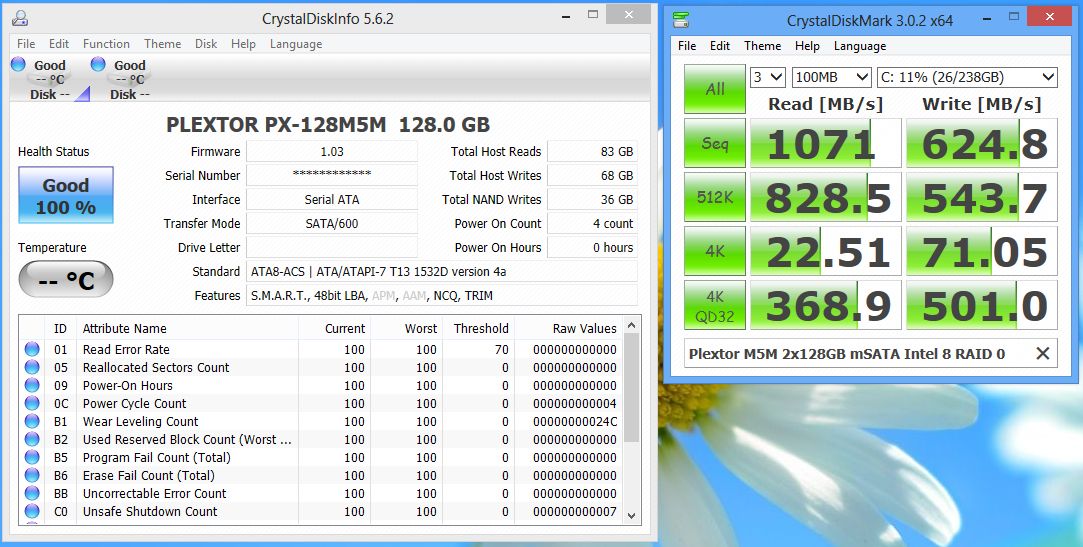
It should manage medium settings at 1080p no problem. Or just run at 720p. I don't see the big deal /shrug/
I'm sure there may be additional screen options, or at the very least switch it out yourself. -
If a game is running slowly at 1080p, then just lower the details a bit, or lower the resolution to 1600x900 or even 1366x768. Sure, it might blur things up a bit compared to native 900p (or native 768p), but given the high PPI of this screen I don't think I will notice. Anyway, it's a sacrifice I'm more than willing to make. I've seen this IPS display on the Asus UX32VD in the store, and it's absolutely gorgeous. And I have lots of not quite new games on my "to play" list, which the W230ST should be able to handle effortlessly in 1080p and at (close to) maximum settings. And even if this is marketed as a gaming notebook, I am willing to bet most of the buyers will be using it for plenty of more mundane tasks as well, such as video editing, photo editing, surfing, writing, spreadsheets, programming etc, etc. This screen will be a joy to use for all of that.
-
I guess OK if one is content with medium settings for games or for non-gaming uses. 720p on a 1080p panel though sort of looks like a naked 90 year old lady dancing 20 inches from your face. Not very keen on replacing the panel either. I'll cross my fingers for lower res options as I really really want to replace my aging M11x.
-
The GTX 765M is memory bandwidth starved like its GTX 670M predecessor, you should be able to keep most games' frame rate past thirty at 1080p resolution and high details as long as you refrain from using anti-aliasing and turn down some details.
-
Problem is you can't beat this, as far as I know there is no 13.3" or smaller machine with an MXM slot so it could fit a 780M say, and even if it could that's not always enough for highest settings (and I use that term carefully, I mean 4xAA and everything else set to absolute maximum). So it's dual 780Ms or make a sacrifice, but lowering the resolution should be the best sacrifice to make to play to the GPUs strengths so go test out less extreme scaling (agreed that 720p is way too low but since this is a PC you're not limited to that, try 1600x900)
-
i'm curious to see how many people will be utilizing the raid0 setup in this laptop.
i'm quite unfamiliar with how it works, but could be convinced to try it out as i already own one crucial m4.
haven't looked forward to a laptop this much in quite some time.
i'm thinking of hooking it up to an external monitor and taking it with me on the go. crossing my fingers on the battery power and noise.
seems like a hell of a system -
It's the best compromise IMHO. I want to do more than game on this laptop and the 1080p panel gives me the desktop space I need. 720p with 2xAA on a 13" 1080p screen it will be hard to discern from 1080p with no AA, but your FPS will be 50% faster at the 720p.
-
Yes, it's a pretty good compromise. A 720p panel is not going to be much fun for much else besides gaming. But a 900p screen option might make me slightly happier because with some GPU overclock I can get it where I want to (the M11x I have can overclock to kingdom come). I'm generally happy with this laptop anyways. I'll just wait for the initial reviews to come out and then if all is well I'll probably get one.
-
What I meant was, that's too overpowered. 2 msata in raid 0. Man.. I wish I can build that in the near future. I'm just waiting for the prices to drop. lol
-
Agree entirely with this!! Hell you could even run games at 1600x900.. The important thing there are options at least.
1080p was a must for me personally, because yeah, I do other things on my laptop outside of gaming. -
apologies if this has been asked before.
does money spent towards the OS or warranty go toward the $50 discount that is offered from various retailers? -
I've noticed on xoticpc that the inner chassis of the clevo w230st they're selling (the keyboard/bezel area) is a much lighter color than other versions of the w230st. It's like light silver vs. dark gray. Is that just how the photo was taken or is the material actually a different color?
W230ST - The 13" We've been waiting for!?
Discussion in 'Sager and Clevo' started by HTWingNut, Jan 25, 2013.


