 Problems? See this thread at archive.org.
I posted some info for you to look at in our test BIOS forum. I don't know that a 10-4 negative is accurate unless you have a machine that is actually functioning correctly with XMP-3000. It's obviously not true for everyone. It's only accurate in the cases where it is true and we don't know why that is true on some machines and not others.
-
-
I keep seeing posts of undervolting the 1080 GPU in the DM3, am I missing something? The voltage control isn't unlocked and the "CURVE" editor only lets you adjust the core speed by voltage, no where can you actual adjust the voltage by core target.
-
If you use the curve to set for example 0.975V to your highest factory clock, then the VGA will not go above 0.975 V and will not reach the factory 1.062V.Johnksss likes this.
-
Bumped my CPU to 47x4 multiplier & 47x cache, stock voltage (not static, +0mV adaptive)... Thankfully still passes TM5 with the G.SKILL 2x16GB @ XMP1 in BIOS!

Hopefully I can run a "stable bench" at 48x4 after the @Prema magic bios is released, and I'll test again there. Right now I can only occasionally manage a wPrime 32m at 48x4 without it locking up...
![[IMG]](images/storyImages/oR9GlsZ.png) jaybee83, CaerCadarn, Johnksss and 2 others like this.
jaybee83, CaerCadarn, Johnksss and 2 others like this. -
I can make it work in both of your machines, but right now it's trying to under stand why it even works that way to begin with. And this has nothing to do with the dll setting either.
Edit:
![[IMG]](images/storyImages/tkocugO.png) Last edited: Dec 1, 2016Papusan, TBoneSan, jaybee83 and 1 other person like this.
Last edited: Dec 1, 2016Papusan, TBoneSan, jaybee83 and 1 other person like this. -
Let me know if you want me to test anything for you over the weekend. I'll have a bit of time to spare
Johnksss likes this.
-
Hi mate, I apologise for the late reply too. Work has been manic and have had no time to get on my my computer to reply. I am currently using a 330w power supply and have been for a while as I thought that was the initial problem many months ago. I shall try leaving everything at default in the bios and try again. Reference the gpu. Mine seems quite comfortable at +175mhz on both core and memory.
I shall try benchmarking tonight and post the results soon.
Sent from my SM-N910F using Tapatalk -
But your machine will start very fast And people still think 128GB ssd is more than enough
Maybe as well op 33%+ your ssd after
@tilleroftheearth recomandation. What will happen if you increase the ram size to max 64GB?
-
-
That wont scale so much with the capacity so it is harshest on the smaller ones.
-
-
Well i tried battlefield 4 for about 2 hours @ 4.2Ghz @ -160mV and it stayed stable but still downclocked to 4.0Ghz quite a few times. This was without the GPU overclock. Really weird!!! Im at a loss now.
-
What was the reason given for the throttle?
-
I have put up all reviews of Kaby lake in this post here(summary)
Review of i7-7700K - Use Google translate http://www.expreview.com/51056.html
As said in the review "This Core i7-7700K physique is quite good, can be reached in the 1.296V voltage 5.0GHz frequency"
![[IMG]](images/storyImages/5g_1hour.png)
-----------------------------------------------------------------------------
Intel Core i7-7700K Retest from TomsHardware http://www.tomshardware.com/news/intel-core-i7-7700k-kaby-lake-overclocking-update,33119.html Not the big change
-----------------------------------------------------------------------------
And for those who wait for new tech... Intel to delay release of super-fast Optane SSDs into 2017-2018 http://www.notebookcheck.net/Intel-...fast-Optane-SSDs-into-2017-2018.186728.0.html
----------------------------------------------------------------------------
Edit.
http://www.hardocp.com/article/2015...76700k_ipc_overclocking_review/7#.WEtwihvhCUl
http://wccftech.com/intel-core-i7-7700k-core-i5-7600k-overclock/
http://www.bit-tech.net/hardware/cpus/2016/12/05/core-i7-7700k-performance-overclock-preview/6Last edited: Dec 9, 2016Ashtrix, jaybee83, Mr. Fox and 1 other person like this. -
@Mr. Fox
Will the 6800K 6 core CPU work on the P870DM3:
https://ark.intel.com/products/94189/Intel-Core-i7-6800K-Processor-15M-Cache-up-to-3_60-GHzPapusan likes this. -
-
I didn't check the socket
-
I know bro If this 6 core i7 could be used, would the cpu cooling in the machine struggling to handle the much higher TDP
Spartan@HIDevolution likes this.
-
-
The cooling barely cools a 4 core i7 6700K..
On the other hand, the news on 7700K seem good, but we need someone from us to get one and see how the temps compare to 6700K in exactly the same settings to make a decision. People change settings when comparing too much on those review sites. -
That's one of the problems mate. Hwinfo isn't saying any reasons!?!!?!?!
Sent from my SM-N910F using Tapatalk -
Not only the TDP but the fact that it's broadwell. Broadwell is hotter than haswell and draws more power, THEN you add the 6-core xD
You'd need the grid to cool it
Throttlestop's Limit Reasons? -
-
You don't need to see much more. Not the big changes.
7700K Stock or with low overclock will not give you the big temperature gains vs. older 6700K. All in all depends on if you are lucky with your chips Kaby lake will in laptops give you bigger chance to achieve high/higher overclock vs. older Skylake due the need for lower voltage (lower temp) with higher clock speed. Adding voltage adds more Stability for higher overclocking, but with a Corresponding heat penalty. If you can archive lowest possible voltage = Lower heat
-
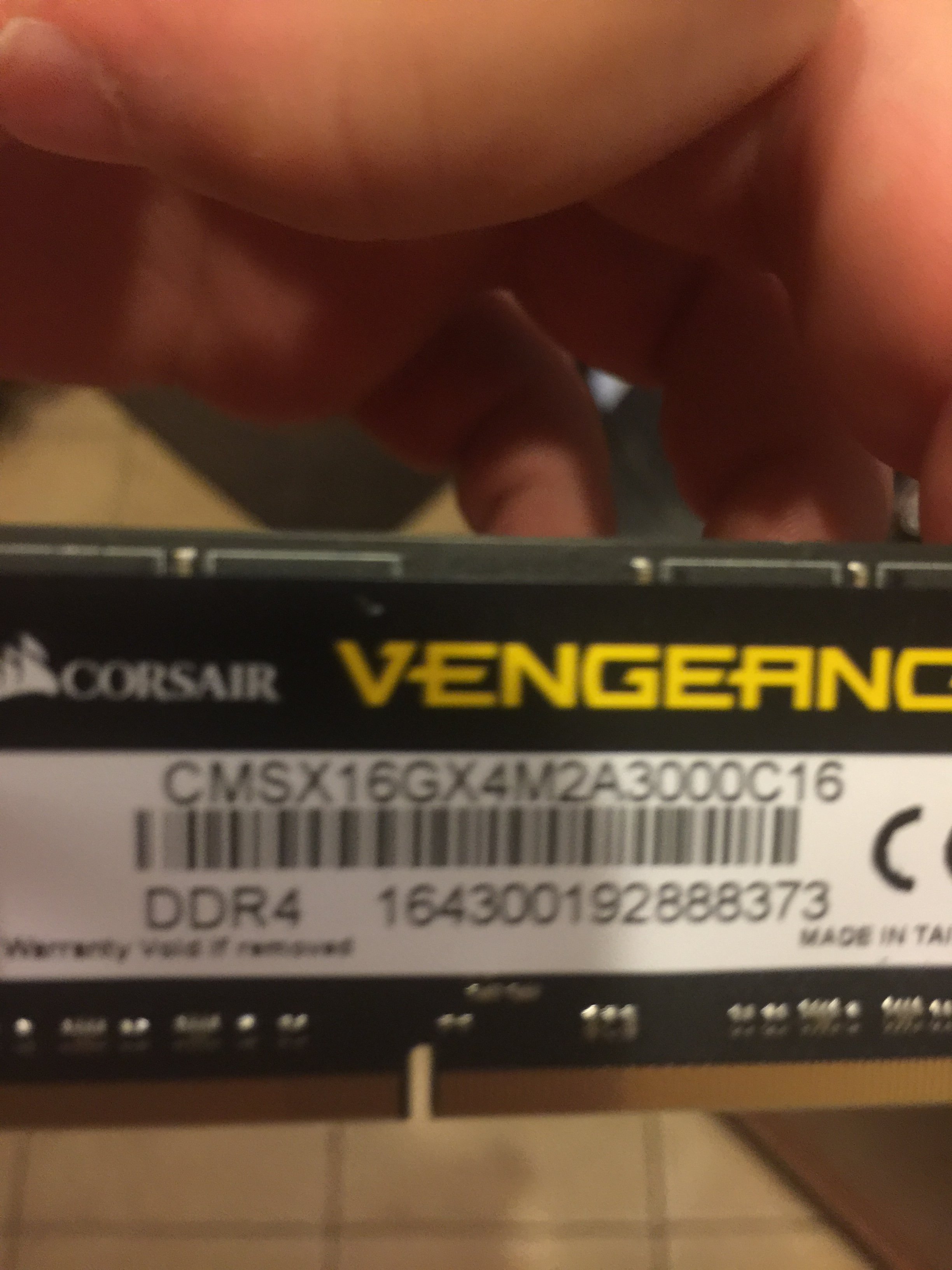
I bought some corsair vengeance 3000mhz 4x8 (32 gb). The stock settings are 2666 (18,19,19,39) which runs just fine. XMP 1 shows 3000 (16,18,18, 39) but is not stable. I have even tried them as single modules as meaker had suggested. With one stick I can post to windows but crash as soon as I start running any applications. Tried this with 3 different sticks. Any suggestions from anyone using these sticks?
-
Have you tried with cpu stock clock speed? The 16GB Corsair sticks have problems once you put OC on processor. Or have you already tried it?lctalley0109 likes this.
-
I was trying with stock clocks. They are 8gb sticks as well.
-
Unless you have the right BIOS/EC the throttling is incurable. As far as I know EC v.04 is the only one that has no CPU throttling issues.
Mine worked fine with only 2 sticks of it, but refused to POST with 4, so I RMA'd it. The SPD is programmed for 1 DIMM per channel and has checksum errors. Send it back for a refund. Two stick passed all tests without errors. The read and copy speeds were over 43K, but the write speed is stunted to 38-39K range for some reason.
Where did you buy it? I found both 16GB and 8GB Corsair Vengeance 3000 malfunction in my P870DM3.Last edited: Dec 3, 2016TBoneSan, Papusan and lctalley0109 like this. -
I actually bought the 32gb from a friend for 100 dollars that was going to sell them. Super cheap. I can either eBay them and make back the 100 bucks or run them at 2666 stock clocks which is probably still better than the stock 2400mhz that came with the laptop.Mr. Fox likes this.
-
Or I could get the info from him and RMA them. Not sure it will matter though at 4x8 if it is a issue.
-
Thanks to the Vapor Chamber, now I'm able to achieve a stable 4.7GHz OC using stock voltage / no offset:
http://www.3dmark.com/3dm/16446598?
![[IMG]](images/storyImages/fffffffff.png)
![[IMG]](images/storyImages/Fire_Strike_GTX_1080_SLI_375_95_CPU_4_6_GHz.png)
-
So do you think it is worth keeping the corsair 8x4 at 2666 or should I switch back to the 16x2 goldkey 2400mhz. Will these corsair at stock 2666 hinder other overclocking?
-
Very nice!
-
I have just loaded up Throttlestop and without doing anything in windows it is saying, on CORE ; EDP OTHER and PL1. Once I clear them and run a benchmark they dont show again but i can see my processor dropping to 4.0Ghz again. It pretty much stays at 4Ghz when i apply the overclock to the GPU
Im running Premas BIOS so all should be ok.Last edited: Dec 3, 2016 -
Clear? Why are you clearing? Does anything up in red or is it in yellow?
-
When i click the grey core button at the top of the limit window. The EDP OTHER and PL1 are yellow
-
Show me a screenshot in a stressed scenario with Limit Reasons? Not cleared?
-
First screenshot is when i open limit reasons when i boot throttlestop. 2nd is running benchmark which shows a drop to 4.0Ghz and i havent cleared the reasons and the third one shows a drop to 4.0GHz after i have cleared the limit reasons.
-
Whoa!! thanks for the share that is awesome.Spartan@HIDevolution likes this.
-
If you got them cheap and your laptop boots with all 4 sticks installed you might want to keep it. I already have 16GB running at 2800 but want 32GB at least 3000MHz. My P870DM3 absolutely refused to even make an effort to boot with 4 x 8GB Corsair installed using the default memory profile. Power button would light up and that's it. Not even the backlight on the LCD would come on, no HDD status light flickering, no rebooting... nothing. No signs of life other than the power button light. As soon as I pull out 2 of the 4 sticks it would boot immediately and ran fine other than the lower than expected write speeds. Before you make any decisions whether to keep it or not, run TM5 and Memtest86 to be sure all tests pass without errors.
Maybe you have a different part number. Those I returned for a refund are programmed for 1 DIMM per channel. Changing it to 2 DIMMs per channel did nothing to improve the situation. The SPD has checksum errors and one of the modules had different timing values in the XMP profiles than the other three did.Last edited: Dec 3, 2016afloyd, Spartan@HIDevolution and lctalley0109 like this. -
You won't ever be able to resolve this until you have a BIOS/EC without the throttling baked in from the factory. There are no settings you can change that will cure it completely, so there is no point in trying. It's a defect in the EC code. You might be able to minimize it by using the least CPU voltage possible for stability and increasing the power limits, but it's mostly driven by GPU power consumption. You can bench the CPU and it will hold with correct voltage and power limits, but adding GPU load to the system robs the CPU of power. I think somebody thought it would be cute to use a BGA turdbook EC on the monsterbook models, because you are limited to BGA filth CPU TDP when the GPU(s) are loaded. Or, maybe it's a stupid treehugger initiative to try to keep the total maximum system power consumption to some retarded limit to save energy. But, I doubt that much thought went into the situation... probably just good old fashioned incompetence.Last edited: Dec 3, 2016
-
Ok I have never run those tests before but will give them a try. Here is a picture of the ones I have.
Attached Files:
-
-
Yeah, those appear to be what I returned. http://www.newegg.com/Product/Product.aspx?Item=N82E16820145362
Interesting that yours will boot with all 4 sticks installed and nothing I tried would allow mine to even try to POST. I spent over an hour trying to get it to and nothing. It was like the machine was dead. Maybe the one stick with different SPD values was the problem. The look the same in TB editor mode, but in hex mode one was very different than the other three. It would boot with that stick installed, but not with all four. -
That is what they did to me with xmp1 but booted just fine and played bf1 for 2 hours with stock 2666. What program do you run to test the write/read speed?
-
-
-
Not sure what these scores mean but here they are.
Mr. Fox likes this. -
Those are all low. The memory should be closer to 40K read and copy at 2666. Also look how high the memory latency is, and the CPU cache is slower than it should be with those modules. I think they're messed up. You may find they have errors with Memtest86 and TM5 as well. The CL timings they have for 2666 are also too loose. You should be able to run 3000 or 3200 with CL18. That should be like CL15 or CL16 at 2666.
But, at least your machine can boot the 4 sticks you have now on default memory profile 2666. Mine absolutely would not even make an effort to POST with all 4 sticks installed. Try removing two sticks and run the benchmark again and see if the numbers are closer to what they should be with only two sticks installed.
Here is my 4x4GB Kingston HyperX 2400 manually overclocked to 2800.
![[IMG]](images/storyImages/Hyper_X_2400_2800_a.jpg)
![[IMG]](images/storyImages/Hyper_X_2400_2800_b.jpg) Last edited: Dec 3, 2016afloyd likes this.
Last edited: Dec 3, 2016afloyd likes this.
Clevo Overclocker's Lounge
Discussion in 'Sager/Clevo Reviews & Owners' Lounges' started by Spartan@HIDevolution, Mar 4, 2016.


![[IMG]](images/storyImages/TpzHdaV.png)


![[IMG]](images/storyImages/48313.jpg)


![[IMG]](images/storyImages/aida64.jpg)