 Problems? See this thread at archive.org.
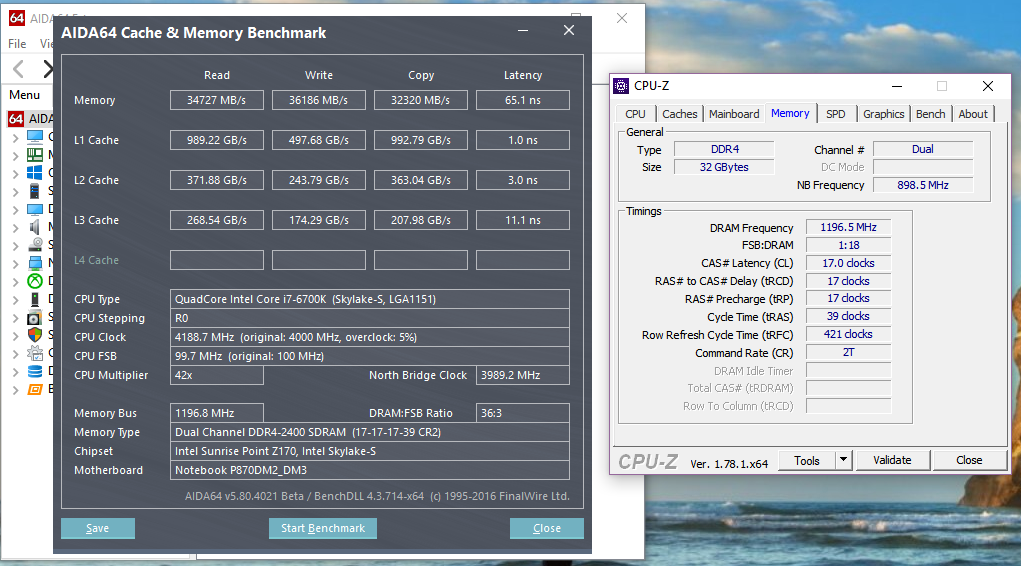
Here is what came with my system. Goldkey 2400mhz. They look a little lower. Could stuff running in the background scew the results?
-
-
It might a little bit, but probably not by much unless you have an abnormal amount of stuff running in the background. I have MSI AB, HWiNFO64, XFi-MB5 and ThrottleStop running in the background along with AIDA64. I also had Google Chrome open. I do not have Hotkey/CCC installed at the moment. I redid my W7/W10 dual boot setup from Legacy to UEFI yesterday and haven't finished installing all of the typical bloatware yet.
Bump your CPU clock to 45x4 and see if it is closer to the first sample I posted with the Kingston at 2800 with the CPU at 45x4..afloyd and lctalley0109 like this. -
I'm running premas bios and ec which he kindly sent me though. So should be cured
Sent from my SM-N910F using Tapatalk -
Oh, did not know that. If you have EC v0.4 it is cured, but you may not have the correct settings in the BIOS. Be sure you have the Power Limits set to at least 200000 (both) and be sure the CPU max OC ratio is set to 80. You may also need the ICCMax higher than stock. You will find those in the CPU VR Overclocking menus... VR Current Limit(s).
-
tried everything mate. max watts, volts, amps. For some reason it still throttles but doesnt seem to give me a reason in HWinfo or throttlestop. Im at a loss!!!
-
Ok will have to mess around more tomorrow. Do those 2400mhz Goldkey look correct or are they slower than they should be as well?
-
Perhaps you missed a setting. I will post something in a few minutes that you can try.
Let me set my BIOS back to default memory profile (2400) and I will post what the Kingston runs. My impression is the speeds are a bit low and the latency high, but I don't want to tell you something that is not accurate based on my recollection. The Kingston has very tight timingss, so that could be why. Mine run 2400 CL14 and your CL17 is going to be slower even if the memory is functioning correctly.lctalley0109 likes this. -
cheers mate. Ive just checked and my EC is 1.05.03PM so not 04 like you said, but maybe thats because im running a P771DM-G and not the P870DM
-
Running Aida64 throttled on me with the 8x4 corsair even with those loose timings after running it for a bit here, so they must be unstable.
-
That could be. I don't know which EC is the right one for your machine since I don't have the same hardware. If @Prema gave it to you, it is probably the best he has available at this time. Check your PM in about 5 minutes.
That's possible. The 16GB Corsair modules did not run stable for me with the CPU overclocked. They were OK stock, but since I never run the CPU stock I found that totally worthless. I am not having much luck at all with 16GB modules, but hopefully will be able to figure something out soon. I guess if I have to live with this Kingston 2400 4x4 kit overclocked to 2800 it won't be the end of the world, but not if I can help it. -
Have these been stable for everyone? I heard there was a bad batch were they still able to get them to work with xmp 1 or 2?
http://www.newegg.com/Product/Product.aspx?Item=N82E16820232310 -
Below is my Kingston at default memory profile at 2400 CL14. My latency is lower and CPU cache is faster than your Goldkey 2400 but your read/write/copy speeds are appropriate for 2400.
No. It has been stable for some, but not everyone. We don't fully understand why yet, but testing things to try to figure out why they are good for some and not others. But, if you are going to have 3000 RAM work correctly, your chances are probably better with the G.SKILL 16GB modules than anything else. I can overclock the Kingston 2400 to 3000, but it's only stable (so far) to 2800. Above 2800 it has errors just as all the other 3000MHz modules I have attempted to use do.
![[IMG]](images/storyImages/Kingston_2400.jpg) Papusan, afloyd and lctalley0109 like this.
Papusan, afloyd and lctalley0109 like this. -
Ok thanks. Do you think the latency is only due to your tighter timings? Maybe I can tighten the timings up on the goldkey some with some testing.Mr. Fox likes this.
-
Yes, that might have something to do with it. Here are my manual 2800 memory overclock settings. The only values I change are reference clock, ratio, tCL, tRCD/tRP and tRAS. Everything else is the same as 2400 SPD defaults.
![[IMG]](images/storyImages/005.jpg)
Below are the default Kingston 2400 values if you want to see if those work with your Goldkey memory.
![[IMG]](images/storyImages/SPD.jpg) Georgel, afloyd and lctalley0109 like this.
Georgel, afloyd and lctalley0109 like this. -
Hi all, I've been unable to keep up the conversion here in the past week, work... and I think this has been covered before, so sorry if this has been answered earlier on. I was running BIOS 1.05.01 and EC 1.05.03 for the past couple of months and I was able to undervolt the CPU to -210mv running at 4.2. I threw everything at this undervolt and it was rock solid, which was great for using in the office around lots of people and having nice and quiet fans. I noticed the problem that the CPU would throttle to stock when benching, but had no other problems. I recently updated the BIOS to 1.05.03 and EC to 1.05.06 and since then my undervolt is no longer stable. I am currently testing and it is running stable at -160mv which still fine. However I have noticed that while benching the CPU now throttles much lower than stock, all the way down to 1.1 at times. Does anyone know what the problem could be? Does some one have the older BIOS and EC versions so I can rollback? Could the undervolt be causing this, even though it was an issue with the older BIOS and EC? Thanks!
-
Your throttlestop isn't actually turned on, man. If you haven't, try disabling BDPROCHOT and turning it on with your set multi at 42T and then tell me if it works.
-
Here is with the same timings on the Goldkey ram.
-
and here is at those timings with 4.5 overclock.
-
You should get a free account with Imgur or Postimg.org because the forum image hosting is broken. It is very frustrating for folks to not be able to see the images posted probably more than 75% of the time. Sometimes I can refresh the page a half dozen times and finally get them to show, but sometimes even that does not work.Last edited: Dec 3, 2016afloyd, D2 Ultima and lctalley0109 like this.
-
Finally got the Kingston HyperX Impact 2400 4GB modules stable at 3000MHz using manual timings with @Prema BIOS and then programmed that to XMP profile with Thaiphoon Burner. After I got it to boot at 3000, I started moving the timings values one notch at a time, reboot and test. Once that took me as far as it could with the least amount of errors I started bumping the voltage. It passed with 1.30V, but I went ahead and pushed it 1.35V so it could have a little bit of wiggle room. I've done about 8 rounds of TM5 without errors at 4.7GHz. This is CL18. I think I have burned enough calories on this that I am probably not going to spend any more effort trying to figure out if CL16 will work. Thanks to Brothers @Prema and @Johnksss@iBUYPOWER for the ideas and suggestions as I figured this out.
Edit: also, thanks to @TURBODUDE!!! for making Thaiphoon Burner. I've purchased it 4 or 5 times now (I lost track how many) and I never regret it. Very useful tool when you need it.
![[IMG]](images/storyImages/EUdD4D2.jpg)
Here are the manual memory overclocking values for the BIOS for anyone that wants to try to use them.
![[IMG]](images/storyImages/B7t02Ai.jpg) Last edited: Dec 3, 2016afloyd, jaug1337, temp00876 and 1 other person like this.
Last edited: Dec 3, 2016afloyd, jaug1337, temp00876 and 1 other person like this. -
-
No problem. I think I had to refresh my brower 8 times and then I could finally see the image your last post.
Simple grab the "DIRECT LINK" to each image you upload to Imgur or Postimg.org and place it betwen the image tags (as shown below) or click on the toolbar button to insert an image and paste the direct link in the box.
Code:[IMG]https://s26.postimg.org/nziz55c87/Capture.jpg[/IMG]
![[IMG]](images/storyImages/Capture.jpg)
That Goldkey memory seems really slow. It is probably very inexpensive. In Linus Tech Tips review of the Sager-branded version of the P870DM3 he mention it came with RAM he had never heard of and it was the same brand as what you received as the stock memory. For playing games it's probably more than adequate. You really won't see much, if any, change in the gaming experience with more or faster memory unless you did not have enough memory to begin with. The main thing is to have two sticks for dual channel and I think 16GB is probably a good base to start with, but 2400 is going to be more than required unless you enjoy number chasing benchmarks, and then it does matter. Having 32GB also matters in that scenario, which is the only reason I am not content with 16GB. Overclocked benching is a whole lot more important to me than playing games.Last edited: Dec 3, 2016afloyd and lctalley0109 like this. -
@lctalley0109 @Johnksss@iBUYPOWER @Papusan @Prema
Here is my latest G.Skill 3000 MHz. Benchmark at XMP Profile 1:
![[IMG]](images/storyImages/3000_MHz.png)
-
Glad it works in your machine. That's awesome. Nice scores.
-
-
Man laptops are really getting high on overclocking steroids these days... Clevo is pushing the limits man
-
You lose on memory but win in Cache! your north bridge is @ 4596 MHz!!

are you running adaptive or static voltage?
-
-
Right now Adaptive. But always preffered static.
I don't want change my avatar
-
and what's your voltage offset?
-
-
+ or minus? I'm assuming ++
-
-
-
Maybe buy a new SL chips But a way better than the best BGA on
http://hwbot.org/submission/3183055_mostafa_abbasi_wprime___32m_core_i7_6820hk_4sec_746ms
![[IMG]](images/storyImages/1619513.jpg)
http://hwbot.org/submission/3318787_delly_wprime___32m_core_i7_ 6700hq_6sec_745ms
![[IMG]](images/storyImages/1701370.jpg)
-
@Johnksss@iBUYPOWER - on your G752VS do you have system agent clock fluctuations? It's happening a lot with my 15R3.
Wondering if you can take a look at the BIOS too if it's even possible to unlock. -
-
Define fluctuations?
-
It bounces around 996-998 while in OCCT, it's the blck. -
That's only true of those within the tiny minority that do overclock well. Most (in particular the BGA turdbooks) totally suck at overclocking.
Good job fixing that typo.
Here's a 3DMark 11 run with the 1080 SLI totally stock. Not too shabby, especially considering it is the Windows 10 poo-poo-cah-cah OS.
http://www.3dmark.com/3dm11/11793773
![[IMG]](images/storyImages/Iad7MaI.jpg)
You're probably right. Not enough voltage is worse than a little bit too much sometimes.Last edited: Dec 3, 2016 -
Any way to stabilize it?
Also the CPU won't stay at 1.39v+ for very long, it just throttles. I remember this happening with the G752VS, is there any way to fix? -
Windows 7 @ a wimpy 4.3GHz baby-girl overclock even beats Windows 10 @ 4.7GHz in 3DMark 11 Physics and Combined tests (both running GPUs stock in the example below). Where Windoze OS X beats Windows 7 is in graphics tests, but only by about half as much as Windows 7 rapes it in the CPU department.
http://www.3dmark.com/compare/3dm11/11711390/3dm11/11793773#Last edited: Dec 4, 2016afloyd, jaybee83, TBoneSan and 1 other person like this. -
You would need the bclk unlocked and a few other things as well.
bclk/ring/cpu will always fluctuate.afloyd, Spartan@HIDevolution, Papusan and 1 other person like this. -
Perhaps Dellienware's software team will fix the problem?Or ask Mr. Azor on social media if he can forward this to his team
Spartan@HIDevolution and Mr. Fox like this.
-
can I send the bios over to you and see if flashing a modded one is possible?
http://www.dell.com/support/home/us/en/04/Drivers/DriversDetails?driverId=FY6GJ -
Whenever Dell/Alienware has a defect, their answer is the same as Pee Wee Herman's...
TomJGX, afloyd, i_pk_pjers_i and 3 others like this. -
Ha. The day I see a good out-of-the-box laptop... the Tornado F5 sucks from the battery even in stock gaming usage. Apparently needs Svet BIOS to fix that crippling. Then these Clevos and all pascal mobile GPUs are basically broken out the gate. Ugh.
As far as I'm concerned, every laptop this gen is basically trash. The ones that become less trash are the ones that get custom BIOS mods, and even then there's no replacing a bad basic cooling system like the P775DM3 with 6700K/1080 which needs so much modding to work below 90-100c under CPU/GPU stress that I don't even count it as feasible.
Edit: I'm pulling even less punches because I'm salty that I can't game lately. Expect more-brutal-than-usual comments until I somehow find a new PC somewhere
Clevo Overclocker's Lounge
Discussion in 'Sager/Clevo Reviews & Owners' Lounges' started by Spartan@HIDevolution, Mar 4, 2016.


![[IMG]](images/storyImages/snowman-emoticon.png)
![[IMG]](images/storyImages/giphy.gif)
![[IMG]](images/storyImages/wprime.png)

