Problems? See this thread at archive.org.
Holy ****, where are you from dude? INDIA ? lol
-
-
As I said, I'm new to CPU ocing. I just followed the advice from @jaybee83 and @godfafa_kr to max out all settings except voltage.
So how I understood it, it's "only" between voltage and multis, not?
Gesendet von meinem LG-H955 mit Tapatalk -
The bench was 3dmark11 not firestrike.
http://forum.notebookreview.com/attachments/upload_2016-3-19_21-16-52-png.133294/
vs
http://www.3dmark.com/3dm11/8826841
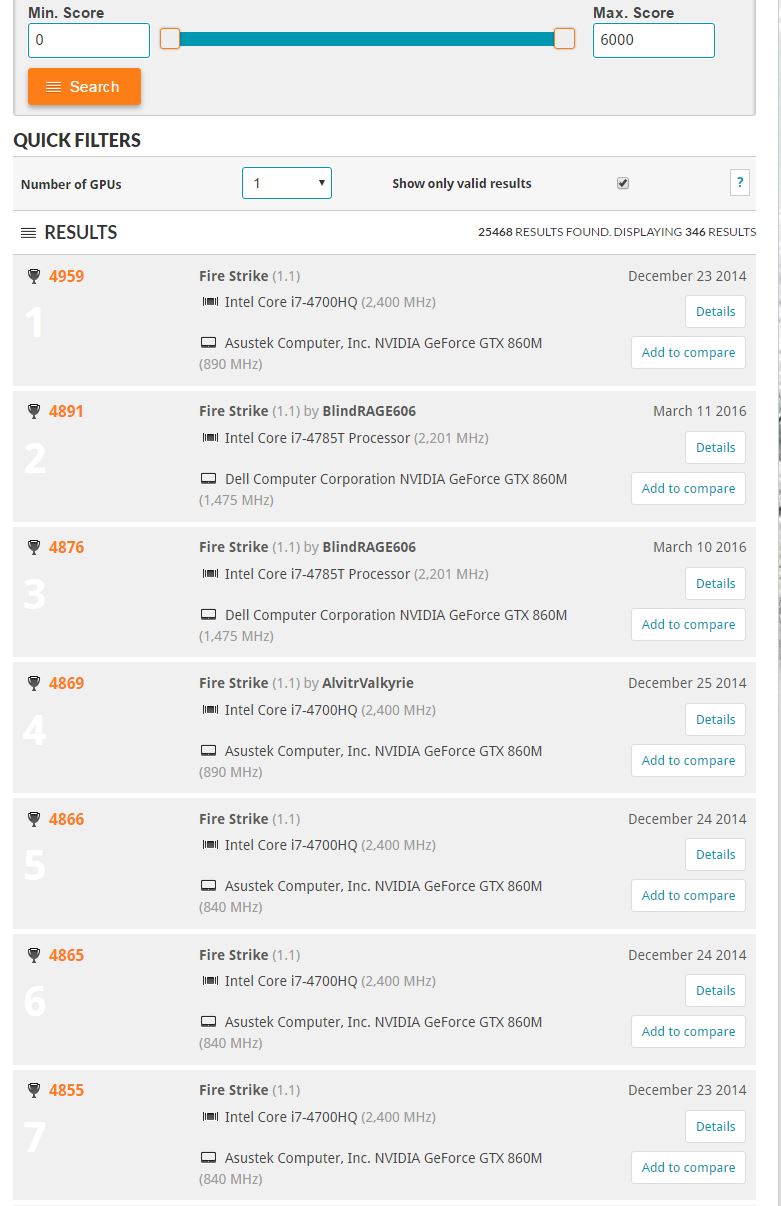
And here is firestrike....Where exactly are you in the top of the list? Because I dont see your name...
http://www.3dmark.com/search#/?mode...gpu/fs/P/958/500000?minScore=0&gpuName=NVIDIA GeForce GTX 860M
You are using way to many amps for starters.Last edited: Mar 20, 2016Spartan@HIDevolution likes this. -
The W230SS vRAM (Maxwell/BGA) has no chance against the one used in the Dell (Kepler/MXM), which was clocked 560Mhz higher...even the W3xxSS systems (Maxwell/BGA) vRAM clocks much better.
Last edited: Mar 20, 2016Spartan@HIDevolution and Ionising_Radiation like this. -
Exactly, but it's still a 860M.
Just like this one....and this is sli
http://www.3dmark.com/fs/3470090
People will start thinking they are kings of kings because they beat this score... Last edited: Mar 20, 2016Papusan, Spartan@HIDevolution and Prema like this.
 -
Mmm, dat should be close to equator
-
Well, 0.00V extra turbo voltage ain't gonna cut it, bro. Go into the BIOS and set the Turbo voltage to about 15 or 20. To do exactly the same thing with XTU, click about 15 or 20 times to the right arrow, then apply. That's nowehere near enough voltage set on 0.00V. If it is still not stable, jump it up to 30 and work your way down until you find the least amount of voltage that it takes to run stable at 43x6. I'm using about 60 for 47x6 with the 4960X. I have all three of my power limits set to 2400 in the BIOS.
I don't even use XTU any more, for the Panther or the Sky X9E... don't have any use for it and I find it a little buggy. Things are much more stable using BIOS and ThrottleStop controls. I think I would only use XTU if I absolutely had to, on something like an Alienware with a crippled stock BIOS that cannot be unlocked due to Secure Flash filth.CaerCadarn and Papusan like this. -
Here this one is at 2133Mhz CL15. Do want a bench mark at 2400Mhz OC'd @ CL14?
![[IMG]](images/storyImages/ff074c1aad8054a4e1e851d40b4314e8.png) https://i.gyazo.com/ff074c1aad8054a4e1e851d40b4314e8.png
hmscott and Spartan@HIDevolution like this.
https://i.gyazo.com/ff074c1aad8054a4e1e851d40b4314e8.png
hmscott and Spartan@HIDevolution like this. -
And here is one at 2400Mhz CL15
![[IMG]](images/storyImages/a73057f4332922f16f8746fe78d471a1.png) Johnksss and Spartan@HIDevolution like this.
Johnksss and Spartan@HIDevolution like this. -
That's really odd. I already gave them that like, I don't know, 4 months ago, when @Prema and I first started on this project. It is also posted in the review at PremaMod.com, LOL.
[parsehtml]<iframe class="imgur-album" width="100%" height="750" frameborder="0" src="//imgur.com/a/6u44Q/embed"></iframe>[/parsehtml]hmscott likes this. -
Does anyone know which Nvidia driver that provides the best bench score? I used nGreedia 361.91 in all my bench tests. Someone said something about a driver from Clevo who gave good bench score, but I do not know if this driver is best for benchmarks(I think it's 359.00 - or I'm wrong?). I'm downloading the vga.zip driver from Clevo... Why is it on the whole 659 MB? Because of 32/64 package?
-
It has Window 7/8 and 10 all in the same archive. I didn't find it to be a good driver though.Papusan likes this.
-
Dang, LOL
Then I use a lot of time downloading garbage with my **** low download speed. I can see here is almost no one who has tested various nGreedia drivers for benchmark testing with this beast, so the interest is perhaps a little low? Just for gaming, LOLMr. Fox likes this. -
I had a issue with it. Don't remember exactly what it was now, but it was buggy and kept saying something weird like there was an error connecting to a server at Windows logon or something along those lines. It was part of the Geforce bloatware bundle that was goofed up. I tried clean installing it a couple of times. I finally got tired of farting around with it and moved on to something else. The driver itself was OK. The 359.00 driver from NVGREEDIA also works fine for me.
Papusan likes this. -
I'll download from Nvidia. What is your personal opinion... Best driver for benchmarks and best driver for bench + gaming(Win **** X)? Everything that comes from the Greens is almost like lotto games. And there are not very many people here who have the time to test several drivers for bench. Maybe not so strange... When we know what Nvidia is capable of.
-
For Windows 7/8, I think 347.88 is probably still the best overall for 980M SLI and GTX 980 overclocked benching. 359.00 is probably a close second to 347.88 and 362.00 are also fairly decent for 7, 8 and 10. Really, there's not a massive difference between most of them. They all seems to be pretty good or really horrible. In other words, very inconsistent results from one version to the next. As I do not play games very often and my primary focus is overclocked benching--which I believe is also the same in your case--I do not really know or care too much about which driver is the best all around for gaming as long as I have one that gets good benchmark scores and overclocks nice without flaking out.
-
No Error Scores. They have to all be legit when representing something we all respect....
Side note:
There seems to be a few 860M's beating 980M's at firestrike on single card benchmarks. With memory at 2k.....
That alone may make me go find one of these. HA HA!
Edit:
P570WM (i7-4960X): CPU
Johnksss@Firestrike: http://www.3dmark.com/fs/7785605
That one goes to either @Kpaxx OR @Mr. Fox for 4960X
Edit:
Here is the correct score I think. From @Kpaxx
http://www.3dmark.com/3dm11/10808103Last edited: Mar 21, 2016 -
That's because they are cheating a little bit:
http://www.3dmark.com/fs/7083456
I would like to have one of those too!
-
Shhhhhhh!
That was going to be my secret weapon.
Edit:
Going to have to re think that category since they have mixed scores from desktop cards.... So the starting point would be just under 5k to start finding valid results.Attached Files:
Last edited: Mar 21, 2016Ionising_Radiation likes this. -
-
Awesome score. I doubt I'll ever be able to get anywhere close to that. And, that's with your Xeon, not 4960X.
Here's my personal best for the Panther in 3DMark 11...
http://www.3dmark.com/3dm11/11088785
![[IMG]](images/storyImages/syZnAO5.jpg)
-
That was for the firestrike physics score for a 4960X on the premamod.com records page.
Prema likes this. -
Ah, I misunderstood. Sorry about that, thought you were saying the link provided was to a benchmark with 4960X CPU.
Well, this is interesting. I installed 364.51 (latest) under Windows OS X and now my 980M SLI voltage is not adjustable with that driver. The slider moves but snaps back to default when I try to apply it. Going to have to test 359.00 again. Hopefully, those retarded muppets at the Santa Clara mafia are not playing games again with clock-blocking. @Prema - any other reports of such stupidity that you know of?
Edit: nevermind... user error. Helps to plug in the AC adapter, LOL. I did not notice it had come unplugged from the back of the laptop.Last edited: Mar 21, 2016Papusan likes this. -
Fair enough. @Prema, is there some way I can add a little more juice to the VRAM, since 2780 MHz seems to be the hard limit for VRAM on mine. Any more and I get severe red artifacts all over and the benchmark quits. Likewise, a slight overvolt of the core to 1.25 V might achieve some seriously good overclocks... The 860M scales extremely well with just a little more voltage added. Understandably this exceeds the 1.2V limit, but I have a crappy ASIC and stock voltages are 1.1 V...
-
I did that a few times.
And as to the link. It wasn't the correct one for a 4960x, but it was for a 1680 V2.
Asic means higher stock voltage and lower memory overclocks because the voltage is not high enough to counter on the vram side of things. (This seems to apply to laptops)Last edited: Mar 21, 2016Mr. Fox likes this. -
@Mr. Fox
OT question but how did you get this config in your panther? what sort of slots/bays does it have? (3x1TB SSD + 4TB HDD) and 4TB HDD???? -
Yes sir, that is not a typo. I have 7TB of internal storage now, LOL. http://forum.notebookreview.com/thr...0-owners-lounge.707507/page-373#post-10215944
I have three Samsung 1TB SSD and a 4TB HDD. I am using a caddy in the ODD bay for one of the 1TB SSD since I don't really have any use for an optical drive any more. And, in the extremely rare case that I might someday need one for some strange reason, I have a USB BluRay burner I can use.Spartan@HIDevolution, Papusan and Johnksss like this. -
Oldie but goodie...780M is still hanging...
![[IMG]](images/storyImages/VYXu0C.png)
![[IMG]](images/storyImages/aGGGOx.png)
![[IMG]](images/storyImages/J3xKk9.jpg)
![[IMG]](images/storyImages/tSnUyg.jpg)
-
holy moly man. Do you think I can order 2 of those and slap them in my Sky X9 or would they not fit?
-
I thought about the same thing and tried to eyeball it. I did not attempt it to verify whether it would fit or not, but I am pretty they will not fit. It they do, it will be super tight and might make the palm rest extremely hot. I was hoping to buy a second one for the Panther and have an 8TB RAID0 volume just for grins and giggles, but it will only fit in one specific drive space. As you can see from the photos, it's almost double the height of a normal SSD.Spartan@HIDevolution likes this.
-
New better wPRIME 32M score 4.257 sec. Small but still a better wPRIME 32M score
.
@Phoenix can you edit my wPRIME 32M status?
http://hwbot.org/submission/3164685_papusan_wprime___32m_core_i7_6700k_4sec_257ms
Last edited: Mar 22, 2016 -
What should be a normal CPU temperature for a Clevo P870 6700K at 4.4GHz?
And how should it be run to be safe for everyday usage? -
With 4.2 I've got 50*c in GTA V and 58-61*c in Armored Warfare.
Cinebench 11.5 loop 5 runs max 72*c on hottest core (Core 1 (aka 2)).
You should keep temps under 85*c, everything lower is awesome. 85-90*c starts to be... hot and loud. Avoid it unless you're benchmark psycho.
Georgel likes this. -
Thanks!
Did you run any special settings, or mods, or it is like this on stock? -
I'm using x42 profile (4.2GHz) with -150uV.
Bonus 200MHz and uV keeps my CPU much (around 10*c) cooler. -
cutting through the CPU IHS to cut the silicon glue that holds it, then after it is removed, you pupt Liquid Ultra on the actual CPU Die then replace the IHS.
Then you put Liquid Ultra again between the IHS and the actual heatsink for better heat dissipation. Although you are free to use any thermal paste between the IHS and the heatsink, Liquid Ultra is highly recommended as it is the best thermal paste for lowering temps and very much needed on this hot cake that runs even hotter than the previous Hotwell processor (AKA Haswell)
This is not for the faint hearted, the video looks scary, it is super easy to do but requires a lot of patience. Always cut through in an upwards motion not horizontal in order to avoid scratching the PCB
victorwol likes this. -
You take the metal part you see off it with a razor blade.
Then change the thermal compound found between the actual chip and the metal plate.
Then glue it all back.victorwol likes this. -
Well... my machine is going close to 95C benchmarking but I have not made any modification yet... gotta read all this before
-
Ohhhh..... I think I would have a panic attack trying to do that, is the extra performance really worth all the trouble??
Can one buy the CPU with that mod already done? if is worth....hmscott likes this. -
https://siliconlottery.com/
You can get a good processor from there and ask them to delid it for you.hmscott likes this. -
jeeezzzzzz...... thats nuts on that video!!!! not for me... hahaha ... I'll b back, need a valium....
Papusan, Spartan@HIDevolution and hmscott like this. -
Its EZ PZ bruh, im gonna delid mine later this week. Want me to make a video for you? <3hmscott and Spartan@HIDevolution like this.
-
-
Yes off-course
HIDevolution sell them, that's where I got mine. They ordered a Silicon Lottery one for me that was already delidded so I got a CPU with lower temps already as it is a Silicon Lottery chosen one, then further enhanced the cooling by opting for the CPU delidding service.
You can also order directly from Silicon Lottery but I chose to get it from HIDevolution as I trust them more.hmscott likes this. -
Trust me d00d, I almost had a heart attack doing it, it's like dissecting an infant's heart. If it wasn't for my bigger brother @Mr. Fox and his psychological encouragement, I wouldn't have dared to do it even if you let me drink a full bottle of Vodka absolute in one go
I was sweating as if I was running a marathon, until you finally get to the last 4th corner and the IHS gets lose, it's like you just had an orgasm!
then everything becomes a piece of cake, putting the Liquid Ultra then placing the IHS back in its place, you don't need to glue it back as the CPU clip will hold it in its place very tight
but if you must, this is the glue that Silicon Lottery recommended me to use to stick it back:
Permatex 82180 Ultra Black Maximum Oil Resistance RTV Silicone Gasket Makerjclausius, victorwol, hmscott and 1 other person like this. -
-
Why did you not post this earlier, just asked for a refund on a different sealant, and cant order this one because it an add on item :|
-
I'm surprised that guy still have 10 fingers... does he????
Spartan@HIDevolution likes this.
-
That video made it look way more difficult than it actually is.
Spartan@HIDevolution likes this.
Clevo Overclocker's Lounge
Discussion in 'Sager/Clevo Reviews & Owners' Lounges' started by Spartan@HIDevolution, Mar 4, 2016.