Problems? See this thread at archive.org.
Or was it real after all and someone is just covering tracks...
-
-
-
Psh, if it were in notebook form I would want a fully unlocked P6000 core at least considering what the cost would be
bennyg likes this. -
In fact not here.
-
This is interesting.. Does this applies to the p870dm-g too?? all this time ive been using the -100Vm. What voltage you think is good for my 6700k @4.4 with the static setting? i know it depends on CPU.. but average voltage around that range. -
Gosh, I don't remember if I ever even used my 6700K at less than 4.6GHz for anything. Try using Override mode at 1200 (1.200V static voltage) as a starting point and see if that is stable. If it is, try 1175 and 1150. If not then try 1225 and 1250.Juang1985 likes this.
-
And now this happened while transcoding with ffmpeg:
![[IMG]](images/storyImages/82LkZuG.png)
I hate Clevo's heatsinks.TomJGX likes this. -
Thanks Mr Fox! Im going to sell my p870dmg just want to leave a decent stable overclock in it before selling it. I got my p870km1 on its way!Mr. Fox likes this. -
Lower the multiplier a bit. That should alleviate the problem.
-
Car engine heating up!!?
Just drive slower from now on.Papusan likes this. -
Sure, but wouldn't that mean my transcode would go slower? Let me try, anyway.
Well, technically I OCed my CPU to 35/35/35/35 when it ought to be 35/34/33/33, so it's more like 'car engine heating up? Yeah, you tuned it too much, turn it down a notch.' -
In a way sure. But you can always tune the voltages.Papusan likes this.
-
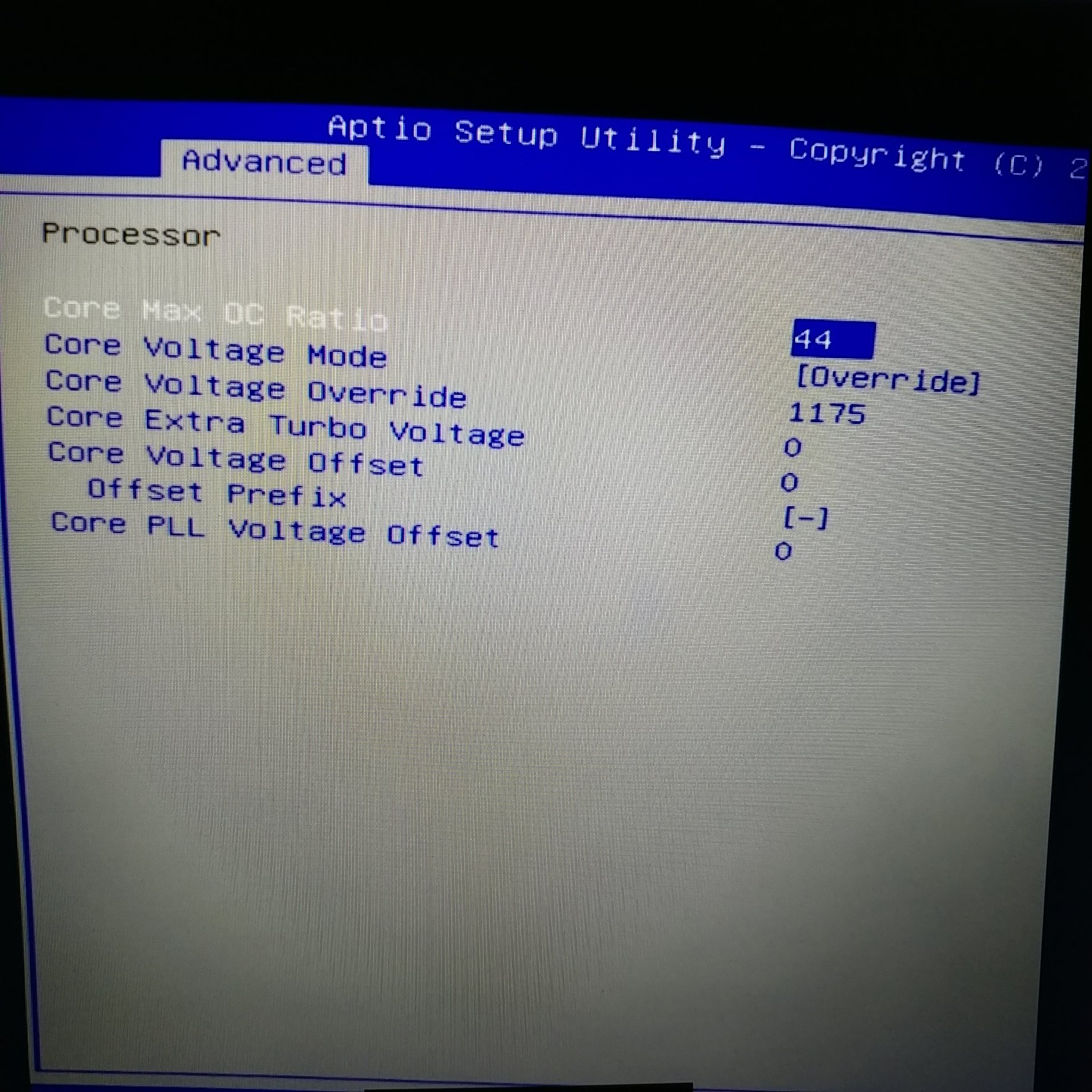
Mr fox, I went in to the bios and chose override volatge of 1175 but the voltage showing on hwinfo are 1.25-1.3v... keeps moving maybe the setting didnt stay or i could be doing something wrong
check it outAttached Files:
-
-
Voltages? HAHAHA. This is Haswell, where a -80 mV undervolt causes WHEA_UNCORRECTABLE_ERROR on near-stock settings, unlike Skylake where one can undervolt - 150 mV and gain something like up to ten degrees C Tj Max.
-
Yes, that is normal. Idle voltage is always higher. Test under load and you should see voltage drop down closer to that amount. It will always be a little bit higher than what you have it set to for Override. Also, if you have separate voltage for cache in your BIOS it needs to be set the same or it will override the core voltage. So, on the P870DM-G I had separate BIOS settings for cache voltage and core voltage. If your BIOS does, go in and set it override/static and matching core voltage. If you change it with XTU they will automatically be set exactly the same.
If the cache ratio is stock, you should be able to go lower on the cache voltage. Once you have them set the same, try lowering cache voltage to less than core to improve temps. You can set them different with ThrottleStop, but not with XTU. If you go too low with cache voltage it will crash, but starting from the same and slowly working your way down in small increments you can find out how much cache voltage is needed to be stable.
The P870DM3 and newer machines do not have the ability to set cache voltage lower than core voltage. The only available option for this is ThrottleStop. -
Thanks Mr Fox
I tried Aida 64 stress test and the voltage got to 1.3 under load and temps went up to the 90s. When i get home I'm going to try the cache voltage. maybe that's why is going up under load even with the override setting?Papusan likes this. -
vBIOS build date of 07/06/2016?
You missed it Fox.
Papusan, steberg, ajc9988 and 1 other person like this. -
Faster at compute but not gaming.
-
Depending on what gaming scenario. It should have 25% more ROP.
-
With much fatter and power hungry 64 bit shaders
tgipier likes this. -
So, with that sort of throttle, it will kill the time. It is the highest multiplier usable over the length of the transcoding. So, if you reduce clocks, for sake of argument, to 3.0 flat and lower voltage, but it NEVER throttles, it will go faster than constantly throttling to 2.6 or 2.7. The point is, if you are throttling that much, you are likely loosing more time than tuning to what it needs to run without throttling.Papusan likes this.
-
OK. That has to be why... 1.300V is way too high for 4.4GHz with 6700K. You should be able to run 4.5-4.6GHz using stock voltage with 6700K. If your BIOS does not have separate cache voltage. set the lower cache voltage using ThrottleStop. At 4.4GHz you can most likely get away with using less than 1.150V for core and cache.Papusan likes this.
-
Hi guys, I have a question and could use the help. I have a X9E2 with a 7700K, Prema bios, I have both grid and t shaped heat sinks, running a 1070 card, I have spare parts (6700k), ssd drives etc. I want to upgrade to a 1080. Does it make sense buying a stripped down KM1 from HIDEvolution with the Prema bios and 1080 for around $2400.00 Install my 7700K, drives etc and then sell my rig with the 6700K etc to make up the difference. Or is the Z270 board not that big a difference? If that's the case I'll just spend the $1200 on the 1080 upgrade? It's probably a boneheaded question but could still use the help. Thanks guys. Have a good night
-
I think either way you would end up close to the same outcome financially. That being the case, I'd rather have the KM1 with 1080 due to the extra M.2 slot and newer chipset with Optane support. KM1 does not have a @Prema BIOS available yet. So, you'll have to wait for that and put up with the crippled firmware in the meanwhile.Jon Webb likes this.
-
Even single threaded apps like a stable clock, Ryzen has shown this with its turbo mode being slower than locking the chip to 4Ghz in a single threaded app.ajc9988 likes this.
-
Anyone having any luck on overclocking the 1080's after a certain threshold? It seems that after 175MHz overclock in MSI Afterburner, anything higher than that crashes the drivers no matter what I do. I have seen one other instance of this on Reddit here. I would love to go over 2GHz if that's even possible but, I can't seem to figure out a way to do it. I know I can use Curve but, I'm not sure if that would make a difference and what voltage is even safe with go above that threshold.
-
Ok so I've noticed something a little odd for me with Throttlestop. I apparently can't adjust anything that isn't already set in my BIOS.
So, I tried a -100mV offset in the BIOS, and now throttlestop can adjust between -100mV and stock voltage offset. But if I set say -150mV it doesn't work (only get -100mV worth of reduction). I tested that -80mV does indeed raise the voltage, so it seems like it can affect only that range. To that effect since I left voltage at default I can't manually adjust the voltage with throttlestop either.
Is there some setting I need to change in the BIOS? Maybe something that lets windows adjust the MSR registers or something? I'd much rather use TS to fiddle than reboot all the time.
Edit: I also set max OC ratio to 80 in BIOS, but TS won't let me pass 4.5GHz at all.Last edited: Apr 4, 2017 -
@Prema if you would please analyze my above post and tell me whether I am idiot or not?
Also, XMP won't work, and I've done NVRAM resets (every time I tried XMP I had to do one; never even booted to BIOS splash screen).
I also cannot enable Fast Boot at all; it just resets to "off" every time the system reboots.
The only thing I could think of was that I saw some CPU lock for something about MSR in windows being "on", and I was sure throttlestop used MSR registers and didn't touch the BIOS, so I don't know if that explains this behaviour (for throttlestop anyway). But I figure it better to ask first.bennyg likes this. -
I have had no success with my ram in xmp either, same problem, never posts, requires nvram reset. Even when using identical timings/clock to standard, or loosening timings, or bumping volts a bit...D2 Ultima likes this.
-
-
Ripjaws 2666cl18 2x16
-
Weird. XMP1 works just fine for me with my 2800Mhz Gskill CL18 modules on both my DM1 and DM3.temp00876 likes this.
-
But you have Prema mod?
-
yes 1.05.03PM
I also get a EDP / SA Iccmax throttle at 4.6 and up which noone else seems to either. -
Even with current limit set to something like 512a?
Sent from my OnePlus 1 using a coconut -
Well XMP works here but different machine, we spoken about yesterday.
About the Fast Boot, yeah i have the same but i think it's that way when using a NVME SSD, do you have one?
Edit: Just saw in your sig 256GB Samsung PM961, so yeah. -
That's not an OS drive and before I put that in I couldn't use it either
Sent from my OnePlus 1 using a coconut -
ah ok, was my best guess back then cause it has to initialize the UEFI thingy, but it boots extremely fast anyway so i didn't bother with it.
-
Yeah this was present since I booted the first time with only SATA drives present... Plus I'd never put an OS on a TLC drive xD
Sent from my OnePlus 1 using a coconut -
Yes. All BIOS settings in that section are set current limit way high. PSYS PMax, SA VR, Core/IA VR, Ring VR all set high (8191). HWInfo confirms no limits
x46:
Click to view full size!
x44:
Click to view full size!
(NB fans weren't on max for those quick tests)Last edited: Apr 5, 2017D2 Ultima likes this. -
I See no reason to choose the older chipset if you whatever-anyway go for Windoze X.
-
Optane is not really lighting any performance figures alight so far, but may mature. The extra M.2 could be nice to use in future though.
Jon Webb, temp00876, Papusan and 1 other person like this. -
Intel Cannon Lake Mobile Processors This Year? - Guru3.com
"So Coffee Lake is the next 14nm CPU design after Kaby Lake bringing six-core / 12-thread processors into high-end laptops and standard desktops for the first time. Then late 2017 Intel would shrink Kaby Lake down to a 10nm node, these are Cannonlake processors."ajc9988 likes this. -
Ok so I got throttlestop working. A bit weird, doesn't work like my 4800MQ did, but I got it working.
I guess I gotta do 1-stick 2-stick RAM gg no re -
Have you experimented with a lower ram divider and playing with base clock instead?
-
So, Kaby is 14nm+ process, the same process that will be used for skylake-x for HEDT. 14nm+ should be less than 10nm and 10nm+ processes. 14nm++ (coffee lake) will not be surpassed until 10nm++. 10nm++ will not be here until 2019. So, they are using kaby process on skylake-x so that cannonlake-x can be competitive, while ice and tiger will have FIVR and likely be on the 10nm++ process. Meanwhile, pushing up server products will not occur until after cannonlake-x. So, just some milking on release cadence... So far, I have not read any plans for 14nm++ on the HEDT platform.
Edit: for comparison, AIDA added preliminary support for an AMD 16C/32T HEDT platform
http://m.hexus.net/tech/news/cpu/104314-latest-aida64-boasts-radeon-rx-570580-16c32t-ryzen-support/
Sent from my SM-G900P using TapatalkLast edited: Apr 6, 2017 -
As far as I can tell, as soon as I try to do anything even close to XMP or custom settings it just fails to boot (even to BIOS). Just black screen boot loop. FN + D has been my best friend for somewhere around 8 boots while I was trying to touch the RAM.bennyg likes this.
-
First boot after a change to RAM settings take a way longer than usual from what i have seen. Im guessing even a NVRAM reset didnt work or using a single module?
-
Been honestly too lazy to attempt single module. As for the long time, I left it for half hour once.
Will try single stick eventually though
Sent from my OnePlus 1 using a coconutGeorgel likes this.
Clevo Overclocker's Lounge
Discussion in 'Sager/Clevo Reviews & Owners' Lounges' started by Spartan@HIDevolution, Mar 4, 2016.

 Let's talk

![[IMG]](images/storyImages/3o6ZtmhpssRev33HgY.gif)