Problems? See this thread at archive.org.
This image looks like it'll make someone feel uncomfortable
![[IMG]](images/storyImages/image588)
-
^ I have a kind of twitch in my arm right now and I'm not sure if I'm just really tired or that picture gave it to me.
Georgel likes this. -
Did you max out VCC and VDD? Do that first, save and exit, then set XMP. Also, you have to be sure that overclocking is enabled in the BIOS or XMP profiles will not work. Remember back to the DM-G days and people were having problems booting XMP-3000? After using my BIOS overclock settings they no longer had any trouble booting XMP-3000. Those that were trying to boot XMP-3000 with the CPU settings stock were never able to. Neither was I.
-
Here's something special.
http://www.3dmark.com/3dm11/12106516
![[IMG]](images/storyImages/BTa7nri.jpg)
-
Ok, can you pm me some shots of settings I definitely need to change before trying XMP? I can give it another shot after I wake up (about to shower and sleep while feeling nice and fresh), and honestly it'll be great to check. I did once set the voltage to 1.35 manually but that didn't work, but I can't remember what I did or did not have. I know when I enabled XMP and had to FN + D the first time I didn't touch anything else in the BIOS except try to get it to boot again, so... maybe this will work like a charm.
Also I had an issue with the pads, I got multiple sets of 0.5mm instead of any 1mm or 1.5mm, but that will be fixed soon and my tuning will be done on the hardware side. I already undervolted for stock to nice effect (no longer holding 80c with auto fans) and will try for more than a -100 offset soon and I also managed 4.7GHz with ease on stock voltage (or as you would say, a pansy baby girl overclock). We'll see if I can't churn out at least one 5GHz bench for the review once I get cooling down pat.
I really like this machine... when tuned. I legitimately feel sorry for people who unknowingly buy it stock from companies that won't adjust pads or delid or anything like that. This thing doesn't work without a delid and an undervolt, at the bare minimum. Even more respect to HIDevolution and OBSIDIAN-PC for their work, and hopefully we can get more people on board.
Sent from my OnePlus 1 using a coconutPapusan, TBoneSan, Jon Webb and 1 other person like this. -
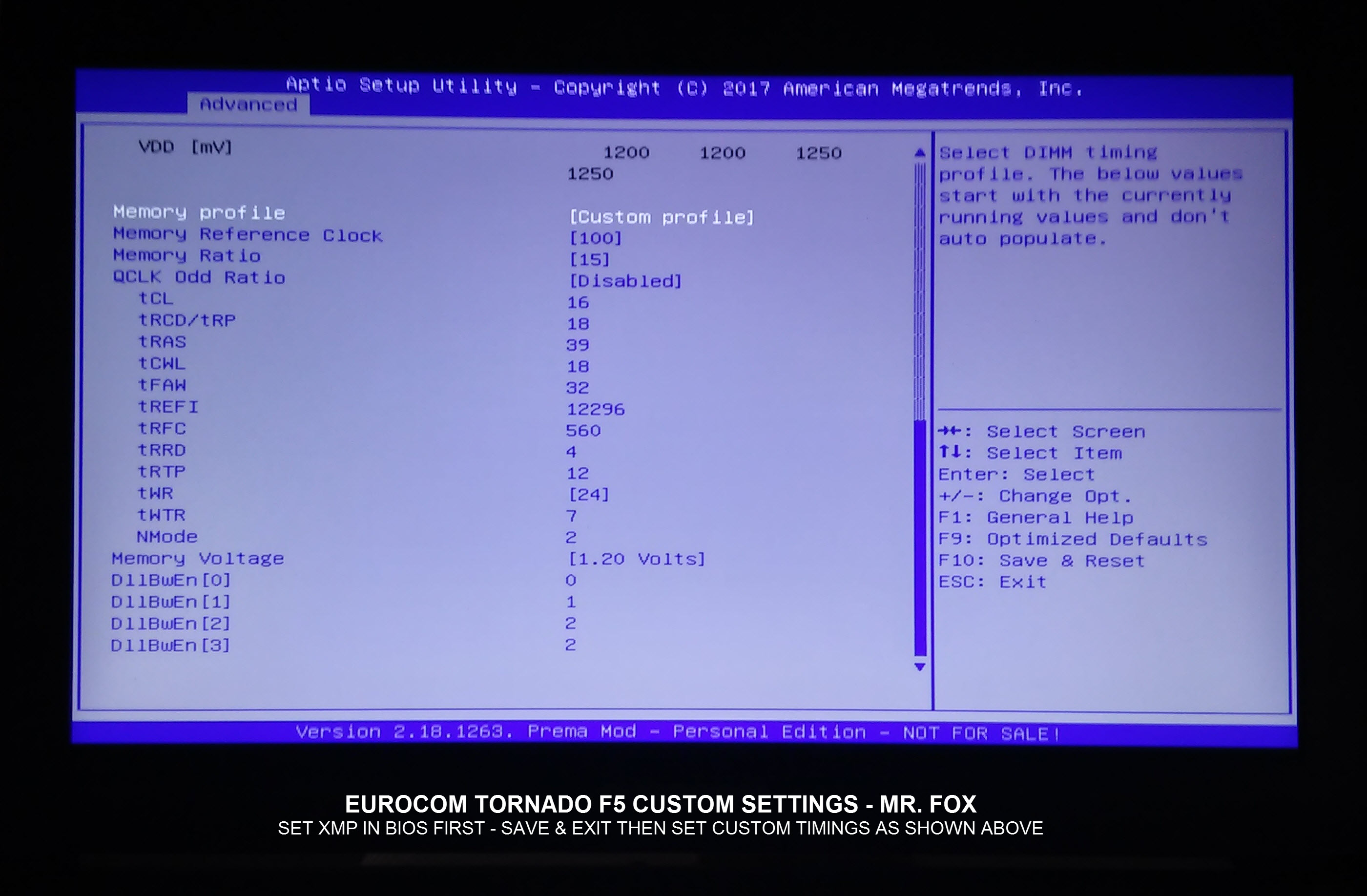
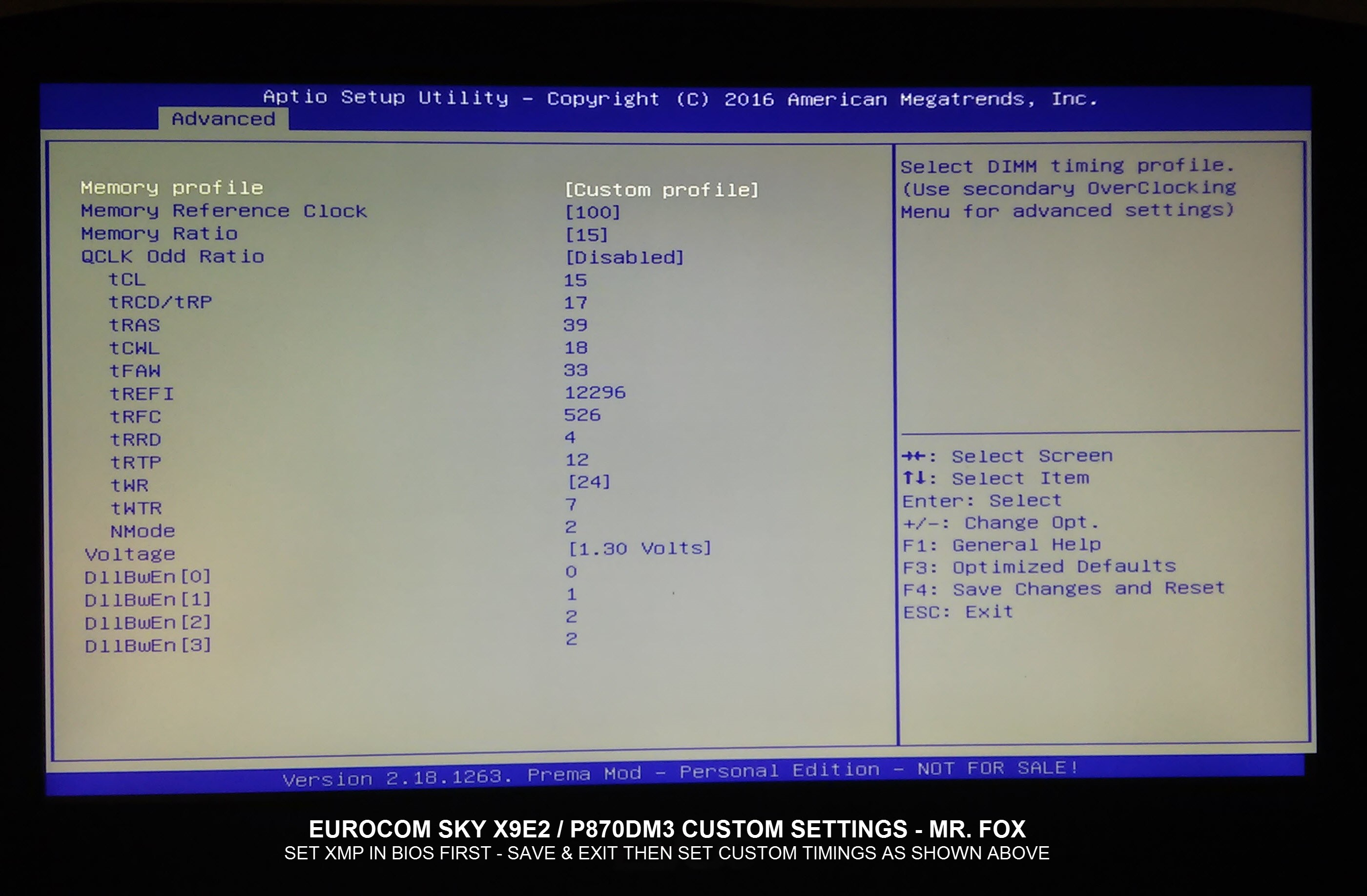
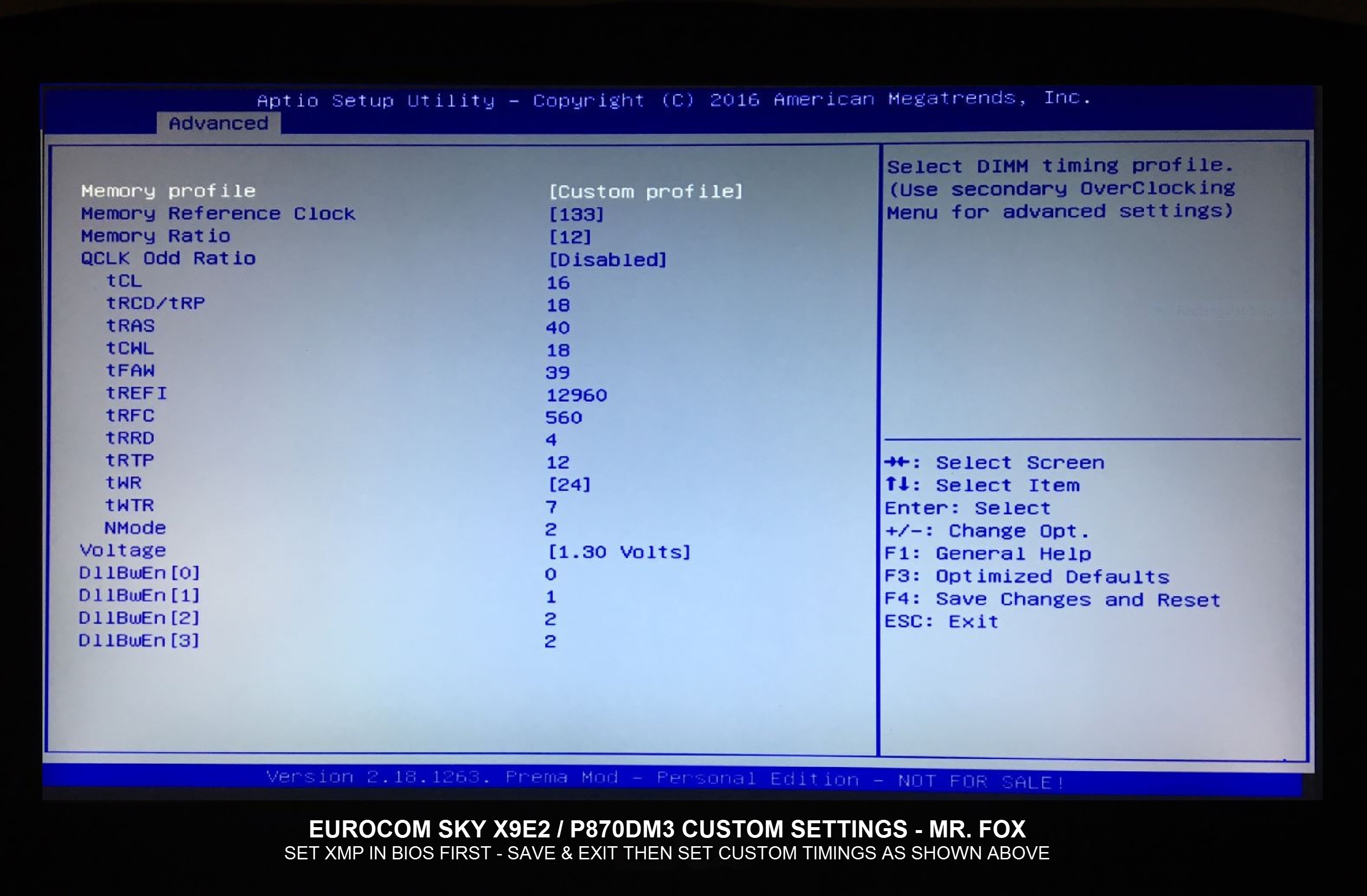
I developed this for Eurocom to provide to owners of the Tornado F5, but it applies equally to our P870DM3 machines with 7700K CPUs. The menus do vary a little bit with some settings being found on a different screen, but everything is basically the same.
Here is the PDF one-pager "Quick Guide" listing the settings: https://drive.google.com/drive/folders/0Bwdqi25LDwZyUlM5SXBXZlo4T28
After applying the OC settings, set XMP. If you have never booted XMP it could take a long time (10 to 15 minutes) for the memory training. The machine may power on and off two or three times. It took about 30 minutes the first time for my machine to re-train itself to boot 3333. If the machine sits there and does nothing for 15 minutes, hold the power button down to shut it off. What a couple of seconds, then turn it back on. Wait again, up to 5 or 10 minutes and see what happens. When you are staring at a black screen 5 minutes seems like forever. Be patient and don't give up too quickly.
Once it boots, hit F2 and go into the BIOS to be sure it is still set to XMP, save and exit. Windows may also throw a BSOD a time or two (usually during Windows logon) as it adjusts itself to the higher memory clock speed. Once everything is booting correctly, go back into the BIOS, switch to Custom Profile and tweak a few things as shown in the photos below. If you try to set everything manually the first time instead of starting from XMP the chances of the machine booting correctly are not too good.Attached Files:
Last edited: Apr 7, 2017 -
-
Ok, so, I've copied your settings except the static voltage & c-states (which isn't really needed I think) and turned on XMP1. Left black screen for 20 mins, turned off, turned back on for 15 mins, turned off, turned back on again and am waiting to see if there is even a sliver of life. So far no booting. I can enable max fans so the system and EC is on. May just go nap and see if I wake up to it actually booting
Sent from my OnePlus 1 using a coconut -
Did ya do a NVRAM reset before using the settings ?Jon Webb likes this.
-
No. Must I reset nvram then freshly set options then try the booting?
Sent from my OnePlus 1 using a coconutJon Webb likes this. -
That is always wise before tinkering with untrained RAM setting. However, since you were using stock SPD and have not changed to different sticks, it might not make much difference. If you were changing from say 2133 RAM sticks or other 2400 with different timings, then yes it can matter a whole lot.
Try it again with the static voltage if it does not work. Adaptive with offsets is crap anyway. But, it actually could make a difference in the RAM training if the CPU voltage is bouncing around all over the place like a pinball machine on quaaludes. There is no reason this can't work for your machine, so if it is not working there must be a reason. Once the memory is trained you can go back to adaptive with offsets if your heart is set on that approach.Last edited: Apr 7, 2017 -
Ok. Will reset again with fn + d (this clears nvram, right?) And try with static voltages.
Sent from my OnePlus 1 using a coconut -
Yes, it does.
And, before clearing NVRAM next time, unplug the AC adapter and then hold down the button to force the power off. Let it sit for 30 seconds and power it back on and see if it will finish training the memory and boot. -
Ok. Well I cleared it, copied the static voltage settings for 4.7GHz to 4.4GHz to be safe (already tested that that works in windows with throttlestop), rebooted, then enabled xmp and now we wait. I'll go have a nap for about half hour. If it's still unresponsive I will try turning off, waiting five seconds, then turning on again. If it stays blank for another 20 mins or so, I will take out the power cable and hold the power button for 30 seconds and then I will try booting it again. If another 10 minutes or so doesn't do it, I will just reset nvram again and assume I need to go in stick by stick.
Sent from my OnePlus 1 using a coconutMr. Fox likes this. -
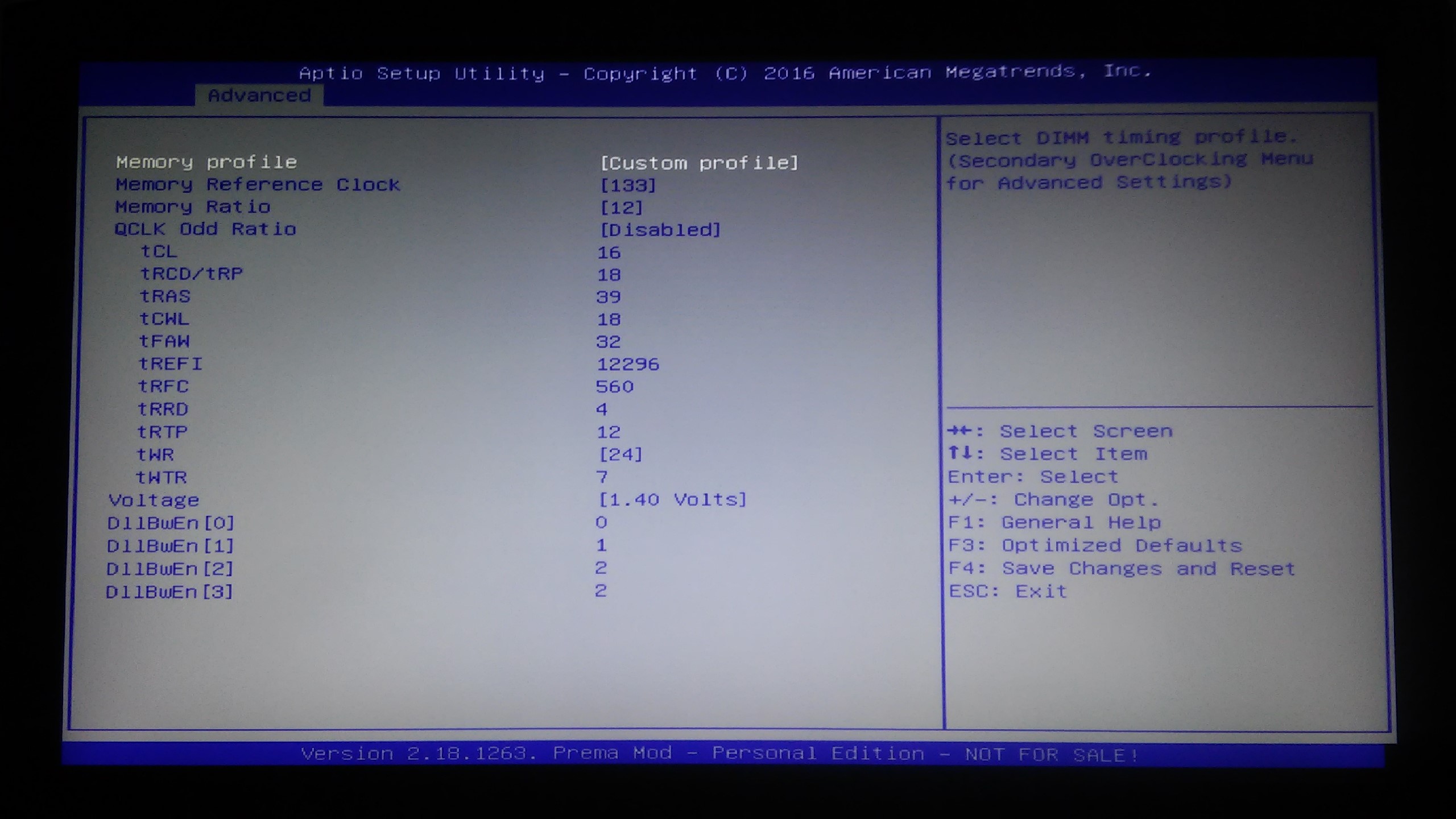
Know what. Just for kicks, try setting these values manually except for reference clock and ratio. Set them to 100 and 15 (3000). I think G.SKILL's default tFAW setting is too high. I just recently discovered that both of my machines work better overall if I lower that to 32 instead of 39 and set the voltage to 1.35V. If it works you can try 133 and 12 (3200) with 1.40V.
I know I said your machine probably won't boot setting everything manually instead of first setting XMP, but might as well try it. If your sticks are stock, the 1.20V being too low might be why it will not boot.
This is a brand new snapshot taken just a few minutes ago showing my current settings.
![[IMG]](images/storyImages/qoZxVK4.jpg)
Attached Files:
Ashtrix, Papusan, Georgel and 1 other person like this. -
-
Well I was about to report that after leaving it to train for hours it did not succeed in anything, but I guess I might as well go and give this a try now, can't really hurt.Jon Webb likes this.
-
Ok. So. News. For the first time, it has begun rebooting by itself. It took almost half hour but then it rebooted, and subsequent reboots have become shorter in intervals. It's rebooted over 10 times now, actually.
Do I leave it? It's never made it to BIOS and the reboot intervals were as short as 1 minute a while ago.
Sent from my OnePlus 1 using a coconut -
Kill it with fire before it lays eggs.
Anyways , i really haven't seen this type of rebooting. For me with the 3000Mhz modules tops it rebooted was about 3 times and it then it booted normally. But Mr. Fox would know more . -
Yeah. @Mr. Fox hope you're around
Sent from my OnePlus 1 using a coconut -
OK, yeah that means it is actually trying to work instead of sitting there doing nothing. Prema, Johnkss and I have seen that MANY times, LOL.
Force the power off, use FN+D to clear NVRAM, then try to set XMP again. Or, try the manual settings again with 1.25V or 1.30V.bloodhawk likes this. -
Ok, I gave up. While it did eventually do that boot loop, nothing came from it at all.
I even set XMP custom to 2400MHz 16-17-17-39 and overvolted it (I changed 133MHz * 9 to 100MHz * 12, reduced CL by 1, and set it to 1.25v) and it simply refused to even boot that. So for whatever reason, XMP does not work at all on my current system. It seems I'll definitely have to do one-stick one-stick. I'll try that another day though, I've not used my PC all day because I've been waiting for it to try and use XMP.Mr. Fox likes this. -
I am going to order some solder paste with a lower melting point, but this looks promising. This is the warped P750ZM heat sink I replaced last year. Shim seems to be stuck really well.
@John@OBSIDIAN-PC @Prema
Last edited: Apr 7, 2017bloodhawk, Papusan, TBoneSan and 1 other person like this. -
Sweet! How long did you have to heat it and at what temperature?
Also did the heat pipes get puffy?Mr. Fox likes this. -
About 20 minutes with the hot air station going full blast (500°C). It is really hard to get it hot enough using an air station. But, in a way that is also good because it won't destroy it easily.
I was using my laser thermometer to check temps and I could barely get it to 140°C, The solder paste I have flows at 183°C so I am going to order the 138°C ChipQuik stuff you linked me to.
Nope, no loose or puffy heat pipes. -
Damn, must be because of the joined up heat sink. Too much thermal mass.
-
Yeah, that could be. Plus, I have a really cheap hot air station from China and just because it is set to 500°C I am not convinced it really puts out air that hot. Checking the tip of the air nozzle with my infrared/lazer thermometer, the nozzle was only getting like 215-220°C.
-
Oh i have one of those $75 stations as well, got frustrated of waiting and used this -
https://www.amazon.com/gp/product/B004NDX7O6/ref=oh_aui_detailpage_o00_s01?ie=UTF8&psc=1
With an add on narrower nozzle. And the rest you know ...
But that Chipquick stuff is pretty good.Papusan likes this. -
Everyone in this thread but no HP in our case lol
(this is Clevo OC thread, so naturally no HP)
![[IMG]](images/storyImages/a2ryL49_700b.jpg) TomJGX likes this.
TomJGX likes this. -
Any large heatsink will be pretty difficult to solder without the appropriate tools.
-
Obsidian is doing it with success using the same method, but believe the solder paste I used could be the problem. It has a much higher melting point and my hot air station doesn't get hot enough. That is good in a way because it will not easily get hot enough to damage the heat pipes. I have ordered solder paste that melts at 138C, which is 50C less than what I used. Monitoring the temps as I went along it was difficult to get it over 140C. Even the nozzle on the hot air gun barely exceeds 200C. I also have not stored this paste properly and the tube is over a year old, dated past its recommended shelf life. Will give it another go when the new solder paste arrives.
-
What solder paste use Obsidian? And what temp difference did you see vs. before?
-
They are looking for something better, but for now they are using this: http://www.tme.eu/en/details/a559asn2ag_35/solders-pastes/amtech/ and I cannot find it for sale in the USA.
I have ordered this: https://www.amazon.com/gp/product/B0195V1QEI - which melts at 138°C
My first effort failed using this: https://www.amazon.com/MG-Chemicals-Clean-Paste-Syringe/dp/B00425FUW2 - which melts at 183°C and it was purchased October 2015 (expired now and not refrigerated in storage)
Also, confirmed the problem is the solder paste did not completely melt. Only a few small places melted under the shim. Either because I could not get it hot enough (most likely) or because it was expired and no longer usable (less likely).
The Kyrosnaut stuck to the shim better than the solder did, LOL.
With shim removed and unmelted solder paste removed, temperatures are the same as before now. So heat sink is still fine and does not have a damaged heat pipe as @Meaker@Sager thought might be the problem.
So, I will do this again when I receive the solder paste with a lower melting point. -
Hmm, seems like the choke thermal pad is too thick?
Try make that thinner or remove.Mr. Fox likes this. -
Amtech stuff is top notch! Here is something similar from Louis Rossman's store -
https://mailin.repair/amtech-syntech-solder-paste-sn63-pb3735g-syringe.html
Also as pointed above that thermal pad for the inductors is way too thick. -
No, not at all. I already checked the fit and the pad it not too thick when using a shim. With the shim inserted a thinner pad does not make contact and there is an air space. In fact, if you look a the photo where the contact was the greatest, that is the side where the thermal pads are. The stock pads (shown in the photo) are exactly the perfect thickness when using a shim. They are definitely too thick for stock heat sink and I use pads that are half as thick without the shim.
-
i just got my p870mk1 and im also getting high temps on cpu... well GPU too but i think those are just warm and normal. (85c on heavy games after 30 mins) like crisis.
but the 7700k seems to spike in the mid 80s pretty easy while gaming.... I think i might have that problem if poor contact with cpu heatsink -
Ah interesting. For me with a shim, the pads are still too thick. Might be because of the bracket.
-
I am using liquid ultra. going to try IC dimond see if that helps it make better contact. Any advices Mr Fox?
-
That is exactly why I did not order it from Europe. I never order products from another country if I can find them in the USA... I always make every effort to keep my money at home and usually only buy from another country when I cannot find what I want here.
Very possible. Always a good idea to check each system because production quality seems very inconsistent. I did check both with and without a shim and select a size no larger than necessary to bridge the gap. -
If you think you have bad contact, CLU is not a good idea.
ICD is the best stopgap until you can get a better heatsink and/or fix the current heatsink.
It's probably the worst high end thermal paste you can buy for a heatsink that makes perfect contact, but it works great for heatsinks that are crooked/not ideal. -
Take the CPU heat sink off. Remove the c-clips on the screws. Use the brush provided with CLU and smooth it out again, then put the heat sink back on without the c-clips on the screws. It is possible that will resolve the issue for you. Removing the c-clips will not fix a warped heat sink, but they can prevent the heat sink from making contact with the CPU IHS. The heat sink ends up resting on the c-clips before the heat plate touches the IHS. As @Mobius 1 indicated, CLU or Conductonaut cannot work if the heat sink is not making proper contact with the IHS. Liquid metal thermal pastes will only work with the contact between surfaces is good.
See this for more detail.
Last edited: Apr 8, 2017Ashtrix, Juang1985, Papusan and 1 other person like this. -
I dunno though, I wouldn't recommend CLU since he said that the heatsink don't make good contact.
-
Thanks Mr Fox. what about the GPUs? Im getting them to maxed out at around 85-88c (on crysis 3) after about 30 mins. it stays around 85c. they are both about 1 or 2c apart from each other. Is that how warm these run on these laptops?
@Mobius 1 Thanks man... I am not sure if i have the heatsink problem. gonna try removing those Washers off see what results i get. -
The temperatures sound good for the GPUs, depending on what other stuff you've done to them. But this is a normal temperature I would say. Maybe a bit on the hot side...
-
Thats rather high if you ambient temps are under 30C. Should be around Low to high 70's with max fans. But the delta seems good.Papusan likes this.
-
Unfortunately i ran out of liquiid ultra... Just ordered some but will be here in couple of days. However i still have a full tube of IC dimond. I am so eager to try removing the c clips and applying IC dimond paste see if i notice a difference in temps. Decisions decisions..... -
Do it now with IC Diamond. I bet the temps will still be better with the c-clips removed even with IC Diamond. You can do the CLU later and can compare the difference with each change from where you are starting today.
Or, just wait a couple of days if you want to do it once and be done with it.Papusan likes this. -
I just installed a new 7700k that I delidded. It was my first time. I used CLU on the die and IHS and ICD for the heatsink. I was able to get through a 5.0 benchmark at about 80c. I could not get through a stress test without dropping to 4.9 and same temps. I did this at stock voltage.
-
If he removes the c-clips chances are very good he won't have bad contact any more and CLU will work fine.Papusan likes this.
-
That's awesome. The drop to 4.9 is probably something you can tune away, as well.Papusan likes this.
-
Clevo Overclocker's Lounge
Discussion in 'Sager/Clevo Reviews & Owners' Lounges' started by Spartan@HIDevolution, Mar 4, 2016.