Problems? See this thread at archive.org.
LOL.
But yeah its more of a high risk , no reward at all kinda thing tbh.
On another note, Juan and Zoltan being champs and might just be able to get my GPU only replaced, instead of having to send the whole system in this time.
-
-
It's pretty much all a high risk gamble, as You already know first hand.

That's great news!bloodhawk likes this. -
Got a video of the stand
Ashtrix, thattechgirl_viv, Jon Webb and 4 others like this. -
You can't make it stay flatter on a surface tho?
Looks a bit uncomfortable like that, I prefer my stands to be absolutely flat where possible. -
-
What are you all doing to me? I've run more than one benchmark within a 24 hour period....
http://www.3dmark.com/3dm/19880335?
![[IMG]](images/storyImages/8SLECzz.png) Papusan likes this.
Papusan likes this. -
I received my first prototype for the the IHS. I wanted it to fit in my relid jig and added 1mm to the bitspower 7700k thickness. I wanted to make sure the upper area cleared the hold down bracket. https://i.imgur.com/Ie0OSre.jpg
https://i.imgur.com/sE1rhPa.jpg
https://i.imgur.com/fYWfRJ9.jpg
https://i.imgur.com/LKmP5zr.jpgLast edited: May 11, 2017 -
Nice. Any side by side pictures? Would be awesome to see it next to the stock IHS.
-
I'm editing the post to include more links. I'm not good with Imgur
-
I prefer to lower the risk of my lappy sliding on my cooler in any way possible. The point is that the laptop is quite heavy (4 KG) and having it sit on a mostly metal surface at a pretty steep angle just calls for trouble.
This is something I've been working on, I'm still going at it, building a custom mod for U3. I really don't want to have the laptop sitting in an angle, never understood how people feel comfortable with it like that. Then again, maybe earthquakes are less common in some areas, so it doesn't really pose a problem. -
-
-
-
On the stand I have a ducky mechanical keyboard and sensai wireless mouse but it can rest flat enough I could use it.
This way the screen is nice and high for me
-
@Prema
Wondering when you were going to get bored of a nice surf, sand & gaming life.
Ionising_Radiation, Prema and Papusan like this. -
Yes and the rear feet get the front of the machine into the stoppers. Plus the angle really is not that extreme on the lowest setting but it's stable right up to the top angle.Papusan likes this.
-
-
can any of you try Overwatch with 200% render scale (unlock the FPS) setting and maxed out? My room is 74F and my GPUS got to 90c both of them equally
I noticed it doesn't matter if i overclock them or not seems like even overclocked they cap out at 90c with +140 core +500 memory. temps are exactly the same whether overclocked or not does this sounds normal?Last edited: May 12, 2017 -
I would, but i don't play overwatch.
And 90C is the norm for most. when running the machine right out of the box... -
How long does it take for you to hit 90c? And what's your CPU at? As far as I can tell whenever I play anything at 4K with unlocked fps my GPUs instantly drop to the mid-high 1700MHz range, at a TDP limit. I don't think your overclock is even working on the core if this is the case.
After 10 minutes of OW at 200% render scale maxed out except SMAA on low (which SLI users should be using) and local fog on low (it does nothing visually but sharply hurts performance), I leveled off around 85c. No repadding, no shim, no liquid metal. Except for a delid on the CPU this system is pretty much stock (CPU is undervolted). Max fans, no laptop cooler. Picture was taken in 33c room (91.4F).
![[IMG]](images/storyImages/Overwatch_2017_05_09_20_59_05_630.png)
-
So power limit is that big of a problem on the 1080? It's easy to remove via hardmod. You just piggy back extra 5m resistors over the existing ones and the power cap doubles. All you need is a soldering iron. I did that to a 1070 Desktop and it worked well. The card reports half of its actual power draw, effectively doubling the power limit.
Ashtrix, CaerCadarn and Ionising_Radiation like this. -
The power limit on all mobile pascal is a large pain. At 1080p and I suppose 1440p too, it's not bad. It creams the Scammer's Edition 1080s by a longshot; the voltage limit on 1080Ns is lower (so TDP stretches further) and Clevo 1080Ns are 190W limited. You could further stretch this by using afterburner to adjust the voltage curve, making the max voltage be say... 0.950v instead of 1.0635v that is default. But the hard power mod would likely be the most useful. Honestly for the purpose of gaming alone, a single 1080N in the top end Clevos with a 220w or so TDP limit and a voltage curve clamp should be sufficient for more than full boost at any resolution and fps. Just my estimation though.
Are you planning on getting one of these to check?
In SLI though I think the machine needs a lot of modification (though usually nothing too serious) and at least a little liquid metal magic to work at stock speeds under full load (with every component stressed). I thought it was not possible before but it seems my paste had been slightly pumped out; I think with GPU undervolts added to the mix it can now work.
Sent from my OnePlus 1 using a coconut -
@Meaker 'hard removed' his 1080s power limits right after the system was released and didn't see major improvements. It's not the miracle solution that it used to be with Maxwell as too many other walls remain in place this way and the additional power draw doesn't translate into equal numbers. e.g on that LGA MSI we bumped the 150W stock limit to 225W and it indeed drew that much power, but results just saw a minor improvement compared to the 150% power draw that the components had to bare.
Last edited: May 13, 2017 -
That's interesting. It just looks to me like a little extra headroom would keep over the 1800MHz range, maybe allow someone to hold 2GHz. But in truth it's not a ridiculous benefit in performance as you'd say. You know, throttle 3.0 etc.
but don't worry I have faith in your mods
-
Yep. this is why my cards are still stock. For benching to get that extra 1 to 2 fps is one thing, but doing it for anything else seems like a pure waste of time. (imho)
Ashtrix, CaerCadarn, temp00876 and 4 others like this. -
I'd like a 1080 but the prices are absolutely insane. I am not paying over $1100 for a $550 GPU.
Interesting. The 1070 I hard modded definitely benefited. It still varied clocks some for reasons unknown, but it held clocks much higher. He could game at 2150 instead of 2000 pre mod. How did meaker do the hardmod? I never really liked the power limit mods I usually see for LN2 guides. They completely break the power reading circuit and make the card draw more power. Mine actually improves power efficiency and if you just double what the card reports you know how much power was drawn.
I also did a small hard voltmod on the 1070 which worked, but Pascal doesn't scale great with more voltage over 1V.CaerCadarn, bloodhawk, Papusan and 1 other person like this. -
From the little testing I have done the 1060/1070 do benefit more than the 1080...hence NVIDIA's plan to milk those further in the near future...
Meaker did pencil Mods on the 3 responsible resistor. If you short them entirely the Falcon will kick in and disable the chip... -
I used liquid metal actually as it's a non zero resistance still
Also it does mean I maintain closer to 2Ghz during gaming but you need to have your heatsink PERFECT to do it.Ashtrix, D2 Ultima, Papusan and 1 other person like this. -
what resolution are you running at? my cpu temps are similar to yours maybe 1 or 2 c hotter not much i am running at 4.6 -
1080p 200% res scale
Sent from my OnePlus 1 using a coconut -
Has any one tried strapping 10 Ohm resistors onto the caps that on the same trace as those shunts? (usually these caps are close to the power control IC), that will drop the readout by 3-5 times. And that works wonders with desktop cards.
The Pencil mod is the worst performing of them all, and is a very hit or miss. Normally the best is to either use CLU / Conductonaut OR just use resistors on the caps.
Can you point out the shunts that you shorted ? Also from what i have seen they seem to be super tiny, compared to the desktop shunts, how did you use the liquid metal TIM on them? -
can I buy a perfect heatsink from you?Ashtrix, TBoneSan, CaerCadarn and 2 others like this.
-
Last edited: May 15, 2017
-
You will likely need to adjust mounts and pad layouts to get yours sitting just right.
Also be sure to press down as tightening the screws in an alternating way. -
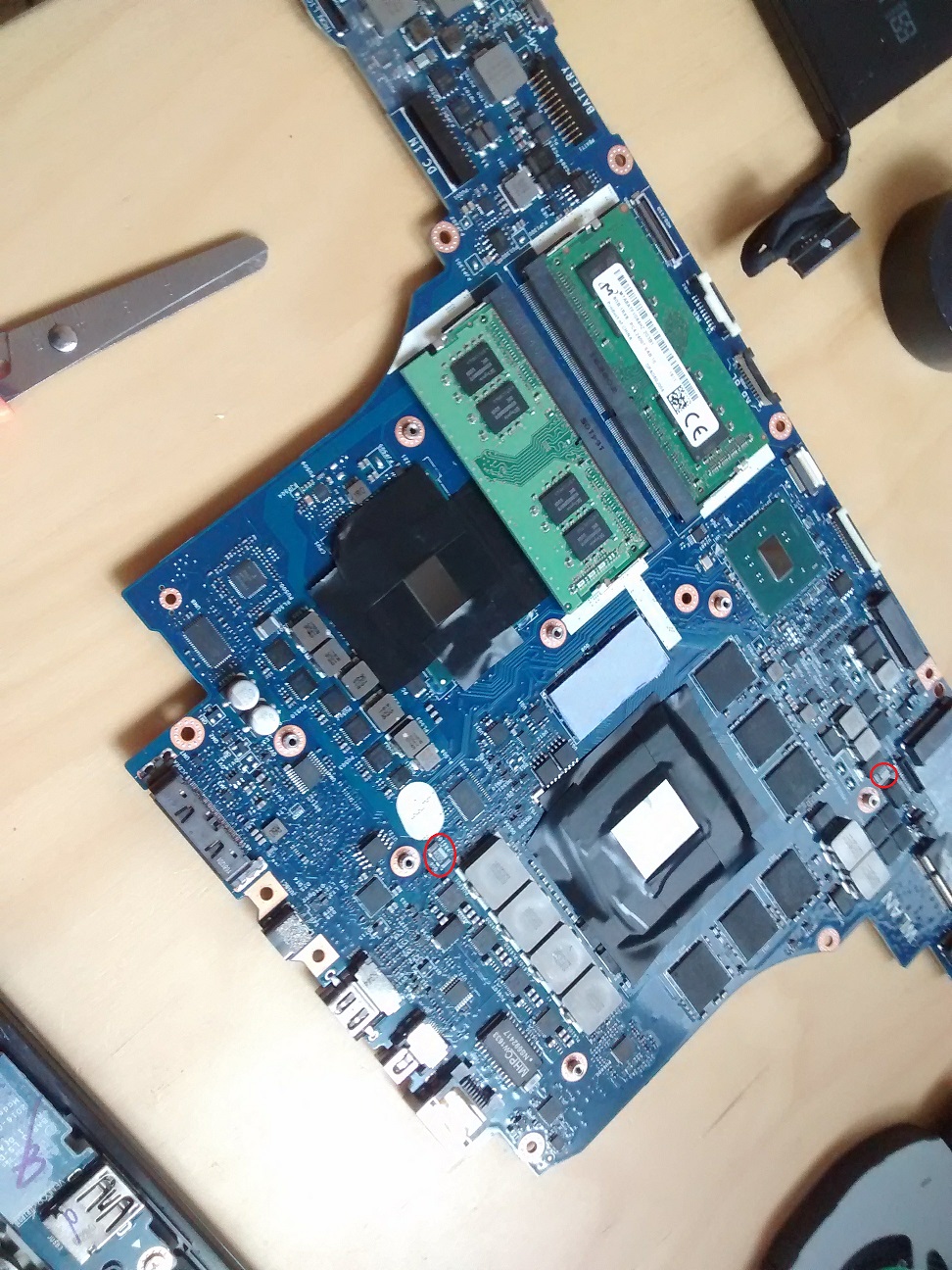
Guys, probably shouldn't be asking this here. See this on a 1070 over volt forum. What is this thing? A mother board? A huge gpu?
Attached Files:
-
-
Are those ram sticks on that?
-
Very difficult to tell, at least for me, link to that thread?
But that is a motherboard with a soldered on GPU and CPU. (BGA)
And yes those are SODIMM RAM sticks.
That is a probably an Alienware 15 board. I could be wrong. -
@bloodhawk I'll try to find the forum I was on. It was a 1070 overclock something. Thanks for the help.
bloodhawk likes this. -
Ah if you were wondering what that board was, then yeah thats what BGA boards/components are like. Cant be swapped.
I thought you were wondering what those circled components were.
-
This smells TRIPOD long way. Oh yeah, looks like AWBOOK

Yeah, pure trash!! Ashtrix, cj_miranda23, Mr. Fox and 1 other person like this.
 -
Looks like a still from what is a pretty good youtube tutorial on applying liquid metal, it was done on an alienware bgabookJon Webb likes this.
-
Hi Team,
Posted earlier about some crazy throttling on a p750dm-g when both the CPU & GPU are loaded. Thanks to a magical person, from a magical land the bios on this unit has magicly unlocked (with the EC also magicly updated). Tis so nice having more control!
Ironicly swtiching on intel speedshift via Throttlestop mitigates the worst of the cpu throtteling (worst being down to a 10x multiplier with Heaven running with 0 additional load on the cpu) - anyone have any idea why this would be the case as it doesnt make a lot of sense to me..? @ 4.5k (adaptive & +55 offset) with TS 1024mb bench running + Heaven it will operate in the 4.1 - 4.3 range.
Without speedshift the units throttling like crazy (10x multiplier) even with the following power related values set in the bios
PL 1 - 4 are set to 185000
PSYS Pmax Current: 3000
SA current: 3000
Core/IA current: 3000
Ring: 3000
Any ideas gents?
Thanks in advance -
-
which cpu are you sporting?
have you checked what kind of throttling youre having? power seems unlikely, but check for it nevertheless. could also be thermal or current throttling. what voltage are you running your 4.5 ghz at? check voltage at load, which should be lower than idle.
also make sure to disable RSR in bios, maybe that will help.
if it turns out to be current or power throttling, master @Prema could help out by raising the limits on your mobo. although i doubt that u need so much current at 4.5 ghz...
im still in my cpu testing phase with my new 7700k, so havent done any cpu+gpu tests yet. also, im always keeping speed shift disabled, dont like anything messing around with my set clocks or voltages
Sent from my HUAWEI NXT-AL10 using TapatalkAshtrix, tranquil911 and hmscott like this. -
Any Limit Reasons listed when running HWinfo64? Sensor only should suffice,
and wb @jaybee83 have missed you already
Gesendet von meinem Nexus 6P mit Tapatalktranquil911, hmscott and jaybee83 like this. -
thx buddy, always nice to be missed was busy with real life, getting my PhD (call me doc now baby!
) and now slowly coming back while having fun tuning my new 7700k (thx, as always, to
@Prema goodness!) time to update my sig soon i guess
Sent from my HUAWEI NXT-AL10 using Tapatalk -
-
All while we have the HEDT platform wars beginning in desktops... Welcome back doc (Brown...)...
Sent from my SM-G900P using TapatalkScerate, Ionising_Radiation, bloodhawk and 2 others like this.
Clevo Overclocker's Lounge
Discussion in 'Sager/Clevo Reviews & Owners' Lounges' started by Spartan@HIDevolution, Mar 4, 2016.


![[IMG]](images/storyImages/Ndbn9XS.jpg)


![[IMG]](images/storyImages/0KVmptS.jpg)
![[IMG]](images/storyImages/Kc8xYc4.jpg)