 Problems? See this thread at archive.org.
Here we go again....![[IMG]](images/storyImages/sE87JpD.png)
But its not throtling at all..![[IMG]](images/storyImages/ZdUS7hI.png)
Why the heck am i going through all this all of the sudden. 2 months no issues... now all this garbage
-
-
maybe need a repaste on the CPU with new IC Diamond
-
This
Attached Files:
-
-
That fast? 2 months and have to repaste it? Darn it
-
Did you change anything? Inclination, how the laptop is placed etc etc?
And your temps are rather high for 4.5Ghz, mainly because of the Voltage.
And PLEASE DO THIS! ^^
And its not about re-pasting it because you need to, there is a good chance it wasn't done properly. Also double check the thermal pads on the VRM's next to the processor socket.ajc9988 likes this. -
Have NOT change anything at all... Sounds weird that i nee to repaste after doing so just 2 months ago.. Thats how you repasted it @Phoenix ? Not the single glob in th middle?
-
It probably wasnt done properly in the first place. ICD lasts pretty long.Spartan@HIDevolution likes this.
-
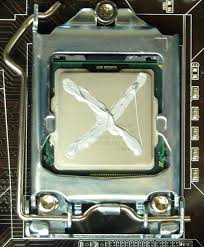
Dr. Papusan showed me a comparison video between all the pasting methods and it seems like the X Cross method is the safes/best way. Reason being, it has the best spread so it covers the entire IHS area AND has the least amount of air bubbles. The last thing you need between our badly designed heatsink and the CPU is some air bubbles which will hinder the performance in some areas of the CPU so you might see of the cores overheating more than other cores. (ie. Core 3 being more hot sometimes on average than core 1, 2, and 4)
-
buying the darn IC diamond again... if its the delidded sillicon cpu thats berserk im screwed they only have a 30 day returned warranty.
New one now![[IMG]](images/storyImages/8LDMjBx.png) Last edited by a moderator: Jun 22, 2016
Last edited by a moderator: Jun 22, 2016 -
do you mean Residency State Regulation? That's RSR in the BIOS which you have enabled.
Try disabling it and check
PS: It is highly unlikely that the problem is in your silicon lottery CPU -
Havent enabled that. dont even know where that is lol
-
-
Thats disabled... and it now started throttling to 41x..
 let me go back in and put the settings you said above and see.
-
@Phoenix - I noticed one of your images that needed to be fixed.
![[IMG]](images/storyImages/O6N31wA.png)
ThrottleStop is first in line when getting temperature info from the CPU cores because it works at a much higher Windows priority compared to the competition. When loaded down with Prime95, Windows can end up responding to ThrottleStop multiple times when it queries the cores for temperature data while HWiNFO will be sitting on the side lines, being ignored. That is why ThrottleStop tends to report higher peak core temperatures when stress testing. A peak of 86°C is accurate. You can trust TS.
katalin_2003, Mr. Fox, jaybee83 and 6 others like this. -
Did you try the ones i sent? Reset BIOS, start fresh.
I have a feeling your voltages are high and thats causing high temps. AND that your VRM's are heating up.
But before all of this. establish a baseline. By running stress tests / your encoding at stock. -
crashed when doing a wprime test..
-
nice catch mr. detective. Thank you for your attention in this thread. Just comes to show how dedicated you are to us enthusiasts.
I have stopped using TS for a while awaiting a final version as my OCD doesn't feel right about using anything that says Beta, I hope its release comes soon as I also need to submit it to Major Geeks, your new host
bloodhawk likes this. -
Blasphemy. Been using the unreleased Beta, and all is dandy.Papusan and Spartan@HIDevolution like this.
-
darn, so I guess your CPU sweet spot is -50 to -60 mV for a 4.5 GHz overclock.
This just comes to shows us that your temps are getting high and you need an X Cross IC Diamond repaste
2 cross thick lines please
I know I used it too, I just don't like software that is Beta tagged. Perfection OCD brah.Last edited by a moderator: Jun 22, 2016bloodhawk likes this. -
-
That
Throttlestop is in beta isn't a good reason to skip i!!
More correct score
Spartan@HIDevolution and bloodhawk like this. -
I don't see throttling.
BTW, when running Fire Strike, all of us Throttle, even if we have Throttle Stop running. Seems like there is something in this machine that throttles the CPU when the CPU + GPU are under high load, but the throttling only happens for a split second. Could that be the case with your video encoder that it is using the GPU also using DXVA or CUDA? -
He throttles after a while. And i saw a PROCHOT trigger last night. And the VR triggers today.
So his processor is heating up and/or the VRM's.Spartan@HIDevolution likes this. -
so let's start with the re-paste with the X Cross method then to rule that out since he has a Silicon Lottery 4.8 GHz rated CPU just like me
-
Yah my encoder is not using GPU its solely using CPU.. Buying the freaking paste again :/
-
This might be theory crafting, but one my friends resealed his delidded processor, and added slightly more glue on the left, so his heatsink was not making proper contact with the VRM's next to the socket.
-
Is it the IC Diamond 7 carat or 24 carat?
-
the bigger the better. I always order 24 carat for the bling bling
-
Dont get why every search I get i never see IC diamond not even in the top 3 of best thermal compounds
keep seeing this
https://www.amazon.com/Thermal-Grizzly-Kryonaut-Grease-Paste/dp/B00ZJS8Q6S?ie=UTF8&tag=qwiztek-20 and this
Cooler Master IceFusion High Performance Thermal Compound
But oh well off I go with the IC Diamond 24k -
I think the VRM temps is more the problem than the processor temp. Many ensure that their application of paste is good, but forget that proper insetting the pads is also important. This may look more like a problem with the pads. All too hot VRM's will create instability.hmscott likes this.
-
Pads? what pads?
Damn.. Ebay takes 10 days to deliver those IC Diamond and Amazon does not have them.. awesome -
-
Sorry for extra post..., But why choose this cooler? I don't get it. Buy rather U3 and mod with better 12v fans!!Last edited: Jun 17, 2016
-
There are thermal pads which make contact with the components next to the processor and the heatsink.
And you can just get this : https://www.amazon.com/Innovation-C...TF8&qid=1466202366&sr=8-1&keywords=ic+diamond -
Those are 7 carats i just got the 24 carats to see if the power of the carats helps mebloodhawk and Spartan@HIDevolution like this.
-
because IC Diamond isn't the best, it is the best for our laptop because of how poorly designed the heatsink is. It doesn't make good contact with the CPU so if you use any other thermal paste which is usually thinner, it doesn't make good contact. That's why I got -10C simply by switching from Liquid Ultra to IC Diamond. I also tried Thermal Grizzly Kryonaut which is a bit thinner than than IC Diamond but thicker than Liquid Ultra, didn't have good results with it as well. idle temps went up by 5C and temps under load went up by 8C
-
Just to see if it decreases the heat at least something. If it doesnt do anything I return it.
About the PADS.. Is that something you buy? you put? or what? -
24 carats FTW
-
Damnit.. We gonna need hair jell then :/ and a globSpartan@HIDevolution likes this.
-
There should be 2 there already.
-
Ok and what to do with them? exactly.
-
Make sure they are making proper contact with the VRM's.
-
Have a picture, reference or something for this IDIOT <----Spartan@HIDevolution likes this.
-
![[IMG]](images/storyImages/d00163c59a40a0ceee3b06176efd9e3a.jpg)
Those things on the right side of the finger (under the socket) -
what are the rpms on the 12v fans?
Sorry im so stupid but still lost.. on the right side of your finger i see the cpu, those 4 white pads covering something and a screw unless the word pad in computer lingo is something im not seeing
Last edited by a moderator: Jun 22, 2016 -
Yes, those those things covered by the white pads and the ones under it. Im using different pads that the stock ones, so it will look different for you.
-
So just manually push em down and stuff to make sure they making contact... Ill doo all that when i get the darn IC Diamond.. 5-7 days of agony
-
-
Do not squeeze them down, you might end up making it worse, since they are kinda squishy and fragile.
You pads will look like the ones here :
Last edited: Jun 17, 2016 -
the white things on the side?
Clevo Overclocker's Lounge
Discussion in 'Sager/Clevo Reviews & Owners' Lounges' started by Spartan@HIDevolution, Mar 4, 2016.



![[IMG]](images/storyImages/JCN9ABz.png)
