 Problems? See this thread at archive.org.
-
-
-
Ok, lets wit for the carats to arrive.In the mean time if this goes haywire again with the settings @bloodhawk gave me, ill go back to stock until i get all parts here and ready to mingle.
-
Give those a shot, but i doubt they will work for you, since your processor seems to be needing more volts.Last edited: Jun 17, 2016
-
-
I was reloading windows. Install was fine, but it had an issue updating windows and paused. I turned it off. Now I have a no boot solution. No bios beep code. It turns on, runs for a little, then restarts. I've tried cmos and ec reset, switching ram, taking out all hard drives. So, what does that sound like? Any recommendations?
Edit: I'm waiting to pull it apart to try a different cpu until I get more TIM, same with testing a different video card in the machine.
Sent from my SM-G900P using Tapatalk -
Umm, tried the full power drain? This happened to me once when my 980 was failing (your issue might be different), after a complete power drain it booted up.
-
I did battery out, cmos battery out, ac unplugged, hold power for 30-60 seconds, let it sit for a minute. No go. Other weird thing is it tries to boot the second you plug the ac in.
Sent from my SM-G900P using Tapatalkoveco likes this. -
This is a NON problem!! Use rubber feet or other similar that are large enough on top of the cooler. Place the laptop feet directly above it!!
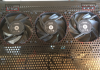
And use similar as my free filters (from my wife's nylon stockings)!!
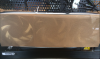 Last edited: Jun 18, 2016
 -
Im at a loss, maybe re seat everything. At this point i went bananas and disassembled the whole system xDajc9988 likes this.
-
Im about to smash this crap. Same thing as yesterday happen. Took CMOS out held power button. Put everything together. Turn on hit yes on all msgs. It boots to where u can go to bios but when you try to go to windows stays a black screen. Won't go to windows.. Wtf
-
Were you on raid?
Also in the BIOS, is UEFi turned on ? -
With or without OC?
-
No just turned on to put memory in xmmwhatever 1 since I have the gskill or whatever the freaking name is.. I'm about to go berzerk and get a hammer. Now not even boot option.. Back to CMOS reset
Back in with stock ****. going to go to bios and just change the memory profile... does the overclock feature need to be enable for that?
you mean to put something though the holes that can hold the laptop from the back part where the rubber parts of the laptop are?
And what the heck are those stockings for?
-
Yeah..., I use my wife's used nylon stockings as fan filters. For me... Free!!
 You can use different rubber knobs and filter than what I use. The knobs can easily be attached to the holes in the cooler with screws or similar.
-
I see... ok.. and are those 12v fans?
-
Yes. But you can use 5v fans if you find decent quality fans(The org U3 5v fans is useless). The main reason for using the cooler for me... Never dust in my laptop!!
-
Where did you get them 12v fans? so i can go take a look
-
I bought it in a web shop here at home (Norway). You can find some similar good fans in web shop you use. Choose high air flow, High static pressure + the noise level you can accept. More noise = Normally better air flow
oveco likes this.
-
Would need a reference.. since not all 12v are the same size.. so if you can guide me there on the size et al
-
I use this one https://www.ekwb.com/shop/ek-vardar-f4-120er-2200rpm
-
Perfect ill get those of course will look for a cheaper site
-
Or fans with higher performance. If noise is not a problem if your better part sleep!!!
Do not forget that they are 12v.
-
Are there any of higher performance that fit that cooling pad? just gimme the link im all gun ho at the moment.. ima try to freeze this cpu however i can.
-
Yeah. No problem. Google 120mm Delta fans = High noise, Very high air flow and high static pressure. Delta fans is monsters
-
http://www.newegg.com/Product/Product.aspx?Item=N82E16835213001
Thats too BIG for that cooling pad.. it wont hold 3.... or even 1 lol
Holy Guacanole i saw a video of 1 of them on.. thats 59db.... that would wake up the whole town HAHAHAHA... Ill stick with the 12v ones
Last edited by a moderator: Jun 22, 2016 -
That mod is not that easy. There are a lot more thing that go into it.
Papusan likes this. -
Everything is possible. Depends on what you want. Delta and Sunnon is noise buckets, but cool damn good. Find something in size 120mm x 30mm. And us 3 of them!!
Edit. http://forum.notebookreview.com/thr...lienware-laptops.593626/page-46#post-10208973 -
can only find 120x25 or 120x32 all others are higher or lower :/.... http://www.frozencpu.com/cat/l1/g36/Fans.html
Dont tell me i need to make the holes bigger to fit them?
can only find 120x25 or 120x32 all others are higher or lower :/Last edited by a moderator: Jun 22, 2016 -
It's enough about fans in this Oc thread now!! Buy the best performing 120mm x 25/30/32mm fans you can find... All fits the U3.
-
Understood. Thanks
Lol i got a better cinebench score with 43x than with 43x... from 10.24 to 9.56 thats awfull
@Phoenix making fun off me Spartan@HIDevolution and Papusan like this.
 -
nope, it's not always about the highest overclock, it's about the best overall experience that makes you happy with your machine
-
Doesnt make me happy that its slower.. im trying to achieve a higher mark not a lower one..
 but i wont push it past 43x if it even holds till i get the ic diamond and the cooler
-
-
I just downclocked to 4.4 GHz from my 4.6 GHz after getting random disk errors. Sometimes AIDA64 stability tests and wPRIME are not all you need to verify the system is 100% stable.
I'll take a stable 4.4 GHz (Devil's canyon clock speed) any day over a 4.6 GHz. OC that is only stable in stress tests but not real world usage. -
if they could just have water cooling for laptops.. or some freezing agent stuff
Spartan@HIDevolution likes this.
-
ASUS GX700 and GX800 has water cooling but I had very bad experiences with every ASUS gaming laptop I've owned so...
-
Sadly Asus does not have the rigs Clevo/Sager has... cant get SLI and a bunch different stuff... And just the way MSI is configured with no palsm rest amd a huge dead space on top its a turn off, also cant upgrade to next generations like you can with these rigs.TomJGX and Spartan@HIDevolution like this.
-
I already know the answer: switch out cpu and video card. If same behavior, motherboard is dead. If it boots, switch in either the cpu or gpu currently in the machine to see which of those failed. If mb failed, see if a local computer shop can test the cpu for me for failure. If it failed too, then I'm going to make sure port holes match and turn my ZM into a DM (which is mb, cpu, eDP screen and cable and ram), unless I can find a better deal on used machine or do a desktop build. So now it is getting TIM and testing. .. I just wanted to see if someone thought of something I didn't.
Sent from my SM-G900P using Tapatalkbloodhawk likes this. -
Johnny blue, although good, isn't my style. Give me a McCallan over 25 years and I'm loving it. I also love bourbon, too!
Sent from my SM-G900P using Tapatalkoveco likes this. -
Now this and @Terrablade 's SL CPU's really make me doubt the use of these binned CPU's in laptops. Its still a hit or miss if they will even be stable at light OC's.Spartan@HIDevolution likes this.
-
I have a feeling that if you're born unlucky, you'll always be unlucky even if a Silicon Angel himself got you the CPU. I have never been luckybloodhawk likes this.
-
Trust me man im neither lucky nor unlucky. Basically the poster child for "work hard/will power/reap what you sow etc etc etc blah blah" (at least according to my dad haha).
But looking at SL CPU's being used in laptops i haven't seen a single good example, but however from the google sheet i posted earlier, a bunch of those were using SL binned chips and got amazing results on desktops.TomJGX and Spartan@HIDevolution like this. -
well let's put it this way, at least the SL CPU enables me to even run 4.6 GHz at max temps of 85C, the non SL CPU could not even do 4.4 GHz on all cores without going nuts. Now @ 4.4 GHz. with the SL CPU, it is super stable. I can run 4.5 GHz easily with 100% stability but I don't like odd numbers so I stick to 4.4 Ghz. Devil's Canyon territory
-
Hmm, have you tried the OC's on the SL CPU without the RAID setup ?
From experience, RAID - 0 has always caused issues for my friends when used in their laptops. -
-
@Terrablade
Even @ 4.4 GHz with all power limits and turbo power maxed out, I noticed that sometimes in HWiNFO the CPU speed dips to 800 MHz then goes back up to 4.4 GHz.
Fixes this by disabling C-States
Please disable C-States on your machine -
Ok this is weird, you guys are definitely doing something wrong.
Hit me up with your exact settings. It should not be doing that.
And C-States is a very good thing to save power and reduce thermals. -
-30 mV offset for Core/Ring
PSYS Max Current Limit = 8191
VR Current limits for Core, ring, etc all set to 8191
Power Limit 1, 2, 3, 4 = 300000 with 1s time limit window
Turbo Power Max / Short Turbo Power Max = 220000
Clevo Overclocker's Lounge
Discussion in 'Sager/Clevo Reviews & Owners' Lounges' started by Spartan@HIDevolution, Mar 4, 2016.


![[IMG]](images/storyImages/2247092fd932.jpg)
![[IMG]](images/storyImages/d9e0f6c29acb.jpg)