Problems? See this thread at archive.org.
From the image this one looks like it might fit , though the default stand offs seem to be spaced a further , length wise : (the one at the bottom left)
![[IMG]](images/storyImages/h90_hardware.png)
![[IMG]](images/storyImages/d00163c59a40a0ceee3b06176efd9e3a.jpg)
-
-
@Terrablade - In regards to themal pads... Check out some of the pix thanks to the work of @tanzmeister - http://forum.notebookreview.com/thr...71dm-p775dm-thermal-paste-replacement.789825/
While the post is in regards to the GPU, some pix give you an idea of what thermal pads look like and how they can be applied to components to reach up to your heat sink.Last edited: Jun 20, 2016 -
That really wont help with the VRM's next to the processor socket.
-
Thx. I edited my post. Was trying to give Terrablade a picture of what thermal pads look like, although the picture was on a GPU. Hopefully he can make the connection between the two components.
-
Yeah, the CPU heatsink is rather touchy with the height and softness of the thermal pads being used. I wanted to give him a full run down, but it will be a lot of trouble / work for him.jclausius likes this.
-
I think the ones you are looking at are for am2 boards.
-
The one on the bottom left that i mentioned, seems to be for 1150. I might be wrong. Since on the desktop 2011 i never needed to use anything extra.
-
The 1150 is pretty square for mounting and is top left. The 2011 uses the inbuilt mounts on the socket.
ajc9988 likes this. -
Ah i just saw what you mean. Thanks for pointing it out.
So will the AM2 one fit ? Otherwise C & C it is
-
@bloodhawk
You should be able to take the whole socket holder off and replace it with the one in the picture. Then bolt straight to the new back plate. There should be 3 screws holding it in place and maybe some adhesive on the back plate itself.
It's what we do with desktop boards, Just be careful not to bend the pins since you dont have anything holding the cpu in place. Not till you put the water block on. -
Ayy Capn'. Ill take this sucker apart later this week. Again.Johnksss likes this.
-
if you can find an all in one that is expandable...that might also be an option....
-
The Swiftech H240X i have lying around at my friends place back in SF. He should be dropping that off this week end.Johnksss likes this.
-
The mounting hole dimensions of am2 should be pretty easy to find.
bloodhawk likes this. -
New best Firestrike score with stock Gpu - 12008P Forgot to validate this score, LOL
Other one...
http://www.3dmark.com/fs/8862381
A nice round number
http://www.3dmark.com/fs/8863437
The valideted Firestrike stock Gpu http://www.3dmark.com/fs/8623432
![[IMG]](images/storyImages/03o8MLO.png) Last edited: Jun 21, 2016
Last edited: Jun 21, 2016 -
incredible.... I was running a stable 43x. Got the new U3 put 2 fans on the side of the cpu and now the computer is throttling and having thermal issues again.. LOL.... what a lucky man i am
Found out something weird if i unplug the laptop while doing and encoding or stress test thats when it starts throttling and thermal issues happen. If i plug it back in it wont change anything, th e throttle continues and the thermal issues continues. Even though I have the performance at 100% on battery too... Wonder if anyone has encountered that same issue?
To fix it I have to restart the laptop then i can start everything normal again. I ask because sometimes I accidentally unplug it when pushing the table or when the wife goes behind the table to look for something.Last edited by a moderator: Jun 22, 2016 -
-
You know, I normally wouldn't do that on purpose, but one time (was when I was re-encoding a movie) I noticed that the CPU was doing funny things. Never really figured it out and the next day when I did a few more movies it worked normal again. I could have ran into that by moving power cords around or whatever, not realizing that I caused a similar issue.ajc9988 likes this.
-
Here's a Fire Strike in Futuremark top 10 for single GTX 980M (including among the mighty P570WM) and #1 in the p750zm.
http://www.3dmark.com/3dm/12650234
![[IMG]](images/storyImages/MSfmRCu.jpg)
-
Spent 2 Hours doing this :
![[IMG]](images/storyImages/nHSKby5.jpg)
![[IMG]](images/storyImages/N1AXGMZ.jpg)
And this :
![[IMG]](images/storyImages/25obSAS.jpg)
![[IMG]](images/storyImages/FmviOjo.jpg)
![[IMG]](images/storyImages/ri5g05O.jpg)
Was it all worth it?
Hell yeah!!! At +150/+300 , load temps have not crossed 61C. Mind you LA is rather hot this week, ambient right now with the Window wide open is about 27C.
Shims really helped with getting rid of the thermal pads on most parts and allowing me to use CLU on the core. Just pasted the rest with Kryonaut.
More pikchurs : http://imgur.com/a/Gw2XMelectrosoft, TomJGX, katalin_2003 and 12 others like this. -
Mr. Fox: Am I seeing right? You're using Precision X with Win10 Combo? Is it safe (again)? Or did you use some "Fox"-Magic to prevent a bricked Screen?
Holy moly! That's nice!
But a lot of Kryonaut on the Chips imo. Did you solder the shims on your HS? I wonder how much the difference would be compared to lets say using FujiPoly 17W/mk Thermal Pads. -
Yeah that was a bit excessive. But better more than too little.
I have all of the FujiPoly Thermal Pads and have used them previously, with very poor results, mainly because of the bad heatsinks. These heatsinks are rarely even. And most of the FujiPoly pads are slightly stiff and dont give way unless a lot of pressure is applied, that why they dont work well here. Alsxo the parts without thermal paste are being covered by FujiPoly Termal pads.
I used Artic Silvcr Thermal Adhesive to bond the shims to the heatsink ( i had my old heat sink lying around, figured why not try this as well) The new one which i kept aside to try this, is actually better. Load temps on that one are 5-7 C lower than this one using stock thermal pads. If shim that one, im sure there will be a much bigger drop in temps.
Would have loved to solder these on, just dont have the equipment here.Last edited: Jun 24, 2016ajc9988 likes this. -
No, it is not safe to use the newer versions. I am using an old version of it that was safe, before they developed their own solution totally independent of MSI Afterburner. Below is a link to the safe version from my Google Drive.
Download: EVGA PrecisionX 4.21CaerCadarn, TBoneSan, ajc9988 and 1 other person like this. -
I've been using that one ever since it released. I never took to the busy redesign once they included Pixel OC and stuff.Mr. Fox likes this.
-
Interesting though some good thin pads and adjustment of those might be easier if anyone else is interested.bloodhawk likes this.
-
I actually tried pads from thickness' ranging from .5mm to 3mm. Main issue is that most of the high conductivity pads are not squishy enough. So if you are off even by 1 mm in some corner it will some parts by that much causing a gap. You try to fix that gap and that starts to cause more inconsistencies.
Also because of the pads the effective distance between the core and heat sink goes up, which doesn't help if you want to use CLU.
The first problem is the not so flat FoxCon heat sinks. Even my second brand new heat sink wasn't making perfect contact with the default squishy pads. Heck Eurocom is so stingy with the pads that come with the heat sink, 2 pads for the chokes were barely covering the whole surface. -
Phobia pads and some basic ones from overclockers were always my pads of choice as the performance is good enough and it allows the height to be just right.
-
Yeah the Phobya ones are pretty good. I specially love their .5mm ones since they are not fragile like most out there.
-
For those that don't do extreme GPU overclocking, MSI Afterburner can now be modded for unlocked voltage control up to +100mV. So, it is no longer totally worthless garbage for mobile GPUs like it used to be. If you need more than +100mV for an extreme OC you'll still need to use Inspector or Precision X to get the job done. The only thing I don't like about it is there is no way to permanently get rid of the stupid sensor panel graph. I never use that for anything, so it's a screen space hog. But, at least it works.
Instructions can be found here > LINK <
-
What FujiPply pads do you tried? 17W/mk thermal pads is known to not be useful at all. But have you tried 11W/mk pads?
-
All of them upto the 17w/mk ones. The problems isn't the pads. Its the heat sink. They are perfectly not levelled.
In my post on the last page, the pads that you see towards the top of the card are both FujiPoly. One is a 11 W/mk and the other one is 17 w/mk if i remember correctly.Last edited: Jun 24, 2016 -
-
Thanks, brother John. Yeah, it seems to like those settings for XTU. And, the temps are great, too (no AC, just max fans).
Even 4.3GHz was almost that good.Attached Files:
-
-
This is a perfect example i was trying to explain to someone earlier in the thread. About using lower clocks and a better score. Nice.
Prema, ajc9988, CaerCadarn and 1 other person like this. -
Woot? How are you topping off at 50C? CLU Pads?
-
Mhz is not everything it's true, even for games maintaining is more important than peaks.
ajc9988 likes this. -
Because it also factors in voltage, an optimized lower multiplier can do as well as higher, among other reasons. ..
Edit: building on what you were saying
Sent from my SM-G900P using Tapatalk
BTW, double posting with reason: @Mr. Fox , @bloodhawk , @Papusan , Since we were talking about pressure film, if you consider going to straight screws for pressure, rather than spring screws, then this is important to keep in mind to not crush the socket (wrote this awhile back from info gathered from Intel specs and estimation on conversions):
So, little knowledge bomb to drop on people about pressure, sockets, and CPU packages.
Integrated Stackup Height (mm) From Top of Board to Top of IHS 7.781 ± 0.335 mm
Package Nominal Thickness (lands to top of IHS) 4.381 ± 0.269 mm (AKA CPU Height)
This means Clevo, in designing the HS had to have taken into account a variance of as large as 0.67mm in setting the height. This can be narrowed with quality control of the Socket on the motherboard, but cannot be controlled for in regards to the CPU thickness, which is a range of 0.538mm.
Max PSI for socket 1150: 85.6PSI
ILM (retention bracket w/arm) static compressive load on processor IHS: Min - 32.4 PSI; Max - 62.47 PSI
Heatsink static compressive load - Min - 0; Max - 23.14 PSI
So, Intel, in building the spec, designed the socket to primarily take the force from the retention bracket, needing a minimum pressure of 32.4 PSI to allow the contact pressure for the CPU to boot and be recognized. In addition, Intel spec only gives 20 times inserting and removing the CPU for any given socket. So unless exceeding intel spec, everytime you remove it shortens this life.
Now, if max psi is 85.6, and the ILM takes 32.4 psi of that on it's own, there is at most 53.2 PSI available to safely torque any HS down to on the CPU. This means anywhere from 0-53.2 PSI may be safe (with 0-23.14 PSI guaranteed to be safe). Knowing this, you do not want to exceed these values in any mod that increases the connection between the HS and IHS. This also means all those tests that show the heatsink torqued to 60+ PSI is exceeding spec by a minimum of 6.8 PSI.
Hope you enjoy the knowledge bomb!!!
Edit: Two notes - first is that de-lidding removes the thermal resistant seal that adds about 0.09mm in height. As this is within the package variance, the ILM should still be at the Min. pressure allowed for booting the CPU, but may give headroom to heatsink PSI.
Second is that with the removal of that seal, the pressure is now DIRECTLY being forced on the die itself. I have not found a max force for the die on the package, so know that although these are the numbers for the SOCKET, it does not speak to the safety of that pressure amount being applied directly to the die!CaerCadarn, Papusan and bloodhawk like this. -
![[IMG]](images/storyImages/giphy.gif)
But in all seriousness. Thanks for that. I had not even thought about the socket. Right now im waiting for the cooler to get here, and will be taking measurements after that.
Another concern is cooling the VRM's/Components next to the processor. Still haven't figured out how they can be cooled if the water cooler mod works. -
That is a good question (cooling the vrm). For my numbers, they are estimates because intel use torque and it isn't a clean conversion to psi, so I used the dimensional footprint of the pcb for the cpu, but it isn't perfect.
That's also why I mentioned going on the lower end of that pressure film. You can go for the more sensitive film, but more than double the price for the same area. just wanted to give a little more to help.
Sent from my SM-G900P using Tapatalk -
not sure if it was brought up, but have you considered milling a custom block? if you have it designed in such a way you might be able to create a fairly large block that will channel it across not only the VRM's but also the CPU. i know, sounds crazy.......ajc9988 likes this.
-
Yeah i might actually be able to get some from out systems department, i saw them using it for a project the other day.
Yeap, actually have but then again its too much work that way, that would basically be close to coming up with a fully custom setup. Right now im trying to just implement an AIO with as less effort as possible. Also if i extend the block/HS too much the gains wont be as much the AIO contact plates arent all that big. -
I have someone that could pull it off, but he would need the laptop to make the measurements and for testing the fit. That's even if he would do a laptop. He mostly builds blocks for gpus and motherboards from his milling rig in his garage. They call him nateman_doo.
[email protected]
GTX 680 SR2 GTX 580 460 2WIN P67/Z68 VOODOO5 6000 GTX 690 My CNC Z97 Stinger ASX 11 X79 DARK X99 CPU-jaybee83, Prema, bloodhawk and 1 other person like this. -
Holy ****, that is some seriously bad ass work.
-
@ajc9988 Nice info. I don't need to use any search engine for info... Just open the forum link. And all you want pop up
Thanks
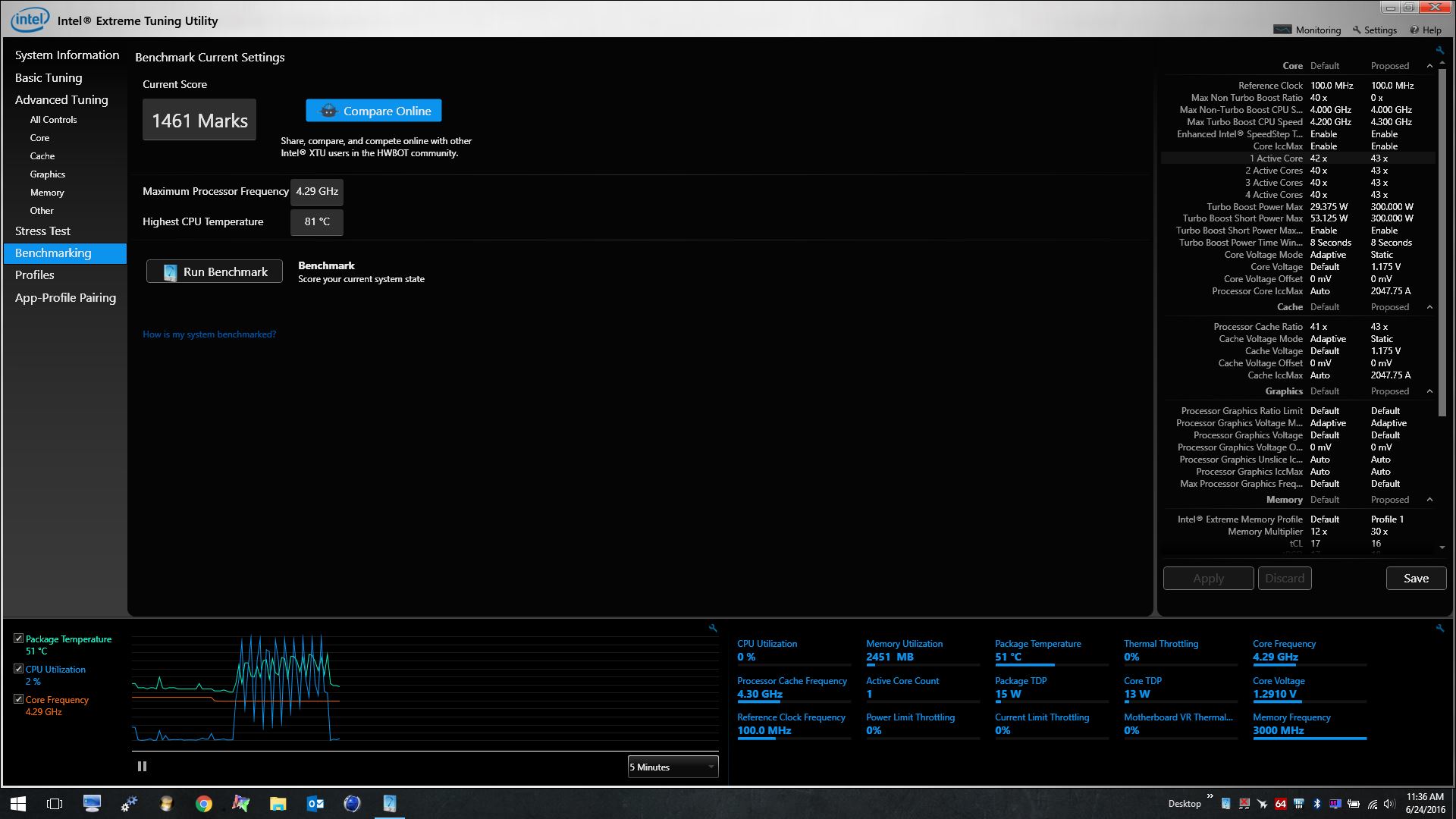
Even with 4.6 GHz on both core and cache... The XTU score dont increase so very much over lower clock speeds. I need better RAM than the cheap Samsung OEM 2133MH I have now, if I shall get better results More like +3000/3200MHz if you want to have more fun with XTU
Damn... Desktops have already +4000MHz now.
http://hwbot.org/submission/3247644_papusan_xtu_core_i7_6700k_1486_marks?recalculate=true
![[IMG]](images/storyImages/1656764.jpg) Last edited: Jun 25, 2016
Last edited: Jun 25, 2016 -
well poop, with windows 10 build 14372 xtu is blocking all advanced tuning....
hmscott likes this. -
I think you meant to say, "Windows 10 Sucks!!!"
-
Can't both suck?
Sent from my SM-G900P using Tapatalkhmscott likes this. -
Technically it's a "Suck's Trifecta" on the Clevo models that don't react well to XTU running Windows 10
ajc9988 likes this.
-
Mine doesn't react well with xtu running on win 7! Xtu just screws up my bios settings, almost like they fight each other!
Sent from my SM-G900P using Tapatalk
Clevo Overclocker's Lounge
Discussion in 'Sager/Clevo Reviews & Owners' Lounges' started by Spartan@HIDevolution, Mar 4, 2016.


![[IMG]](images/storyImages/G5qRrnk.jpg)