 Problems? See this thread at archive.org.
I think thats normal, but cant confirm. Maybe your laptop gets too hot?
-
-
Hi guys
Any idea if the 680M is going to work in a W860CU? -
Does any one know where I could get a 6970M with the modded heat sink? I don't really trust myself going at it with a hacksaw to try and make it fit

If none are available, I would be satisfied with someone giving me a list of gpu's that fit the stock heatsink and are worth an upgrade. Currently, I have the 280M and it really is stressed when playing games like Tribes and League of Legends. Thanks in advance for any help that is given. -
Idle temps @ 38 *C and 78 *C at load
-
Did you install a 680m, jaug?
Sent from my HTC Desire using Tapatalk 2 -
Anything worth upgrading over a 280M that has BIOS support? I thought W860/W870 were the last somewhat modern Clevo that still has decent BIOS support?
-
No. I'm considering buying a 7970M and installing it though.
The 680M isn't worth installing in this machine, for obvious reasons.
I've currently got the 6970M (just as you), tapped in 20 copper heatsinks and 8 aluminium heatsinks +quick repaste on the CPU (it went beyond 60, repasted with MX-4) and did a foil mod so the cooling won't fail on me.
The 6970M is.... although it doesn't have direct BIOS support
I'm still confused whether getting a -
Sir a clevo w860cu i7 820,FHD,gtx 285M,4gigs,500hdd clereance sale but never opened still sealed for $620 is good deal? or i should buy another notebook?
-
Maybe 600$ but yes a decent deal.
Anything particular you are going to use this machine for? The 285M is old, but still valid -
Can this machine run BF3 smothly with medium setting @720p?(with stock gtx 285M)
-
Medium yes.. if you are alone on the server.
Or else maybe medium... with no shadows and w/o AA I'm not sure.
-
Would it be possible to put in an HD7970M with enduro disabled?
Ive read that people on the asus forum here are trying it out with a G73.
http://forum.notebookreview.com/asus-gaming-notebook-forum/657920-ati-hd-7970m-asus-g73jh-25.html -
Enduro will only work in the new machines, it won't work in the W860CU (I mean with Enduro, in case you want to purchase the 7970M)
-
Did you actually read what I wrote?
with enduro disabled?
In the asus G73 it works when enduro is disabled in the vbios, and the g73 is almost the same as our clevo's. So this might even work. -
Enduro isnt on the NP8690. The 7970M is the first AMD mobile GPU to have enduro and its only included on the newest computers. The previous ones like the NP8690 dont have Enduro at all as it wasnt around when they came out. So as Jagg1337 mentioned you cant disable it because theres nothing to disable.
-
But enduro is on the graphics card not on the motherboard of g73. So if you disable it on the gpu it might work on the clevo w860cu.
-
Enduro and Optimus need both the video card and motherboard/CPU to support it. When the NP8690 was a current model it offered the Nvidia GTX 460M/470M which those cards did support Optimus but it was never available because the motherboard/CPU did not support it.
-
Yes, thats exactly my point! And if I am not mistaking the mobility radeon 7970m will work with the NP8690 with an enduro disabled videobios. Some sellers on ebay offer it or you will have to blind flash it to an enduro disabled videobios.
(I never said this motherboard supported optimus/enduro, all I said is that this card might work if we change the vbios with a version that has enduro disabled, altho im not gambling 400 euro for it )
-
You confused the hell out of me.
But I'm in the same boat.. 400€ for a try is not really me -
Yeah my communication aint the best
-
yep, done that in GTX280m
as long as you stick in 720p, you could run it in medium-high setting ( but with AA in 2x, or if you are playing in cold environtment you could try that as 4x. My environtment is at 39-46 Celcius, about 104-113 Farenheit )
what your IGN? mine nemesis_99th , i play at asian server ( HK, Jap, Sg). Say hi when you met me ok XD
++++++++++
i had this weird problem, my w860cu just turnoff with a loud click. No shutdown, no beep. Just click and its off. Any idea?
i thought its a case of overheating, but the funny thing is, its happen when i'm doing something easy on the system ( like browsing, watching movie, etc) but never happen ( like i said, NEVER ) when i'm doing something heavy such as playing games like BF3, RE5, etc.
quite confused with it XD
+++++++++++
last thing, anybody here with experience ( or at least has tried) on system model software? both discrete and dynamics ( my department on my college use promodel on discrete and system dynamic on dynamic modelling ). I have something to ask about running those thing in w860cu.. especially about promodel. The rough number is about 4-5 times the limitation of student edition promodel. How many gigs di you think i need?
my department lend us workstation pc's, some core 2 duo powered with 4 gigs of RAM HP WS 4-series, but i want to be able to do it anywhere, since i have to meet some people that i'd like to avoid if i go to my department lab... and an i7 will do quite a boost in virtualization speed i believe...
thx XD -
Hi all. I'm trying to upgrade my 860cu with 16gb ram. I bought two sticks of Corsair ValueSelect (CSM08GX3M1A1333C9).
I'm getting BSOD's when trying to boot into win 7. Any ideas? Memtest shows the memory works just fine. Should i try a bios upgrade? I believe i'm on x.xx.xx.12GH, which iirc a w870cu bios.
Thanks.
EDIT:
Yea i updated the bios to .18, no dice.
Where can i find the RAM compatibility site?
I'm certain these shouldn't be giving me any trouble but who knows
EDIT2:
Could it be because i'm running the i7 620m? I saw a post review on amazon that someone with a alienware that could with the same ram as these without problems, and iirc clevo makes the mobo for alienware. The only thing that differed was the cpu.
Just running one stock won't work as well though.
Would a fresh install of win7 x64 work perhaps? I did it a couple of weeks ago so i'd rather not do it again. -
Ok, I have the excact same memory (also 16gb) and mine runs great without issues / BSOD's.
I went from 8 to 16gb and didnt reinstall my windows (shoudn't be needed for a ram upgrade). -
Yea, something iffy is going on.
What i've tried:
Memtest86 for a couple of hours, works just fine.
1 stick in either slot
2 sticks in either slot
1 stick of old ram and new ram in either slot
2 of the new sticks in another laptop, works fine (win7 x64 home premium)
tried loading win 7 install. no dice. (via usb)
tried safe boot mode. no dice. (halts at disk.sys)
going into winxp x86, works fine.
loading ubuntu live cd (via usb), works fine.
I haven't got a clue what could be wrong but it might be related to the hard drive, since it locks up at disk.sys.
Something something partitions something.
Funny thing, it reboots with 2 new sticks, but gives BSOD on 1 stick.
I'm going to do a full reformat once i locate a drive big enough to backup all my crap.
It's very likely that it's my hard drive/partitions that's messing it up, because the windows one has been resized (although a fresh install was made on it after resizing).
If i can at least do an image of my win 7 x64 partition i could try installing ubuntu and see if that works. Since the live cd/usb worked perfectly fine i'm beginning to think that it's a botched win install.
Still doesn't explain why i can't even start the install though..
UPDATE:
Alright, it seems to be hit or miss with functioning under ubuntu live cd.
The same goes for memtest. It runs perfectly fine in another laptop (with intel chipset 6 series), but in mine not so much.
I've tried the W860CU .18 bios and W870CU .18 bios. I'm gonna try downgrading it to .15 and work up but i'm beginning to think that these wont ever work in my system.
Should i even attempt buying another brand or just be done with it? I may be able to sell these off at the same price so.
UPDATE 2:
Yea i'm not going to bother trying anything else. These will not work with my w860cu.
I don't know if they've changed the RAM or whatever it is, since yours is working fine, but it won't work for me.
CMS08GX3M1A1333C9.
Oddly enough, they work fine in the other laptop (i believe it's the sandy bridge architecture).
Been running a memtest and it looks to be going fine.
Also odd, they show up as 665 mhz on that laptop (1330). CAS is 9-9-9-24.
I've seen crucial being mentioned in this thread and i'm thinking of trying to get my hands on those instead. Which are recommended? -
Strange tho, Im on a modded bios version of 18s (but the mods dont do any thing other then unhiding menu's)
And I dont think a bios would improve anything memory related, but I think your windows might be corrupted other than that I woudnt know. -
Hi all,
I'm pretty bad and inefficient on computers but I try solving things on my own, sometimes taking 10x more time than others. If anyone could please advise me on this it would be appreciated. You can skip the below text and go directly to the bold to see my question ><
I've been trying to find the solution to my problem over the forums and everywhere but couldn't find a simple answer =(
I bought my Sager np8690 roughly around two years ago, and since last year I've been having the "display driver stopped responding and has recovered" problem. Funny thing was, it only happened if I had some of the known conditions: 1) Opening two internet explorers (seperate pages, not tabs) at the same time. 2) Play Ragnarok (yes, the 10 year old game), or 3) Running any low-end graphic game. It sometimes happened on random, and ignoring it would make it go away for a few hours to days, or sometimes it will simply stay there. However I could play high-end games with the highest graphics with no problem - League of legends, dota 2, skyrim, aion, etc. I tried things such as updating graphics drivers, cleaning fans/heatsinks, changing power performances on gpu (through nvidia 3d setting and power management), etc but none worked. So this summer I decided to re install my computer system, clean out my fans, and left it super clean. Now it's much faster, and I don't have the problem with the "display driver stopped responding" problem...for low-end games. Ragnarok, internet explorer, no problems. However, I just bought guild wars 2 yesterday, and even with the lowest settings, it would crash my driver every few seconds, and at the 3rd crash (where the screen would black out for few seconds), it would lag and shut the game down, or rarely just stuck there for 3min and then refresh again.
I heard from some people it may be because the video card has dust in it. I know my GPU did not overheat, as it happens at any temperature possible. Also through very high benchmark tests my GPU doesn't really go past 80 degrees so I know it isn't a heatsink problem. So I decided to open the computer and check out the video card. Problem was, I checked all over the internet (including user manuals) and it only taught how to open everything BUT the video card heatsink. Could any please post how to open it up, preferably with pictures/video. I know the CPU heatsink is on the right, which I can open up easily and access the CPU. However, after unscrewing the left side fan & heatsink, it would not even budge if I tried yanking it up down left or right. Afraid to damage anything, I closed it back up and gave up.
Is the video card even accessible to clean? Is it even replacable? If cleaning it still gives me the problem, I might just buy a new 280m and replace it myself, if its even possible.
Thanks again and sorry for posting a lot. I'm a pretty noob game lover and really need help on these simple things haha.
Mike -
Edit: For all NP8690 users, can any of you not access your video card from removing the GPU heat sink (left side)? Mines a customized one from xoticpc a few months after it was released, and strange thing is there are metal bars pinning the left heatsink down. I can open the CPU heatsink easily, but it is impossible for the GPU one. This way I am unable to switch/clean the GPU.
Anyone know how to open it? The videos I saw did not have any metal bars around it. Mines a 280m video card. Heres a photo of it:
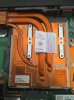
As you can see there are 2 mini bars on the bottom, and one on the left/right pinning the heatsink down to the video card.
Thanks for the help! I appreciate it. -
I dont see any metal bars, I think your thermal paste is stuck.
It looks perfectly normal, just use a little bit force and dont bend it. -
Hi some body cam help me with this topic: http://forum.notebookreview.com/sager-clevo/690515-clevo-w870cu-3d-possible.html
Thx -
I want to upgrade my graphics card on my 8690 from the Radeon 5870m to either the 7970m or Nvidia's 580 mobile GPU. I lean toward the 7970m due to the cost differential and the fact that I'm probably a year from replacing this machine.
The questions I have: Will either GPU work fine in here?
Has anyone done this, and are you able to very roughly indicate the type of performance improvement observed on more demanding games like BF3 at high resolutions (at/near 1920x1080 with most/all eye candy)?
Finally, is a different power supply required if you upgrade to either of these cards? I know the P150 is now issued with a 180w PS, and as I understood it, it was because these cards can draw up to 120w. However, as you know, the 120w adapter is what is supplied with the 8690.
Thanks! -
Not possible to get the 7970M in the W860CU. You can get the 580M though, or the 6970M or 6990M (if you get a 180W PSU)
-
Ok, so I just bought an AMD 6970m.
And im still on the 120w power supply and I think I need a bigger one. (with i7 920xm overclocked)
Does any one know if this one will work?
Ive read somewhere that a 150w dell would work, but wich one? -
I believe King of Interns mentioned in this thread that you would need 180w for 920xm + 6970m
Here's a link to Targus Universal Notebook AC Adapter PA 1181 08 APA05US w 1 Connecting Tip Cord | eBay -
Nahh, i've measured my current usage.
With an i7 920xm clocked at 2.6ghz 100% load it consumes 100w. (72w on cpu alone).
And if the 6970m uses like 20 watts more I should be fine with 150w adapter. And i will give the amd card a nice undervolt so I think I will be fine.
I'll first test it on the 120w adapter tho and see how it copes. -
I'd like to upgrade to an SSD for the W860CU that I got about 2 years ago, what are my best options for that at a price range of <$200?
-
i personally would go for a samsung 830 256gb but be aware that they are 7mm so you need an adapter to 9.5mm or get the more expensive notebook edition.
Btw. I am using a amd 6970m with i7 920xm and both overclocked together with a 120w adapter and it works perfect, even got 3750 3dmark11 score
-
I just put a 6990M in mine, but I have one issue, from my initial looks, then 5870M heat sink fit just fine and I applied new thermal past/pads to the needed areas... but my temperatures are insane... it idles at about 50 C and under load can get up to 100 C. Should I be worried, or do i need to double check my past job.
-
This was definitely not the case with my card, which needed heat sink modifications rather similar to what mxm update have documented.
Of course, variations in design exist, but I would be very careful when fitting the heat sink, since even minor blockings can result in gaps wide enough to reduce heat transfer efficiency.
The 6990M dissipates a lot more heat than the 5870M, but the cooling in the W860CU is sufficient for this.
I would expect no more than 15-20 degrees above ambient air temperature when idling; while 30-35 would indicate at the very least bad pasting.
GL
//
---
Sent from my Xperia Pro with Tapatalk 2 -
That's horrible.... are you sure your GPU is not damaged?
-
You HAVE to mod your heatsink to fit 6990m so you say it fit fine, I say you have to mod it to fit it properly. or else you woudnt have such bad temps, altho 50c on idle aint that bad for that card but 100c on load is bad. my 6970m gets 90c on 830mhz core and 1100mhz on memory but on 730mhz and 0.96v it gets 80c max at load and thats with my 2 year old thermal pads wich I will replace soon.
So search the forum here or MXM upgrade for the mod for a good fit
You dont damage a gpu with just 100c (ok its not good for longterm but short term wont do much, also depends on what part did get 100c if its memory its not good but shoudn't kill it directly)
I had replaced my thermal pads on my old 5870m memory for arctic silver mx4 wich wasnt a succes after a few months it was around 94c still the card worked fine (I did put back the old thermal pads when I found out It scared the out of me that I was running on 94c for couple of months hehe) -
hmmm... when I have the spare time this weekend I will have to take a look at how the heat sink is sitting on the 6990M and where it needs to be modified to have a better fit.
On a side note, any body having trouble with trying to get windows 8 to cold boot? Its new hybrid boot messes with the BIOS so that it constantly thinks the laptop is resuming from hibernation. Even turning off hybrid boot wont allow me to access my BIOS settings. -
**** Sorry post deleted, wrong thread ****
-
As I'm still running on the 120w power supply it runs really well with overclocked cpu and undervolted gpu.
But I've tried heavy overclocking on cpu (2.8ghz all cores) and amd 6970m at 830/1100mhz. When I did 3d mark vantage the notebook just turned off in the middle of a benchmark and woudnt turn on for a few minutes, is it possible that the motherboard cant handle so much power and overheated or would it be the 120w power supply thats going in protection mode? (at lower clocks I managed to get over 13.5k marks in 3d mark vantage). -
Yes. Either that or it overheated insanely.... or it can't handle the power needed
-
Definitely the Power Supply. One of the problems with using the 120watt is that power supplies put out less stable current and overheat when hitting their maximum wattage, so the 180 watt runs cooler and puts out "cleaner" voltage which protects your components.
-
Hi,
Posted this on the XoticPC forums and got one response: I'm looking into other opinions for the problem as there are more people here. Any help or insights would be great, thanks!
#######################
I need some help pinpointing the problem with my laptop. Until recently, my unit has been doing fine. All of a sudden, it's been turning itself off at random and I'm having problems booting to windows. I've uploaded a 2-minute video on youtube for reference. Sager NP8690 power problem randomly turning off - YouTube I've done some "googling" and I found similar cases but not exactly the same. I've found some potential causes and I've addressed them by following the proposed solutions from various forums and discussion groups.
1.) Overheating - well, I was going to replace my thermal paste on my cpu and gpu anyway so I did it. This did not fix the problem.
2.) Fresh/Clean install of Windows - done this twice already (DVD and USB install) - but when Windows restarts, problem occurs again. I've tried Startup Repair (before reinstalling Windows and after reinstalling Windows) - I've done the "fix mbr" solution but that didn't work.
3.) Replace video drivers - apparently the latest ATI/AMD drivers (12-10) are buggy; so I downloaded the latest stable set that I used (12-8), still the problem persists.
4.) Replace / Remove motherboard battery - haven't done this yet
Observations:
1.) After a number of failed boots - the laptop boots to Windows (managed to type this post)
2.) Both of my fans are working correctly.
3.) Booting Windows (and installing it) from a DVD or USB works well.
4.) My power adaptor works properly with other laptops. I've tried using another power adaptor and the problem persists.
5.) Loaded BIOS defaults, problem still persists.
I've read somewhere that this might be a power supply issue(?) if it is then how do I fix this? Can I fix this myself? Or do I need to send this back to its maker?
Addt'l question: was using HWMonitor (64-bit) and my ATI MR 5870 is now read as ATI FirePro M7820 - I'm sure this is related to the ATI/AMD merger; but would this be a potential cause of my system crashing?
Help please! -
I think we have the same issue. I'm still searching for solutions and trying to identify what is wrong with the system.
From what I've gathered, it's a hard drive problem. As soon as I get my hands on another hard drive to try, I'll let you know my results.
-
Yeah, as I said on the Xotic forum, I still think you should disable your video card in device manager and then use your computer normally to see if it is the cause or if you can fully rule it out.
-
I've had the exact same problem. But it got solved it's the GPU (in most cases) that is either broken or just bad.
I solved it by baking it... sounds weird but it NEVER occurred again
-
Yep, although it is hit or miss on whether the solder will re-flow correctly and how long it'll last. I did it on an old "yellow light of death" PS3 and got about 6 months of extra use out of it.
**OFFICIAL W860CU/NP8690 Owners Lounge**
Discussion in 'Sager/Clevo Reviews & Owners' Lounges' started by ChinNoobonic, Oct 8, 2009.


