Problems? See this thread at archive.org.
There are many on this forum who speculate it will cost about $150 more than the 460m....bringing the total to around $450 or so. Like I said it's just speculation, but ya...
-
Yes the 470M is coming out very soon. Of course they will be made available for NEW system orders for a while first....

________________ -
I just got a blue screen right before the frozen black screen:
Memory_managment problem or something it said.
Sure, I pretty much knew it was the mem, because with 1 dimm it works fine, and with 2 not. Although memtest clears them both...
I noticed that the memory timing on a sticker on the dimms is something completely different from the actual timings, according to memtest.
I once had an unstable desktop years ago that also detected the wrong mem timings. After manually adjusting them the system was stable. But this bios doesn't allow me te manually adjust the timings. Will the new Sager bios be able to? And will my Xxodd still function with the Sager bios?? -
Okay, I have been trying with the new DIMM only and it still hung after a while. Thrown the new DIMM out and put in my working DIMM. Well, I guess it should be working, or something else must have gone wrong all of a sudden. And just to be sure I burned the Sager bios onto a disc and booted it. I flashed the firmware (of what?) and the bios. It now shows a Sager boot logo, but it still boots and it is the newest bios version, so I guess I'm fine.
I looked a bit further into PC Wizard and CPU-Z and it seems that my RAM is capable of different timings at different frequencies and the 9-9-9-24 that's on the sticker is for 667 Mhz and it currently runs at 533 Mhz with 7-7-7-20 timings as described in CPU-Z and PC Wizard of valid timings for my RAM, so I think the timings are okay then, even though the timings on the stickers are different.
I'll keep y'all updated. If my laptop crashes again with only the DIMM in it I thought was the good one I'll do a complete reinstall of Windows 7.
Thanks for all the quick responses on wether or not the Sager bios would work or just completely brick my very expensive 1 month old laptop. Oh right, nobody wanted to touch that subject... Well, I tried it anyways and it seems to be okay.
-
I'll be planning to buy gtx 285m until fermi came.. playing with 400m series DX11 card its worth waiting Q1 2011.. bad for me RJtech only accepting US and Canada Customer using Paypal Credit Card..
Is there anyone here in this forum used Bank Wire Transfer?? Is GTX 460m/470m already available in ebay? i can't find one, only 480m, I'm from Philippines. is there another store beside rjtech selling those card? guys your help much be very appreciated..Thanks
-
Hello everyone! I'm a proud new owner of a Sager NP8690.
cpu: Intel® Core i7-720QM
gpu: nVIDIA® GeForce GTX 460M with 1.5GB GDDR5 Video Memory
ram: 4GB Dual Channel DDR3 SDRAM at 1333MHz
OS: Windows® 7 Home Premium 64-Bit
Display: 15.6" HD+ LED Display (1920 x 1080)
HDD: 640GB 5400rpm SATA 300
Bought it straight from sagernotebook.com. I am loving it so far. The screen is super clear, plays FFXIV smoothly at 720p. So far my only gripe is the keyboard isn't backlit, LOL. Attached is the 3Dmarkvantage score, though I don't know what it means LOL.
Looks like Sager just updated the display driver for the 460M. Gonna try 3dmarkvantage again after installing the driver.Attached Files:
-
-
^ Did your NP8690 come with the USB 3.0?
-
o yeah my 940xm arrived!!! time to mess around with it
-
i think i need 180w psu, i put mine at 24-24-24-24 80w/75a and to know whether it works, i use the prime 95, not in 5 seconds, my laptop went black -_-
-
ok here is some SS
![[IMG]](images/storyImages/allat24scorescreen.jpg)
http://img101.imageshack.us/img101/6585/allat24scorescreen.jpg -
G, try a few things.
Download and install HWiNFO32 (now v3.61-992): HWiNFO32 Download
Download and install wPrime v1.55: Downloads | wPrime Multithreaded Benchmark
Load HWiNFO32, click on Sensors and minimize anything else (click Program/Configure to display Sensors and minimize main window at startup)
Load ThrottleStop and set to 82W/72A and multipliers to 22x flat. Also, if "BD PROCHOT" is checked, click on Options, check "Unlock Bidirectional PROCHOT", click OK and at main screen uncheck "BD PROCHOT." This may have no effect, but this item was never checked on my computer until the most recent BIOS update and is not checked on my other computers. It is possible that this reflects some effort to limit o/c.
Load wPrime, click Advanced Settings (lower left corner), set thread count to 8 and Save. At the main wPrime screen, click "Run 32M Benchmark".
In T-Stop, the FID should stabilize at 22 for all 8 threads.
In HW32, check Intel PCH/CPU Core to see how much power the 940 used to run the benchmark. For reference, my 920 used 77.984W (and 8.7 seconds). This should give us some idea about whether the 940 is drawing substantially more power than the 920 for the same use.
If all goes well, increase the multipliers to 23 across the board and rerun. The 920 used 80W (8.35sec). [For later reference: At 24x, it takes about 83W (7.93sec). At 25x, it needs 89W (7.72sec) and at 26x, about 92W (7.35sec). I have run all with the 120W PSU, but mostly now use a 150W brick for 25X and above to avoid stress on the stock AC adapter (benching only).]
Then, increase multipliers to 27x across the board and change wPrime's Advanced Setting to 2 threads. Close and restart HW32 to get fresh stats, then run wPrime 32M bench. You should see FID stabilize at 27 using the two core simulation and will only use about 52W. This will tell you that there is nothing limiting your 940 from using the higher multipliers. Try 28x at 2 cores/threads (54W, but mine gets jerky). At 29x, I crash, regardless of the number of threads, won't even start; click to start = BSOD.
Play with these settings and you'll find out the o/c'ing capabilities of your processor in your machine. They're not all the same, particularly with ES chips. -
yo R, getting it now
give me 30 min to post the result.
ps: arghh crap, the seller of 180w did not send to my country
i was able to play at 25-25-25-25 @ 83/76 that is 3.33ghz on all 8 threads, it was ok, i even played sc2 on ultra settings.
ok here is the ice breaker, when the battle got high, many carriers and mas bannelings exploding, my laptop went black ( sorry to my partner that i quit in the middle of battle)
-
Should have said review instead of check.
![[IMG]](images/storyImages/hw32cpu.jpg)
-
940xm 82w/72a gets 76.958w @ 9.67sec
24x 85.05 w @ 9.01
25x 85.05 w @ 8.99
26x 84 w @ 8.83
aw man does that mean i get a bad chip -_-
at 83w/76a 25x 86.957 w @ 7.93 sec -
No, no. It probably means you're running out of power at the higher settings. The 82W/72A setting is used up (in fact, overdrawn 3 Watts) at 24x. When you set to 25x or 26x, you're still running at 24x because that is all the power available to the chip. It takes 89W+/- (maybe a bit more for the 940) to run these chips at 25x, so you have to raise TDP/TDC to 90/80 or so, but that's a lot of stress on the stock PSU. Some can do it, some can't. Some will throttle, some will trip/shut down, some will break/fry. There's no way to know which will happen for you. Most prudent thing is to be happy at 24x until you get a bigger PSU.
Other thing, you don't need 25x in SCII or any current game. The performance increase will be minimal, if any, over a slight o/c like 27-26-20-20, which is more than it looks like and is much less stressful. Truthfully, the stock settings of 25-24-18-18 will do fine. This crazy stuff is just for benchmarking. It's fun, but it's just play. Remember too that in game play, you have to deal with the substantial power demands of the graphics card. There's often not enough power for a high-end card and an extreme processor if either, much less both, is heavily o/c'ed.
Edit: On further review, your time is out of whack, taking your 940 about 9.01 sec to run the bench vs. 7.93 for the 920 when both are set to 24x. That's pretty dramatic. You might try increasing to 85W/75A and run again at 24x in case it's getting power throttled (starved), but the results suggest your 940 is operating below spec unless someone has a better explanation. -
lol ok2 now i get it about the 82w/72a while the hwinfo shows 85 wats
thanks for all the guidance, true enough when i played the sc2, i only get 2-3 fps boost
i like the 84/77 25-25-25-25 as it allow me hit till 3333.4 mhz (why it has to be 4, 3 in the end would be better >_<)
for now i think ill stick with 82w/72a with 24-24-24-24 get me 3200.1 mhz till get better psu
-
The better course. But still, remember to watch your temps. A 940XM running at 24x is a powerful, heat-producing engine.
Edit: G, if you downloaded and used wPrime v2.04 instead of wPrime v1.55, then there is nothing wrong with your 940XM. The newer v2.04 is significantly slower than the older v1.55, but v1.55 is the one used for benchmarking purposes by HWBot and the serious benchers and is the one you want for comparison and evaluation purposes. So doublecheck which version you used. That makes more sense; the ES extremes have generally been very strong. -
aw man the 180w seller did not ship to asia, only usa and canada
any other place i can get my hand on the psu?
am using the 1.55 like you posted, pardon me but what you mean by es extremes have generally been very strong ? better? -
Have you checked with RJTech ( R&J Technology, Clevo Barebone Notebook kits, Laptop and desktop system builder) for the 180W adapter for the W880CU? It's expensive, but high quality. I ordered one earlier but cancelled because of delays in availability and got a 150W Asus PSU recommended by my reseller (GenTech). I'd rather have the Clevo 180W unit.
-
looks like their website is down, keep getting error.
-
I tried my laptop with the updated bios and with only the good DIMM. Well, the good DIMM isn't perfect either. I can watch 2 or 3 movies but it will hang eventually (so I like to watch a couple of movies on one day...
). Much more stable then the other DIMM or both DIMMs in it.
I tried a reinstall of Windows 7, bought another CD, with the Ultimate version instead of the Enterprise verion (is actually the same version as far as I know, Ultimate = what you buy in a store and Enterprise = Ultimate for big companies and schools). I had both my 4gb DIMMs installed. Windows was copying the files, expanding the files, rebooting the OS, doing something more and BANG black screen and the computer froze again.
I've downloaded Hirens Bootcd and I'm running a Western Digital drive diagnostic. Quick scan reported no errors (SMART test) and doing the extensive test now. Still one hour and a half remaining. Maybe there's something wrong with the HDD, I don't know.
I'm getting the feeling I'm starting to run out of options with my laptop. How can I ever get it fixed? -
It is great to announce that it is confirmed now that the nVidia 470M GTX will be $425.00 more than the ATi Mobility HD 5870 and $395.00 more than the 460M for system orders for the Sager NP8760 / Clevo W870CU and the Clevo W860CU - Sager NP8690 . It will be ready to order tonight or tomorrow. No shipments till late this month. At this time there is no benchmarks for it that we have, sorry....
_________ -
baby, am interested with the 470m, hope you could do review of it
-
Okay, my HDD is fine and I ran another night of memtest with no problems.
I activited driver verifier, which doesn't see any driver related errors up untill now, but since activated my laptop freezes up every couple of minutes. Sometimes it reboots without freezing and I also got a BSOD IRQL_NOT_EQUAL_OR_LESS or something...
What could be wrong with my laptop? -
What?!!! So the 470M should be approximately $745? That is not good
-
Anyone know any fixes for dealing with audio delay from microphones in Windows 7? I know people have found registry fixes specific to certain chipsets in certain computers, hence why I am posting this here.
-
what?? 470m is usd 745? darn its more expensive than 480m i guess mobility 6000+sandy bridge is my turn then why so expensive? it was only 80 usd more than 460m in eurocom before is this a correct price?
-
hey guys just checked xotic pc i dont know whats with the price
clevo w880cu base unit with 480m is usd 1650
where as if you configure the same spec with w870cu with 470m its usd 1700+???!! is 470m faster and more expensive than 480m?? -
might or might not.. heard that 470 uses lesser power compared to 480 that might be the reason?
well im sticking with my 480 meanwhile.
-
Damn, I waited all this time for a GPU that costs $400 more? Cripes.
-
how does the 460M compare with the 285M?
-
Why does the 285M perform better in benchmarks?
-
According to a reseller, the GTX 460M is not an intended replacement for the GTX 285M and performs about the same. The only worthwhile upgrade from a GTX 285M is probably the GTX 470M.
Shame about the stupid price of it because I won't spend that much. It is just not worth it. -
But what is good about the 460M over the 285M?
-
dx 11 support and higher mb of ram.
-
maybe the 460 is intended to replace the 260/360m's
-
so it's unwise to buy the 460m to replace one's current 285m?
-
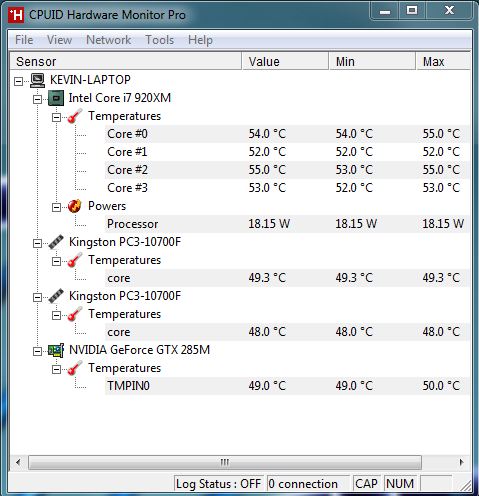
why can't i see the temperature of my hdd in hwmonitor?
i've attached a picture for reference. i remember that i can see the hdd temp before.Attached Files:
-
-
It would be a complete waste of money. Consider that even replacing the GTX 285M with the ATI 5870 is questionable given how close they perform at stock. Having said that, the ATI 5870 does usually overclock really well compared to the GTX 285M and the GTX 460M may do so as well.
If the cost was not so high it would be less of an issue. -
Well, the 5870 has heatsink issues with the Clevo laptops that's why I hate it
-
Heatsink issue's? my w860cu does a pretty good job with the hd 5870 overclocked to 830mhz wont get hotter then 82c at a few hours of gaming at 100% load.
-
Mine never peaks 80 C while gaming as well (StarCraft 2 with everything on ultra).
-
Is there any one who has already tried using raid with the w870 bios and a hdd bracked? im pretty curious..
altho my momentus xt isnt any good for raid a future upgrade would still be interesting to look at. -
so the heatsink issues for the 5870 are already solved today? is the heatsink already completely flushed against the gpu die now? when i had a 5870, this issue is still rampant in this thread.
-
For my 860 it is no problem it has good temps
Altho i ordered it with a geforce 460m but got the 5870 somehow lol..
On the package list is even says 460m but SOMEHOW they still managed to put in a 5870..
But it works fine they even gave me a intel 6300 wifi card instead of the cheaper 6200 i ordered hehe..
My temps: the max temp in the image is from a kombustor stability test. after a few hours it gets max up to 82c.
![[IMG]](images/storyImages/vxdats.jpg)
-
how about the downclocking issues of the 5870 while in idle mode, is it already fixed?
-
o yeah my 180w psu has arrived and it is awesome !!!! 3.33ghz on all 8 threads stable without shutting down. guess desktop will be not on for time being
btw guys i7 940xm @3.33ghz compared to i7 975e @3.33ghz, is it the same? both are 4 core 8 thread. -
goodluck for not damaging any component of your laptop in the upcoming days you are running at those clocks
-
no problem, it is in an aircon room with 22 degree Celsius all day. temp wont go higher then 75 on gaming
**OFFICIAL W860CU/NP8690 Owners Lounge**
Discussion in 'Sager/Clevo Reviews & Owners' Lounges' started by ChinNoobonic, Oct 8, 2009.


![[IMG]](http://img193.imageshack.us/i/hw32cpu.jpg/)