 Problems? See this thread at archive.org.
Today I got the caps required for mSata port and I soldered them. guess what, it works.
now Clevo P570WM supports mSata
thanks to Prema for the Bios mod, the bios shows the mSata detected on Sata configuration tab.
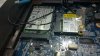
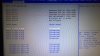
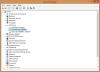
-
-
Ok I checked out prema's site looks strait forward.
REACAP TO MY UNDERSTANDING
1. swap out CPU reinstall heat sink
2. reboot and update new bios save and reboot
3. enter bios and reset raid configuration save and reboot
4. normal boot then reinstall IRST driver reboot
5. normal startup and operation with the exception of some tweaks
Is this even close any input would be greatly accepted thanks guys.
-
Just make sure you have backed up any important data in case something happens
Unlikely but better safe than sorry.
-
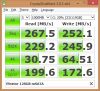
@solar...freaking awesome man!! I never used Msata before are those speeds good for that kind of drive?
@Jason.....sounds good give it a shot. -
thanks man.
in fact no, the speed is not good, because the msata drive I used is not a good one itself. its one of the cheap msatas. I think the Samsung should have better speed.
I forgot to check if it is sata II or sata III. I'll borrow the drive again and check it
Takaezo likes this. -
SATA II as X79 only has 2 SATA III channels.
Solariseir likes this. -
... simply :thumbsup:
Can you list what you need for the mod, please?
The Plextor PX-128M5M is a 6Gbps drive with 540MB/s read and 430MB/s write - Homepage.Solariseir and Takaezo like this. -
Sorry to say it Meaker but HWiNFO says it is SATA III.
However I this software gives me wrong information, sometimes. I'm not sure.
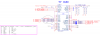
@SFVogt , you need a mini PCIE socket, i think 4mm will do the job. the white debug connector under it should be removed (carefully, I damaged the motherboard by pushing too hard)
then just solder the caps :
4 * 0.01uf 16v X7R Capacitor
1 * 0.1uf 16v Y5V (optional)
1 * 10uf 10v Y5V (optional)
-
Thanks for the diagram and information. Just wondering why there are two cap's that you list as optional?
-
those capacitors used to filter the high frequency noises on the power lines ( 3.3 v and 1.5 v ).
I soldered the 3.3 volt caps but I couldn't find the 1.8v (I didn't really search for them ) and I just ignored them.
I should say those caps prevent the voltage shifting (milivolt or less) in power lines and ignoring them may cause instability.Takaezo likes this. -
Ok Guys "Freaking out a little" so i did premas bios updated v5 seems to have worked well. i can enter his bios premas screen comes up but of corse i ade 2xssd in raid 0. so no boot. i cant seem to get back into the boot menu to reset the configuration. PLEASE HELP thanks.
Sorry this is for my sagernp9570 -
now this machine can fit five 2.5" SSD. just right below m18x R2. its a shame ivy HM77 and x79 never had all sataIII only 2x sataIII.
-
-
I find all mentioned positions :hi2:
![[IMG]](images/storyImages/mSATA_BD.png)
![[IMG]](images/storyImages/mSATA_MB_R1.jpg)
![[IMG]](images/storyImages/mSATA_MB_R2.jpg)
![[IMG]](images/storyImages/mSATA_MB_V1.jpg)
![[IMG]](images/storyImages/mSATA_MB_V2.jpg) triturbo, ole!!!, Takaezo and 1 other person like this.
triturbo, ole!!!, Takaezo and 1 other person like this. -
Nice pictures :thumbsup:
-
Sorry but only the double HDD/SSD cage is SATA-III 6Gbps. The single HDD/SSD bay and ODD is SATA-II 3Gbps
-
Yes as I said (and then linked) the chipset is only capable of two SATA III channels, there is no controller providing more so it's not really a question of if the software is wrong or not.SFVogt likes this.
-
Yes, but i think the possibility of a additional mSATA SSD with SATA-II 3Gbps is better then not :thumbsup:Takaezo likes this.
-
Jason, You have a couple of spelling errors here that mess with your content, Please explain clearly and concisely. You are saying that you did a good flash but now you can not access BIOS menu with F2 at start up? Calm down and take a breath, explain again what is happening. Look at the instruction manual from clevo.tw and verify that you followed that sequence correctly in order to set the RAID up properly with drivers etc. I also was not successful the first time as I recall, but this was because I did one of the steps out of order, (in the process of flashing new bios and setting up RAID 0) You have to set ACHI to RAID and also UEFI boot.Last edited: Jan 28, 2015
-
@SFVogt, Nice pictures!, Was wondering what tool/s you used to post such nice pictures and full page here on NBR? Looks like you did a little photoshop on them and then what reduced the pixel density to get them under the post limit? Or?
Thanks
TakaSFVogt likes this. -
OK "TAKAEZO" thanks for the patients, So it seemed like the bios flash was good when i restart the computer i can see premas bird. i can hit f2 and f7 and get into what is obviously premas bios. Now i messed with the drives enough that i just want to reinstall win i have the original disks. but it whont seem to let me. i took my drives out connected them to my other computer and looked at them with disk management doing a format and the active partition they said healthy. I put them back into the sager and when i go to install win 8 i go thru the process it gives me the windows " We couldnt create a new partition or locate an existing one. " when I try to get into the raid setup i believe its ctrl+I i get a bunch of funny symbols. not sure what to do now.
-
"TAKAEZO" something wired when i go into the bios and change boot priority#1 to a HHD save and exit it restarts and give me a line of crazy symbols. normally it should say something like no os or not bootable drive instaead of crazy computer talk. now if i put the boot priority #1 to cddrive it will say hit any key to boot from cddvd and when i do then windows logo appears at least that part works. now if i look at the message for to long with out hitting enter it will wait a couple of seconds then give me a line of computer symbols. forgive all the extra mumbo jumbo Im just trying give you guys as much info as possible
-
OK so for giggles i put in my original momentous drive that came with the sager from Xotic. it has win 7 and all the original drivers and it starts up fine and works normal. I had the two SSD drives in raid 0 when i did the bios update and now i want to put them back to normal so i can re raid them again "if that makes sense".
-
I use a resolution of 1000 pixel in width for forums pictures. The image files are on my own webspace. I embed this files with the image function of the forum. Example:
Code:[img]http://www.sfvogt.de/CLEVO_P570WMx/mSATA_BD.png[/img]
Takaezo likes this. -
-
@ Jason, as I recal the ctrl +i, should give you a pop up to designate the drives for the raid, I could not say exactly what the issue is. As I understand that you want to/are wiping the two old drives to reinstall windows and setting them up for the RAID. Be advised that if you dont have the drives in a RAID before windows is installed it will(did for me) install it to the default single drive automatically. I had this issue before, where I loaded windows in the wrong order and then tried to raid them(which auto matically wipes the drives) then booted and could not find my OS........it was because I wipped it off the drive when I set up the RAID. Also after raid is set up, you access bios hange sata to raid mode in advanced tab, then go to boot tab and set to boot from cd, then insert cd, reboot and it should install windows accross the raid upon boot. The owners manual details this process on pages 5 and 6.
-
Yes, of course, but I just wanted to nip any confusion in the bud
Solariseir and SFVogt like this.
-
i just noticed, i thought this machine only takes up to 1866 mhz memory speed for 32gb. so does it mean 2133 is doable?
-
You did it
As i know: Core i7 up to 2133MHz ; Xeon v2 up to 1866MHz ; Xeon v1 up to 1600MHz
Look @Takaezo signature
Solariseir likes this. -
yes i saw thats why im asking. and btw is 980m sli throttling in this ? im thinking if i should buy a barebone and mod it
-
some of you might be interested. if its able to hit 5.0+ then those might be decent chip, unless they run on liquid nitro
http://www.ebay.ca/itm/Intel-Core-i...X-/141542169111?ssPageName=ADME:X:AAQ:CA:1123
takaezo check it out -
Awsome guys very nice!!!

OK got the system back up and running i will take a few day to get everything installed. in the meen time i did try to put in my i7-4960X ivy bridge. i push power the keyboard lights up my dvd searches the fans do not turn on the screen does not turn on and after about 30 seconds it shuts itself off. any ideas. "BUMMER" i was hopping to really get to use this CPU in this thing.
-
If you look closely at the blurry info images you will see that is a FAKE! on Ebay, I looked at it about two weeks ago, but there is no evidence there just some guy with blurry pics of a different oc'ed processor(notice it is not listed in the description on that image) next to an actual info image.
-
the guy replied to me 4.9ghz with 1.5v LOL no different than any chip. hes like it'll oc, on 1 core maybe.
-
@Jason,
Oh man that sucks, I started about 5 am this morning and reinstalled windows 7 and re raided my 840 pros again which had been out for about 5 months for RMA. The actual time to flash v5 and re raid was only about two hours, installing my apps and OS....well I am just now getting most of it done. My advise to you Jason is to get copies of the manual pages 5 and 6. There is one error on there, because you can not install anything from a thumb drive until the USB drivers are installed. So that being said, as you close out of your Raid, you have to make sure that your windows os disk is in the drive and F7 to set boot form CD. After that you need to pop in your drivers cd, when it asks to load drivers and install the IRST x64/or/32 driver, then you can either load all the other drivers or---------if you don't want to update them all again later, you can just wait till windows installs completely, then load your Wlan or Lan basic driver, get online and find the most up to date versions of those that are on the CD. I know I was able to boot from my USB before, but for some reason I couldn't see it without the driver. premamod v5 up and running, working very good so far. Good luck with the ivy-bridge.
Side note: I don't have Ivy installed, so maybe someone else here can take on Jason's issue as first hand experience is most likely needed to solve your issue.
Good Luck
Takaezo -
That's funny that he even replied to you! I don't use the word hate very lightly, but scammers like that approach the threshold of that label. "chuckling", sorry for some sucker out there.........
...........
-
I have only been using premas, any reason why you would need SVL7's?
-
Looking pretty good for my reinstated Raid0.......although that freaking 7.8 is killing me!!
http://s1256.photobucket.com/user/Takaezo/slideshow/
Did a little ram-sink mod on the northbridge arm, seems pretty stable at 4.6Ghz....
Last edited: Jan 30, 2015 -
you should be able to get to 7.9 if you OC high enough, just a little more man, 4.9 it goesTakaezo likes this.
-
It should have it, are you sure it flashed properly?
-
So Premas V5 Bios update installed successfully. I got the RAID0 set back up and I am going thru the reinstall all your crap mode phase "boring" ive noticed that my BT and WIFI buttons stay lighted up even when I push them and the device shuts of anybody run into that.
-
Ok...I got a little stumper for you all.......
I purchased an expansion card 3 x USB 3.0 express card adapter...(gives me three extra USB 3.0's !!), but when I have all my peripherals plugged in and use the express card.....I get an error message that says there is not enough resources to use the card, please unplug something to free up resources......this is a new one for me. I have never seen that before. My question; is there a setting in the USB or PCI in the Bios that can deal with this issue? What other resources are on the PCIe-Express Card slot?
note: this express card works when almost all other peripherals are unplugged.......but it is not true 3.0 speed by any means... -
yes, when they go on and off but the light doesn't go out that usually means the driver is corrupted for that device.
Or there are two conflicting drivers for that device like the correct one was installed over the formerly un-removed intel automatically installed driver. try reinstalling HKey as well
I corrupted the Bluetooth driver once, and was not able to resolve it with out reinstalling windows...no kidding! -
just clevo mobo design, poor power management maybe? also btw that usb 3.0 express card is true 3.0 speed, its just you don't have the right settings to max it =/ i can get ~380MB/s with m18x R2, you just gotta have a device fast enough, use windows 8.0+ and have everything that works with UASP or w/e its called. and then enable PCIE 2.0 for expresscard slot then you are good to go. if clevo doesn't have an option to change that 1 lane port to pcie 2.0 then you are stuck at 180 to 200 MB/s max which is maxed out for pcie 1.0 with no way around it.
-
@unityole, Yeah, I know the speed is not 3.0, I read about that before I bought it, not really worried about speed thru that port, although sure 3.0 would be nice. This is a cheap flush mount design. I just wanted to use it for charging mostly. because there are times that I have all other USB ports in use and it does work good for that, but if I put something like a mouse dongle or xbox controller dongle in there in combination with charging something it post that error. Basically it works but you can't use all three channels at the same time, which defeats the purpose of having three slots in the first place, but I thought maybe the configure of those channels needs to be messed with?. This is the issue not a lack of power management. or the fast enough speed as you mentioned. ... Windows what? I cant hear you.......yeah I am a legacy person myself. I was happy when 7 came out and I am still happy with it now.
-
Those cards are made with cheap controllers usually, it may not be able to cope properly with 3 devices hanging off it.
-
I finaly got it working, enabled all the PCI and USB in Bios, then re-re-reinstalled drivers after uninstalling and deleting the stupid Microsoft drivers that try and install. Plus another problem is actually mounting the usb connector because of the ports push pull feature. Then when you add the (whatever) usb it installes another driver for that device. but you could easily push it to hard and then when you let go it is completely disconnected, seriously like a Donald duck cartoon, you have to hold the face of the port adapter with pliers while plugging and unplugging. And no you can not plug it in first because then the first driver doesn't install before the second one!!
Anyways it is working with three external drives attached now. What is a good app to check port speeds? -
Well you could test each drive simultaneously with something like crystal mark.
-
1. What's the difference between Sager P570WM and P570Mx?
2. I installed Prema's bios V5 for gtx680M and almost everything works. I cant adjust the screen brightness with the Fn+F8 or Fn+F9.
3. Do I have to do something in the BIOS to use an Ivy-Bridge CPU after the Bios Update or should you just be able to swap CPU's out and turn on? -
@ Jason I read somewhere here, that prema sacrificed some of the legacy settings for adjustments to facilitate gtx-980m, you might PM him about that. Also sounds to me like you need to reinstall the Hkey driver, that controls those buttons.
*** Official Clevo P570WM | P570WM3 / Sager NP9570 Owners Lounge ***
Discussion in 'Sager/Clevo Reviews & Owners' Lounges' started by jclausius, Feb 5, 2013.


