Problems? See this thread at archive.org.
That's a nice wPrime 1.5.5, I get 5.1/130+ in my machine in wprime.
-
Here's a new 3DMark 11 run...
http://www.3dmark.com/3dm11/9405275Santander likes this. -
I tried the Catzilla on 720 and got just under 13000, don't have the funds right now for the full license. The 3dMark11 are you running paid version of that as well?
Mr. Fox likes this. -
Yes, most all of my benchmark programs are the paid versions. Futuremark, Heaven, Valley, Catzilla and of course those that are included with games. I generally find them on sale for $20 or less before I buy.
Here are some new numbers...
http://www.3dmark.com/3dm/5826830
![[IMG]](images/storyImages/ztMlvtNl.jpg)
http://www.3dmark.com/3dm11/9405275
![[IMG]](images/storyImages/g6jpiGNl.jpg)
http://www.3dmark.com/3dmv/5218884
![[IMG]](images/storyImages/7G9otYUl.jpg) Last edited: Feb 8, 2015
Last edited: Feb 8, 2015 -
Nice run. I cannot seem to overclock my 980M cards that high. My screen goes black. It is hard to tell since the screen is black, but it doesn't seem to be freezing and there is no BSOD. When I have more time, I will have to tinker with drivers to see if I can find a way around that problem. Perhaps using an external monitor or something like that will work. Maybe its something related to me having LVDS and 60Hz screen versus eDP and 120Hz, as I had exactly the same problem with these GPUs in the M18xR2.
-
make sure your settings in bios are set to disable hibernation....seems like the most obvious, happened to me too, then one time I pressed the space bar and it came back on, sometimes it would just "trigger a freeze" when hibernation started after so many minutes.
Also disable hibernation/sleep on desktop via "keyboard shaped" icon in the clevo(not windows) control panel.Last edited: Feb 8, 2015Santander likes this. -
@Takaezo - I think it is already, but I will double-check that just to be certain. Thank you for the suggestion. I bet it is something simple like that. I happens under Windows 7 and 8.1.1 so I doubt it is OS related.
-
also just remembered that the setting in Nvidia control panel, sometimes with certain benchmarks that are trying to run OpenGL/PhysX on your CPU....well when set to auto config PhysX/OpenGL it will black screen while the bench continues..sometimes recovers most times doesn't. In those particular cases i.e. 3DMark 11's last bench, it will most times black screen and seems like the problem is the oc on the GPU......but its not....it needs to be set to CPU in Nvidia control panel, mine does anyway in order to complete the bench.
Mr. Fox likes this. -
Dang those are some nice scores Fox, you're almost catching up with my desktop 970s clocked to 1600/7800 in 3DMark11!

Here are my results just for fun. All runs done at 1600/7800 with my own bios that clamps P0 to a fixed voltage. For 3DMark11 runs I was stable at 1.25V, but Firestrike needed 1.26V to be stable.
![[IMG]](images/storyImages/a37cBg3l.jpg)
http://www.3dmark.com/3dm11/9408472
![[IMG]](images/storyImages/7WTmDd0l.jpg)
http://www.3dmark.com/3dm11/9408431
![[IMG]](images/storyImages/myAgri9l.jpg)
http://www.3dmark.com/fs/4023124
![[IMG]](images/storyImages/cfo1i7tl.jpg)
http://www.3dmark.com/fs/4023157
![[IMG]](images/storyImages/7gi3lZ3l.jpg)
http://www.3dmark.com/fs/4023199
Have a look at this as well:
![[IMG]](images/storyImages/eIZIILtl.jpg)
Notice how both of my 970s reached 90% of their power limit? This was mostly during test 1 in both 3DMark11 X as well as Firestrike. Gigabyte was generous enough to set the power limit to 250W in the stock bios so I didn't have to mess with that. But if you do the math, 90% of 250W means each card was pulling 225W!!! Might as well be running 780s at that point lol
Btw I have the highest 3DMark11 X score for 970 SLI, and in the top 20 for Firestrike Ultra as well. Not bad for an amateur bencher running Win7 I dare say. Last edited: Feb 8, 2015
 -
Very nice! And, thank you for sharing that. I always enjoy seeing this kind of stuff.
Edit: Speaking of power draw, I was watching the meter on my 900W CyberPower UPS during those benchmarks and 3DMark 11 Test 1 peaked at 702W and throughout the other tests it was peaking above 650W frequently. At 4.6x6 I see the 4930K often exceeding 200W (in HWiNFO64 readings) under full CPU load.Last edited: Feb 8, 2015TomJGX likes this. -
I get the blank screen issue pushing the vram, that's the vrms giving out, we need to populate the other half of the phases that are left blank to be able to go toe to toe with the desktop.
Takaezo likes this. -
Well 7800 is about as much as I could push my memory without getting artifacts. Either my Samsung chips aren't that great or I'm doing something wrong, since almost everyone with Sammys seem to be getting 8000 easy. But it's good enough for what I do so I'm not complaining.
According to my Killawatt, my power draw peaked around 602W during 3dMark11 X, and 610W in Firestrike Ultra. For the most part though the power draw hovered around 576-590W. I saw earlier that your 4930K was at 1.411V, and those 330W PSUs probably aren't as efficient, so that might account for the increased power draw compared to my desktop. Still, pretty amazing that a laptop draws more power than a desktop!
And yeah I think my 4930K pulls around 230W when benching XTU. -
The 980m needs a memory volt mod to get above 1475mhz memory clocks which stresses the vrms even more.
-
Right because mobile GPUs don't have dedicated memory VRMs correct?
-
They do but it adds to the draw of the entire card and heat output.
Mr. Fox likes this. -
doh just looked at my 780M again, and realized it's the ones on the long edge with the smaller inductor
Mr. Fox likes this. -
Well, I just flashed svl7's vBIOS and will have to give it a go benching on AC. Something on the GPUs might be getting too hot and causing the black screen.
But, dang, with NO CPU or GPU overclock, this beast just rocks. Here is a 3DMark 11 run with BIOS defaults and svl7's vBIOS and no changes to GPU clocks or voltage. Amazing.
http://www.3dmark.com/3dm11/9408769
Santander likes this. -
-
Just googled some 980M images and I see what you're talking about. Yeah what's with those missing phases? Cost cutting measure or making it just enough for stock so not a lot of headroom left?
-
They are not even positioned in the same spot on every GPU. One of my 980M has them on the outer edges and the other 980M has one of those component moved inward to the spot that is blank on the other GPU. Probably does not matter in the grand scheme of things, but I thought it was interesting that this was not consistent in manufacturing. They are otherwise identical and purchased as an SLI "kit" from RJ Tech, so they are not from different sources.
-
You can be sure a fully unlocked part will have all of them populated
 so might a quadro which would give it an edge perhaps. It seems the quadros are not being released quickly though.
-
What's going on with Maxwell Quadro flagship GPU's for this beast really?
Anything on the horizon? -
Yes, it's called the 980MX or 985M, and won't be out for another half year or so.
-
wow, Mr. Fox finally got one of these, it's about time, XD.
WELCOME TO THE CLEVO FOXY =D -
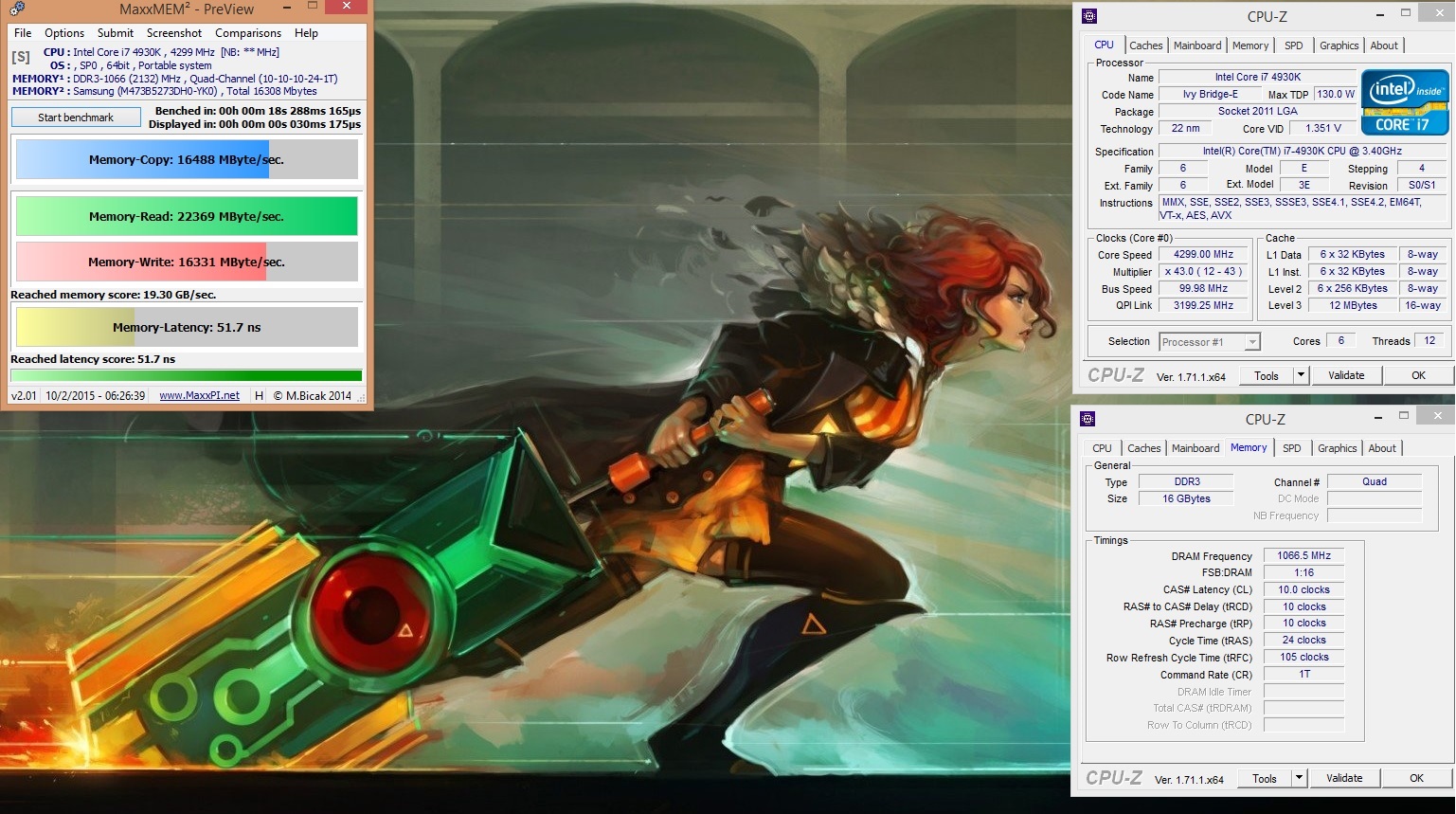
![[IMG]](images/storyImages/membench_zpssw7yu4jo.jpg)
Attached Files:
Mr. Fox likes this. -
-
Yeah! Woot! Although it comes as no surprise in light of my past memory product testing, that overclocked Samsung 1600 is a ton better than G.SKILL Ripjaws 2133. The single bank design of the G.SKILL memory also sucks.
-
Good old YK0
You need to improve your sub timings though.
-
I received the IndigoXtreme kit today, so sometime this week I am going to swap the slower 16GB G.SKILL with the faster 32GB Vengeance 2133 currently in my M18xR2 since the R2 is no longer my primary benching beast.D2 Ultima likes this.
-
Well at least get the tRFC into the low 100s region, laptop ram always seems to smack that right up to the roof (300+ I have seen which is nuts).
Mr. Fox likes this. -
OK, thanks for that tip. I will give it a try.
-
I have found that does help improve throughput, you probably wont get too much out of the others and watch going too low with that timing, it can get a little tricky to tell when it's starting to generate errors but anything south of 150 will do just fine.
Mr. Fox likes this. -
Congrats Mr.Fox!
How is it with a true computer?
reborn2003 and Mr. Fox like this. -
Guys... We need some help with ranting at GeForce Community. Looks like another botched driver release. See below.
-
I really do love this beast. It's nice to finally find a laptop that is more potent than my M18xR2. I only wish its guts would fit into the R2 chassis. So, now I have bragging rights to owning the two best laptops in the history of the world, LOL.
-
Mr. Fox, in the spirit of geek-ness I must pronounce, " There can be only one"...........lmaoD2 Ultima, TomJGX, Santander and 1 other person like this.
-
I agree, but there is always a second place/runner up.

One has a "real CPU" and the other one has a superior chassis. In that respect, they're not even close to equal. The build contest is a landslide for the R2 as much as the performance is a landslide for the Panther. Would be nice to have the best of both worlds rolled into one. The R2 is still the king of laptops that don't run a 6-core desktop CPU.
The nice thing is, I love them both. They both excel in their "class" so to speak and there is nothing to dislike about either machine.reborn2003, sa7ina and Takaezo like this. -
Agreed.
I am waiting for the Maxwell Quadro Flagship cards.
A couple of those and a Xeon e5-2697v2 24 threads.
Golden!
Edit: Hopefully 64GB RAM too.reborn2003 and Takaezo like this. -
The Intel IMC has an issue preventing it from addressing 16GB sticks, this should be fixed with broadwell.
-
@Meaker or @Takaezo - curious if either of you or someone else has any idea what the deal is. I used thinner thermal pads for the CPU VRMs and other surface mounted components. Now I am getting a random beeping alarm sound, flashing media panel lights and then Windows shuts down, even when the system is idle. The CPU temps appear to be fine. It seems worse if I run max fans instead of better, but that may just be my imagination. I know placement on the pads is precise, but maybe too thin and not enough contact tension? Or, something else?
-
I think they may not be making proper contact. Can you try switching back to the original pads and see if it stops beeping? I've never experienced that.Mr. Fox likes this.
-
Yes, I can try that. Just curious if anyone knows for sure if that is the cause of this before I pull it apart. I used up the last of my Liquid Ultra, so I will have to use IC Diamond and lower my clock speeds until my order of Liquid Ultra arrives. Thanks for the reply.
-
Mr. Fox, that is a bit of a stumper, I had this situation like your talking about when the system doesn't recognize the power to CPU fan #1, I remedied this by adding a jumper from the CPU fan#2 to the yellow on CPU1, but this was only for the hydrocooler install, The first thing I would check is the CPU1 and CPU 2 fan headers are completely plugged in and no wires are loose in those plugs. It could be also that those pads are not transferring heat due to lack of contact. You could use something like a plasi-gauge or clay that they use in engine mechanics to find the exact clearance of those and then address them from that end....
The reason I said the Fan headers is because this was Exactly the situation I was getting, for which Meaker helped me solve before; that is : flashing two locks on upper right of Hkey panel, with long beeps, and then shut down, gets worse and fails more quickly when you enable full fans.
Also I have had the experience where the Heatsink is not entirely seated correctly even though it was bolted down completely, where is seems to be in contact but is actually not, I remedied this by simply wiggling the heatsink and it dropped into place. .Last edited: Feb 11, 2015Mr. Fox likes this. -
Cool, I will check that first.
Question for my own curiosity. What is the sensor that the CPU heat sink plugs into the mobo next to the fan header? Is that just a temperature sensor? I don't see anything in service manual that identifies what that critter is. -
Yes it is the Temperature sensor I believe for the VRM, being cooled by the aluminum. Meaker please correct me if I am wrong.
Mr. Fox likes this. -
LOL! OK, now I feel like a retard, ha ha!
Simple fix. As is often the case, user error. Temps were fine before. Now they are really fine.
C'mon Fox, pull your head out!
![[IMG]](images/storyImages/lzPSK6B.jpg)
reborn2003 and Takaezo like this. -
 Shazzzzzzzam! I get to say that when I am Right!! lmao
*** Official Clevo P570WM | P570WM3 / Sager NP9570 Owners Lounge ***
Discussion in 'Sager/Clevo Reviews & Owners' Lounges' started by jclausius, Feb 5, 2013.

![[IMG]](http://i.imgur.com/ztMlvtN.jpg)
![[IMG]](http://i.imgur.com/g6jpiGN.jpg)
![[IMG]](http://i.imgur.com/7G9otYU.jpg)

![[IMG]](http://imgur.com/a37cBg3.jpg)
![[IMG]](http://imgur.com/7WTmDd0.jpg)
![[IMG]](http://imgur.com/myAgri9.jpg)
![[IMG]](http://imgur.com/cfo1i7t.jpg)
![[IMG]](http://imgur.com/7gi3lZ3.jpg)
![[IMG]](http://imgur.com/eIZIILt.jpg)