Problems? See this thread at archive.org.
After making changes in BIOS, make a full shutdown from within OS afterwards, not a reboot (also make sure OS is not set to sleep or hibernate, it needs to be a full shutdown or UEFI will prevent the BIOS from botting from scratch and writing new NVRAM tables).
Only that way all your changes will stick incl. RAM and CPU multis and take effect from next the boot onward.
-
-
Priced tooooo high is my guess. First they made sure that cheaper, yet comparably performing AMDs are off (M7820 and M8900 did that, as an added bonus the M7820 was also cooler/less power hungry (compared to 5000m), not very sure about M8900 vs 5010m). Then after seeing how (bad) it goes with AMD and lack of anything comparable, they are ready to ask for even more. I know it comes as a lot of hate, but a quick glimpse at the past couple of years, I really can't think anything good about them (nGreedia).
Still can't get my head around how on earth they came with MXM?! I haven't dig and I'm afraid to do so, since this is so far the only everyone benefiting thing that they made. -
Pretty sure nVidia didn't make MXM though. And AMD cards use it too.
-
"MXM is no longer supplied freely by Nvidia but it is controlled by the MXM-SIG controlled by Nvidia."
I don't want to be rude, but REALLY?!? Anyway, that's what I meant with "everyone benefiting thing".D2 Ultima likes this. -
OK
Question still remains: Why Quadro M6000 came to life?
Quote:
"The most powerful pro graphics card with advanced NVIDIA Maxwell™ GPU architecture to conquer challenging graphics workloads and power interactive, photorealistic visualization. Includes 12 GB of GPU memory and advanced capabilities for up to four 4K displays."
The original spec i wanted in this monster was far more expensive at the time (about a year ago) 25K$++.
So i bought it with gaming spec for 7000$ so ill have a good base, hoping after a year or so ill upgrade both CPU to XEON E5-2697 v2 and GPU's to Quadro K5100M successor...For half the price.
I can get right now XEON E5-2697 v2 for 2000$. (that i will do anyway, hopefully with an OC)
And a couple of Quadro K5100M for extra 2000$.
Total: 11000$ = 25000 - 11000 = 14000$ SAVED!
I want to go PRO soon...I need Double Precision A.S.A.P.
Question: What shall i do with the GPU's?...Wait for the successor or just buy a couple of K5100M?
10XTakaezo likes this. -
Buy K5100m and call it a day. As I said and what you just said as well (the money saving thing), I think nGreendia quoted ridonculous amount of money and the OEMs just said NO. Everyone benefits from more power, not when it comes at insane price tag. Mobile workstations are tough sell as they are (top spec that is), can't imagine adding another grand or two to the final price. You see Maxwell on desktops because there's still some competition coming from AMD.
sa7ina likes this. -
Maxwell sucks at double precision anyway the kepler chip is faster.
Last edited: Jun 3, 2015 -
OK
I cant wait over a year for Double Precision so i guess i have no dilemma.
Thank you both. -
Even the new titan-x is pants at double precision too. Maxwell is a single precision monster only (to save die space as the node has not shrunk)
Takaezo likes this. -
^^^
Did not know that.
Good Thing i asked.
Very good thing i have you guys.
10x -
Well enjoy the beast and the savings you have found
 sa7ina likes this.
 -
I will.
After that upgrade i can stay with it 4 more years and have endless fun
-
That's the beauty of the machine it has some serious staying power.
-
You reminded me this video:
Still the strongest one even in 2015
Attached Files:
Prema likes this. -
-
A tick box in the options for use previous settings or not would be good.
Takaezo likes this. -
thats a pretty good software you got there never heard of maxmulti gotta look into it, for my 2007/2008 machines lol. btw, any chance the newer throttlestop in future support more than 8c/16t?
what is double precision good at in daily usage? rephrasing the question, what daily usage we need double precision?
@Takaezo, oc to 5.0ghz plsTakaezo likes this. -
clevo's new machine with i7 5775c, im super interested in it but i know i definitely won't be purchasing it lol. anyone have any thoughts about this where this is clevo moving towards, no longer doing -E cpu but just regular DT cpu that stuck with 4c/8t
Takaezo likes this. -
I could not get the multimax to work, it downloaded and a spitting tongue emogi says not authorized, in a small box then you can only close out the app at that point. ??
@unityole , still working on 4.7, I can boot at 5.1GHz, but it wont clock that high, I have not given up on it, but it seems real strange the way it automatically clocks down several full points after you exceed 4.4GHz, I can not get the 4.4 to BSOD as hard as I try, I mean it will boot and you can set all the setting to max and it loves some 4.4, Voltage running to 1.56V but you go to 4.5 and it clocks down to 4.2??, then you can go all the way to 5.1(set), but it is barely pushing 4.6 at that point... it is strange to say the least, and of course clock settings above 4.4 is really finicky about voltage and turbo clocks, and it clocks down, so I am still playing find the sweet spot.
Double precision is the term used to describe how accurate the video card can do vector analysis within mathematics oriented software and applications. The greater the precision the more clean the video lines become for v-max rendering and rhino5design software etc. The greater the precision the more precise the line become in reality when displayed on a screen. Where historically the pixel density was the limiting factor for photon ray traces and the like, in stead of a line that you zoom in on, lets say in old Photoshop versions, it would appear jagged and stair stepped, double precision allows for the three dimensional resultant vector to be calculated and can appear smooth and solid even when you zoom to one pixel density, it also allows for gradient colors and depth to exist inside a single pixel. Because it is a multi dimensional dynamic analysis (its very good at complex math, because of this precision), it also is highly effective at complex muti-macro executions. LIke in complex excel formulas and matlab etc. This is why a premium is given to the kepler GPU's, it is also why Macintosh video graphics have ruled the roost for so many years in the past. Double precision is kind of a misnomer because what ever the current tech supports...its just twice that. I believe that single precision currently is like 32 and double is 64..something like that. hope that makes it clear. If I am mistaken on any of this, anyone feel free to jump in.
Takaole!!! likes this. -
The only reason I can think of that makes it clock down are TDP and/or AMP value targets being set too low...
Takaezo likes this. -
I have been making many desktop scores cry with my setup too, good feeling
TomJGX, Takaezo, sa7ina and 1 other person like this. -
NVIDIA GeForce GTX 980M SLI video card benchmark result - Intel Core i7-4930K,Clevo P570WM powered by PremaMod.com <- this run pulled 675W on the UPS meter in test #1, LOL.
![[IMG]](images/storyImages/dtS273vh.jpg)
NVIDIA GeForce GTX 980M SLI video card benchmark result - Intel Core i7-4930K,Clevo P570WM powered by PremaMod.com
![[IMG]](images/storyImages/WT7Pem5h.jpg)
Brother @Santander - do they have a benchmark thread over there?
![[IMG]](images/storyImages/ytjU4wwh.jpg)
-
so somehow mr fox can clock to 4.6 but taka stuck at 4.4, problem with mobo ? or bios version
takaezo have you tried oc with throttlestop? manually up the clock and then adjust voltage in windows via xtu -
doubt it, theres more to it than that. takaezo doesnt get bsod, just clock keeps downing itself, seriuosly doubt its a cpu itself.
-
Not stuck anymore at 4.4GHz, I just broke 1400 in XTU at 4.5Ghz. sweet spot. Highest clock sofar is 4.61 but not that good of a score. Still dealing with the down clock issue. First I turned hyper threading off, and enabled PLL in XTU. at least now if it boots to that clock it will clock at that clock until you adjust it up or down in XTU then it down clocks again , so you have to set it to like 4.9-5.0GHz in order to actually do a bench at 4.5-4.6. Here is a couple pics.
-
Dang, that graph looks like my 780M SLI does with 350 series GeForce drivers. What are you setting your power limits and time window to in the BIOS?
In order for me to run the 4930K at 4.6GHz I have to set cores 1 to 4 at 47x, cores 5 and 6 to 46x or the CPU runs 4.5GHz. Sometimes I even have to set core #1 to 48x or it drops to 4.5GHx. I believe this is a Clevo BIOS crippling problem, not a CPU problem. I think there might be some missing registers.Takaezo likes this. -
It seems like you have things cranked up way too high to me, especially the voltage. That could be part of the problem. RTT doesn't work well for me at higher overclocks. Maybe trying my overclock setting will help some as a starting point...
Credit to @Prema for his BIOS mod making this possible.
[parsehtml]<iframe width="853" height="480" src="https://www.youtube.com/embed/o4jkKLpuMbE?rel=0" frameborder="0" allowfullscreen></iframe>[/parsehtml]And, a big thank you shout to @unclewebb for making ThrottleStop work with these desktop CPUs, too.
[parsehtml]<iframe width="853" height="480" src="https://www.youtube.com/embed/KRUfmPvaOzI?rel=0" frameborder="0" allowfullscreen></iframe>[/parsehtml] -
I thought ThrottleStop 8.00 already did.
ThrottleStop seems to be doing OK on Intel's flagship 18 core / 36 thread Xeon E7-8890 v3 behemoth.
http://ark.intel.com/products/84685/Intel-Xeon-Processor-E7-8890-v3-45M-Cache-2_50-GHz
![[IMG]](images/storyImages/SThm8px.jpg)
Buy me one and a board and I will do some testing just to make sure. -
Does someone have the Prema bios V4 mod that they can upload for me? I need to test something with it.
-
LOL im still on TS 5, im way behind now, no time to follow anything tbh but will jump right back into electronics again when skylake hits. imagine if throttlestop allows oc on xeons lol -
btw takaezo do you change cooling solution once every few months? or do you just swap out cooler for another one of the same kind. closed looped cooler?
-
NO I have not changed cooling solutions, although I did try the H100i coolers mounted to the heatsink vs direct mount, I was hoping that the additional air cooling in combination with the cooler, would be better at total heat dissipation, but it is not the case. I am running two hydro coolers currently one on cpu and one on GPU1, which I plan to move to GPU0(primary) soon. Not sure why I mounted it to GPU1 in the first place but both are direct mount. If I had 980m's sli, I would hydro-cool both GPU's and the CPU with coolers, or at least I know I can do that now.ole!!! likes this.
-
I've needed a crazy number of adapters for my loop because the runs are so short.
-
To which system are you running a cooling loop in? Pic's?
-
Our resident genius @residualvoltage (mw86) gets the credit for this. I did nothing but flash it.
![[IMG]](images/storyImages/Q4t9NLh.jpg)
-
Nice, looks like I am going to need a socket on my motherboard for my bios since board has a resistor to ground for the write protect *sigh* at least with that and a manual programmer I should be good to go.
Maybe then I can actually tweak my memory settings lol.residualvoltage and Mr. Fox like this. -
My Panther is sandwiched very cozy right in between two desktops with Titan GPUs.
Comparison Result: 3DMark 11 Extreme - Desktop Titan SLI vs Panther 980M SLI vs Desktop Titan SLI
![[IMG]](images/storyImages/K1lEkJj.jpg)
-
Congrats Mr.Fox I knew we could do it. Simply awesome cheers brother Fox I am loving the Panther 5
Takaezo, Johnksss, Santander and 1 other person like this.
-
Thanks @Santander - probably not for very long. I just gave you and @johnksss a new target to aim your 4960X CPUs at, LOL.

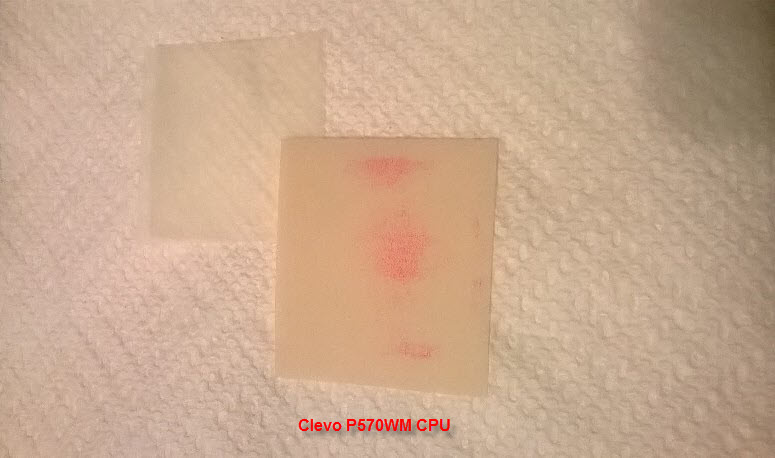
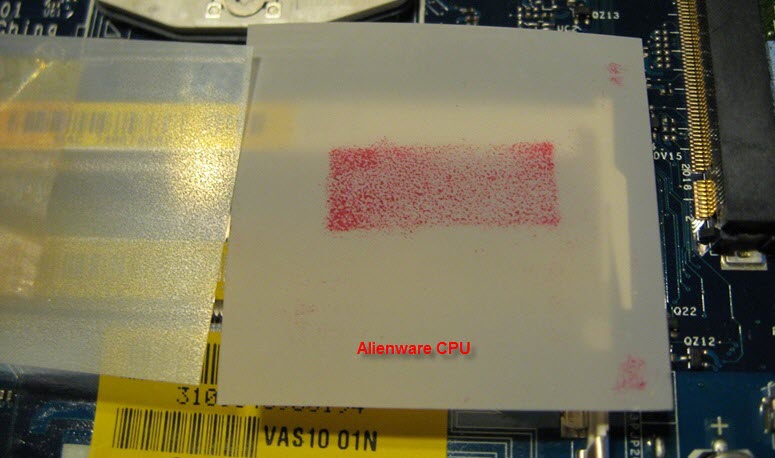
Got to get me one of those sooner or later, along with a new CPU heat sink. Tried one last time to use Liquid Ultra on it yesterday and the fit is just too poor.
Here is how the pressure test looks. Too bad it doesn't fit nice like my Alienware heat sinks do. That huge heat sink would probably do a great job if it fit right.Attached Files:
Johnksss, residualvoltage and Santander like this. -
-
what about a light lapping of the cpu/heatsinks surfaces to get a fully flat surface?
-
I've already done that. It did not help. The heat sink copper plate isn't pressing on the IHS hard enough and does not seem to fit flush. It seems to make somewhat better contact toward the rear panel and less on the side closest to the front of the laptop. I've examined it closely and nothing appears to be amiss other than poor fit.residualvoltage likes this.
-
is there any room to fit a washer between the tension spring and where you screw the heatsink in to add tension. like the two tension screws on the opposite side of the good contact?katalin_2003 and Mr. Fox like this.
-
That won't help because the aluminum part of the heat sink is already pressing really hard on the MOSFETS and inductors, to the point of almost pinching thermal pads to death. They literally are almost cut in half from being crushed so hard, LOL.
If I had a machine shop use a planer to mill down those parts of the heat sink, say maybe 1.0mm or 0.5mm (like re-decking the top of an engine block) that might work with increasing spring tension, but there is no way to press the heat sink down further toward the CPU because it's making great contact with everything all around except for the most important part (copper plate and die).
Now, what I could try is removing the thermal pads completely and just letting direct contact handle the cooling of those components. Honestly, that is probably all those parts need anyway. I may try that to see what happens. I've already reduced those pads down to 0.5mm and that wasn't enough to help.residualvoltage likes this. -
Awesome idea I hope that last .5mm will do the trick. Goodluck buddy it has to give better contact than what you have shown, really sucks the fit is like that. I dont have that paper you have. how do i get that to check/show you the contact pressure of mine? Perhaps replacing the heatsink but that seems very expensive since it clearly is massive.Santander likes this.
-
That pressure sensitive film was given to me for some test purposes. I haven't found a place where consumers can purchase small quantities of it. I'd like to buy some, but it is super expensive.
I'm really trying to avoid buying a new heat sink. Not only does it look like an expensive part, I don't want to spend money on a new one only find out it is no better or worse than what I already have.
I'm not impressed with a couple of things about the P570WM design and that is one of them. Overall, awesome machine and I really love the monster, but more than anything else, the cooling system wasn't given adequate attention. The GPU heat sink copper plates are also very thin and there is no way to avoid cooking your SLI bridge with it being sandwiched tightly between the motherboard and vRAM. Second to the cooling system, the lack of access in the BIOS to everything one should expect from an X99 motherboard really irks me. There are things like base clock, QPI link (cache ratio) speed and CPU input voltage that should be there, but they are not.Santander and residualvoltage like this. -
if we found a seller we could get couple together for some idk... lol. I used some sent to me once for the ICD24 test survey.
*** Official Clevo P570WM | P570WM3 / Sager NP9570 Owners Lounge ***
Discussion in 'Sager/Clevo Reviews & Owners' Lounges' started by jclausius, Feb 5, 2013.





![[IMG]](http://i.imgur.com/dtS273v.jpg)
![[IMG]](http://i.imgur.com/WT7Pem5.jpg)
![[IMG]](http://i.imgur.com/ytjU4ww.jpg)


![[IMG]](http://i.imgur.com/Q4t9NLh.jpg)
![[IMG]](http://i.imgur.com/K1lEkJj.jpg)