Problems? See this thread at archive.org.
IIRC there are some associated passive parts too.
-
-
where can them all from?
-
-
this is the right motherboard it just hasn't got the connectors soldered on which cost a couple of pounds/dollars which is alot better than buying one with it on for around 3 or 400 pounds, not worth and affordable for me
seems like the only difference between the normal version motherboard and the versions with 3 at the end are just two 3d connectors -
I think meaker mentioned that something else may or may not be needed.....
Mr. Fox likes this. -
And, if it doesn't turn out as well as you hoped, you're buying a new motherboard anyway and throwing the ruined one away instead of having a good backup board. You're going to need to buy a new screen and eDP cable as well. As far as I know, you do not need the 3D emitter crap unless you want to pay games and watch movies in 3D. If all you want is 120Hz, I think you can skip some of the extra fluff. Maybe @Meaker can confirm if that is accurate or not.
My 60Hz AUO panel seems to work well at 95Hz.
ole!!! likes this. -
Yeah for 3d you need the emitter and extra parts and for the just the 120hz screen it's the eDP connector that needs soldering on. I need a 2x15 pin edp connector and hopefully that's it. obviously I need the screen and edp ribbon. the 50-pin is just on lcd side the 30pin is on the motherboard side according to the service manual. it shows all the extra parts you need for the 3d version.
I just don't know where to get the parts fromAttached Files:
Last edited: Sep 27, 2015 -
-
overclocked?
-
You can overclock monitors with nVidia GPUs that don't have Optimus on any laptop; it's a function of nVidia for custom resolutions.
Monitors, mind you. TVs (especially via HDMI) may not allow you to; my sharp TV that functions as my second screen allows no custom resolutions to be set. -
Overclocking monitors is great. My display in my P370SM has been at 110HZ for like 1.5 year now.
Takaezo likes this. -
It varies a fair bit from panel to panel even of the same model but you can usually get a nice bump.
ole!!! likes this. -
So, question for all you overclocker enthusiasts. Due to the large amount of general lack of knowledge I see from people elsewhere, I'd like to ask a few questions:
What do you all consider unsafe voltages for 24/7 use for an intel i5/i7 CPU? 1.4v? 1.5v?
Is there a difference in safe voltages between mainstream CPUs and enthusiast CPUs? I know the enthusiast chips like the 4960X etc probably need more voltage to hit say... 4.6GHz than an i5-3570K.
I've seen a lot of people claim high voltages require watercooling. Since I can't fathom any reason why water or air is different as long as temps are low enough, does that theory hold any water? (That pun wasn't intentional I promise).
@Mr. Fox @johnksss @Meaker @jaybee83 (I forget who else to tag) -
forgot to tag me =) LOL
i read places where 1.35v is for 22nm anymore is too much, but then i use 1.35v for my old x9000 CPU so.. =/.
i'd say to be safe, long lasting for years and years to come (6+ yrs?) 1.3v for 22nm and 1.25v for 14nm? theres also saying the leakage doesnt affect a thing which i doubt that, and more voltage means higher temp and its temperature thats killing CPU so some suggest voltage can go as high as possible as long as CPU is in good temperature, which I doubt too.
i guess no way to find out unless you have a bunch of sample, run each one differently for years and find out lol
tbh, i have seen HEDT cpu like 3970x or 4960x at requires 1.4v to run at 4.5-4.7ghz while other chip runs at 1.35v. just to let you know, intel gives the best of the best to xeon, remaining of those LGA2011 comes to us consumer, its only logical as we dont pay as much as xeon cpu cause consumer are limited to 64GB just recently changed to 128GB with DDR4, while xeon single CPU can go beyond that.
an unlocked Xeon, basically better versions of HEDT CPU are usually E3 1600 series, v1,2,3 type. those can go 5.0ghz, 5.2 ghz at 1.3/1.4 volts. some HEDT CPU even if you want to give more volt it won't go higher in frequency lol.
lesson is, dont get HEDT CPU, find ES of unlocked xeons E3 1600 version and hope it overclocks well.Last edited: Sep 28, 2015 -
I've seen all sorts of stuff like that, however I've almost never seen a CPU die from voltage, and all Mr. Fox's chips have lasted quite some time and his voltages are usually quite high. It's why I asked the users who basically don't understand the meaning of "stock" and haven't understood the meaning of "stock" for many years =D.
That's normal, each chip works differently. I think there's a user in the P770ZM forums who has his i7-4790K at 4.6GHz under 1.2v -

This is taken out of a Norwegian web site that I have a paid subscription to. Translated from Norwegian to English .
.
Estimert krav til 4,4 / 4,5 GHz for en gjennomsnittlig 4670K / 4770 K
= Estimated requirements for 4.4 / 4.5 GHz for an average 4670K / 4770 K
Maks anbefalt på god luftkjøling = Max recommended air cooling
Maks anbefalt på god vannkjøling = Maximum recommended on good water cooling
http://www.tek.no/artikler/guide-overklokking-av-haswell/137463/alle?key=BoCngbNv
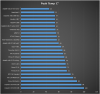
Edit: Here is also a roughly temp difference between various benchmark tests.
 Last edited: Sep 29, 2015
 -
My 3970x would hit 1.57 @ 4.9Ghz volts, and my 4960x doesn't go much higher than 1.37-8 V. @ 4.7Ghz(set to 5.1Ghz in BIOS)
-
-
Ok, but why is there a difference between recommended volts for air and water cooling? What's the difference? As I was saying: if temps are fine in whatever your setup is, why is less recommended for air? Is it a temp concern? And if it isn't a temp concern, what difference does it make for the actual volts running through the system the kind of cooler?
In other words, I want absolute specifics. I wanna know if people are just blowing hot air when they say stuff like "I wouldn't use 1.3v on air" or something. I mean most of Mr. Fox's benches have over 1.3v in his CPU and he's obviously on air, for example. But he doesn't let his temps go out of control. -
What settings are you sporting with your 3970x in 24/7?
-
@D2 Ultima. even though mr. fox can overclock high, he doesnt use it 24/7. even if one is able to run at that clock, it'll degrade and soon you'll realize CPU that can OC to 4.5ghz at 1.4v will no longer run unless voltage is raised to 1.5v.
all cpu degrade, even at stock clock, depending on how golden your chip is and how lucky you are, thats it, no point dwelling into the physics behind it that we'll never be able to control lol, plus we not gonna stick to sandy-E/ or ivy-E for 5-6 yrs anyway. in 3-4 yrs we'll prob upgrade, for being an enthusiast =)
i am waiting for skylake-E xeon unlocked ES. single socket CPU E3 1680 v5? for at least stable 4.8ghz OC on all 8 cores, or a dual socket 8 cores CPU E5 2600 v5 and hope with BCLK I can get towards 4.0ghz on all 16 cores. -
He keeps 4.3GHz minimum on all CPUs he owns; he only tries to go higher for benches. But he still uses a decent amount of voltage for 4.3GHz.
This is the basis of my question though. What's safe? What's killing-level? Too many theories floating around and nobody who has any actual answers. There's a group of serious overclockers here, so I decided to ask. I know John does desktop overclocking too and has mentioned before he has a team. -
I try to keep the 24/7 voltage around 1.3-1.36v if possible for 24/7 overclocks
My i7 870 did 4Ghz 24/7 @ 1.3v
My current 5820K does 4.5Ghz @ 1.323v 24/7 -
IVY-E has tended to have a real sweet spot, once you start going past that it goes VERY voltage hungry, for 24/7 you really want to sit right in that sweet spot to get the best experience.
-
4.3 isnt high at all, i thought u were talking about 4.7-4.9, the frequency he use to do benchmark.. if its 4.4, I have mine at around 1.38v though.
-
Many try to run the lowest voltage at a given clock frequency when running benchmark tests. But for the stable 24/7 clock use many a slightly higher voltage. Benchmark tests are not 24/7. In many benchmark tests can processor work with low voltage but it does not mean stability in use 24/7. Don't forget that a good watercooling is slightly different than an good air cooler or a simple water cooling in long term use.Last edited: Sep 29, 2015Takaezo likes this.
-
If temps are the same, why?
-
my next machine will have dual CPU if they cant BCLK to 4ghz which prob won't happen until cannonlake, imma jump for skylake-E. u should do given BGA mobile is junkTomJGX likes this.
-
Master is outside and slave is inside next to the cpu.
-
u jumping to skylake soon?
-
No answer about the voltages though huh...
-
Temps are not the same with water cooling usually though, they are much lower which reduces the voltage requirement.
-
that doesnt make any sense meaker. assuming at high frequency cpu needs high voltage to stay stable for average chips, it should be other way around. temp are much lower simply because water cooling is tad better than air given the same high voltage.
-
Not necessarily true. If you keep a CPU below 50 degrees Celsius you can achieve a lot weather on air or water, but go above 50 degrees Celsius and your CPU becomes less optimal. The higher you go in speed the more voltage is required but if you're under ln2 in the beginning you can get away with less voltage until you start going super EXTREME. Example the same chip on air Cando 4.6 gigahertz. The same chip on water can do 4.7 4.8 gigahertz with the same amount of voltage on liquid nitrogen the same chip can do 5.2 gigahertz with the same or less voltage. This is just an example. But right after say 5.3 it automatically takes a serious jolt in voltage to climb higher. Each multiplier may take 1 volt and there's no way you can do that on air or water.
No problem.
I don't know yet.
Sent from my SM-G925P using Tapatalk -
A test of Skylake... Air vs Water vs sub- zero cooling. http://gaming.msi.com/article/skyla...247-air-water-and-sub-zero-cooling-oc-results
-
so what is this optimal temp, 50c?
-
50c Celsius is a good sweet spot.
-
actually i thought about it, under load at high frequency, unless with LN its almost impossible to stay at 50C. so doesn't this mean under load, water/air cooled cpu voltage only differ tiny bit? also if temp volt related which kind of make sense at fundamental physics level higher temp = more volt used due to more leaks so does that mean people worrying about tunneling using too much voltage at lower die size isn't true, like its all based on temperature then that will reduce lifespan of a cpu, nothing voltage related.
-
People worry to much about how long a cpu will last. These aren't amd chips where you over heat once and the chip is dead. Plus intel has an over clocking warranty plus 3 year warranty.
I'll wait till tintin and vince get around to testing these before i chime in on what i think.
It's just something i have seen from benching allot of cpus on air/water.
It's like it's hard coded as far as i can tell. My test would run far better if i stayed below 50C. Just like when benching higher over clocks, that 50 changes to something lower. It's hard to explain unless you have done it a few times.
You wont be able to unless you run chilled water. Room temp is not going to cut it. People have hung their radiators out windows at night to get the lower temps for running water benches. -
It may just be the way the silicon is reacting to the temperature, but the lower the temperatures the lower the voltage required to run at any given speed.
-
My best benches start at mid to high teens (deg C) and end in mid to high sixtyies with 4960x, I can t actually get it above abt 74C, it cant take more current than that. I think that is it's hard limit, even in the middle of summer when the water cooler isn't performing as well, I have seen 76C. I am stable 24/7 at 4.5 now. I mean rock solid stable temps are idle about 22C running up to mid to high 30's C for average work load. i.e ruining every port on the machine at the same time, on three screens. ,
@johnksss is right, I like to keep my radiators right in the window sill for better performance over all. That doesn't mean its unstable, just cant idle at 20C , runs up to abt 36C at room temp of 72F. idle. The i7-3970x however would straight hit 100C in 30 seconds even on water. my stable 4.5 now(i7-4960x) is abt 1.38-1.42 volts kind bounces back and forth under load. What is really impressive though is the current(I) that is running, 10 degs C differential gives me up to 30 more amps of current though the core(at least that is what my Corsair LINK soft tells me, and I can see it jump from 68 amps to 93 amps every time the temps drop.
Also @unityole , the thermodynamics that apply to superconductors also applies to regular metals like copper and gold, it is just on negative exponential scale. Think of it like this the colder you get the less the particles move in the way of your electron wave transmission through the materials, so IT IS A FACT THAT A COLDER WIRE CAN ATTAIN THE SAME POWER OUTPUT AS A HOT WIRE WITH MUCH MORE INPUT REQUIRED TO ATTAIN THE SAME OUTPUT., period, there is no argument to be had. look it up in a thermodynamic book if you like or even a basic circuits course, the change from room temps is an exponential decrease/increase per degree temp.
If you get them cold enough the magnetic fields line up in a full oriented pattern and if you understand biot-savart , you know that lining up the magnetic field is the key to "pushing current and voltage, the more precision you have in the alignment of those fields and how they orient, the closer you come to attaining zero resistance. this is also why many people have seen the superconductor alloys "float" after they are submerged in liquid nitrogen. there magnetic fields line up in such a way to repel the minor static charges that are on the surface of pretty much everything(some exceptions), this is why they usually do a super conductor demo on a Styrofoam tray, because it is easier to keep a static charge on that materials surface....actually because it is an insulator the charge is ALWAYS on the surface it can not move to the interior, so even a little bit of static will be prolific on most foam styrene materials...
Correction : Gold may be the exception to this thermodynamic phenomenon. I am not sure if you can (other than with gamma and alpha waves) proliferate the magnetic field of gold. in such a way as to line them up in a precise orientation as with other metals for which particles can switch polarity In-Situ. as fast as the speed of light..
on another more theoretical note: this is the basis for quantum tunneling, the magnetic fields of everything around a particle determines what direction it can and can not take in its journey.Last edited: Oct 3, 2015ole!!! and CaerCadarn like this. -
With electron tunneling it comes down to manipulating the probabilistic field that the electron exists within with the voltage across the cell. Of course magnetic fields and electric fields are two sides of the same coin so it's all linked.
-
@Takaezo & @Meaker its obvious with heat particle tends to move around faster but from what you said tunneling has nothing to do with heat, but more to do with the m/e field. so technicially I can have my CPU at 90C and last a long time with same voltage/clock as long as my voltage remains 1.3v or lower? 6ghz 1.3v pls
-
There are multiple ways that chip degradation occur but the major factor is heat:
http://www.anandtech.com/show/2468/6
![[IMG]](images/storyImages/Degradation.png)
This is the kind of differences you would see. -
You used a link from 2008?
And the funny thing is, I have a e8400/e8500/e8600/q6600/q6800/pentium 4 and so on.
And all those chips still work after going through many extreme voltage scenarios.
And I think they still are at least 98 percent effective. (Depends on what it's being used for) That's over 7 years these chips have been in service and yet they still work fine.
I'm sure kris thought he knew what he was talking about in 2008, but that theory has long since been dashed. I even have older chips than that.
I have left a 5960x running on water with no pump running and what do you think happen? Nothing. That chip locked itself out at 85C and that was it. It sat there for at least 6 hours. And it still worked after that.
You need a bit more voltage than 1.5V to burn up today's chips with all the built in protections they have. And you would buy a new chip before degradation ever had a chance to set in. Real degradation where the chip has errors. At least for intel. Early Amds....Once they over heated a little the chip was doomed and then it would die out right. Not sure about today's amd since I don't use them on a regular basis.
But, this is all based on my own experience onlyCaerCadarn, Takaezo, TomJGX and 2 others like this. -
These are intel's charts based off thousands of results. Life is mostly based off temperature as shown here. You can get away with higher voltages if you cool the chip down too.
These graphs are running the chip at higher temperatures over extended periods of time and while the absolute values will have shifted the general trend will still apply today.
The way to read the graph is what voltage is required to run stock over time depending on the temperature the chip is run at (with constant stock voltage). -
Only problem I see there is that was 2008 and this is 2015. And intel chips have surpassed their initial findings.
And the best experience is personal experience. You can't get that through someone else's eyes in this scenario, unfortunately.
Edit:
Besides. More chips are "burned up" by user error than the chip giving out to degradation.... -
I also have never had any chip go out due to degradation. I overvolted the crap out of my previous i7 870 (although I did at least have it on water) and it ran fine.
I even had a Core 2 Quad reach 122C because the heatsink wasn't making proper contact and after fixing the contact issue it's still running today lolTakaezo likes this. -
extreme voltage for few hrs a day and maybe few days in a yr time, then new tech come out so you'd switch to that then no longer bench the old ones. i'd say good 3 yrs on extreme condition 24/7. i remember my sony vaio T5750 or w/e its called pretty much useless now after 4-5 years of use at high 80-85C, even though it still works, overheats too quickly.
-
that ^ is what i wanted to know, but tbh i wouldn't be surprised these CPU are ES samples that are as good as xeons to show what their cpu is capable of, after all they are a business and have to put out great results.
@johnksss what sort new protection have intel put in place on newer chips? -
Try the chip in a different system and it more than likely will not overheat. You have to use more than one source to figure out if the chip is bad or not. (Speculation in your case of course)
New protection? Not sure if thermal protection would be new, but you can't just burn the chip up letting it overheat. Although you sure as heck can burn one up setting the wrong voltage and attempting to boot. (Example: 1.8V) Not so easy with laptop chips since they are pretty much locked out to a certain point. And they need more than just vcore to to overclock past a certain point.
You can always get a new chip and test the theory? If you in fact burn it up, intel will replace it under the overclock warranty.
http://click.intel.com/tuningplan/purchase-a-plan
Get you a setup and have at it. Just let it sit there ( no fan running) to see if the chip burns up or degrades from extreme overheat. I already did it with one of my 5960X's (Not intentional).
*** Official Clevo P570WM | P570WM3 / Sager NP9570 Owners Lounge ***
Discussion in 'Sager/Clevo Reviews & Owners' Lounges' started by jclausius, Feb 5, 2013.