 Problems? See this thread at archive.org.
dont have one, but planning to get one so just doing some research lol. i looked around and looked at notebookreview barebone came with killerN1202 which has bluetooth/wifi combo, same with intel wifi/bluetooth combo card. so i guess for those who only have wifi function they dont have bluetooth at all.
-
@unityole , You can order this with two SEPERATE modules one dedicated blue tooth, and one dedicated wifi, OR you can get a single combo card that does both. I have the Killer 11xx wifi card, and there is a stock blue tooth(non killer) that I have. There is no driver for the separate blue tooth(although you can accidentally install an intel driver over it, however if this happens nothing will work correctly.
Because of this issue with drivers, I wish I had just bought the combo card to begin with, that way there would only be one driver. I am not sure about the rest of the peeps out there but, when I have Bluetooth enabled I loose my wifi, or the connection is really shoty. The regular blue tooth intel module will install the correct driver as soon as you turn on your Bluetooth device. If it can not be seen there is a setting in the BIOS to enable it.ole!!! likes this. -
I have the Killer 1202 in the Panther, M18xR2 and Alienware 18. I used driver-only INF installation for WiFi and the Killer BT driver package. This module is combo WiFi/BT and it works excellent in all three machines. I recommend that one, and they are very inexpensive to purchase on eBay.
-
It's either that or an Intel 7260AC (mini PCI-E variant as it comes in M.2 too).
Takaezo likes this. -
thanks for the answers above.
just a thought this is something prob @johnksss and @Mr. Fox would know best due to constant benching. gpu just like memory directly connected to CPU any loads would affect CPU greatly so temperature increase and would need more volts to keep an overclocked cpu stable, i guess biggest difference between the two would be GPU runs off pcie lanes and memory doesn't? although something similar.
intel xtu memory test is one i use as my standard stress test i find it more stressful than xtu's cpu stress. memory stress test would have higher temp and usually requires more voltage to stay stable, then finally theres prime 95 imo it's overkill.
what do u guys find when doing GPU stress test would require a lot more voltage than intel xtu memory stress test? -
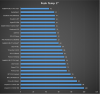
An ok indication of the temperature differences between bench tests. Can not remember the hardware that was used.
 ole!!! likes this.
 -
does peak temp means more voltage requirement? half of these software on this chart is overkill and majority user will prob never encounter them maybe once during entire 3-4 years of usage unless they purposely stress them. its good to see prime is up there as i use it and stress/bench from xtu is near middle. usually i use xtu memory stress pass a test then i add 1-3 more voltage value just in case prob being paranoid.Papusan likes this.
-
Yeah. I assume that you must have some higher voltage than required if you don't have a golden chips on the toughest tests

-
I do not stress test my parts. What for? I only bench my parts then run them at stock afterwards....
-
Stress tests can need more voltage to remain stable yes, it depends if they hit a certain part of the core that has the weakest transistor in it (will vary chip to chip).
-
Or a lower temp threshold to remain stable at a certain voltage....
-
Indeed, water cooling does have that large enough temperature drop to help even at the same voltage
-
Just talking colder temperatures in general since most laptops are not water cooled. 4.5 gigahertz might take 1.45 volts to run at room temperature, but take the laptop outside and you are able to run at 1.42 volts. All CPUs have an internal temperature range that allows them to operate optimal. Which has nothing to do with the temperature you see using software-based temperature monitors. But that's a whole nother story...
-
so during your benching, do u use more volts with CPU/GPU bench than intel xtu stress?
edit: does anyone know if this machine takes 2133mhz 32gb ram? i'd think it does if its ivy cpu..Last edited: Mar 30, 2016 -
-
dope, just what i needed, its ashame the 64gb project halted because no info from intel.
-
Intel benchmarking test is able to pull the most watts out of any cpu it benches. This test will in fact, use the most watts in that scenario. More than wprime155-203/cinebench/normal prime95/linx or any other. Now making it through any of these does not guarantee you to be stable for say the next test inline.Although linx is the respected one for memory testing. And prime95 blend for cpu and memory.
We also do not rely on every word intel says....If we did that.... No machines would have anything above 1600 mhz and would barely be getting to 4gb slots....
And it also depends on the memory you are running. Most should run factory, but there might be some that need a tweak in it's settings to run that from stock. And you would need the unlocked bios also if im not mistaken.ole!!! likes this. -
would this fit http://www.ebay.com/itm/252329007561?_trksid=p2060353.m1438.l2649&ssPageName=STRK:MEBIDX:IT
rofl 15c/30t turbot all core to 3.2. 37.5 MB lvl 3 cache. -
Check with Prema on that one, just remember it is technically illegal to sell engineering sample CPUs
-
If they cared that much they would just buy the chip themselves and then prosecute.....
temp1147462323 likes this. -
Perhaps, but it's worth being extra careful.
-
Actaully, no it's not im afraid.... Since intel is the one leaking these chips to a degree..... And the other avenues these chips hit the streets.
-
Careful in terms of the stepping and errata associated with them, who is selling chips they really should not and the lack of warranty are things you have to think about compared to retail chips even if intel is not going to go after you.
-
People who buy es cpus know what they are getting into so no need to give the "be careful speech"
Most also understand that there are no warranties involved and the other small portion try to play the dumb role to get reimbursed because the chip did not perform as well as they thought it should have. Or try to turn someone in as an afterthought because they can't get their money back. Yet they still bought an ES cpu which is still a crime. Not sure if anyone ever thought an ES chip was a retail chip. Not really understanding that one.... Also some oems have passed off es cpus in production systems, yet did not go to jail for this. As to whether they knew or not is debateable. Since not all cpus are stamped with ES on them.
It is always best to buy a retail or oem tray cpu if you want warranty and the piece of mind that your cpu has passed all testing and has been certified for public use. That has always been true.
You would be surprised as to how some people get these chips and it has nothing to do with stealing them.....
Side Note:
just installed the 1300mbps wifi card and it seems to work fairly well. Average speeds of about 80MB. Will see if I can get that speed up some....Last edited: Apr 1, 2016 -
in which machine and what card is that?
-
Is it a broadcom wireless card? I know they have one, though I can't remember the model. I know the Intel and Killer ones I've seen cap at like 867Mbps (depending on the model).
-
P570WM3
http://www.ebay.com/itm/262183332705?_trksid=p2060353.m2749.l2649&ssPageName=STRK:MEBIDX:IT
http://www.ebay.com/itm/281963506281?_trksid=p2060353.m2749.l2649&ssPageName=STRK:MEBIDX:IT
And it's capped at 1300 Mbps. Initial testing shows an average of 70MB to 80MB (Somewhere around 640 Mbps Max) data transfer rates with no tinkering.triturbo likes this. -
1300Mbps should cap at around 160 MB/s. does this come with bluetooth though?
edit: nvm the sticker label on pcb or RF show it does
@johnksss why would we need the extender cable in p570wm? we only need the card itself, machines got 4 antennas already by default -
Most but not all people, they just see the model and the fact that it is cheaper for engineering samples. So long as you as the person is aware then fine, it's not my place to defend Intel but a reminder does not hurt.
-
You're going to need to show me where you have seen someone actually do 160MB/s on wifi. Because I have never seen that as of yet. I only reference the 1300 or 1.3 gbps because that's what it connects at to the router.
An extender cable? What are you talking about? That is not an extender cable.
Im around way to many people that do this. That's why. If people want to know the risk I let them ask since that would be like one of the first things they ask. Only people interested in ES chips are mainly overclockers looking for unlocked cpus in their class. Example: Like an I5, with ht enabled before the retail version comes out with ht locked. And multis locked. A Lot of es cpus have features enabled that the final products do not. The average person is not looking for that sort of thing....but maybe a handfulLast edited: Apr 1, 2016triturbo likes this. -
Looks like a sweet upgrade if you can get it to work.
-
Get what to work?
-
I got my 8260 connected via my Asus router now, i'll have to see if I can test it
-
Now that would be good. The fastest I could get my 866 one was and average of 40M to 50MB with a burst of 60MB. I was using a 7 gig file for the test.
-
When I get the chance i'll wire in a different machine and do a transfer across.
-
I was just glad it was faster than my last one. I think im going to upgrade all my laptops to this one. That way they will at least be updated to 1.3Gbps on the home network.
-
8bits in 1 Byte. 1300mbps ~ 160MB/s in theoretical value. the extender cable from the link you posted links to ebay. ipex connector extender, the mini card has 3 ipex right?
-
I seriously thought this was easy....I guess I was wrong. So i'll explain it.
1: You can not get 160MB out of a 1.3 gigabit wireless connection. This is a fact. So we try to see what real world speeds you can actually get. So far I have seen that this card go as high as 97MB
2: IPEX-4 IPEX Gen4 UFL Female to IPEX-1 Connector Jack Male Pin For BCM94360HMB. Nowhere in there does it say extender.
3: The BCM94360HMB has a smaller connector that our laptops do not use. so the IPEX-4 IPEX Gen4 UFL Female to IPEX-1 Connector Jack Male Pin For BCM94360HMB is to convert the connecter to the right size for use with our laptop. I saw no need to take my screen apart to rerun 3 new antennas to connect the new card.
I hope this helps....triturbo likes this. -
so the rating of 1300mbps is just their lab test result? whats the reason why it can't hit 160MB/s due to interference, given if your internet connection speed is over 1300mbps. ipex UFL female to male, i just call those extender cause if u add those in basically ur antenna goes longer, also i took a closer look of that module compared to other wifi module, the IPEX is indeed smaller.
ipex cable i use that in my m18x r2 mod as i dont use mini pcie wifi instead i use the usb mini pcie port for usb wifi, and originally antenna isn't long enough. -
So the rating of 5 gbps is just a lab test result for usb 3.0? What's the reason why it can't hit 625MB/s due to interference, given if your bus connection speed is over 5 gbps....
See how that plays out? The best i could get was 350MB and that was with a macbook pro. And the macbook pro was able to do that using thunderbolt and onboard usb 3.0. Windows is lucky to even hit a 220MB, then sharply falls into the 150MB range.
Numbers on paper are just that. When it comes to these machines. This is why we spend so much time testing them to see exactly what they will do. To take the guesswork out of it.
As to this extender. My antenna does not move, it's already in the screen. All 4 of them. And it's not a UFL female to male adapter. It's a IPEX-4 IPEX Gen4 UFL Female to IPEX-1 Connector Jack Male Pin. The key words here are IPEX-4 to IPEX-1. Does it add 2 inches to the overall length....Sure. Is it called and extender. No. Can you get an extension from IPEX-1 TO IPEX 1. Sure.triturbo likes this. -
isnt the 5gbps was without to 8/10 overhead? and then theres driver causing the reduction of speed so generally we get close to 400MB/s. now 1300mbps since it's x79 and i'm assuming its gonna be pcie 2.0 hence the same overhead shouldnt we still be capable of going more than just 64MB/s? plus pcie 2.0 has less overhead to deal with than usb.
there are usb 3 devices capable of going over 350MB/s though, m18xr2 got a good usb 3.0 if theres a fast enough device to take advantage of it.
btw this new module, theres only 3 ipex but theres 4 antennas for this laptop which i think 1 is for BT im assuming their original intent was to use all 4, all of the card ive seen come with this machine got just 2 ipex or 3 ipex in total. this module also come with BT is that the middle ipex connector?Last edited: Apr 2, 2016 -
It's the same thing as with PCI-E and the 4x limit between chipset and CPU, you never get that full bandwidth due to transmission overheads and such.
ole!!! likes this. -
-
To the PSU question, two options (in my personal opinion here), a slim as possible brick that handles the top spec and then the option for either a 2nd brick or a huge brick to extend beyond that.
-
meaker, do u think theres any hope clevo adopt another HEDT CPU in laptop? unless of course intel decided to change their cannonlake consumer 4c limit to 6c and HEDT becomes 8-12c
-
Never say never but it depends on a lot of factors.
-
I think you may be putting far to much energy in the wrong direction with this....
-
so whats the quick way? everything times a percentage?
-
Accept real world numbers over paper....
Otherwise.....you'll just beat yourself up trying to calculate the answers to problems that no one manufacture can really prove. And the ones that can prove something is very very very small.Takaezo likes this. -
heh, thats what i like about electronics.
so on another story.. i decided to purchase p570wm off a friend of mine and help him upgrade his desktop with the existing 3960x he had in his machine as i am going for what brother johnksss has inhis a xeon or at least a 6c version of it from ebay, in hope to get a gold binned chip.
gonna need a list of things, cosmetic fix laptop palm rest and lcd cover, wifi card that comes with bluetooth + wifi etc. a xeon and waiting for new GPUs. anything else i need to take note of?Takaezo likes this.
*** Official Clevo P570WM | P570WM3 / Sager NP9570 Owners Lounge ***
Discussion in 'Sager/Clevo Reviews & Owners' Lounges' started by jclausius, Feb 5, 2013.


