 Problems? See this thread at archive.org.
k i'll give that a try
-
Just like I predicted, Samsung 840 pro's in RAID 0 dead on boot. Had to spend half a day to get them reformatted and booted to last restore. I am not sure I will ever use a disk benching tool on this machine again. There is no coincidences here after predicting it, and it happening on more than three other devices, all within 24 hrs of using a tool like disk mark or HDtune. Also using different disk benchmarking soft and time frames spanning a year or more. What gives? Is there a reason that this KEEPS happening? @Meaker@Sager , @Mr. Fox , @johnksss , @unityole , others-
Thanks -
i have used hdtune for a long time now and dont have any problem, i use atto.
-
Define dead on boot. When you boot and the raid screen shows up. What did it show in that window?
-
No resistor for MSata, only capacitors C927,C928,C929,C930, C324,C335.ole!!! likes this.
-
@Takaezo , I have the same config on my device, 840 pro on raid 0, and never used any tuning software, however the boot problem happened to me too. not only the boot, the whole partitions were gone. I've got back the data, no worries

-
guess its a hidden problem with the 840 pros?
-
Widi. Only now it's called wiGig since they upped the speeds for it....It would seem.
http://www.wi-fi.org/discover-wi-fi/wigig-certifiedSolariseir likes this. -
Possibly an odd firmware conflict, I only ever had a failed array when using some of Prema's early files but that was with OCZ vector drives.Takaezo likes this.
-
This is not an 840 issue, This has happened repeatedly on 4 other devices completely different devices(as I have already stated). It always occurs following a disk benchmark test (any of them!). Dead on boot means that the boot sectors are corrupt and the data is there it is always reverted to raw, and you can repair the partition enough to get data off with testdisk 7.0, but you can not repair it enough to keep using without wiping and reformatting, drives external HDDs, SSD's internal SSD HDD , doesn't really repair completely(enough for it to function correctly.
Here is where I am at with 4.6 (touches 4.7 occasionally) GHz OC. abt 1370 XTU. (my current most stable config).
-
Recently, I wanted to try a different way to overclock my K5000m GPU's (since EVGA precision X crapped the bed on us). I surfed for a while and I found a link to NVidia Ntune for XP, I installed it and something very strange happened. First, it installed two a new (older version of an Nvidia Control panel) icon, this CP is dedicated to tuning GPU and has no other options on it. Now I know this may be old hat to some others who have GTX cards; but Quadro is a different (albeit similar enough to install drivers on). So I have never had any of these options before except for the Nvidia inspector GPU OCing app.
Any ways the very strange result was a entire new section called performance in other(primary?) Nvidai Control Panel. Here are the pics.
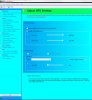
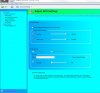

Of course the idea of OCing a Quadro in the first place is only due to the extreme skills of others around these here parts.Last edited: Apr 18, 2016 -
There used to be an add on overclocking option in the nvidia control panel that was discontinued due to third part programs offering better support.
-
I would try a different bios.
-
Indeed, what BIOS versions have you tried?
-
Hard to say. I know a few of them killed raid for a bit, but prema and i worked it out in the end. Some people may still have one of those versions.
ole!!! likes this. -
It was a version of the 5. When did you download that version?
-
Looks Like I am using one with most recent files dating from Jan 2015, The file sizes and dates match the most recent version posted @premamod.com.
Last edited: Apr 20, 2016 -
I think I will re-flash just to be safe next time I restart, unless there is a newer version that I am not aware of? @Prema?
Here is a list of the files on my Boot stick
-
Did you try downloading just the bios file. In other words. Go download it today and flash it sort of thing?
-
-
Then that would mean it's the wrong bios. The correct one doesn't need to backup files. It flashes as intended
Takaezo likes this. -
No I didn't flash it yet, I was just comparing the files that I flashed last complete install, to the ones that are online and checking the file sizes and dates to see if they are different in any way. @johnksss , I am sure Meaker is just being cautious reminding me to back up system before flash in case something "is" bad wrong. Also I have only copied the BIOS PMv5 files. The other files in that picture are formed (as I think you know well) when the stick is formatted with rufus. I will flash later tonight though, but I am not sure how to tell if it made a difference except to try and "accidentally", kill a disk/drive or USB stick. Seems like its catch 22, if I try and it kills the disk again. I am right back to the same place I am now. I still need to be able to check my transfer speeds to make sure they are working correctly.
-
I was under the impression that you already had a backup from the last set of crashes....
And the file sizes will be identical since the change falls under the normal size of the file.
But i do understand his concerns for you.Takaezo likes this. -
My files get moved and updated frequently. It would still impair me to loose newest file from say the last month. However since disk benchmarking exploded the boot partitions on my largest back up, it would see that the 60 plus hours of recovery for that 4TB drive would not be worth its price or trouble. Seems that at least testdisk7.0 from cmd prompt is one of the only GPT recovery soft that works(at least for me). I tried three other recovery softs including paragon, and they would see the drives but could not read files on them and then they would disappear. I ran one professional program i~care, it scanned the drive for 74 hours before it told me that the sector sizes and the GPT format could not be read. If you use the testdisk7.0 and your successful, there is a donation link on the download page. Its worth donating for the considerable retrieval job it does. imho
-
Oh, i don't really have problems recovering files from most corruption. It's part of what we do for a living. Just had a server get hit by ransonware and recovered from that as well.
The smart person in this situation would pull all drives but one with just an os on it. And then investigate what the problem is. Flashing takes all of 1 minutes. And recovering from a base os is 20 minutes. Installing a new os on a ssd is 15 minutes.....I guess what it boils down to is if you have the extra drive and time to find out. And waiting 74 hours seems like you have time..
-
Finally got my NP9570 back from repair. Working great. This thing really is a beast next to my GE60.
The power jack feels a bit wiggly though. I imagine that's more of a safety feature in the event that it gets abruptly tugged, it falls out instead of damaging the jack. Might make a block to give it a little support, as I do a lot of work on my desk that requires shuffling tools around and any movement of that thick cable makes the power jack shift.
Now that it's all good and running, the only strange thing I've noticed is that sometimes it will beep 1-3 times intermittently. Usually once per session of use, shortly after turning it on. It seems to be followed by the GPU fan spinning up the first time and/or the HDD spinning up (the drive is set to sleep after ~1 hour), but that may be mere coincidence. Is that something I should be concerned about? -
@GammaBreaker, If your getting beeps from the Computer itself there are several different things that could be causing this. First check your fan pin headers. The most common (because those suckers are so small )problem is they are not plugged in all the way or at all (there are four three pin headers and one two pin H-Sink block temp header. There should be no beeps (ones for which the numbers lock buttons flash simultaneously) at all occurring on your system.
GammaBreaker likes this. -
@johnksss , well you may be a super human drive guru, but I wonder how many times you have installed a full complete version of Adobe Suite , a full master builders autocad suit. those program files are 300GB+, just the program files. Exactly what software do you recommend to retrieve data from drives that only read as RAW and for which are formatted at 128KB sector size in GPT, and there is no boot partition?? I would love to know, because I searched all over for one that works on windows 7, and there was only one that worked. ??
I image your answer is going to be LINUX based.
Also A BASE OS is completely unreasonable to restore to. It would take another 16 hours to install all the software....IF everything worked correctly the first time. -
I'll take a peek under the hood after work. I did notice when installing the replacement secondary CPU fan that those headers can be a little tricky to get at (and in). Perhaps the others aren't seated all the way.
When it was beeping at me, I unfortunately didn't catch whether or not the lock LEDs were flashing. My peripheral's pretty bad from some nerve damage, so I'd have to be looking right at it, and of course it's random and brief.
Learned the hard way that the system has a shutdown failsafe when a fan isn't plugged in though! When the secondary CPU fan finally bit the dust, I figured I'd unplug it and watch the temperatures without it. Temps were fine at idle, but then I learned that it will shut itself off anyway. Whoops. -
john doesnt know how to cook though @johnksss
-
@Takaezo
I had this super long explanation, but decided to scrap it...
All i was asking was for you to test something so we could try to figure out what was wrong. Sorry We wasted each other's time. -
Fan leads and temp lead were all plugged in nice and square. I'll try to keep an ear and an eye on it.
-
My digital footprint is less than 1tb which sometimes makes life a lot easier
Papusan likes this. -
I can see how that would be a bit trickier to work with
-
yea man sometime its a headache because i dont got 10-20TB of HDD. plenty of 6/8TB drives and constantly backing up.
-
Quick question: I'm on BIOS v1.0.3.6aLS2, and about to update to Prema's v5 for the model.
It's on AC power right now, but since the battery on this is screwed in, should I remove it entirely before flashing? I have to pull the AC for 30s after it shuts itself down, so does leaving the battery in interfere?
I've got an Ivy-E in it, but that's supported now, from what I've read elsewhere in the thread. -
Thanks. Up and running on Prema Mod now. :]
-
Technically to do an EC reset you would need to remove the battery yes, if you get any odd behaviour then do that before trying anything else.
-
I'll keep that in mind, thank you. So far, so good.
-
It's mostly precautionary to stop Prema getting a ton of emails saying it's not working properly
He gets enough as it is.
-
u guys got a problem of computer randomly shuts down after restarts? after i put 1680 v2 in im getting couple of problems such as self shutting down at boot up, at idle and sometimes it stays on for awhile before shutting down. one of the thing found to prevent shutting down is to use my backedup image from m18xr2 i guess something to do with my power registry cpu tweaks.
aside from that, another bigger issue i got which only happened once but it was a pain to deal with. computer would black screen & only boot with 1st and 3rd slot memory in the machine while 2nd/4th removed. i had to reset many times with cmos didn't help and somehow after few hrs i got it to boot with all 4 sticks but im wondering if its the 1680 i got causing me problem. back in m18x i recalled had once 2920xm would only boot with 1 GPU and only detects 1 stick of ram... maybe brother @johnksss would share some advise. -
What clocks/timings are you running the memory at?
-
1600mhz , not overclocked too.
-
@johnksss,
I wansnt trying to be rude(maybe a little sarc), I flashed the BIOS has been stable for several days now. I hope that was the issue. Is it possible to corrupt the BIOS in someway, i.e. overclock?
Thanks, again sorry if I came across rude or unappreciable. I am just frustrated starting with the stupid EVGA precX deboggle, then loosing my main back up after doing several disk benches, having to recover it all and then the issues recently that we have been discussing regarding drive recovery/ system backup images.
@unityole ,
Sounds like you have several different issues going simultaneously. I have only had RAM that didn't register when it was not quite in the slot 100% properly. But may be due to memory OC as was suggested.Last edited: Apr 30, 2016 -
the ram itself is probably fine, cause machine came with 3960x and didnt have any problem. my guesses are either the mobo/cpu due to fact that i have experienced something similar back with 2920xm would only boot with 1 GPU and 1 RAM stick where as a 2720qm was able to pick up both GPU and 4 sticks of ram etc etc. its rare to see cpu get issues though.
since 1680 v2 is too expensive and i have got it working right now with 4 rams of stick, im gonna try getting a different mobo see if that does anything. 2nd mobo is also for msata purposes.
if only i can land on a 1680v2 1.15v 4.5ghz. excellent temp with great speed.Takaezo likes this. -
@unityole ,
So you think it might be a CPU driver conflict?
I was thinking about the idea of purchasing a mobo by itself, and then modding it with the M.2's and maybe a few other extras, then design a case out of clear lexan or the like. A transparent acrylic would be nice. In this way one might be able to create a machine that, for example, has a larger or greater res screen etc. Mounting discrete boutique water blocks. or deciding to do something like @triturbo did in his custom water block mod. -
that would probably be way too much work lol. although if i have the money and time i wouldnt mind pour it all into it, but still one biggest issue is chassis design, dont got a good 3d printer capable to make a great quality chassis thats big enough for it.
also cpu driver? -
Perhaps a socket issue? If the pins are not making perfect contact it could cause issues.
ole!!! likes this.
*** Official Clevo P570WM | P570WM3 / Sager NP9570 Owners Lounge ***
Discussion in 'Sager/Clevo Reviews & Owners' Lounges' started by jclausius, Feb 5, 2013.


