Problems? See this thread at archive.org.
Stop using Furmark. Soon you will Kill the rest of the graphics cards lifespan @Phoenix
Rather test with Heaven or 3DMark (FireStrike).
-
-
I'm just trying to stress test my gpu to figure out if its indeed the GPU that is faulty. Not even OC'd, I already stress tested cpu and ram so its not those. But, I've never had a power issue like this where the charger either dies while being plugged in or pc just doesn't power on until I unplug/plug in my charger.
-
The only you will manage, is frying your graphics. Use posted tests.
-
Well, I ran Heaven and still same results. I get 80-100fps, 60*C, crashes in 10-20 sec. Gotta unplug/plug in my charger and it starts up again.
-
Thanks! Took me forever to find the service manuals for removing the KB, but I finally got it!
While I was digging through the chassis I noticed I could remove the video card... What form factor is this card? I'm wondering if I could possibly upgrade it in the near future. It runs Destiny 2 pretty well, but it would be nice to run at higher graphics.
Second question,
If I hook up a g-sync display to one of the display ports (I don't own one yet but want to get one soon) will g-sync function on the external display? Or is g-sync strictly locked to the laptop LCD? -
You had same problem before you changed thermal paste or right after?
-
Before but temps were way higher, maybe 70-80 average.
-
Gtx980M is known to die. Perhaps a matter of time. If I remember correct, @Mr. Fox have seen it on 2 or 3 of his 980M. He is tagged maybe he have an idea.
-
In that case, I'm wondering if I should just get a 1060 instead. I mean, I'd like to have g-sync but that doesn't really matter if performance is better and less risk of my card dying. But, finding a card is gonna be hard, I guess. Don't have much cash to spend on cards anyway. I'd also like to make sure it is indeed a GPU issue before getting one and finding out its something else entirely.
-
Two of my 980M died before too. I think those and the 7970m were the least reliable mobile GPUs I've owned. No issues with any other models.
Papusan likes this. -
I would be sure I have a clean new Windows install with proper drivers. Take out the graphics, clean graphics + MXM connectors, then apply new paste and see if pads is in good shape +(correct placed on gpu). Then se how it goes.
-
Only thing sort of fault I noticed was one of the screws was on real tight, stripped the screw almost entirely but it's been working for a long time just fine. I'll take out everything and clean it up and see what happens. Again, I don't think its driver related, I think its hardware, specifically electrical. And I'm worried that switching gpu's won't do much.
-
I tag in @Khenglish Maybe he have some advices. He is good on this.
-
Furmark is not stress testing your GPU. It's frying it!
![[IMG]](images/storyImages/nRtkmIB.jpg)
Out of all the benchmarking and stress testing tools out there like Fire Strike, AIDA64, wPrime, Cinebench. You pick the worst one that has fried many people's GPUs. (Google it)
![[IMG]](images/storyImages/giphy.gif)
-
All the times I've used it before with other benchmarks, it has never caused issues like this. Sure, artifacts and crashing due to overheating. But I'm always safe with voltages. And if it was the GPU, it was fried way before I launched furmark anyway, just a way to try and confirm its indeed the culprit.
-
it's your computer, do whatever you want to it
-
Wrong way anyway. Read also this. The big letters!!
-
Yeah, not the best of ideas, I know. But like I said, it was crashing just playing regular games on pretty medium settings, haven't run any benchmarks except the ingame one for siege at all this year before I noticed the crashing.
-
It seems to be fine as long as I keep it below 30% TDP. Been playing some games for 4 hours without a crash at 835 and 2000. Still, thinking about what card to upgrade to. I haven't heard or seen anything from Prema in terms of a vbios for the new 10XX series. So, still debating what card would be worth to replace my current one.
Last edited: Nov 5, 2017 -
You must have been really unlucky, my 7970m worked so well even at high temps of 120c on my msi gt780dxr whilst playing crysis 3, rise of the tomb raider and even gta 5. IT DIDN'T EVEN THROTTLE LOL! I used it for 3 years and sold it, with no problems whatsoever! It was an msi card though not a clevo one. I think MSI mxm cards consist of better quality components than clevo ones, all MSI cards I had NEVER failed on me, 7970m, 970m and even the 980m. Even with extreme temps and extreme overclocks each card worked fine. I might have been lucky but I think mxm graphics cards are usually quite reliable.
-
Also I want to know why there is power limit throttling on my 6700k, why is it limited to only 4GHz? Do I need the prema mod bios?
I have a Clevo P771DM-G. -
What do you mean by crash? Freeze? BSOD? Artifacts? Black screen? When a PSU is overloaded it should shut down and the system will continue running normally on battery. Additionally a GPU crash can cause a large power spike and shut down a PSU near its limits. What wattage is your PSU?
It sounds like the GPU did an emergency shutdown. High power draw can do that, even at stock clocks and voltages. This is normal behavior for a 980m that did not have the 3 empty FET pads filled in. -
Just a freeze and emergency shutdown I guess, no BSOD or artifacts prior.
It never used to do emergency shutdowns ever.
So you are saying I need to fill in my mosfet pads and it should stop? -
No, you seem to have a different problem. When a 980m have power FET problems they will power off and black screen, but this should not trigger a power supply shutdown. I'm thinking your 980m has a BGA problem. You are running with a battery installed right?
Can you try the stock 980m vBIOS? This will have the power limit in place, which should stop the PSU from powering off. -
Yeah, but I took the battery out and same issue. PSU doesn't always power off though but it does happen most of the time.
I'll try and get the stock vbios but prema website is offline. Don't have the file on hand. PSU is the 330W one but same issue was happening on the lower watt one too.Last edited: Nov 6, 2017 -
Unless it detects a short at the input.
-
Hmm well, after clean driver install and everything else, most recent crash all screens go black, PC keyboard and lights stay on, I can still hear audio from the PC but power light is orange and starts to flash.
-
Recently had the same issue with a GTX 980 in the p87, black screens under load resulting in shutdown and orange flashing power LED. Card died 2 weeks later, your 980m is possibly on the way out (sorry to say)
-
Yeah thats fine. Glad I'm not the only one. Thought it might be an even more serious issue and might need to get a new laptop instead. At least this way it's not upwards of $1k. Still wondering what card I can put into it instead. New 10 series is reliable right? But no g-sync support or availability of vbios yet. And the 980 won't fit, pretty sure. So its just being stuck with the 980m again?Last edited: Nov 7, 2017
-
ideally you would want to source a spare MXM card which you can swap in to 100% confirm its the 980m playing up.
In terms of options, 10 series or lookout for a deal on a 980m new or used(roll the dice going second hand - like I did) or a 970m which are great value for the outlay. -
Yeah, unfortunately, don't have any way of getting another mxm card in so just gonna have to bet on it being the card itself. If not, well f me I guess. Still, gotta find a card in the first place. Hopefully I can still keep using this card for a bit longer but crashes are more frequent so I doubt it. Really wanna get a 10 series in my system but again, I have no idea if anyone is gonna make a vbios anytime soon. Prema hopefully comes out and surprises us again with the Prema magic.
-
Wait wait wait wait.
Forgive me, that i have'nt fully read your posts. Did that in haste, and don't have much time right now, but.... After 5-6 months, my p771dm-g (980m) started to act up. Sometimes it works fine but usually once in a day it shuts down, when gaming. It started to do that more frequently in the end, although somedays it was fine, so i gave it into warranty service. It was a faulty adapter... think on it, changed that and everything works. I game much and 980m works ******* fine. Food for thought. -
Okay hello everyone. I have six more minutes to spare (i'm in a bus) and because i don't come here very often, i thought i'd share some fast thoughts about my p771dm-g (6700k - 980m). After one warranty, everything works fine as hell. I have owned it for 21 months and temps have gone a little up. No cleaning has been done yet. Initially i had -150 core voltage in the intel xtu, but sometimes fallout 4 started to freeze my pc,
needing a restart, so i changed the value to -75 and now it works fine. Every other aspect (keyboard, jacks, screen, everything) works fine.
Hell of a fine pc. Could somebody tell me straight up, is it possible, to install newer and better mxm card or not and if yes, then which card. -
Hi guys,
Just want to ask does the p770dm-g/p771dm-g support a 4k edp panel after a connector change with the p775dm-g 40 pin 4k cable. Is this even possible.
Please answer, please. -
Yes you can put a gtx 1070 msi version 1.0 in the system. You need to replace the capacitor in the way with a smaller one and have to remove the m.2 connector. It is worth the upgrade.
If you want upgrade details contact me. -
I already got a new charger, a 330W one. Unless, thats now what you mean by adapter. Still crashes, it's not the issue.Last edited: Nov 8, 2017
-
If anyone needs a gtx 970m g-sync mxm like new with the original vbios let me know. I will be putting it up for sale with the back vram heatsink.
-
It does sound like a power issue somewhere internal to the machine to me.
-
Well, if its a power issue, its only related to the gpu and not the cpu side. As soon as any amount of stress above 40% TDP on the gpu occurs, it will most likely crash.
-
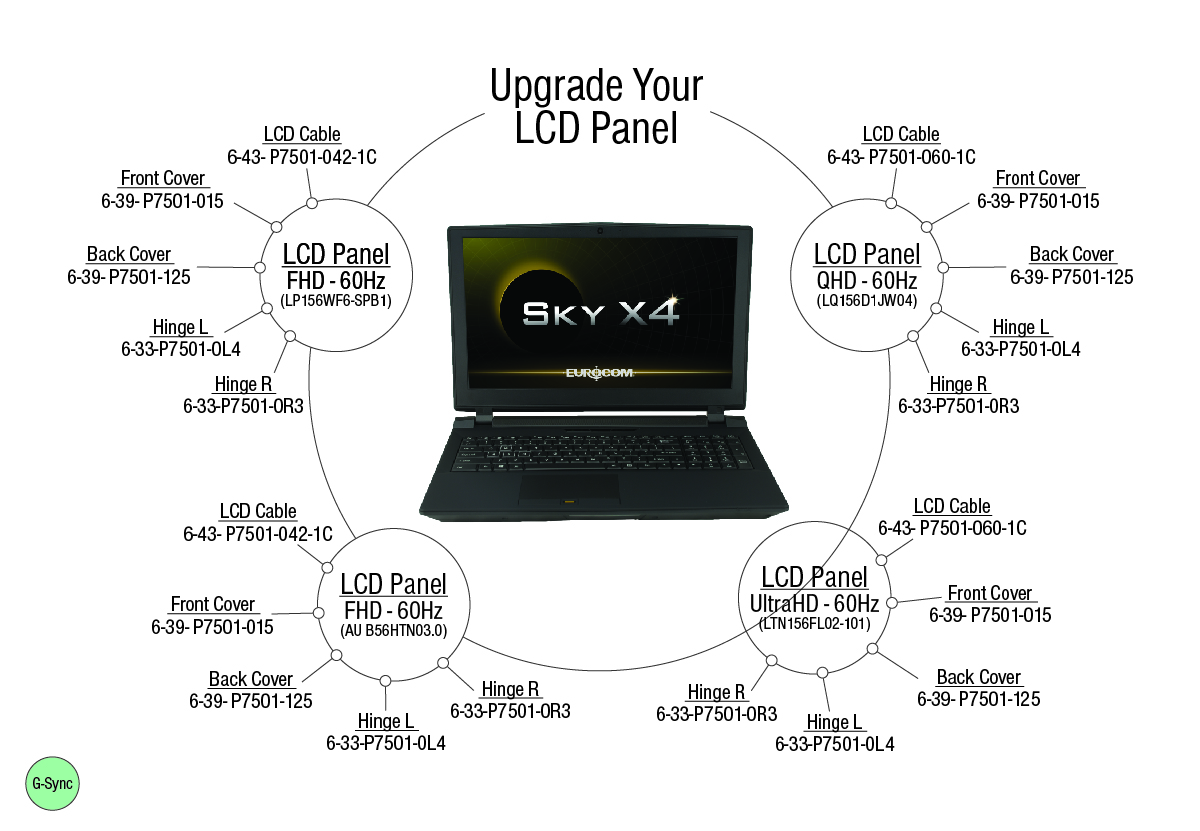
Check our LCD Upgrade Chart / attached.
Attached Files:
DaMafiaGamer likes this. -
-
We are planning to review this week both P750DM and P750ZM models as far as GTX 10 series support is concerned. Both models are dGPU only based laptops so you would need eDP panel in order to use GTX 10 series.
benson881 likes this. -
This is for a 15.6'' screen I am looking for 17.3'' or is it the same connector for 15.6'' and 17.3 4k panel''?
-
Check our website Upgrade section - there are LCD upgrade charts there for other models.
-
I can't find the same type of image anywhere please help. My model is a clevo p770dm.
-
@Eurocom Support it will feel like a waste upgrading my laptop to a gtx 1070 with a 1080p display panel, what would be the point in that? FPS are already at 60 with the 970m overclocked on most games.
-
I have a year-old-ish P775DM3-G and was wondering what kind of GPU temps people typically see? I feel like I ramp up to 90-91C and then plateau there (presumably it's throttling) pretty easily. My (-140mV undervolted) CPU seems to peak at ~80C, and that's only when I'm really pushing it, which seems a bit warm but not bad.
I generally run my control center on the Automatic fan setting just for noise purposes, but even switching over to Overclock it tends to get there if I'm playing anything really demanding. I run on a hard surface with the back feet propped up ~1cm, typically in ambient temperatures around 70F.
Is that sorta par for the course, or is it worth looking at repasting my GPU? Anything else I can try? -
@Georgel What GPU temp have you?
-
Pre-sending it back to repasting, I can reach 91C right now. Those are not normal temps and it needs repasting when this happens.
-
Have you tried overclocking your display?
-
Hm, good to know. It was original pasted with Coollaboratory Liquid Ultra which I've heard is kind of a pain to deal with. I'm happy to repaste myself and really don't want to deal with sending my laptop back to Mythlogic, but I'm nervous about actually getting it clean and not shorting something out trying to get the conductive paste off.Georgel likes this.
*** Official Clevo P75xDM and P77xDM/Sager NP9758-G and NP9778-G "Batman 2.0" Owner's Lounge ***
Discussion in 'Sager/Clevo Reviews & Owners' Lounges' started by ProFX, May 18, 2015.