Problems? See this thread at archive.org.
Would suggest removing magician, its a POS software. Have only had issues with it. And it fakes its speeds using a ram disk.
-
-
There are a few nice controls and things and metrics to look at but it's not required.
-
thanks!
-
Does anyone else leave their system on 24/7?
-
-
Me.
-
always on. always watching. like the great eye of sauron
CaerCadarn likes this. -
Do you ever get restarts with Event ID 41? "The system has rebooted without cleanly shutting down first. This error could be caused if the system stopped responding, crashed, or lost power unexpectedly."
I'm still getting these for some unknown reason. -
i have mine off when i don't use it but if i am downloading something overnight i'll leave it on.
-
Check if Hibernation is off and in the power settings "Turn off Hard Disk After" set this to 0.ParallelTwin likes this.
-
finally - a pc that can play crysis 3 on high settings.
ParallelTwin, hmscott and Papusan like this. -
Done and done, but I still get them :/
Sent from my iPhone using Tapatalk -
crysis 3 crashed the gpu oc...oh well - stock it is!
ParallelTwin likes this. -
skylake-E comes with 2066 pins, can any clevo rep who see this pls voice to adopt this in upcoming laptop line up however small chance it may have.
or possible, have future laptop adopt share cooling module between cpu/gpu would be nice so cpu would heatsink would be cooled not only by CPU fans but also GPU fans. -
-
-
no way man, each to his own!. i prefer cpu performance lol. shared is great just like gt80, well not exactly shared as cpu gets the left over cooling from GPU however if GPU not in used, thats extra cooling for the cpu if it has its own module ontop of that.
-
Linked heatsinks is fine so long as heatsink size is not impacted.
-
I've never seen success with shared heatsink in any laptop. Only downsides. It looks like Clevo has more than enough to try to hold up the quality of their single heatsink. You need learn to crawl before you can run. Still more headroom for making better single heatsink. And quality control can be much better than today.
Last edited: Jul 18, 2016Mr. Fox likes this. -
You design a heatsink system then add in a bridge for the best results I have found.
-
Started having an issue with only the screen going off, when I select the Shut Down command. Keep having to hard shut down, by holding the power button. Anyone else experience this?
-
How about the stock voltage, have you undervolted it? Have you also checked your heatsink(s) if they are mounted properly?
-
Sure, many times. Are you overclocking CPU or GPU at all? In my case when I see that it is due to overclocks too high or a program not liking my current overlock. Certain games, benchmarks, or even just running some programs may trigger it.
-
Are your power settings something like this?
-
CPU OCed to 4.5GHz, but have been running the OC 2 months now.
-
It's all stock, and no I haven't checked BUT i have run prime 95 until tjmax, and it was fine.
-
look at my signature is exactly what i did, added on heatpipes and use fuji extreme 1mm thermal pad onto cpu/gpu heatsink lower temp by quite a bit so i can endure high clock, of course at the cost of down clocking my GPU which is why i need powerful gpu that can perform well while being under clocked than default profile.
Meaker got it wrong though, what I am asking isn't exactly "shared" heatsink as I dont exactly like that idea. what I wanted is shared fan? so say a GPU fan cools GPU heatsink and then blows onto a portion of CPU heatsink, though it may sound dumb simply because the air to cool cpu heatsink its hot and defeats the purpose but CPU would also have it's own dedicated fan to another portion of CPU heatsink.
best part is if GPU isn't used like daily workload not gaming, CPU can pretty much hog all the cooling (where as traditional, if GPU isnt used, the fan on GPU is completely unreleated to CPU temperature no matter how fast it spins, like M18x R1/R2. the example would be closer to GT80 but additional fan and heatspreder to CPU heatsink) -
Yes, right on. I think you nailed it. And, that's the "iffy" part, unfortunately. Doing that as an effort to make something that is too small to work good squeak by and merely achieve "ok" temps is not a very smart approach.
Well, nothing done sloppy with poor QC is going to turn out right and expecting a bridged/unified heat sink to make up for that is a flawed concept. That goes way beyond personal preferences. I value CPU performance as much as GPU performance, perhaps even more so than GPU performance in some cases, as it appears you do. I have seldom had GPU thermal problems in any of my Alienware or Clevo systems (at least GPU core temps) but CPU thermal problems seem to be fairly frequent with Clevo. I've been hearing and reading about Clevo owners struggling with poor CPU overclocking due to poor thermal management since before I switched from Alienware to Clevo, and there is no good excuse for that. That is a symptom of inadequate attention to engineering and lousy QC.
As a matter of personal preference, I would prefer to have a thicker machine with much larger heat sinks that work extremely well as a stand-alone component without any reliance on a bridged design to fudge and nudge heat in a different direction. Now, once you have achieved that and it doesn't need to rely on a bridge, if you want to bridge them and further improve upon good temps, nothing wrong with that. That's a great idea at that point, because your making something already good enough better. I don't see any of the OEMs actually doing that or taking their attention to superior thermal management that far, including the MSI example. Most seem focused on achieving passable temps (not superior temps) at stock clock speeds. In other words, just enough to pass by the skin of their teeth.
The problem, I think, in addition to poor QC and sloppy manufacturing, is trying to balance out the temps and do more with less in a chassis that is too small to accommodate anything awesome. We see unified heat sinks in a number of laptops and none of them stand out as being excellent from what I can see, and I think the reason for that is the stupid idea of trying to do more with less instead of more with more. Doing more with more is always a better idea in my way of thinking.
Edit: the 200W 980 heat sink in the P870DM-G is a marvelous example of nice engineering. I'd like to see dual GPU heat sinks made like this for SLI systems and a massive 6-pipe CPU heat sink made the same way. If that meant the machine needed to be an extra 1/4 or 1/2 thicker, or a pound heavier, I'd be all for it. Thin is absurdly popular, but that doesn't mean it's actually good if you're a performance enthusiast.
![[IMG]](images/storyImages/56lA5O9.jpg) Last edited: Jul 19, 2016LoneSyndal, hmscott, temp00876 and 3 others like this.
Last edited: Jul 19, 2016LoneSyndal, hmscott, temp00876 and 3 others like this. -
Prime95 may not be the best of ideas. At least, I will not recommend small fft tests.
-
I would swap the heatsink the middle heatpipe goes to personally but it is very nice.Mr. Fox likes this.
-
if they would only ever make a cpu heatsink of that quality =/
main stream CLEVO DESKTOP CPU 6 cores in laptop in 2018? http://wccftech.com/intel-14nm-coffee-lake-10nm-cannonlake-2018/ -
That would be awesome, if (maybe a big if,) the TDP is not too low to be useful. If it's only 6 core/12 thread with locked down TDP and doesn't overclock worth a damn then it won't be relevant to us. If it works as great as a 6 core/12 thread revision of a 6700K on steroids that has no problem pushing 4.7GHz or higher, mounts in a socket (no BGA filth allowed) and never suffers from TDP throttling, it will be pretty sweet. I guess most of that remains to be seen.Last edited: Jul 19, 2016Papusan, ole!!!, temp00876 and 1 other person like this.
-
Well 4.7Ghz 6 core operation would be a bit much but if it could reliably switch core counts to do that in quad while giving 4.3ghz hex core that would be good.
Mr. Fox likes this. -
Even though I have lid close action set to do nothing on plugged in, it still sleeps the machine :/ wat.
I have it plugged into an external monitor via hdmi.
Does this happen to anyone else?
[EDIT] ignore me, i'm a muppet. -
I guess balanced vs high performance profile differences.ParallelTwin likes this.
-
Thank you CaerCadarn for the answer.
By the way, i have my new EVOC: i have placed my new i7 Silicon lottery 6700K delidded CPU and repasted it + GPU, placed my RAM in the 4 slots and my 2 Nvme Samsung M951 SSD then screwed the backplate, plugged and powered on, then went into the BIOS....
But face a major problem, given that i'm a newbie ! I need everyone's brain on it:
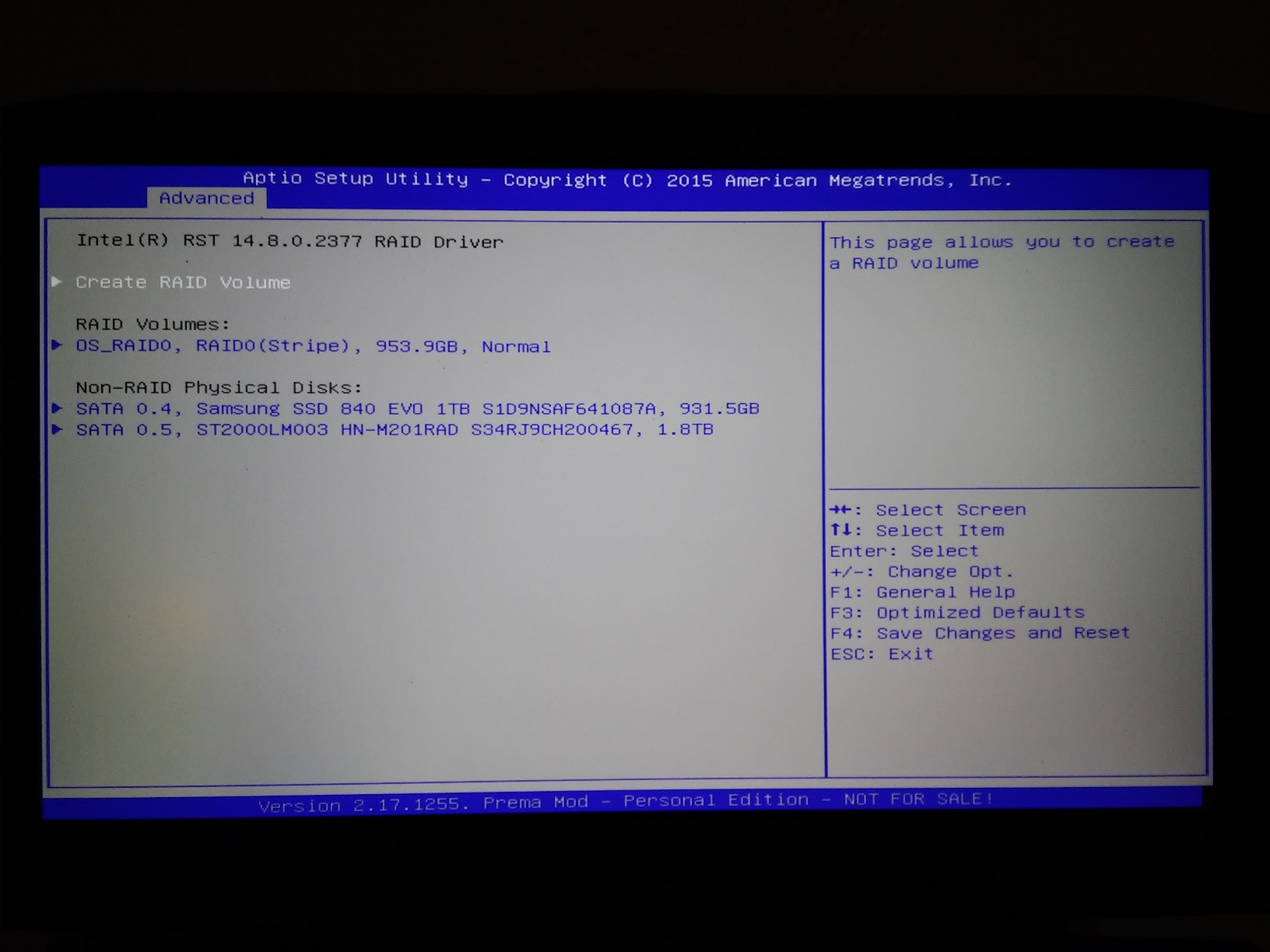
In the bios, i can see that my 2 SSd are recognized. I followed Phoenix "how to do" topic to set my ssd in RAID 0 but when i reboot and try to get into Intel Raid ( CTRL + I ), nothing happens and i can't do anything else, no access to raid options in the Prema Bios.
Is there something i forgot or did wrong not to be able to access these options ?
I have later booted my Win 10 UEFI Key, injected the Intel Rapid Storage drivers when asked and Win10 recognizes my Nvme SSD but not in raid: 2 Disks, 488 GB of capacity each...
Help me, please ...or i'm dead without Raid 0 -
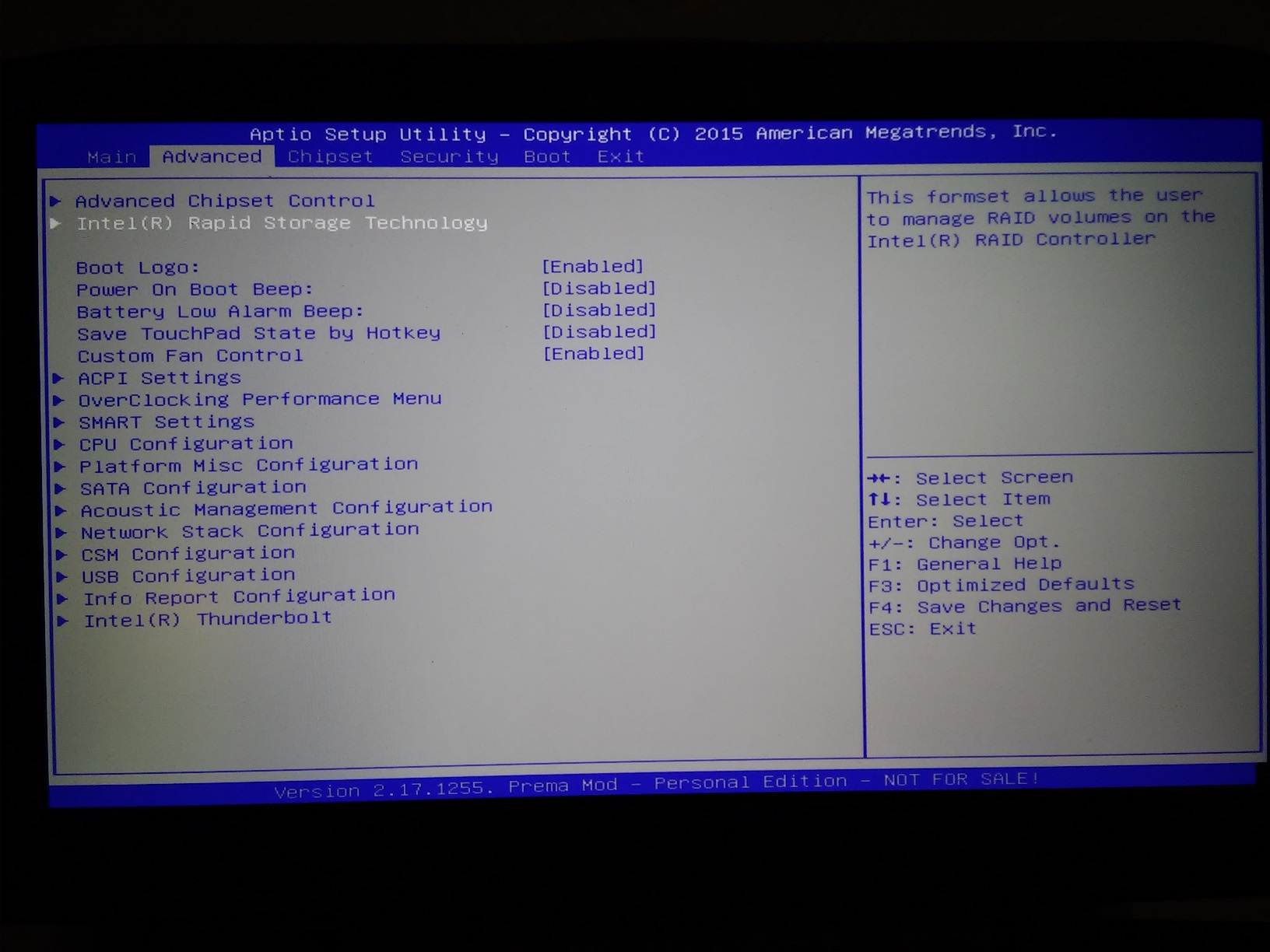
If you have UEFI enabled and set to Windows 8+ you won't have that boot external boot menu to press Ctrl+I for configuration access. You will find the RAID Configuration inside of the system BIOS at the top of the main menu in a UEFI boot environment.
-
Hello Mr Fox and everyone online:
Ok, so let's proceed with what i can see:
All i have on the main menu is system date, time, SATA Port 0, 3,4 and 5 not present
Advanced Settings: ACPI settings enabled, SATA controllers enabled, SATA Mode= Raid 0, agressive LPM support Disabled ( All SATA port are empty ),
CSM configuration: CSM support is enabled, boot option filter = UEFI only, Network and other PCI are Legacy, Storage and Video are UEFI
Graphics and Memory configuration: VT-d is enabled
CHIPSET-PCI E configuration: DMI Link ASPM Control is Disabled
Boot: SPT value is 1
: Bootup NS is On
: Boot option priorities --> Boot option # 1 = Qualcomm Atheros Boot
--> Fast boot is disabled
Network devices BBS Priorities: Boot Option # 1 Qualcomm Atheros Boot
: Boot Option # 2 Qualcomm Atheros Boot
OS Select: others
UEFI Boot enabled
Launch CSM: Enabled
Where did i f...cked the thing ?
Thanks for helpingMr. Fox likes this. -
Set it to Windows 8+ press F4 to save and exit, then go back in.
Sorry, Advanced, not Main menu.Attached Files:
Last edited: Jul 20, 2016Stheto likes this. -
-
Sorry, Advanced, not Main menu.[/QUOTE]
It did work, you're a Genius!
But when Win10 has loaded its installation datas, it goes back to the beginning of installation and asks for the key again, though did i fill it at first: is it normal, do i have to go on or what to do ?Mr. Fox likes this. -
Now try to boot from the main drive.
-
What is the benefit of having to chargers connected?
I have two, but one is for home the other for work.
I'm just wondering. -
Gives more juice for those extreme overclocks where power draw may become a limiting factor.
I have 3 chargers, 2 connected together at home and 1 that I keep in my laptop bag so I can easily go out with the laptop when I wanna go to a cafe with my taptop.TomJGX, Papusan and ParallelTwin like this. -
If you do some heavy overclocking you may pull more than the rated output from a single adapter.
With a single GPU I don't think you need to worry about it much. I can overclock to the limit of my GPU, plus overclock the CPU at 4.4 and still don't exceed the power adapters ability under normal conditions.
For heavy benchmarking and number chasing two can come in handy. Possibly also reduce the heat/load even if you don't really need the second one.Papusan, ParallelTwin and Spartan@HIDevolution like this. -
so 2 questions
im setting my clocks to the tested one on the first page of the dummies guide. what should i set my fan settings to though in the sager fan control thingy?
also, any suggested cooling pads? im using a notepal u2 and it kinda fits, but should i get something else? -
Set the fan profile to over clocking
-
Thanks for the compliment. Not a genius as much as simply knowing the answer.
Look for the tiny and obscure text on that screen that says "skip this" or something similar. Then you can enter the key after the install is finished and activate later, unless it does it on its own. I don't enter the key during Windows Setup. -
I think I have a problem with my Nvidia 980. After a round of Rainbow Six or Just Cause is the temperature at about 80 degrees. I have renewed the thermal paste, but the temperature remains at 80 degrees. In idle it remains at 37 degrees. Is that normal?
Greetings
Gesendet von meinem SM-T810 mit Tapatalk -
What TIM have you used? And remember: when it comes to repasting, less is more!
 temp00876 likes this.
 -
A few questions. The bottom code is ok. What about the others market blue? Needed for use with Win Crap X?
code:
bcdedit-set load options DISABLE_INTEGRITY_CHECKS
bcdedit-set TEST SIGNING ON
Bcdedit.exe / set nointegritychecks on = Disabling DSE to the next level. I do not literally have to reboot and select the option to disable DSE from the Legacy Menu with that.Last edited: Jul 21, 2016
*** Official Clevo P870DM/Sager NP9870-G Owner's Lounge - Phoenix has arisen! ***
Discussion in 'Sager/Clevo Reviews & Owners' Lounges' started by NordicRaven, Sep 22, 2015.