 Problems? See this thread at archive.org.
My vbios is 84.04.88.00.1E.
-
Unless you flashed it then it's unlikely to be a Prema one.
-
Maybe ask prema for the bios and vbios.
Sent from my SM-T560NU using Tapatalk -
Hi Meaker - I have never flashed the BIOS/vBIOS, so it is the same as when I received the laptop from HIDevolution. I may ask HIDevolution next week.
Would be nice if anyone here has experience undervolting the GPU (GTX 980) - similar to how most people undervolt their CPUs to -150mv adaptive under stock clocks @ 4GHz. -
Some monitoring pictures during game play:
About 1:30 hr of FFXV under High setting. There were a lot of cutscenes so my average GPU temp was on the "low" side. It didn't look like GPU throttled when it was in the 88 C - 91 C range. I believe the 1189 GPU clock was when I alt + tab from the game and 1227 GPU clock is probably turbo.
![[IMG]](images/storyImages/2vab56v.jpg)
Below is about 30 min of The Division game play under Ultra settings. Average GPU temp appear to be on the higher side compared to FFXV - since there weren't any cutscenes. Similar observation though as FFXV where most of the game play temp appeared to be in 88 C - 91 C range and no GPU throttling.
![[IMG]](images/storyImages/ka46ra.jpg)
Overall, I still feel GPU temps are pretty high. This is of course after cleaning fans, etc. Haven't looked at re-pasting yet since I don't have the materials for it right now. -
Have you tried capping the fps to 60? See how that fairs for temps.
Sent from my BKL-L09 using Tapatalk -
For FFXV under High Settings - I'm getting an average of 45-55 FPS with in-game FPS Limiter set to 60 FPS.
For The Division under Ultra settings - I'm getting an average of about 60 FPS with in-game FPS Limiter set to 70 FPS.
I guess I'll continue doing what I'm doing - just wanted to see if any owners have similar experiences with GPU getting into the 90 C zone.
I'm getting an inch closer to wanting to "upgrade" to 1080 SLI (P870TM1), but trying my best to wait for next gen CPU/GPU.
-
anyone know where i can get a power cable for the 980 desktop for the dm-g?
-
Check with your seller, or its easily available on ebay/aliexpress. OR RJ TechPapusan likes this.
-
I wonder if the plugs from this listing is the same?
https://www.moddiy.com/products/4%2dPin-Mini-GPU-Connector-Extension-Cable-(40cm).html
Sent from my Honor View 10 using Tapatalk -
Haven't found any listings with the keywords.
-
-
$25 for a cable? Gosh!
Sent from my Honor View 10 using Tapatalk -
if anyone has the measurements i'm sure i could fabricate one if i knew the sizing of the socket.
-
It should be this:
https://www.moddiy.com/products/4-Pin-Mini-GPU-Connector-Extension-Cable-(40cm).html
Sent from my Honor View 10 using Tapatalk -
found same product here http://www.performance-pcs.com/4-pin-mini-gpu-connector-extension-cable-10cm.html for 8$ cheaper
-
LOL the site is just listing the item I linked to.
Sent from my Honor View 10 using Tapatalk -
Yep lol they probably bought a load of them and can't sell them, or the price difference wasn't noticed at all.
-
Have fun modding!
Sent from my Honor View 10 using Tapatalk -
aye, thank you for letting me have that chance! have a mxm 1080 and desktop 980 coming in the mail.
-
What opportunity?
Sent from my Honor View 10 using Tapatalk -
without the cable, my modding would be stopped short, as i realllly didn't want to spend 35$ on a cable lol
-
Don't think that cable will work for an MXM 1080 but the 980DT it should.
Sent from my Honor View 10 using Tapatalk -
Hi-
After running the latest April 2018 Windows Feature Update last night, I now have a notification to update the firmware on my TPM security processor.
Does anyone know where to get this firmware update for our model of Clevo?
Current stats from my Windows Defender Security Center:
Manufacturer: IFX
Version: 5.51.2098.2
Spec version: 2.0
PPI Spec: 1.2
TPM Spec sub-version: 1.16 (Tuesday, July 28, 2015)
PC client spec: 2.56
-There's a yellow ! alert saying I need to update the firmware for my TPM. I have no clue what that means and I have never seen this before I updated my Clevo last night.
Any ideas how to get that updated?
There was a list of manufacturers provided, but none of them were IFX.
This was the support page it took me to:
https://www.infineon.com/cms/en/product/promopages/tpm-update/
Thanks. -
Read first and last posts IMPORTANT SECURITY UPDATES!
-
Sorry if this isn’t the correct spot but only have a phone and having a hard time finding info...
While gaming on my P870DM-G the colors on the screen briefly went wonky, then the laptop shut down. Now when I try turning it on the screen stays black, the airplane light is solid, the hdd/ssd light flashes, the ac light flashes, only the left side keyboard lights turn on, the lights on the back of the lid pulsate, the screen stays black and doesn’t display anything, and after a few seconds the fans turn on high. It runs like this for 1-2 minutes and then just turns back off.
I’ve tried it plugged in and on battery, opened the bottom and cleaned out the fans, let it sit for a while (1 hour or so), and still getting same indications.
Any ideas on best step to take next. For different problems I’ve seen troubleshooting steps such as removing one stick of RAM at a time, and removing the CMOS battery, but not really sure if one of those would be my best course of action. Any help is greatly appreciated. I have no back up and sending it in now would turn into a huge hassle unfortunately. -
-
Try what @jclausius mentioned to rule out the display or eDP cable. Also go ahead and remove the battery, AC adapter and CMOS battery to clear NVRAM. Won't hurt to try it and you should. However, the behavior you are describing is a fairly strong indicator the GPU has failed.
-
No change with the external monitor using HDMI. Known good cable and on a TV I’ve used before.
I’ll try that out tomorrow. Is there anyway to verify failed GPU? Since it is SLI is there a way to force it to use one GPU, or an onboard GPU to kick to somehow?Arrrrbol likes this. -
That was my next post.. No output is a good sign something is wrong with the GPU.
I don't have a machine with SLI, so I don't know if you can turn it off in BIOS or not. However, since you have no display to work against... Not sure how you would turn it off in BIOS either. You may have to physically take a stab (50/50 guess) at which one is bad, unhook the SLI cable, pull the card and try the external test again. -
Awesome that you have SLI. This makes it easier. It is very unlikely both have died simultaneously.
Test them one at a time. Remove the slave first. If it has the same problem, remove the master GPU and install the one from the slave MXM slot in the master slot. Test again. If the problem is the same with one GPU no matter which GPU is in the master slot, then it is not very likely a GPU failure.
For the basic display output testing you do not need to install heat sinks. You're only looking to verify if one of the GPUs is dead and only need to see if it boots and operates. You should be able to tell in 30 seconds or less, unless you cleared the CMOS, which might take a minute or two for the first POST. (Do not use the system normally without the GPU heat sinks, as that can fry your good GPU if one is bad.)Last edited: Jul 31, 2018 -
Hello all has anyone ever tried using 2 x MSI 980 (LAPTOP) cards in the P870DM G
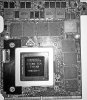
-
I would not recommend the MSI 980 - they are barely more powerful than 980Ms when in SLI. Also, remember SLI scaling is very hit or miss. In every day use a single 1070 would be a faster card. If you want to try SLI though, then you can get 2 1070s working in there with some minor modifications.
http://forum.notebookreview.com/threads/p870dm-g-1070-sli-upgrade-teaser.812736/ -
See I have 3 of the MSI cards available so it's worth a try for me I just put one in a p150sm and vs a 980m stock it's over 2000 points more on a single GPU no OC ... I'd say it's a good 20 - 30 % stronger possibly
-
This topic I managed to get it running in a P150sm just need to fix the driver modification
http://forum.notebookreview.com/threads/msi-gt80s-gtx-980-work-in-clevo.821733/ -
I've been banging my head on this BIOS issue for a week now.
I picked up a used P870DM-G (specs in sig) a few weeks back and it was running 99+ right out of the box and throttling down to 3.5-3.8 on all cores running Wprime1024 and CB R15
I delidded w/ conductonaut and a lapped Bitspower SL, switched to Kryonaut from nanogrease since pressure was good and temps obviously dropped drastically (30+) so when it was running stock on all cores temps sat in the 60's/low 70s so onto the
undervolt and finding the sweet spot for a 100-150 uv and stable multipliers and thus commenced the head->wall.
While it isn't the magic of @Prema , the bios has some OC controls, but it will not allow me to set a negative core offset for some reason even though it clearly says it has a range of -500 to +500 mv
The BIOS allows me to adjust adaptive or static, Multipliers, PL settings, memory timings, use XMP and more but there is no way to inputt a negative core offset to undervolt. I can set a positive core offset
no problem.
Right now I'm using the newest Intel XTU and it is working as intended and I'm @ 4.4 w/ a -110uv and fantastic temps. But I'd rather set it in the BIOS.
I've included some screen shots of the BIOS.
Am I missing some simple key command/combo to enter the mystical land of a negative core offset?
@Mr. Fox
![[IMG]](images/storyImages/2vwin90.jpg)
![[IMG]](images/storyImages/28coaau.jpg)
![[IMG]](images/storyImages/2nav24i.jpg) Arrrrbol likes this.
Arrrrbol likes this. -
It seems you lack the prefix + / - for offset voltage. Use ThrottleStop and put your undervolt/overclock. And make a scheduled task. You find a guide (first page) in TS guide thread if you not know how to put it.
Edit. You can as well put up 4 different Power profiles (clock speed- voltage) with ThrottleStop. And easy switch between them with a key command on the fly.Last edited: Aug 4, 2018electrosoft and Arrrrbol like this. -
The KM introduced the +/- selector in the normal bios.
Arrrrbol and electrosoft like this. -
Yeah, I’ve used TS off and on since the m15x days with my 920xm when we first discovered how insanely overclockable the 920xm was. Good times.
I wanted to double check and make sure *I* wasn’t stupidly missing some esoteric key combo to activate or input a negative value since the bios says it has a +/-500 offset range and the bios has so many other options for control. I guess if no one knows it must be a non @Prema bios limitation on the DM even with a partially unlocked bios. Ah well.Arrrrbol likes this. -
As I said, it's only been unlocked on the standard bios since the KM series.
electrosoft likes this. -
Oh I read your reply Meaker. I wasn't implying you didn't know.
-
Hey everyone, I have a P870DM-G that's recently gone out of commission. The motherboard's fried, the keyboard's toast, battery's done, the GPU may be fried, and the casing has cosmetic damage. What do you think would be a fair resale price for it?
-
Strip it down and sell each of the pieces, it's too damaged to sell as a unit really.
jclausius likes this. -
Yeah, you need to verify what's working and what is not and sell it piecemeal or look to dump the whole thing for like ~$300 as-is no refunds because you can't verify what is working and what is not. How did it stop working/fry? Do you have another laptop/desktop to test some of the components?
-
Sounds like it went through quite a bit...
-
Liquid spill. I do not have a way to test anything. Clevo was very slow with doing so and couldn't give too many concise answers. Apparently, the GPU fried two additional boards, making the technician too afraid to test anything else in any capacity.
-
Have a small niggle on my P870 - the LED indicator lights for caps lock, num lock etc do not work, instead the HDD activity light is on constantly. Anyone else have this issue? I've not really missed having them and everything works fine, so I've not looked into the cause of it.
-
When did it start happening?
-
It has always done it.
-
If you have updated your bios/ec at some point it would leave a board or ribbon cable issue.
Arrrrbol likes this.
*** Official Clevo P870DM/Sager NP9870-G Owner's Lounge - Phoenix has arisen! ***
Discussion in 'Sager/Clevo Reviews & Owners' Lounges' started by NordicRaven, Sep 22, 2015.


