Problems? See this thread at archive.org.
Thank you for the replies. I have to say that this is not worth the hassle with all this fiddling around and the risks associated with it
-
They had to get them out there quickly which meant following the reference layout for vram. The msi cards came later.
-
Hi, any idea what the chances are of Sager sending out replacement badges for the top lids? The "A" on mine has broken in half and it just looks a bit unsightly. Seems like the adhesive on these units has run its course.
Attached Files:
-
-
Hello, I've an XMG variant of this laptop and I'm trying to upgrade my ram. Since I can't find the original 2133 CL13 hyperX ones anywhere, I bought 4 of 8GB hyperX 2666 mhz CL 15 (2 kits of 2) to replace the old ones completely. But I cannot get the PC to boot (stuck in black screen) if all 4 sticks are installed.
I've confirmed that both 2x8GB new pairs work by themselves with the laptop both in the slots under the keyboard ( 1&2 RAM3 & RAM4 showing up as slot 2&4 in CPU-Z) and in the slots behind the laptop ( 3&4 RAM1 & RAM2 showing up as slot 1&3 in CPU-Z). Am I missing a crucial bit of information? What may I do to overcome this? Also CPU-Z reports "Ranks - Single" with the new pieces of ram while the old pair reports "dual" is this normal?
My CPU is i7-6700Last edited: Nov 30, 2020 -
You need to pair them up correctly, where each pair sits in correct dimms slots. So you will need to have dimms 1+4 and 2+3 running pairs. Go by the serial number where pairs are something like xxx4 & xxx5 and xxx6 & xxx7. Dimm1 is the top under the keyboard, dimm 2 is right blow it under the keyboard. While dimm 3 is the one closest to the motherboard and dimm 4 is the one on top of it. I'd also clear cmos after setting them to let the system retrain properly.
-
Also if you have an unlocked BIOS there can be tweaks to CPU IMC voltages to help.
-
This didn't work unfortunately, still getting black screen with 4 sticks. Though the ram sticks I have don't have consecutive serial numbers, I still went ahead and tried it as described. In my case, the ones under the keyboard were named RAM3 & RAM4, the ones on the other side were named RAM1 & RAM2 (I corrected it in original post). So I tried these pairings, neither of them worked:
-1 pair in RAM1 & RAM4 1 pair in RAM2 & RAM3
-1 pair in RAM1 & RAM3 1 pair in RAM2 & RAM4
-1 pair in RAM1 & RAM2 1 pair in RAM3 & RAM4
I think I also got the CMOS reset correctly, since I got the CMOS & NVRAM message at the next successful boot with my old ram sticks.
![[IMG]](images/storyImages/ngzjZYU.jpg)
I don't think I have an unlocked bios, I haven't seen any voltage options in the BIOS. -
So looking at this I can see it's two kits that you are trying to run in a 2x2 config. Even though the kits may be identical in size, speed and timings, they might not work correctly due to sub-timings and minor differences at silicon level. Ideally you would get a kit of 4, since they would be pre-tested and certified to run together.
-
So there isn't so much a limitation in terms of 2133 Mhz or something? If I buy a kit of 4 with 2666 Mhz, it all should work? Or would I better off buying 2x16GB perhaps? Or maybe move to another brand and try 4x8GB 2133 Mhz?
-
What does Thaiphoon burner say about both kits, are they the same chips? The free version can read them.
-
I returned the kits and ordered 2x16 kit. But I'll keep that tool in mind for next time. I've read elsewhere also that even 2 kits of same brand/model sometimes might not play nicely, I guess there are just too many variables for me to wrap my head around as a novice, cause at the same time I also read people just combining different brands even.
On the other hand I broke one of the FMC connector latches of the keyboard while plugging it in and out 10 times, which is gonna be a headache . So now the integrated keyboard doesn't work -
I tend to place the keyboard face down attached and to the side rather than removing it totally to take stress off the connector.
jc_denton likes this. -
A couple pieces of tape under it to easily pull it up, is a neat little mod as well.
TheLuddite and Papusan like this. -
If you are going to be working on it a lot sure.
Papusan likes this. -
Think of them as hood pins on a sports car, Meaker.Papusan likes this.
-
Well.....
I delidded my CPU, applied some LM and rebuilt it. Practiced on an old i5 3470 I found lying around at work. Made me realise quite quickly that the delid tool is a MUST have for doing it on a chip that still sells for £300!
Bearing in mind I am still running on the clevo BIOS, I used XTU to wind it up to 4.6 Ghz and it very rarely hit thermal throttles with fans on max. Cool down time has increase massively and most importantly it all still works. Tried winding it up further but past 4.7Ghz, XTU just froze and crashed. Still, for someone who is very much on the beginner end of eeking more performance out of my DMG, I am happy with the results! -
Yeah I don't like that either personally either but hey
-
That's fair enough but they do serve a purpose in my case.
-
That's very true it does make it easier, it is functional. Just like where those hood poppers are on a race car as required by the marshals
-
Indeed there's a nice temperature delta after swapping out Intels stock TIM to LM.Spartan@HIDevolution and Papusan like this.
-
I used a bare razor blade on the 6700k and 7700k
-
Anyone running cyberpunk on this? How does it look?
-
That is really going to depend on the GPU.
-
Hi, I've got a few questions, I hope this is an alright place to ask.
For Christmas a friend of mine gave me a P870DM-G (it says Maingear on it) that as far of either of us know has been sitting in a sealed box in a warehouse since 2016/2017. I reset it, and after tracking down the software for the LEDs and such I ran a couple benchmarks, which seemed fine for the GTX 980.
Then I updated Windows and my Nvidia drivers, and from then on the graphics card has been entirely nonfunctional. I get pixelated artifacts, mild freezing, and then a full crash to black whenever I attempt to do anything with the card enabled.
I have reset and tried old versions of both Windows and the drivers (and combinations thereof) to try to recreate the starting conditions where it was working. Nothing I've tried since then has changed anything; whenever the card is enabled the system crashes completely. As far as I know what I'm seeing is consistent with hardware failure. But I don't know enough to know if it might be about something else like the old BIOS or such. A bit out of my league at this point.
Does anyone know of anything this might be other than the card being broken? Does anyone have other advice? It's a beautiful machine and I would love to see it functional. -
It could be the GPU is defective or the fact it sat in a warehouse so long in who knows what weather conditions it could be the thermal compound or pads are aged out.
If you can, open the back and take a pic and then remove the GPU heatsink and take a pic of the GPU and and GPU heatsink. -
You could try cleaning the old paste off and putting some fresh stuff on.
-
Hello to all.
I have Clevo P870DM-G with DSanke BIOS (1.05.11 Modified by dsanke at august 2019).
I try insert ES samples of CPU that was made from mobile CPU (have two QQLS and QL3X code) but system not startup (shutdown after 0.5 sec by press power button).
I tried disable ME hap-bit in CoffeeTime prog but not receive success. System not work and shutdown after 10 sec.
May be anybody using this CPU in P870DM?
Thanksmoral hazard likes this. -
@SergILD did the seller who sold you those CPUs go by the name of mr.su?
Did you ask the seller to mod the dsanke bios for you to support these mobile CPUs? I think there must be some further bios mod required. -
I bought it at aliexpress
https://www.aliexpress.com/item/4001201770134.html
I wrote seller question about modding BIOS for this CPUs. Waiting. -
Please update this thread if you get a modded bios. I would love to try the 10th gen qtj1 on lga1151:
https://m.aliexpress.com/item/10050...c3298d836330d0068236.jpg_640x640Q90.jpg_.webp
How crazy would it be to see 10th gen on the p870. -
What's the point if the core count is lower?
-
QQLS Is 8C16T.
QTJ1 is 8C16T 10th gen and unlocked. As me mentioned here:
https://www.cpu-world.com/forum/viewtopic.php?p=296158
Seems like progress is happening in this thread :
http://forum.notebookreview.com/thr...ptops-rtx-cards-now-supported.825558/page-219
My i5-8500 is on its last legs, perfect timing. -
I'm trying to sort out the upside here. 10th gen = 9th gen + more cores. 10700k = 9900k. With Dsanke, you can just put a 9900k in your laptop.
-
Oh the upside for me personally is that this CPU will give 9900k performance at almost half the price (and no need for a de-lid).
electrosoft and FTW_260 like this. -
I like the proof of concept position, but if advantages can be found in cost, thermals and performance that is added incentive but the ali listing shows it pulls just as much power as a desktop 9900k when placed under desktop conditions. Binning also would come into play....but the price is definitely compelling.
-
You would actually need an IHS for it to use it in the system.
-
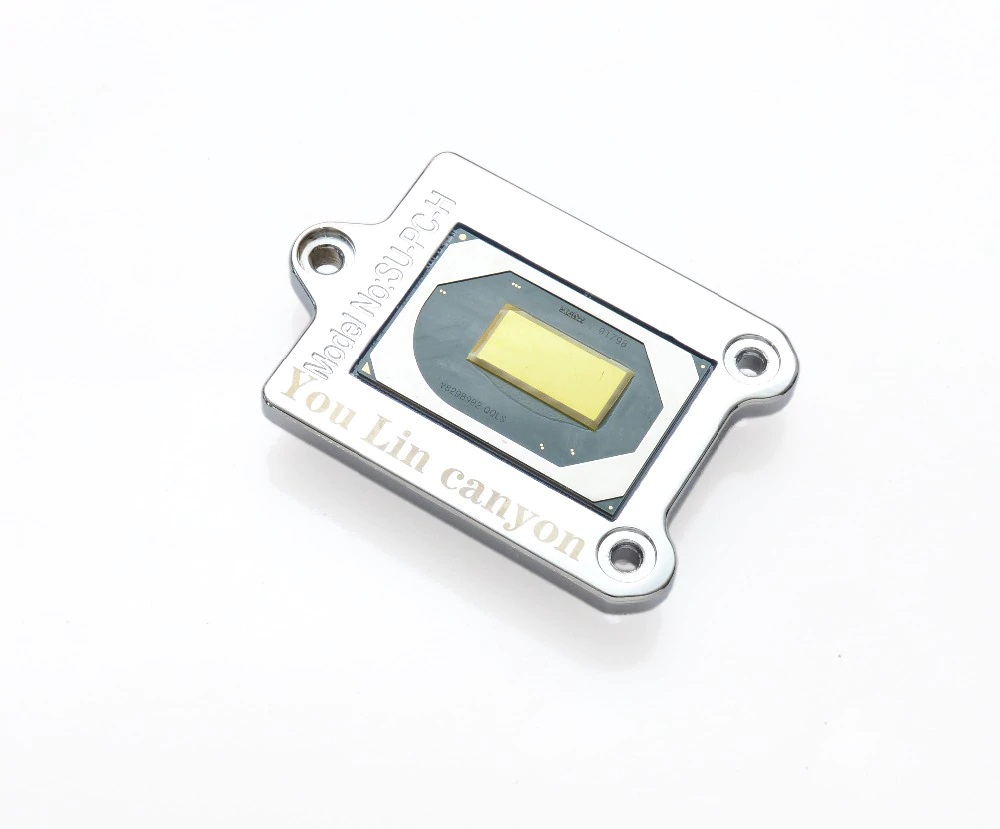
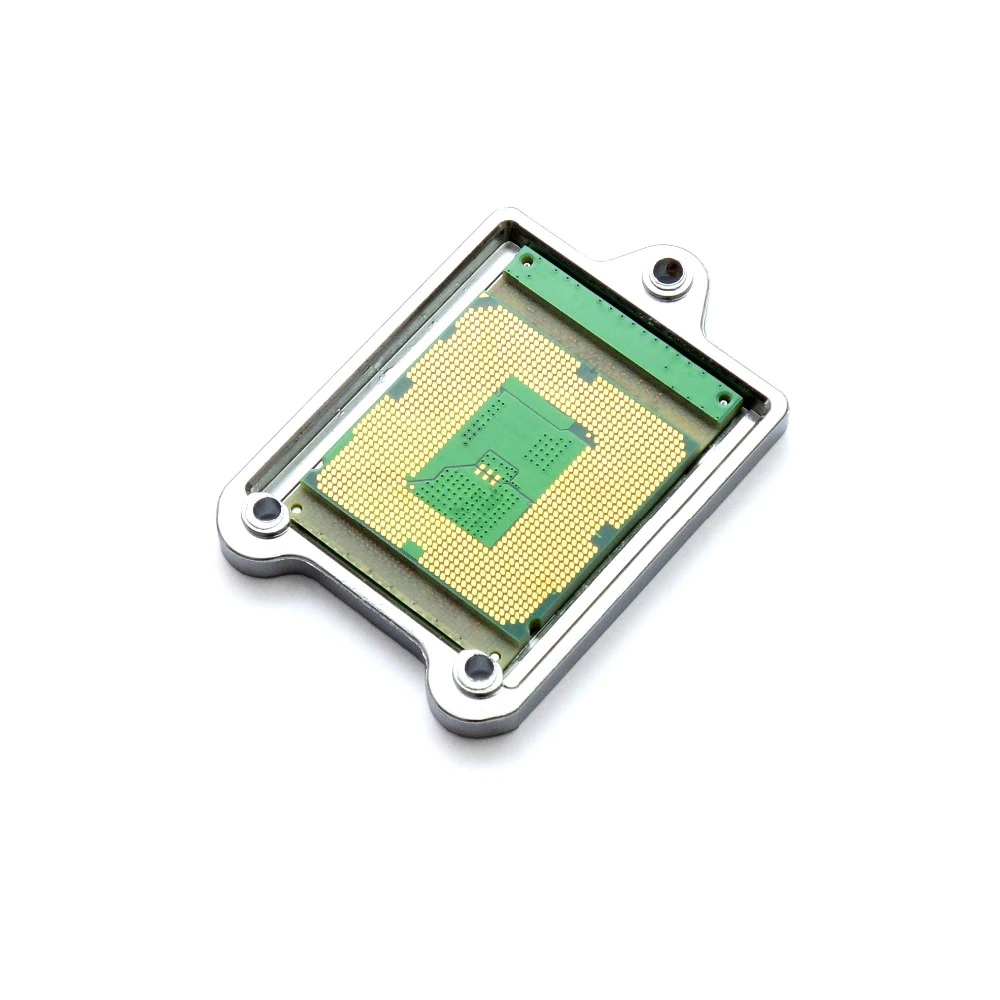
I tested install QQLS, basic CPU cooler P870DM-G has perfect contact of crystal without IHS. I understand that if laptop will be are dynamic dropped - CPU may be broken.
my experience for case QQLS:
I modded BIOS of DSanke of august 2019 for this CPU.
In result I made this:
https://drive.google.com/file/d/1qUUX7TMztZZPz4mJGnfjg3vKKpHolXyE/view
If I disable ME by change HAP-bit in CoffeTime - laptop not was started. As result QQLS CPU is not work (may be is main problem of this case).
P.S. My i5-9600K is perfect working with modded DSanke BIOS (new microcode version "DE", new ME code, some add patch).electrosoft likes this. -
Is the core raised above the socket by the adaptor?
-
If I right understand your question this CPU have adaptor as photo
Attached Files:
-
-
Yes, its an interesting setup, the die has direct contact with the heatsink like laptop cpus or the old Desktop cpus, Linus tested some of the these CPU-s
-
Yes that has a socket replacement, you so that in the standard socket and it won't be taller. Then you have to match it up to the CPU heatsink which is not designed for that height. A lot trickier than the desktop.
-
Socket not need change. Standart preasure frame of socket need to change by metall frame that connection by 3 screw.
CPU heatsink has spring preasure that compensation minimal diffrence between standart CPU and mutant CPU. I think it's 0.1-0.2 mm max.moral hazard likes this. -
Well if you get it working, please take pics
-
Interesting mod for sure!
-
just wondering, can this be upgraded to the 9xxx cpus or the 8xxx cpus?
-
Unoffcially, see the bios mod thread.
-
Hey everyone
I've a NP9870-G from 2015. Recently reapplied thermal paste to the GPU (980, non M version) using artic mx4. Is it normal under 3D Mark time spy benchmarks for the GPU to be reaching 764-77 after one run? What results do we get from the (normal) time spy bench?
Also is 1.05.07a the latest version of the BIOS for the gsync variant?
Thanks!Last edited: Feb 19, 2021 -
Yes the standard vbios on that GPU thermal throttles at 79° the GPU has a fair bit more it can give to you when a custom vbios is used
This is my result with firestrike if you want a comparison
https://www.3dmark.com/fs/24613915 -
Laptops do quickly reach their thermal equilibrium point due to low thermal mass. Though a gaming session should confirm.
*** Official Clevo P870DM/Sager NP9870-G Owner's Lounge - Phoenix has arisen! ***
Discussion in 'Sager/Clevo Reviews & Owners' Lounges' started by NordicRaven, Sep 22, 2015.





![[IMG]](images/storyImages/u2mMgZW.jpg)
![[IMG]](images/storyImages/VHwQt1G.jpg)
![[IMG]](images/storyImages/G0YDmY9.jpg)