Problems? See this thread at archive.org.
FPS dropping under 120 doesn't have that same issue for me. One of my games is locked to 30fps and it's smooth still. I haven't been able to test many games yet but so far so good.
-
This is worse than the old Alienware wait. Ugh... I should have not froze my order those extra 2-3 days lol
-
Just ordered my P870DM3 thanks to you all!
They're waiting for the 960 EVO which Donald said would be in by the end of the monthDonald@Paladin44 likes this. -
Is anyone else having this issue?
Everytime I restart, my L and R channels are set lower than the rest. So if my master volume is at 76, the L & R are at 51! I thought the speakers were just worse on the DM3 compared to DM1 but this was the issue.
Upon setting it right, it will go back to this on restart. It's for the internal speakers, not related to external audio.
![[IMG]](images/storyImages/9tCcuzo.jpg)
-
1) Please tell me your RealTek Audio Driver version
2) Please tell me your SoundBlaster X-FI MB5 Driver version
3) I am downloading the SoundBlaster X-FI MB5 Driver v1.01.21 right now, it will take 3 days to finish the download from the crappy Clevo servers. Once it's done, I will upload it in the P870DM2/3 Drivers mirror so keep an eye there please. -
Here you go:
![[IMG]](images/storyImages/d3keBn2.png)
-
Here's your problem:
Driver v6.0.1.7930 is for the P67xRP6 only
![[IMG]](images/storyImages/Driver_Problem.png)
Please uninstall that driver then reboot.
Then install this driver and reboot: Realtek HD Audio Driver v6.0.1.7898
Let me know if that fixes the issue. If not, I have another driver for you to try -
Thanks bro, that solved the issue it seems. What's weird is, I thought I downloaded that driver from the P870DM page.
![[IMG]](images/storyImages/SKkzec5.jpg) Spartan@HIDevolution likes this.
Spartan@HIDevolution likes this. -
I had that driver posted initially then I pulled it when Clevo labeled it the next day that it's for the P67xxx series only.
I test all drivers that I post usually but couldn't find an immediate issue with this one immediately -
Control center AP (5.0001.0.90) for Windows 10 64-bit has been released
-
Downloading it since 5 hours and still @ 51%.
![[IMG]](images/storyImages/ZLacP63.png)
Ill upload it soon to the Drivers threadPapusan, hexum23, jaybee83 and 1 other person like this. -
[QUOTE="
3) I am downloading the SoundBlaster X-FI MB5 Driver v1.01.21 right now, it will take 3 days to finish the download from the crappy Clevo servers. Once it's done, I will upload it in the P870DM2/3 Drivers mirror so keep an eye there please.[/QUOTE]
if u use VPN (china) it wont take 3 days
-
switching VPN servers as we speak. Thanks for the tipAKHIL likes this.
-
Try disabling FastStartUp (in Windows, not the BIOS setting), and better yet, disable Hibernation which FastStartup depends on:
Start As Administrator a Cmd Window:
powercfg /h off
to reenable
powercfg /h on
Windows 10 Tutorials 60 – How to Enable or Disable Hibernate
http://www.windows10update.com/2015/05/windows-10-tutorials-60-how-to-enable-or-disable-hibernate/
Reboot to take effect. Then set volume, and reboot again to see if it comes up the same between boots
FastStartUp can cache settings, and changing them is lost between cache updates. This has caused people to have Muted audio stuck enabled between reboots. Disabling Hibernation, FastStartUp stops that caching and lets the app / driver maintain the setting.Last edited: Nov 11, 2016jaybee83 likes this. -
What program are you guys using to download?
Thanks, but it was the driver that was the issue. All is well now.
hmscott and Spartan@HIDevolution like this. -
Or maybe I just found myself an even better idea.
Just over clock the screen I have now!
Which is what I just did.
Did not notice a huge difference up to 95 hz, but at 100 hz I noticed that it is much more smoother! I can go a few more hz, but 105 hz is the limit and I don't want to push it to the edge.
And by smooth I mean that its actually almost as good as my 144 hz monitor. For obvious reasons its not as good, but close enough and I did not have to pay anything.
Ghosting is the same since response time remained 25 ms but games feel so much better than with the default 75 hz and ghosting is not really annoying as the stutter is at 75 hz.
I think I postpone the 120 hz screen purchase. Yes it would mean an improvement but not that much (especially compared to 100 hz) to make the $750 (with shipping to the EU and cable) pricetag worth it and this way I also don't loose any fps due to the higher resolution . I think a 100 hz IPS panel will be enough for the time being
Last edited: Nov 11, 2016Donald@Paladin44 and CaerCadarn like this. -
Friends,
Many Thanks for all the little tips you get here!
I now have my fourth laptop after many PC's.
For the first time on the laptop I changed something in the Medion x7811(Dell before) (Forum notebookjournal) afterwards I have the next project with an MSI notebook GT70 undertaken and quickly separated me from it. There was too little room.
Then came the Clevo P375sm-A.
And now this beast.
Tonight I tamed the Beast for the first time.
After I made the grids on the back and especially my good Enzotech from then projects again put into use and after your tips the MSI Afterburner and Throttlestop to the undervolt and Übertakten has used - the Beast finally fun.
The temperatures during racking reach the graphic card with maximum settings of Stalker OSGE to very good 65 degrees C GPU and after all only slightly fluctuating at 70-72 degrees C the CPU.
For the first time I am satisfied with the laptop.
Let's see what you can still improve.
The Prema Bios will hopefully make the laptop even more comfortable.
Thanks again.
Today I have no desire to send new pictures of my many small copper particles.
I'll take the days.Donald@Paladin44 likes this. -
I installed the latest nvidia driver because BF1 wont run without it. gsync got nuked.
So i tried to roll back the driver. An hour later windows wont load and i have to reinstall windows. Man -
DDU will help you here usually.
http://www.guru3d.com/files-details/display-driver-uninstaller-download.html -
Well I got my laptop in about 8 hours ago, I haven't done any benchmarks in it... But did follow the excellent guide @Phoenix posted on Windows10 setup which took a while, lol. Made a system image after that and installed drivers.
Then first thing I did was to install a 2nd SDD I already had BF1 downloaded onto, then Origin, no tweaking settings or anything... And it was AMAZING!!!!! Like I had said before I can't say I'm the best person to speak to the response time as my previous screen was a 1080P@60Hz 3ms one... But I experience no input lag that I could perceive at all, and with all settings on ULTRA@2560x1440@120Hz it ran beautifully. Played for ~90 minutes.
Here's the HWInfo shot from the session, not to shabby. Although when I took my headphones off when my wife came in and wondered what was happening it sounded like a hairdryer was going, lol.
![[IMG]](images/storyImages/5i7vOTi.png) Last edited: Nov 11, 2016Spartan@HIDevolution, Red Line, hmscott and 1 other person like this.
Last edited: Nov 11, 2016Spartan@HIDevolution, Red Line, hmscott and 1 other person like this. -
Worst case response time is not whole story, you can still benefit the rest of the time
-
Also... Took some close-ups with my Galaxy S7 from a few different angles to check the 3K screen pixel "issue", it honestly doesn't bother me at all. I can see it at my "normal" distance, but only if I'm really concentrating on trying to see it. I likely would have never even noticed had it not been for this thread.
I tried taking many photos from slightly different angles because every ones seems to be a little different, these aren't touched up in any way & straight from the camera. I think it's a beautiful screen for a laptop for gaming, nicest I've ever laid eyes on!
![[IMG]](images/storyImages/mnVgiee.jpg)
![[IMG]](images/storyImages/cYqGEv9.jpg)
![[IMG]](images/storyImages/kLXW0AU.jpg)
![[IMG]](images/storyImages/0uK1oyr.jpg) Spartan@HIDevolution, Red Line, TBoneSan and 2 others like this.
Spartan@HIDevolution, Red Line, TBoneSan and 2 others like this. -
Unfortunate for me ive had my computer for a few days, but still havent turned it on due to working so many days, 18 so far. Looks like I will have 4 days off to play around with it and not worry about having to get up for work the next day. Once i get rolling theres gona be some late nights with this laptop.Trafficante, Spartan@HIDevolution, afloyd and 1 other person like this.
-
What have you tested it out with games wise?
-
Only ones I really play lately are Battlefield 1 and iRacing... But haven't been back to iRacing yet since BF1 came out, hahaGTVEVO likes this.
-
I can see why that has been a joy with 1440p and a 1080
afloyd likes this. -
So I'm wondering have any of you all been able to accomplish playing Battlefield 1 in automatic mode without reaching the thermal limit on the GPU. I am not really bothered by the fans to much in overclock mode but I am just curious of others temps in automatic mode while playing a GPU intensive game. I reach the thermal limit in automatic mode in about 5 minutes of gameplay but in overclock mode am hanging around 70 C.
-
@Johnksss@iBUYPOWER
I'm so jealous...Spartan@HIDevolution, temp00876, TBoneSan and 1 other person like this. -
@Johnksss@iBUYPOWER
Ohhh looking good. We must be getting close now
Spartan@HIDevolution likes this. -
Oh, this was something I could have done a long time ago, but apparently I was not thinking clearly with my execution.
I hope so, still waiting on master @Prema .temp00876, Trafficante, jaybee83 and 2 others like this. -
See my earlier post, I'm guessing it's with auto fans because I didn't change anything fan-wise... GPU @ 64*C. How do you tell what fan mode you're in??
EDIT: Nevermind... Looks like I am in overclock fan mode, the Clevo Control Center was already installed
Last edited: Nov 12, 2016 -
Nice, let me know in automatic mode if your are in the 90 plus range or lower in BF1?afloyd likes this.
-
Hi guys, placed an order for a Sager NP9873-S 6700K Dual 1080's arriving by the end of November 2016. Would like to inquire any particular important start up guide i need to back read on this thread? Thank you..
-
Can anyone lend a hand by saying what bios and EC files I need to use to flash with on my 9873 and in what order I need to flash them to resolve my throttling issues.
Sent from my iPhone using Tapatalk -
Guys what's the consensus on Clevo Control Center? Only the older non XTU version still? I'm keen to change LED color and have a play with fan profiles.
-
Not sure if I just got lucky or what, but CCC doesn't seem to be causing me throttling... I've updated my LED coloring, and in bios set CPU cores to 42x4.
I just adjusted my vCore offset to -50mV last night, but haven't tried gaming or wPrime again yet. But I'll post back on that, as well as BIOS/EC version & CCC version
EDIT: I Have...
ControlCenter: v5.0001.0.83
BIOS: 1.05.03
EC: 1.05.06
![[IMG]](images/storyImages/cUDl8UW.png)
![[IMG]](images/storyImages/6FcSlx4.jpg)
![[IMG]](images/storyImages/dZYbyX7.png) Last edited: Nov 12, 2016
Last edited: Nov 12, 2016 -
Thanks, I'm more concerned about it goofing up the fan tables, than throlling which ControlCenter: v5.0001.0.83 is likely to do. Have you noticed this?
I'm going to install non XTU laced Control Center AP v5.00001.0.50 to be safe.Papusan likes this. -
I'm not sure about the fan tables, or how I would go about checking that...
This is after playing with fans on automatic for ~30 minutes... GPU max 79*C, CPU max 79*C
![[IMG]](images/storyImages/A2i4rMJ.png)
![[IMG]](images/storyImages/jLm4ngX.png)
lctalley0109 and GTVEVO like this. -
Wait. I installed, but show in .73 version, not .90
-
1.05.02 Bios and 1.05.04 EC
Not sure about order.
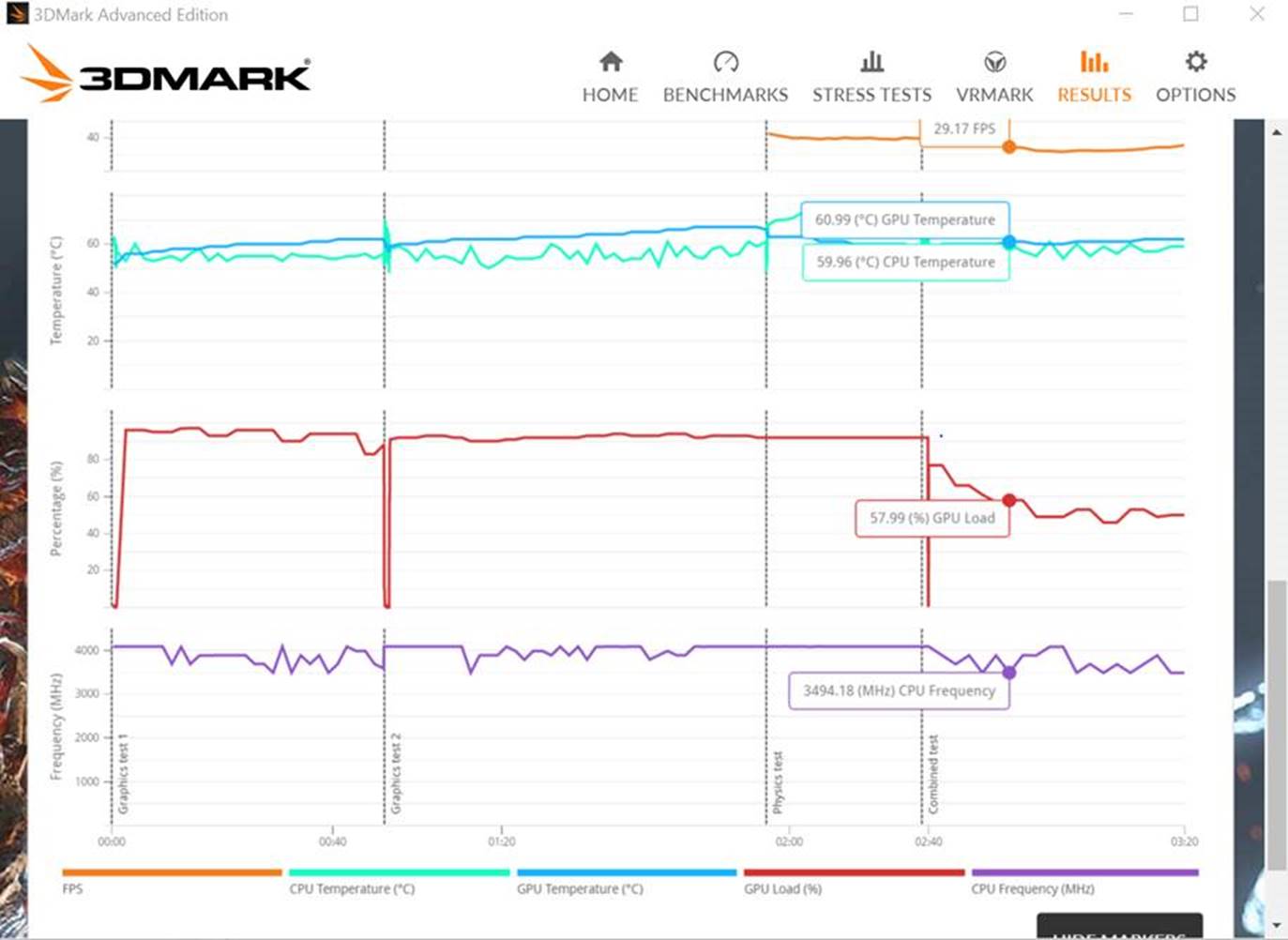
I have same versions as you (BIOS, EC, CCC) and get throttling. You probably are getting throttling but don't realize it. If you have the full version of 3dmark, you'll see the throttling in the results, with gpu being underutilized and CPU throttling from 4 to 3.5. (See attachment)
I think it mostly has to do with EC. I asked HIDEvolution for 1.05.02 Bios and 1.05.04 EC. For whatever reason, the files they sent me only changed bios to 1.05.02, and my EC is still 1.05.06, and I'm still getting throttling. Anyone have the correct files and willing to send them to me? HIDEvolution support is closed for the weekend
Attached Files:
-
-
Weird. Was thinking about trying it, but does anyone know what changes are in this new CCC? If it's nothing special, I'll probably want to go back to the non-XTU version of CCC.
-
This is with fans on auto, I had my processor "minimum state" set to 50%... My max CPU temp did bump 91*C for about 1-2 seconds. Will re-rerun with it at 100% and max fans.
![[IMG]](images/storyImages/5HLZfWK.png)
So yea, guess I am throttling? Ironically it did better overall with auto fans & minimum processor state @ 50% ( Score 6496) vs at min processor @100% and max fans ( Score 6315).
![[IMG]](images/storyImages/vQz1BUL.png) Last edited: Nov 12, 2016lctalley0109 likes this.
Last edited: Nov 12, 2016lctalley0109 likes this. -
@afloyd
You'd notice it by strange fan behavior. Spinning up at odd times or not spinning back down.
Well anyway.. I installed Clevo Control Center AP v5.00001.0.50 and was getting random crashes that I wasn't getting before. So I did a system restore to get rid of it. Funny part is after that with the program gone my keyboard light stayed the color that I changed it to... WINNING! Shame I wasn't able to change the lid light too with the v5.00001.0.50 build. -
Very odd, when in single GPU mode I never saw any throttling at all but you are. The EC you want is 1.05.04 . Just seen your post in the overclock thread, you probably have 1500+ points in firestrike being held from you once you get the EC lined out.
-
I'm on the newer EC bios. It originally fixed my clock throttling. Now they get goofed down to 4.1 once the GPU comes under load. I've not idea what it is.afloyd and Spartan@HIDevolution like this.
-
Thanks for the help. I did download DDU and im almost fixed except Gsync wont work.
If I install the 3.75 driver then there is no Gsync option in Nvidia control panel.
If I install the 3.68 driver then Gsync shows up but I get average 17 fps in games.
If I disable Gsync in Nvidia control panel then fps are normal.
Im screwed. Any more advice anyone can give me will help. -
So after some weeks with my laptop, something has crashed or failed to the point of RMA. Perhaps someone here understand what's going on?
I've had a few system freezes-shutdown early on, but it seemed to go away. Two days ago, while playing a game, the system hangs up, system freeze, and then shut down again. Upon restarting the machine, the screen would not turn on. I heard some windows sounds in the background (no screen, and booted to Windows because no password right now) but then the fans ramp up and down repeatedly until it shuts itself down. HDMI or DP do nothing. I've been thinking it has been the GPU the whole time, and I think that may be the answer. Could this have been a CC issue though?
I've issued an RMA already, but I'd like to hear thoughts if anyone has experience with an issue like this because it'll be days before I can send it out anyway.
Thanks all! -
Based off my research of the newer EC 1.05.06 versus EC 1.05.04 or older, the newest EC doesn't NOT throttle a single GPU setup. If you have a 6700K/1080, you shouldn't need to downgrade your EC. This is based off what I've seen from brothers, Mr. Fox, GTVEVO and myself on SLI setups. If you go back into my posts, you'll see I have posted single 1080 vs 1080 SLI firestrike scores.
Single GPU 1080
http://www.3dmark.com/fs/10603876
I stand corrected, apparently there is throttling taking place on single GPU setups...yet it didn't effect me at all.TBoneSan, afloyd and Spartan@HIDevolution like this.
*** Official Clevo P870DM2/P870DM3 (Sager NP9873/NP9872) Owner's Lounge! - The Phoenix 2 is here! **
Discussion in 'Sager/Clevo Reviews & Owners' Lounges' started by Spartan@HIDevolution, Aug 3, 2016.


![[IMG]](images/storyImages/67jepd.jpg)


![[IMG]](images/storyImages/8ADZkDgh.jpg)
![[IMG]](images/storyImages/CcGi0TUh.jpg)
![[IMG]](images/storyImages/s21s6Mmh.jpg)
![[IMG]](images/storyImages/cm1ul8Rh.jpg)
![[IMG]](images/storyImages/5ftPk4vh.jpg)