 Problems? See this thread at archive.org.
It's not made that way. There is nothing available to brush on. It is in a package that is in a totally solid (not liquid) state with a plastic cover on it. It has to reach a melting point to flow across the IHS. It's really weird... never seen anything like it elsewhere. When I removed the part that did melt and flow part-way across the IHS it peeled off like a sheet of foil. The ID markings on the IHS with the CPU information transferred a legible imprint onto the sheet I peeled off.
You have to run wPrime and keep it like 95°C for a time and then (when it works) the temperatures suddenly drop as the product melts and flows over the IHS. Then you shut it off and let it cool for 30 minutes so it turns back to solid. Holding 95°C was not a problem but I went almost three times longer than they said to expect and the temps never dropped at all. It just stayed hot as long as I ran it, but never finished melting and flowing over the IHS.
-
-
It works like the Coolaboratory metal pads for Notebooks. The metal pads made for notebooks need maybe less burn in temp. Around 65c if l remember correctly.Mr. Fox likes this.
-
Somewhat, but not that much. It's made totally different. See image below. There is a 3-sided perimeter of the metal TIM product in the shape you see below, like a "U" shape with square corners. The part in the center is bare and it has to melt and flow from one side of the CPU to the other. It's thick on the one end and holds the heat sink away from the IHS until it melts enough to collapse and start to flow over the IHS. The very thin blue line around the perimeter of the mating surface is sticky and bonds to the outer edges of the IHS to form a gasket to keep it from running off the edges of the IHS. The thin blue line is also there as a guide to assist with placement of the Indigo pad correctly on the IHS.
This is why I think insufficient heat sink pressure is why it does not work. You also have to use the laptop upside down for the burn-in since the CPU is normally facing down. It has to face upward during burn-in. Every time I tried to do it, I set mine on the lid with an external monitor and keyboard connected and even that did not work. If you use the laptop normal side up and CPU facing down it does not flow at all because of gravity. It would have to flow over the heat sink, which cannot work. I did not try standing the laptop up on its side. That might have worked using gravity as leverage to assist in the flow process.
Edit: I tried using Liquid Metal Pad and found it was not even close to being as effective as CLU. On the P750ZM and P570WM heat sink to CPU pressure/contact is so poor that one pad is too thin to make contact. It was sloppy loose and took three layers of the Liquid Metal Pad to fill the gap on the P750ZM and P570WM, and for that reason it never fully melted and had air trapped between the layers of foil. I don't recommend Indigo or Liquid Metal Pad on most notebooks based on my own experience. Liquid Metal Pad probably would work fairly well on an Alienware M18xR1/R2 or AW18 because they have truly excellent contact/pressure and maybe on the P870 if the heat sink fits well enough.
![[IMG]](images/storyImages/file_44_2.jpg) Last edited: Nov 23, 2016Ashtrix, lctalley0109, Prema and 4 others like this.
Last edited: Nov 23, 2016Ashtrix, lctalley0109, Prema and 4 others like this. -
@Papusan - when I receive the Tornado F5 from @Eurocom Support (sometime next month) for stress testing I will see if the heat sink fit is good. If it is, I will test Liquid Metal Pad and see how it works out.
afloyd, jaybee83, CaerCadarn and 2 others like this. -
-
I was hoping for more of a free flowing sort of thing, but since that is not what it is....Then I would have had to hot air gun it.....Hummmm
-
Yes rather than compromising to get the melting point to room temp, make it a bit higher, improve the properties and get it to melt at load temps, it then sets in place. The higher the pressure the better to make it spread properly.
Prema and lctalley0109 like this. -
Well, this isn't exactly true. The only difference between the DM2 and DM3, as defined by Clevo, is the DM2 supports either 1x 1080, 1x 1070 or 2x 1070, while the DM3 supports either 1x 1080 or 2x 1080. That's it...there are no other differences. This means it is only a SKU type difference, not an actual physical difference, because given the proper Vapor Chamber GPU heat sink assembly, plus the CPU heat sink assembly that matches up to the Vapor Chamber assembly, you can mount 2x 1080 in a DM2 as well as a DM3. (you need both because the CPU heat sink assemblies are different depending on which GPU heat sink assembly is being used. The Vapor Chamber assembly needs to mount to the matching CPU assembly, it will not mount to the CPU assembly that comes with the single GPU. assembly)
If you were to order a DM3 or DM2 with a single 1080, you do not get the dual GPU Vapor Chamber assembly. What Clevo delivers is the GPU/CPU assemblies that match either the single or dual GPU’s.
If you buy the P870DM2/3 with a single GTX 1080, the Vapor Chamber heat sink assembly and CPU heat sink assembly cost is an additional $175, which could make sense if you never intend to upgrade to dual GTX 1080s. However if you intend to eventually upgrade to dual 1080s, I must caution you that the SLi upgrade kit will become available soon, and will include the 2nd GTX 1080, the SLi cable, the dual GPU Vapor Chamber heat sink assembly + CPU heat sink, the 2nd 330W AC Adapter and Converter Box. So, if you buy just the heat sink assemblies now, you will either end up with two sets, or, you will have to put together all of those pieces which in the end will be more expensive.
The bottom line is, if you are buying with a single GTX 1080, it doesn't matter whether you get a DM2 or DM3 labeled unit. Currently, the 3K QHD (2560x1440) panel is only shipping in DM2 labeled units. DM3 labeled units do not come with a single GTX 1080 at this time. This is true regardless of from which Clevo builder / reseller you purchase.
. -
-
The german site is up, maybe try firing them an email on that site?
-
Thanks good explanation for those who are about to buy the machine. Wish I would have done some research ahead of time as it is around 220 for the Vapor Chamber set up GPU/CPU if you purchase it after the fact like I did.
-
unfortunately, thats always the risk you take as an early adopter
 first to have the tech, but also first to get bitten in the butt by subsequent, better offers
Rage Set, Mr. Fox, afloyd and 1 other person like this.
first to have the tech, but also first to get bitten in the butt by subsequent, better offers
Rage Set, Mr. Fox, afloyd and 1 other person like this. -
Unless cost is an obstacle or one never intends to have SLI the best approach is to buy it the way you want it on day one. Then it is all under the original warranty, too. Buying with the intent to upgrade later probably isn't the smartest approach. It would be best to wait and save some cash to cover the difference in price. That will also be more cost effective. The SLI kit should be for those that realized too late they should have done the right thing and splurged on the most powerful beast configuration offered.
Spartan@HIDevolution, TBoneSan, Papusan and 3 others like this. -
Well said; however, in my case I did not do the research which I am sure the majority of people do not research option like a bigger heatsync available before they buy. As for me I have no plans on upgrading to sli video cards but am more interested in getting the heat down on the one GPU. It should be offered as a upgrade option on each sellers website when you buy the computer in my opinion.
-
With that being said, lesson learned. I buy a new laptop about every 3 years so next time I will be better prepared and look at the different options from different resellers.
-
Question @Prema Do you offer the bios for the Clevo P870DM3-G to those who are still wanting it when it is not offered through the reseller at a price/donation? I realize it is not covered under warranty except for the resellers who offer it.
Thanks,
Lance -
Hi Bro,
I played several hours of Fallout 4 yesterday.
Temperatures were just over 60 degrees Celsius at 20 degrees Celsius.
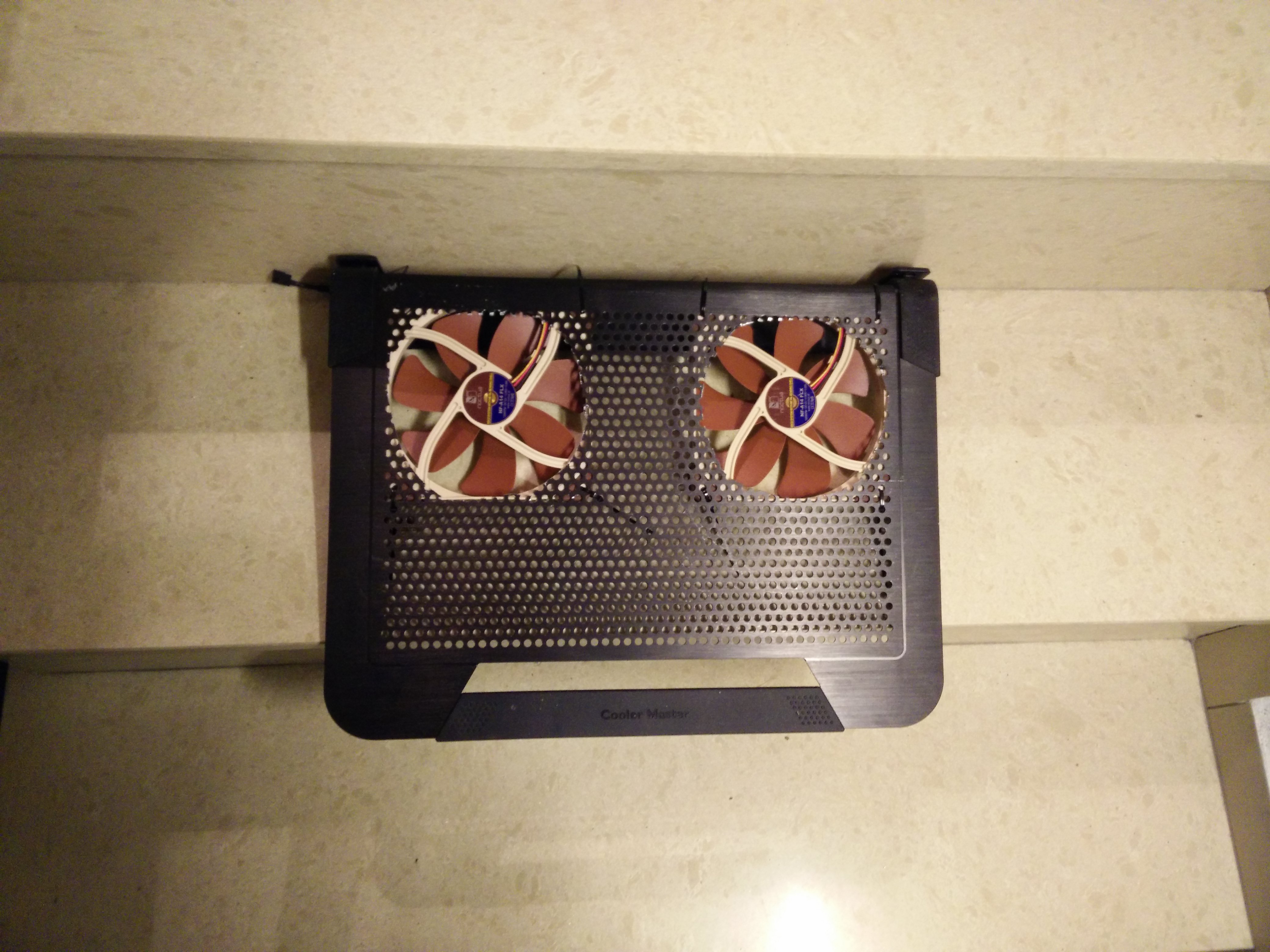
Today, I tested the new Nocua NF-A14 FLX fans and placed them in the Notepal U3 Plus. All about USB 12V conversion by Sony cable.
Times the question to Fox:
Do you have an external power supply for your fan Mod?
It only brings what if I raise the notebook on the notepal a little by rubber feet.
Temperatures CPU and GPU under Ungine Heaven at maximum 63 degrees C.
I am happy.
Now I can gamble in peace.
What does peace mean?
I got myself a measuring device.
48 dBA to just over 54 dBA I now measure on the notebook keyboard.
At the height of the external keyboard 46 dBA.
I can live with that too.
A part of the copper plate I have again expanded since the Vaper Chamber but very sensitive to any change responds.Attached Files:
lctalley0109 likes this. -
-
I have the same stand but am running stock fans with it at the moment.
-
I can answer that for @Mr. Fox His modded U3 Plus does come with a powered external fan controller. I am using one of his modded U3 cooling pads with my P870DM-G I purchased off him.jointhegame, afloyd, lctalley0109 and 3 others like this.
-
I'm having to resist picking up a second 1TB SM961.... tempting.
Donald@Paladin44, Papusan, Rage Set and 1 other person like this. -
"DO IT! .... JUST DO IT!" You know you wanna, hehehe. Is it on sale?Donald@Paladin44 likes this.
-
Thanks bro,
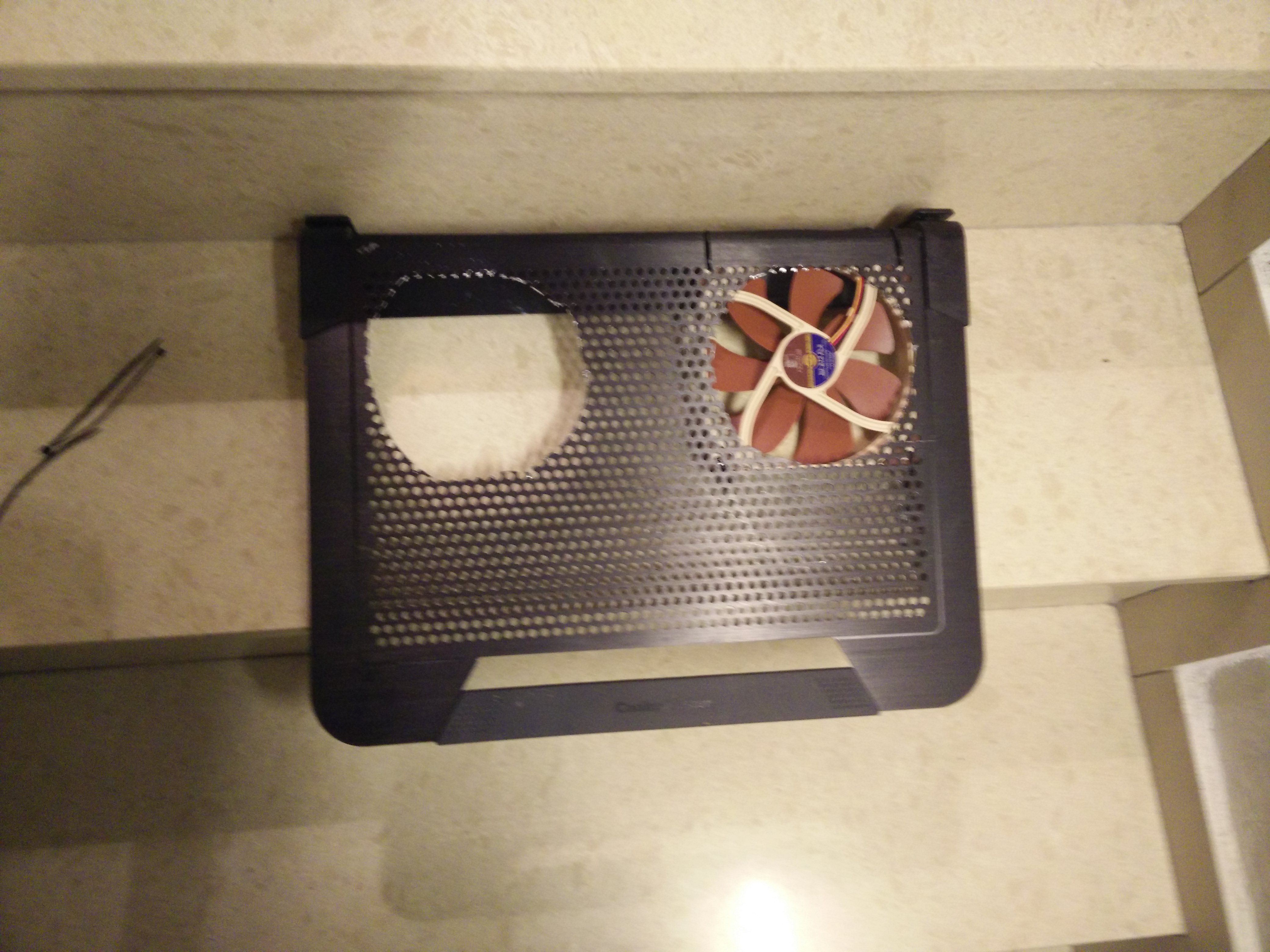
Started today my fan-mod.
I picked up the hole saw and made space for the Noctua square in the Notepal U3 Plus to the hoppers.
Now the two large 140mm fans can distribute their air unhindered to the buttom case.
I'm just wondering if an external fan control with A / C adapter would be useful.
Mr. Fox finally did it.
Maybe the fans are a little faster?Attached Files:
SirSaltsAlot and Rage Set like this. -
-
I would recommend a powered controller, that way you can control how fast you want to run the fans. For example, I run my cooling pad all the time but at lower RPM's when I browsing the web or coding. When I'm playing games or OC'ing, I turn them on full blast. It all depends on how loud those fans are and whether you want full control. Due to the nature of your beast, you would likely want full control.
-
Can anyone confirm all Skylake chips have the same IHS? Even the G series...
Im pretty sure they do. Just want to be 100%. Thanks -
Hi everyone, first time here. I've got a Sager NP9873 with a single GTX 1080, and its cooling solution is different from which has 2 GTX 1080s, as shown below:
(Well, how to upload pictures?)
Anyway it's the 6 heatpipe design, similar to what they used on GTX 980 model.
The question is, I want to upgrade my TIM to the famous Coollaboratory Liquid Ultra, and we all know that it will destroy aluminum heatsink. So does anyone know which one Sager use to make their cooling solutions? Copper, or aluminum, big question.
Thanks!AKHIL likes this. -
Welcome to the community! I believe Clevo (of which Sager is a reseller of) uses nothing but copper heatsinks, so you should be good to go with LM. What you will get from various members is to make sure your heatsink is flush, as a few here has gotten warped heatsinks that forced them to use TIM's like ICD. This is all for the CPU though, as I wouldn't use LM on the GPU.Papusan likes this.
-
Eh, English is not my native language so, what do you mean by 'flush'?
And, why wouldn't you use liquid metal on GPU? Is there a particular reason or it's your personal preference?
Thanks for your reply!
EDIT: Oh OK, flush means flat... But that raises another question, if a heatsink is not flat, wouldn't that cause a gap between the heat spreader and the heatsink, and therefore HUGE temperature problem? I don't think even the best thermal paste in the world would be able to compensate that. -
We stopped offering Coollaboratory Liquid Ultra (CLU), or any liquid metal, on the GPU because we had a few GPU's overheating after some time. Not only that, but the CLU would become runny (like water) and run down to the resistors causing them to fall right off. This is not covered under the manufacturer's warranty if it happens.
We could apply it, but we would be responsible for the GPU overheating (more than usual) or just not working after some time, and we are not willing to take that risk, nor do we recommend that anyone should do it.
IC Diamond is thick enough to fill in any of the minor gaps between the IHS and heat sink on the CPU and GPU.
. -
Tbh I am running my 970m's with CLU since 1 year and I got temp reduction by 15°C while gaming under full load. I found it even easier for the GPU and you don't have to cover the huge CPU IHS-areas with it!
 Ashtrix and lctalley0109 like this.
 -
Did you notice anything like he mentioned previously? Things like CLU running out and need to redo, or other issues, please share your experience.
-
That's probably not a unified heat sink design though, so you're more likely to have a tight fit.
Sent from my iPhone using TapatalkAshtrix likes this. -
@izombot
Yap, that's right! That's not unified heatsink design on the P570WM and my GPU heatsinks really making good contact. Unfortunately I can't say that from my CPU heatsink.
-
Its still £440, I might have to be good for now I did just get a new chair.
Rage Set, TomJGX, Zoltan@zTecpc and 1 other person like this.
-
haha sounds like the ministry of finance in meaker-land (=wife) is watching you closely
concerning clu, real life experience in the end depends on two very important factors: heatsink quality and laptop transport habits. i for one tend to move my laptop around a lot and in a vertical position at that (shoulder strap laptop bag and/or trolley on wheels), so wont be going back anytime soon to liquid metal pastes. however, if your machine is stationary all of the time and you watch out for horizontal transport it should be fine, AS LONG as your heatsink fit is not abysmal!
Sent from my Huawei Mate 8 NXT-AL10Last edited: Nov 25, 2016Ashtrix, boricuafly, TomJGX and 2 others like this. -
15C is huge. My understanding from most reviews of CLU was that the only big gain was normally between the die and IHS and that most people only saw around 3C difference from the IHS to heatsync. Sounds like with a flat surface on the GPU there are more gains to be made than a CPU? I would also think that even vertical and being carrier around if you had a good fit and put on very little CLU there would not be much of a chance of it running.
-
-
I took a look last night and today at Samsung 960 pro and Samsung sp961 but couldn't find any deals so far for "Black Friday". Maybe one will come along between now and cyber Monday but doubt it! If any one sees one let us know!!afloyd likes this.
-
It wasn't a Black Friday deal, but I got a GTX 1080 FE for $450 from Best Buy last week because of a misprint on their website.
Sent from my iPhone using Tapatalkafloyd, Prema, TomJGX and 1 other person like this. -
To all the folks afraid of using CLU...
![[IMG]](images/storyImages/z9lTNhV.gif)
lctalley0109, TBoneSan, Papusan and 1 other person like this. -
lol
ive tried it and phobya LM several times and while the temps were really nice ive had spills after transporting my laptop around. nothing serious happened mind you, it was just a pita to disassemble the machine down to the mobo in order to clean up everything. besides, i can already reach my max. stable cpu oc (4.8 ghz) with regular paste, so why bother?
liquid metal is definitely not for everyone. still, it was fun experimenting with it
Sent from my Huawei Mate 8 NXT-AL10 -
You won't be saying that when Liquid Metal burns out your GPU
The only thing you will be doing is Crying like a baby!!
Ashtrix, TBoneSan, Donald@Paladin44 and 7 others like this. -
-
More like this?
![[IMG]](images/storyImages/giphy.gif)
Or this?
Ashtrix, Donald@Paladin44, TBoneSan and 5 others like this. -
hmscott, lctalley0109 and Papusan like this.
-
Anyone looking for a chair massdrop has s decent one:
https://www.massdrop.com/buy/e-blue-massdrop-exclusive-gaming-chairsTBoneSan and lctalley0109 like this. -
-
LMAFO The irony...
Last edited: Nov 25, 2016Ashtrix, Donald@Paladin44, TomJGX and 2 others like this.
-
Yep. yep.. that's him alright... he got a reballing
Last edited: Nov 25, 2016Ashtrix, PrimeTimeAction, jaybee83 and 5 others like this.
-
wth is going on in here..
anyway, http://wccftech.com/amd-zen-8-core-35ghz-cpu-spotted/
looks like zen quad core would destroy intel's current quad core pricing lol, assuming zen is as powerful as broadwell or skylake after the bug is fixed.jaybee83 likes this.
*** Official Clevo P870DM2/P870DM3 (Sager NP9873/NP9872) Owner's Lounge! - The Phoenix 2 is here! **
Discussion in 'Sager/Clevo Reviews & Owners' Lounges' started by Spartan@HIDevolution, Aug 3, 2016.




![[IMG]](images/storyImages/RkuIWoG.jpg)


