Problems? See this thread at archive.org.
Youre welcomehttp://forum.notebookreview.com/thr...lienware-laptops.593626/page-46#post-10208973
-
-
I used a line method, some others used the x method. If you are spreading it may be more difficult to see if it is spreading out and making good contact. Don't personally have any experience with spreading it.
-
That still seems a bit high. I just grabbed that bench and ran it a couple times with every setting maxed out at 2560x1440, and the cpu and gpu's overclocked a bit. GPU's max'd at 67 & 68.
I love running older benchmarks like that and demolishing them, at several points it hit 500+ FPS lol. (according to hwinfo64 it peaked at 699)nevermore93, afloyd, Spartan@HIDevolution and 2 others like this. -
I'm using DSR at 4K on max settings. I can bump it down to 1440p but I've unlocked the frame cap as well.
Sent from my iPhone using TapatalkPorter likes this. -
Be on the lookout for pricing that is too good to be true on new ASUS, MSI and EVOC laptops. HIDevolution.com was burglarized early Saturday morning by a team of professionals who got away with an estimated $300,000 worth of our laptops. See - http://www.ocregister.com/articles/habra-740005-computer-break.html
GTVEVO, TomJGX, Red Line and 1 other person like this. -
OH NO!!! Will keep my eyes peeled. Praying for your company that everything gets settled out through law enforcement / insurance.
Sent from my iPhone using TapatalkTomJGX, Donald@Paladin44 and Spartan@HIDevolution like this. -
That's awful. Hope they catch the guys and that HID is insured.
neohopper, D2 Ultima and Donald@Paladin44 like this. -
Thanks for your good wishes. HIDevolution is well insured, but there is no way to get back all of the lost labor hours of our production team.
-
Thank goodness you already send me mine I hope whomever stole them gets what they deserve in the end.
TomJGX, Red Line, Donald@Paladin44 and 2 others like this.
-
-
So I'm running uncapped at 1440p and the temps are slowly creeping up back to 84. That's where they are settling in at. Not great obviously....
What was your score and average framerate after the run? Did you loop yours to let it build up heat?
Sent from my iPhone using Tapatalk -
Actually I spoke too soon. The temps in these runs are staying below 80c so far...
Sent from my iPhone using TapatalkDonald@Paladin44 likes this. -
Here are my score & settings. I have no idea if this is good score or not, I just got back from being on the road, and I had my laptop in various powersave settings, so hopefully I have it back to running full speed. I only ran it once each time while I was messing with it.
FINAL FANTASY XIV: Heavensward Benchmark
Tested on: 1/1/2017 7:03:55 PM
Score: 22628
Average Frame Rate: 185.035
Performance: Extremely High
-Easily capable of running the game on the highest settings.
Loading Times by Scene
Scene #1 1.090 sec
Scene #2 4.448 sec
Scene #3 3.437 sec
Scene #4 3.108 sec
Scene #5 2.849 sec
Scene #6 1.223 sec
Total Loading Time 16.159 sec
DAT:s20170101190355.dat
Screen Size: 2560x1440
Screen Mode: Full Screen
DirectX Version: 11
Graphics Presets: High (Desktop)
General
-Wet Surface Effects: Enabled
-Occlusion Culling: Enabled
-LOD on Distant Objects: Disabled
-Real-time Reflections: Highest Quality (DirectX 11 Only)
-Edge Smoothing (Anti-aliasing): FXAA
-Transparent Lighting Quality: High
-Grass Quality: High
-Background Tessellation: High Quality
-Water Tessellation: High Quality
Shadows
-Self: Display
-Other NPCs: Display
Shadow Quality
-LOD on Shadows: Enabled
-Shadow Resolution: High - 2048p
-Shadow Cascading: Best
-Shadow Softening: Strong
Texture Detail
-Texture Filtering: Anisotropic
-Anisotropic Filtering: x8
Movement Physics
-Self: Full
-Other NPCs: Full
Effects
-Limb Darkening: Enabled
-Radial Blur: Enabled
-Screen Space Ambient Occlusion: HBAO+: Standard Quality (DirectX 11 Only)
-Glare: Normal
Cinematic Cutscenes
-Depth of Field: EnabledDonald@Paladin44 likes this. -
I'm so sorry to hear that. I hope Ted, yourself and the crew suffer minimal downtime and loss.
One wishes we could track these sh#t-stains of society and have our way with them for a while.neohopper, TomJGX and Donald@Paladin44 like this. -
Go back and try the preset of Maximum instead of high (desktop).
Sent from my iPhone using Tapatalk -
Man, sorry to hear this. I absolutely hate these low life SOB's that do this crap. Get a F'ing job and stop taking s$&@t that isn't yours. I despise low life asswhipes likes this.TBoneSan and Donald@Paladin44 like this.
-
Here you go
FINAL FANTASY XIV: Heavensward Benchmark
Tested on: 1/1/2017 11:44:00 PM
Score: 19593
Average Frame Rate: 159.437
Performance: Extremely High
-Easily capable of running the game on the highest settings.
Loading Times by Scene
Scene #1 1.144 sec
Scene #2 4.475 sec
Scene #3 3.605 sec
Scene #4 3.279 sec
Scene #5 4.685 sec
Scene #6 1.194 sec
Total Loading Time 18.385 sec
DAT:s20170101234400.dat
Screen Size: 2560x1440
Screen Mode: Full Screen
DirectX Version: 11
Graphics Presets: Maximum
General
-Wet Surface Effects: Enabled
-Occlusion Culling: Disabled
-LOD on Distant Objects: Disabled
-Real-time Reflections: Highest Quality (DirectX 11 Only)
-Edge Smoothing (Anti-aliasing): FXAA
-Transparent Lighting Quality: High
-Grass Quality: High
-Background Tessellation: High Quality
-Water Tessellation: High Quality
Shadows
-Self: Display
-Other NPCs: Display
Shadow Quality
-LOD on Shadows: Disabled
-Shadow Resolution: High - 2048p
-Shadow Cascading: Best
-Shadow Softening: Strong
Texture Detail
-Texture Filtering: Anisotropic
-Anisotropic Filtering: x16
Movement Physics
-Self: Full
-Other NPCs: Full
Effects
-Limb Darkening: Enabled
-Radial Blur: Enabled
-Screen Space Ambient Occlusion: HBAO+: High Quality (DirectX 11 Only)
-Glare: Normal
Cinematic Cutscenes
-Depth of Field: Enabled -
Hello all,
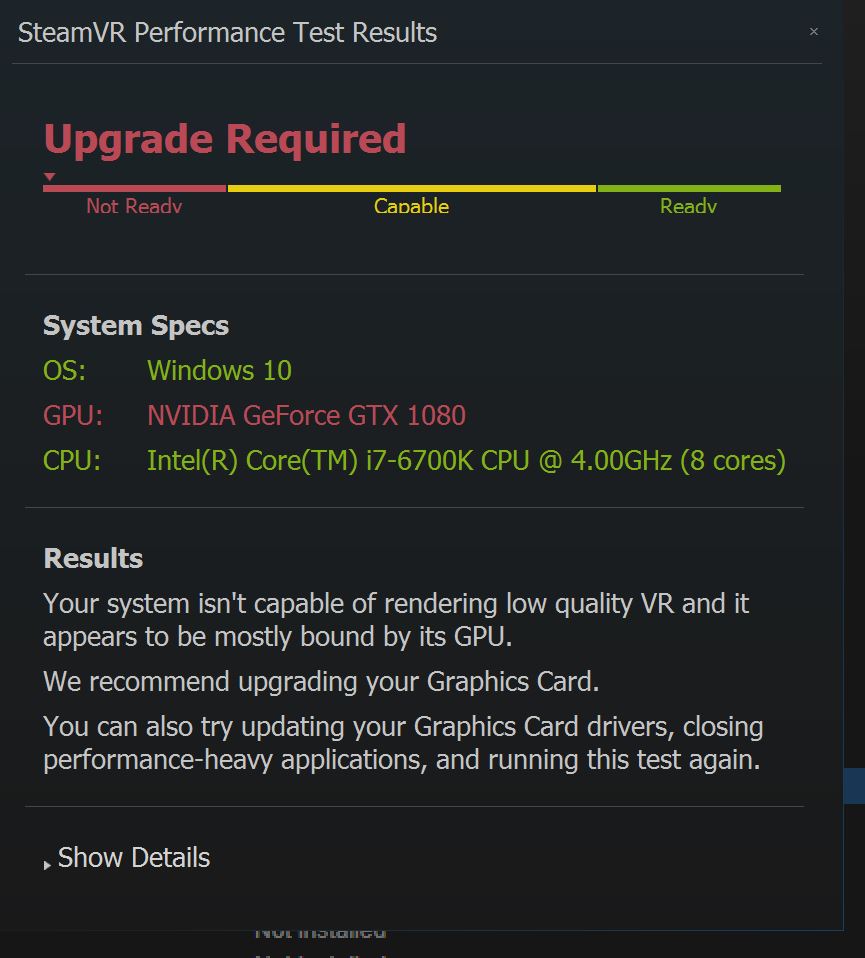
I have a new Sager NP9873-S and I installed steam lately and run the VR ready test and it fail on the gtx 1080??
any id why?
Intel i7-6700K 4 core/8 thread @ 4.2Ghz, NVIDIA Single GTX1080 8GB, installed 376.33 nvidia driver.
64GB 3000MHz DDR4, RAID 0 2x 500 M.2 SSD, 750TB SSD, 2TB hybrid 2.5" SATA HD, Display. 4K UHD 3840 X 2160 G-Sync @ 60 Hz, Win 10 Pro 64bit
Attached Files:
-
-
So sorry to hear, praying y'all will make a speedy recovery back to business as usual, and they'll catch the filthy scum thieves!!boricuafly, Spartan@HIDevolution, Papusan and 2 others like this.
-
Was gsync on when you ran the test?
Al so was the system connected to AC power
? -
Your RAM in your specs makes me wonder.. are you sure it's stable?
Most people here have found problems or a bear to run 64gb RAM @ 3000mhz.Papusan, hmscott and Spartan@HIDevolution like this. -
Guys, so I gotta ask, how's your overall performance been with the dm2/3 so far? I'm about to start negotiating a return for my dm2 today because I've been unable to cope with my vendor as well as the laptop's temps/heatsinks. In the end, is this a viable laptop?
-
Yes, it's superb
See my review please : http://forum.notebookreview.com/threads/evoc-p870dm3-review-by-phoenix.798685/afloyd, Papusan, nevermore93 and 1 other person like this. -
I guess I'll be waiting a little longer for my laptop.
Donald@Paladin44 likes this.
-
Still decently higher than my cards. What were your temps like?
Sent from my iPhone using Tapatalk -
I had g-sync on last time, so i turned it off. Since it was well above refresh I didn't think it would be working, or affect anything. Usually when it is on the FPS locks at refresh.
Scored a bit higher, my cpu was at 4.6 and my gpus were at +200 core/+300 memory. Max temp cpu was 57, gpu's max'd at 58 & 59.
If you want I could do a stock run and loop it a few times to get a common set of data points. Realize I am running stock BIOS but a updated EC, so that could also make some decent differences. (I think it jumped my firestrike score 2-3000 points alone)
FINAL FANTASY XIV: Heavensward Benchmark
Tested on: 1/2/2017 8:50:41 AM
Score: 22266
Average Frame Rate: 173.272
Performance: Extremely High
-Easily capable of running the game on the highest settings.
Loading Times by Scene
Scene #1 1.060 sec
Scene #2 4.465 sec
Scene #3 3.325 sec
Scene #4 3.176 sec
Scene #5 3.269 sec
Scene #6 1.210 sec
Total Loading Time 16.508 sec
DAT:s20170102085041.dat
Screen Size: 2560x1440
Screen Mode: Full Screen
DirectX Version: 11
Graphics Presets: Maximum
General
-Wet Surface Effects: Enabled
-Occlusion Culling: Disabled
-LOD on Distant Objects: Disabled
-Real-time Reflections: Highest Quality (DirectX 11 Only)
-Edge Smoothing (Anti-aliasing): FXAA
-Transparent Lighting Quality: High
-Grass Quality: High
-Background Tessellation: High Quality
-Water Tessellation: High Quality
Shadows
-Self: Display
-Other NPCs: Display
Shadow Quality
-LOD on Shadows: Disabled
-Shadow Resolution: High - 2048p
-Shadow Cascading: Best
-Shadow Softening: Strong
Texture Detail
-Texture Filtering: Anisotropic
-Anisotropic Filtering: x16
Movement Physics
-Self: Full
-Other NPCs: Full
Effects
-Limb Darkening: Enabled
-Radial Blur: Enabled
-Screen Space Ambient Occlusion: HBAO+: High Quality (DirectX 11 Only)
-Glare: Normal
Cinematic Cutscenes
-Depth of Field: EnabledDonald@Paladin44 likes this. -
-
Sorry to hear that news. Hope can recover very soonDonald@Paladin44 likes this.
-
My laptop is restart automatic during gaming recently, and checked the event, have a critical issue as below, what happen and how can I solve it?
- System
- Provider
[ Name] Microsoft-Windows-Kernel-Power
[ Guid] {331C3B3A-2005-44C2-AC5E-77220C37D6B4}
EventID 41
Version 4
Level 1
Task 63
Opcode 0
Keywords 0x8000400000000002
- TimeCreated
[ SystemTime] 2016-12-07T11:06:43.070592400Z
EventRecordID 5593
Correlation
- Execution
[ ProcessID] 4
[ ThreadID] 8
Channel System
Computer DESKTOP-B4G21KD
- Security
[ UserID] S-1-5-18
- EventData
BugcheckCode 59
BugcheckParameter1 0xc0000005
BugcheckParameter2 0xffffa6b44f889399
BugcheckParameter3 0xffff930143606c80
BugcheckParameter4 0x0
SleepInProgress 0
PowerButtonTimestamp 0
BootAppStatus 0
Checkpoint 0
ConnectedStandbyInProgress false
SystemSleepTransitionsToOn 1
CsEntryScenarioInstanceId 0
XML Viewer
- <Event xmlns=" http://schemas.microsoft.com/win/2004/08/events/event">
- <System>
<Provider Name=" Microsoft-Windows-Kernel-Power" Guid=" {331C3B3A-2005-44C2-AC5E-77220C37D6B4}" />
<EventID>41</EventID>
<Version>4</Version>
<Level>1</Level>
<Task>63</Task>
<Opcode>0</Opcode>
<Keywords>0x8000400000000002</Keywords>
<TimeCreated SystemTime=" 2016-12-07T11:06:43.070592400Z" />
<EventRecordID>5593</EventRecordID>
<Correlation />
<Execution ProcessID=" 4" ThreadID=" 8" />
<Channel>System</Channel>
<Computer>DESKTOP-B4G21KD</Computer>
<Security UserID=" S-1-5-18" />
</System>
- <EventData>
<Data Name=" BugcheckCode">59</Data>
<Data Name=" BugcheckParameter1">0xc0000005</Data>
<Data Name=" BugcheckParameter2">0xffffa6b44f889399</Data>
<Data Name=" BugcheckParameter3">0xffff930143606c80</Data>
<Data Name=" BugcheckParameter4">0x0</Data>
<Data Name=" SleepInProgress">0</Data>
<Data Name=" PowerButtonTimestamp">0</Data>
<Data Name=" BootAppStatus">0</Data>
<Data Name=" Checkpoint">0</Data>
<Data Name=" ConnectedStandbyInProgress">false</Data>
<Data Name=" SystemSleepTransitionsToOn">1</Data>
<Data Name=" CsEntryScenarioInstanceId">0</Data>
</EventData>
</Event> -
It is too early to say. We have to determine how many we have to rebuild to replace those that were stolen, and since we have been closed since Friday it will take a day or two to sort everything out.
-
I hope the thieves slip up and get caught sooner than later.Prema and Donald@Paladin44 like this.
-
Thank you!
We do have the serial numbers, but the police department has asked us not to publish them at this time.
We also have very good videos from multiple cameras in the parking lot, and the interior of the building.
If you see something, please email me at [email protected] or call me at 888-666-3418 Ext. 44
.lctalley0109, Jon Webb, izombot and 6 others like this. -
yes gsync was on and AC power on (performance power)
-
I would suggest running the test once with G-Sync off.
-
I'm sorry to hear this has happened, best of luck recovering as much as possible and catching those responsible.
Can you show details? This will bring up a chart of the course of the benchmark and will give insight on to what is going on.lctalley0109, afloyd and Donald@Paladin44 like this. -
I just wanted to say thanks to this thread, and a lot of the folks posting here, for helping me making the right decision while searching for a laptop last month.
I actually had the GT83VR is my basket several times at newegg. I owned the GT80 with dual 980's but detested their battery draining "feature" that was unadvertised, and power limits below what even the stock 330w adapter could do. I sold it swearing off to ever buy MSI again after their tech support did nothing to resolve my issues or even acknowledge they were issues really.
The only two things I would have liked better on the GT83VR were the built in optical drive (yeah I use mine all the time, and like having an all-in-one), and the mechanical keyboard was really nice.
Everything else would have been worse, less storage options, lower screen resolution and refresh, physically larger chassis, likely power limited GPU's, BGA CPU with less overclocking headroom, too much of a "flashy" gamer look, only red keyboard backlighting lol. Plus the GT83VR was almost $1,000 more, I mean if it was $1,000 less I could maybe argue it was worth it (to me) to give up some of those things. But the uncertaintly of the last one I owned, lower performance and higher cost sealed the deal for me. My other BGA notebook failing recently, and me having to send it in (been 2 weeks and still waiting on a RMA) helped insure that I made the right decision.Ashtrix, lctalley0109, D2 Ultima and 6 others like this. -
Enjoy your beast The config certainly has a lot of legs in it for future titles
lctalley0109, nevermore93, afloyd and 2 others like this.
-
I solved the problem by uninstalling the latest 376.33 nvidia driver with DDU in safe mode and reinstalled the nVIDIA GeForce Driver v21.21.13.6956 from @pheonix driver thread.
passed the steam VR test with G-Sync on...
ThanksPapusan, TBoneSan, Spartan@HIDevolution and 3 others like this. -
Updated news story with video included - http://abc7.com/news/thieves-steal-$300000-in-computers-from-la-habra-business/1682996/
lctalley0109, D2 Ultima, jointhegame and 4 others like this. -
Their vans number plates are seen...maybe they are real.
Also go through old footage and see whom of them has shown up before...
Maybe you can get access to mobile phone movements in the regions cell towers during that time.
If some of them had their phones on their are done.
Check the Windows keys with MS, they know exactly where each activated Notebook is...Last edited: Jan 2, 2017Ashtrix, lctalley0109, TomJGX and 9 others like this. -
I don't have my machine yet but I wanted to get some help/recommendations on how I should set up my computer. I ordered my laptop with the 1tb HDD because I have a 1tb 960pro, 1tb 850pro, and a 256evo. I was wondering if I could get away with cloning the new HDD to the 960 or should I be doing a clean install by making a USB recovery based on the installed drive? The 256 has windows 10 on it with some programs that I can't reinstall because a program I use is no longer supported. Will I be able to boot to this drive in addition to the main one?
-
i wonder what the FS scores are for a single clevo 1070 at stock? i am curious as to how it stocks up with my scores.
-
Hello Guys,
Happy New Year!
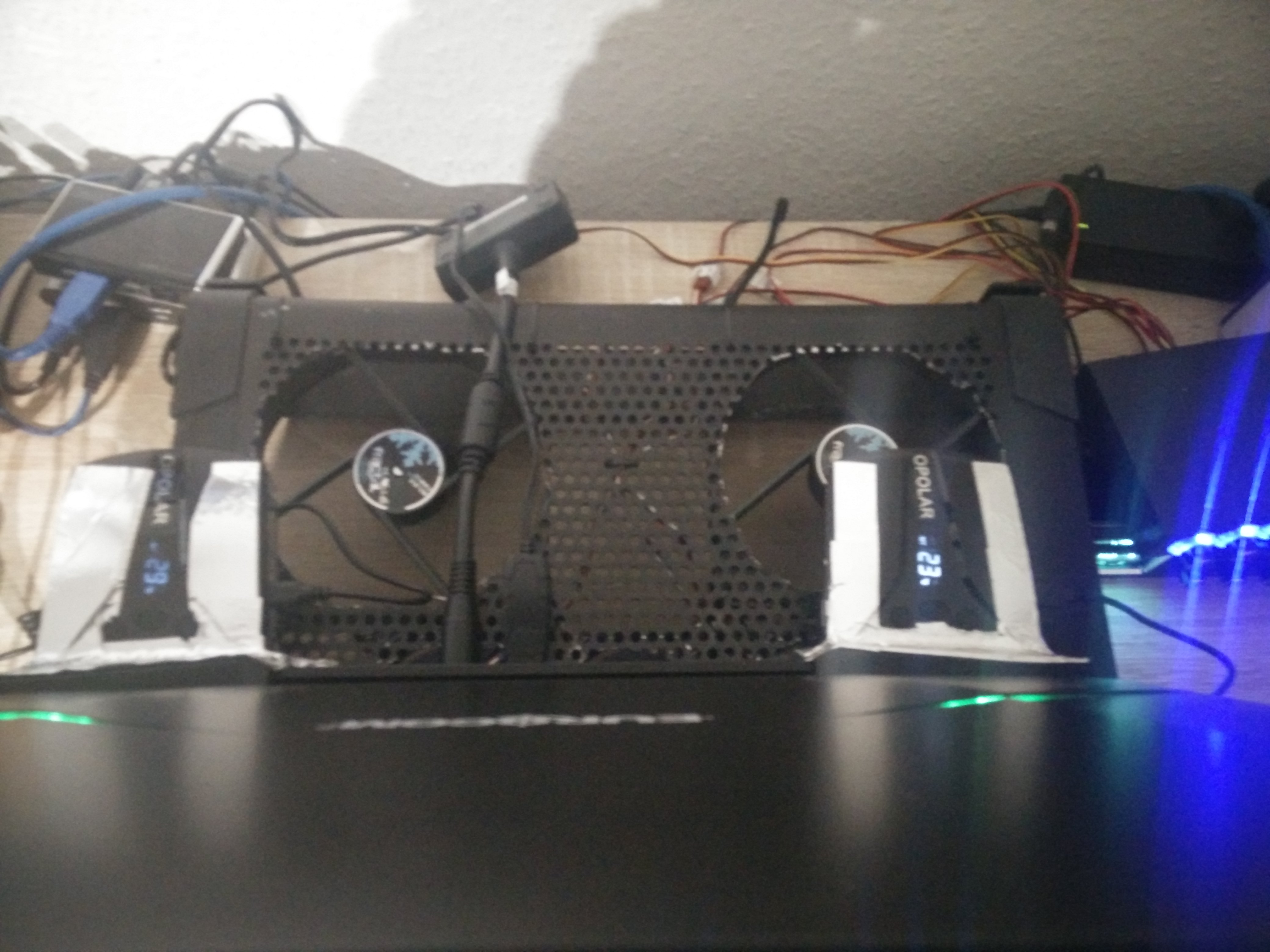
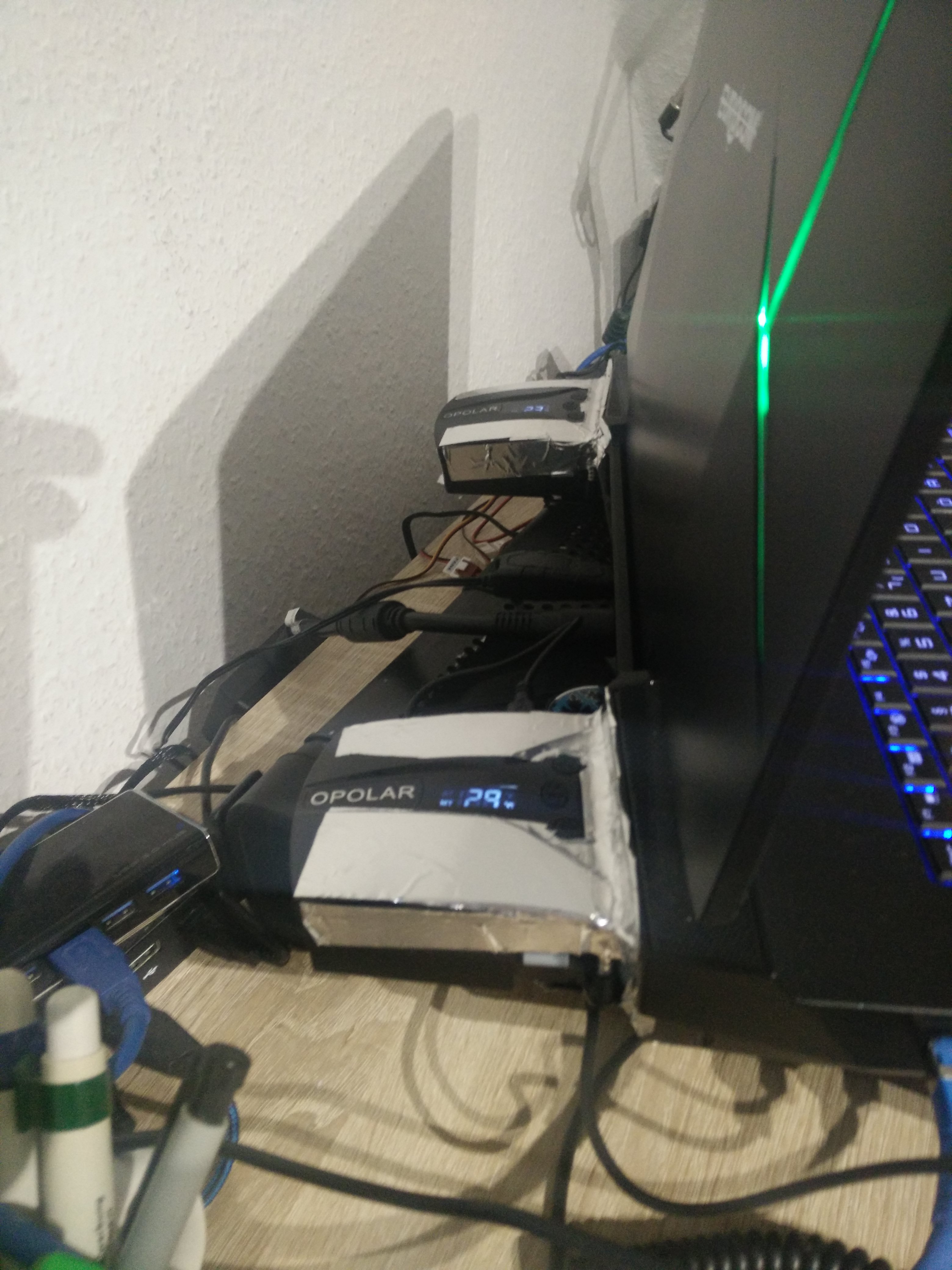
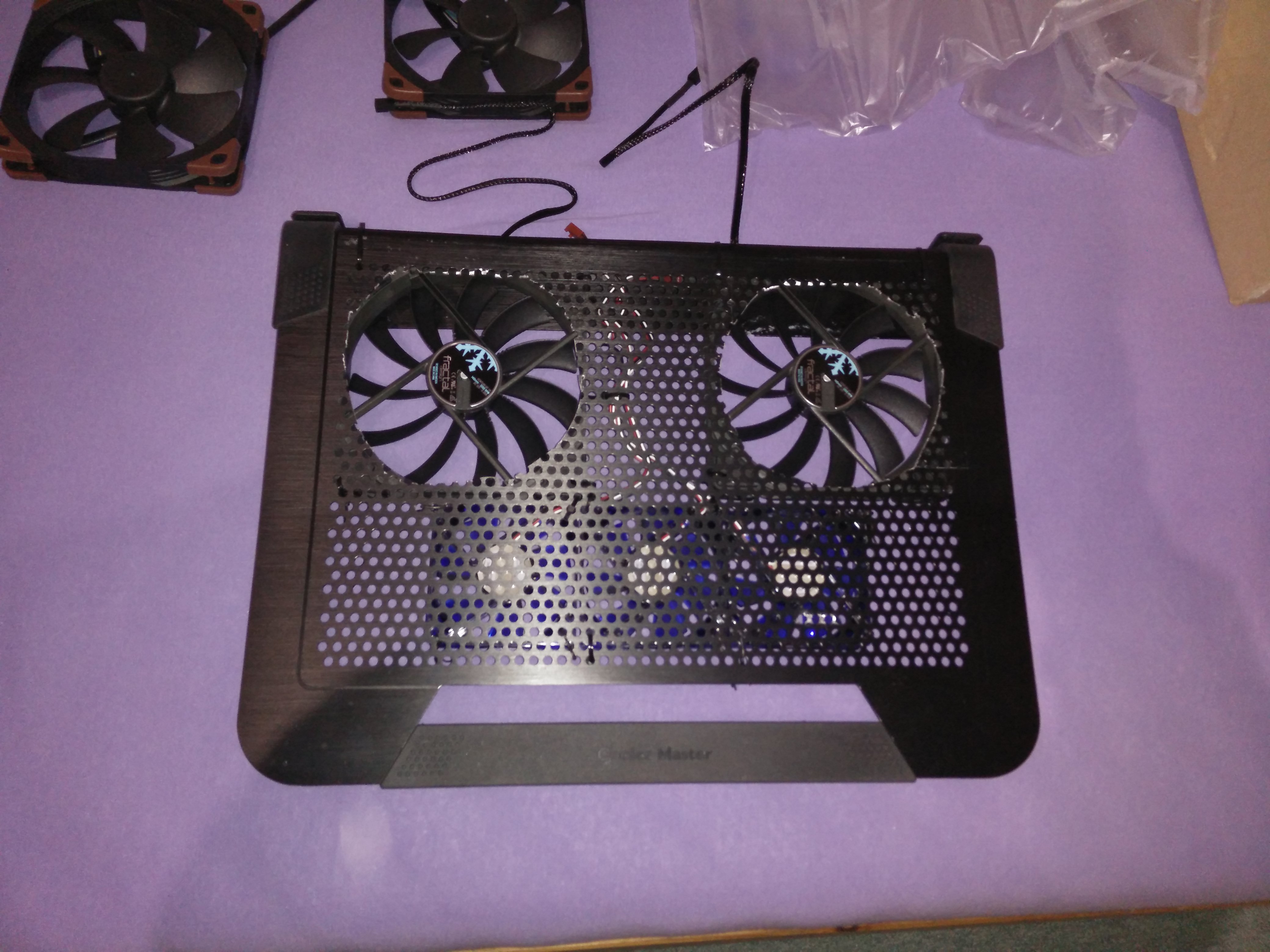
This additional USB fan I can recommend you warmest.
https://www.amazon.de/gp/product/B01MFD2YHE/ref=oh_aui_detailpage_o00_s00?ie=UTF8&psc=1
I have attached to my notebook.
The mounting is not so easy, because the P870DM housing has rear plastic straps and the anchoring would not fit.
The metal rail I have glued as a base.
For this I have the side ventilation holes so far that the air stream is only blown to the outside via the USB fans.
The temperatures are at least 5 ° C or more downwards.
The Opolar USB fan can be set up to 5000 rpm.
Simply press + or -.
The fan then displays the current temperature at the fan.
I have measured.
55 dbA volume.
This is limited.
How far the fan behaves at high temperature I will measure now and report.
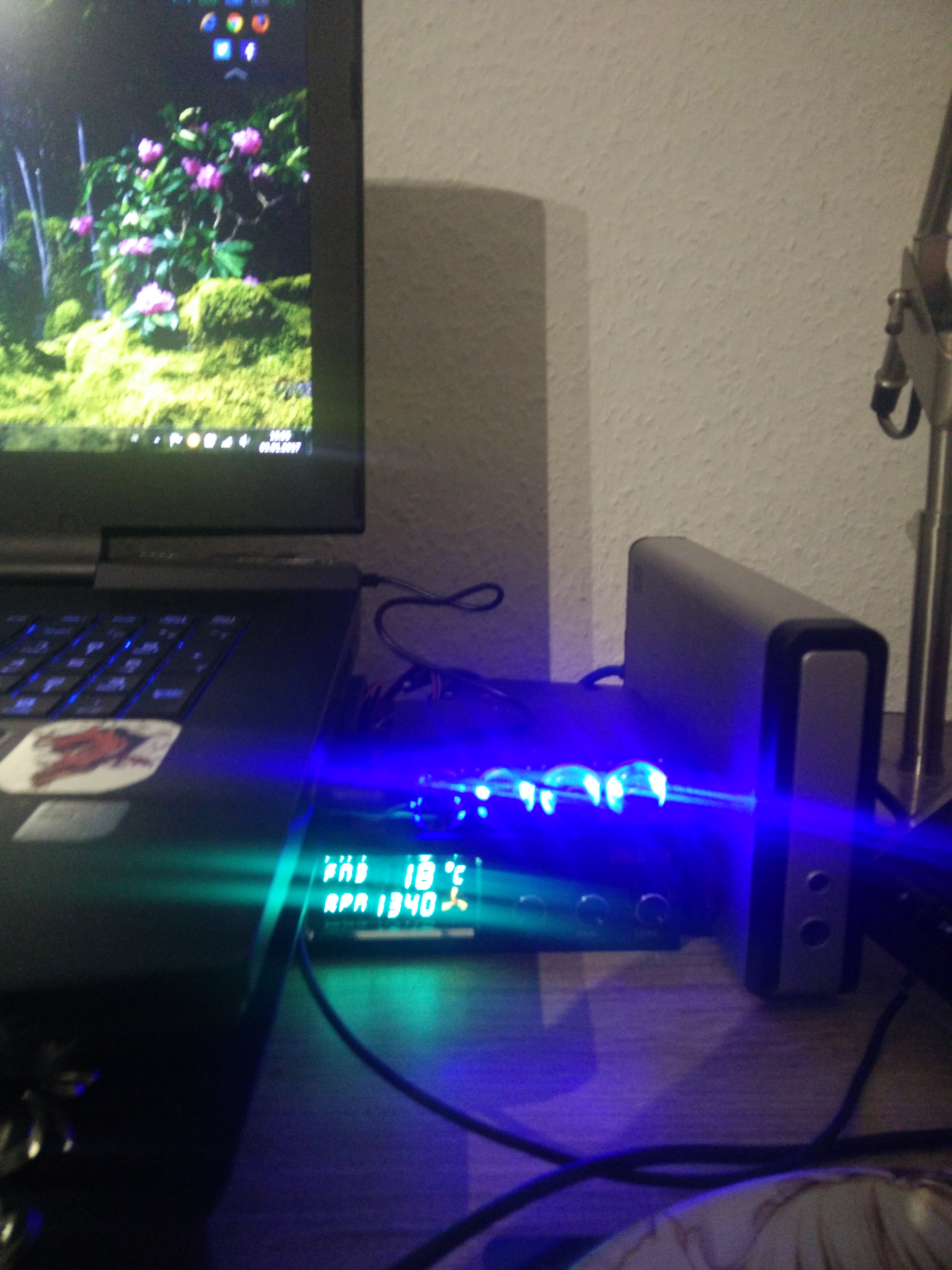
The two other pictures are from Fan-Mod and the Fan Control which is completed.
These are the current temperatures browsing this internet session.Attached Files:
lctalley0109 and afloyd like this. -
-
Donald You're a good person.
The feeling I have in any case.
And I was already robbed in our house.
So I know this feeling.
Especially where the company is affected to this extent.
I wish you and your company that you can deliver again soon for the notebook gamers.
I've already got a TrackR from the USA.
But I'll buy another tracking device.
Perhaps you should also incorporate these tracking devices into a few notebooks.
With a conversion of the battery can be with some copies even several years over a SIM card where the device is located.lctalley0109, afloyd, izombot and 1 other person like this. -
The phone check is a great idea but I had NO CLUE MS could actually find their product. Scary![/QUOTE]
-
All that necessarily implies is that Windows dials in every now and then to check its activation status. You can get the IP from any such request over the internet, which narrows down your location quite a bit.
-
So I'm a bit at the end of my rope with keeping my 1080's cool in this thing.
So I double checked all of the thermal pads, all of them are making contact. This time (after cleaning off the die's and the heatink) I applied the Kryonaut in the X pattern on the GPUs.
So far I've flipped the laptop over on its lid, with the bottom cover off, and I'm running MAX fans and I'm getting 70-72c on GPU1 and 68c on GPU2. I think these temps are okay. As soon as I put the bottom cover back on (and yes I've removed all the foil blocking ALL holes on the bottom of the unit) that the temps will be right back to 84-85 for GPU1 and 80-82 for GPU2.
Should I be able to get these under 84-85 with max fan? Is this normal? Or is it time to send it back and have LPC Digital take a look?
*** Official Clevo P870DM2/P870DM3 (Sager NP9873/NP9872) Owner's Lounge! - The Phoenix 2 is here! **
Discussion in 'Sager/Clevo Reviews & Owners' Lounges' started by Spartan@HIDevolution, Aug 3, 2016.