 Problems? See this thread at archive.org.
i'd upgrade from 6 to 8 cores, very much worth it, i think
-
That would actually be less of a gain (+33% more cores) than going from 4 to 6 (+50%)Stress Tech and ole!!! like this.
-
yes, that 2 more cores is still worth it. my goal was 8 core but i had to settle with less satisfying 6 cores if i didnt want to wait for another 1.5 to 2 yrs.Stress Tech and bennyg like this.
-
Now that my temps are a bit better I enjoy the 6 now over the 4 from the 7700k
ole!!! likes this. -
For anything CPU bound then certainly, it's worth it. Mostly I game so it's just not worth it for me.ole!!! likes this.
-
Warframe absolutely loved it. But I think they still have some multi core issues to work out. Haven't had a chance at Bf1 yet. But Warframe is my go to game anyway lolStress Tech and ole!!! like this.
-
fingers crossed for an 8 cores same socket CPU.. theres a chance due to spectre/meltdown bugs. just hoping it wont come with mesh unless we can overclock mesh to like 4+ghzStress Tech likes this.
-
i just noticed i never asked before, but what are you guys using for gpu fan control? i just realized that the gpu overclocking utility (installed with ccc) shows a gpu temp of 0 degrees C and show "n/a" next to "gpu name". if i fire uf afterburner, things are shown correctly..unfortunately no fan control with a.b. ;-)
-
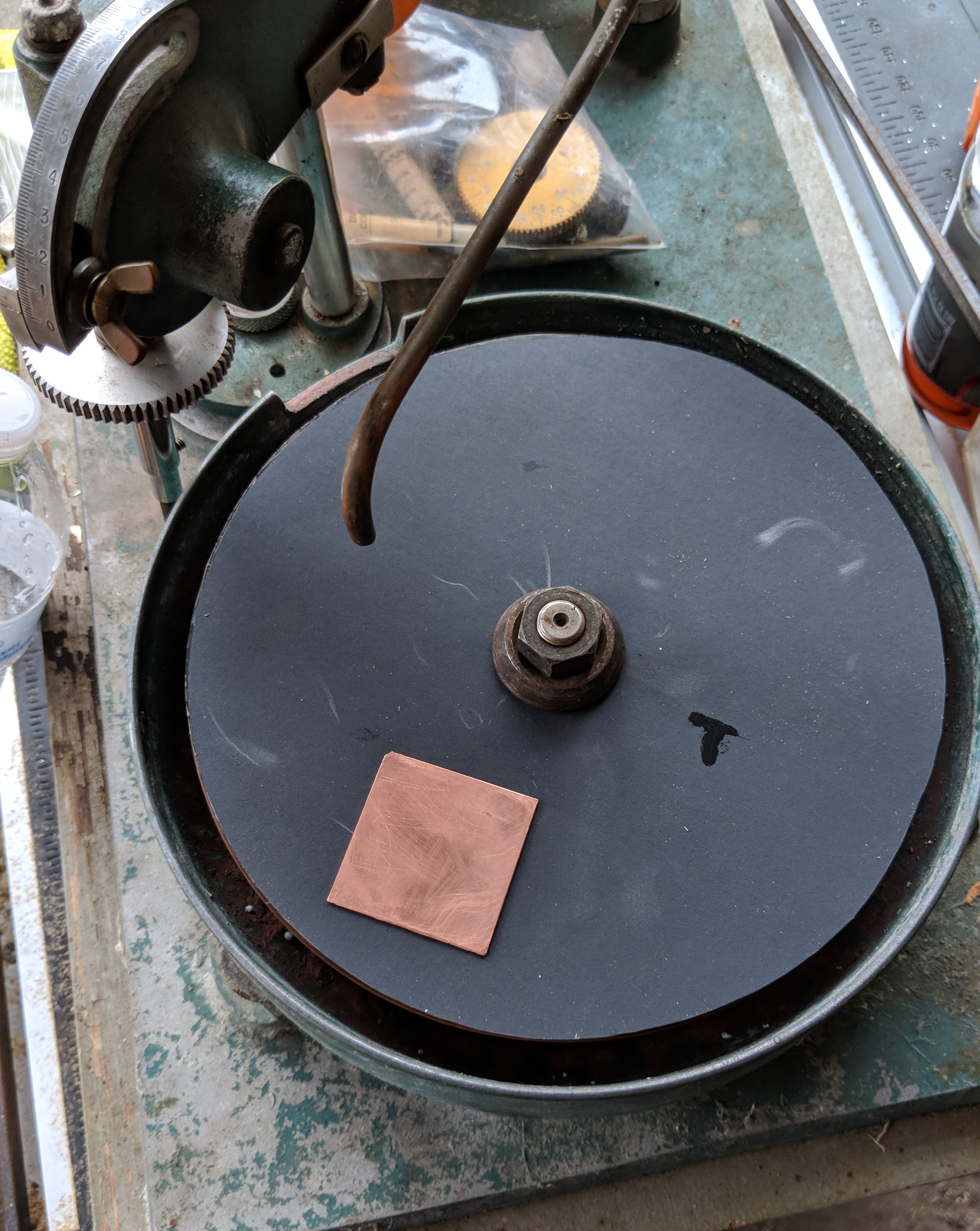
Found the old lapper my grandad used when he was doing gem stones way back when. New copper,and steel wheels are in. Along with the sanding discs. These copper shims are about to be prestinely flat lol
Attached Files:
-
-
But beyond 6 cores though you will see a drop off unless your program REALLY loves threads like video rendering.
-
Does anyone know if the bitspower ihs will work on the 8700k given the die is a little longer ?
Prema likes this. -
I had the same problem a couple of days ago, right after new video drivers were installed... rolled back the drivers and the GPU OC tool was back working like normal
Sent from my SM-T560NU using Tapatalkkfxsti and _deadbydawn_ like this. -
ah damn i tried a lot of things, but totally forgot about the gpu driver -.- thanks a bunch, worked for me as well!
is the gpu-fan option within gpu-overclock a fixed value? i use the german version, and the name of the option doesn't make clear what it does. does it just fix the fan-speed at i.e. 50% when you set it to that (and ignore the temperature of the card)?
thanks a bunch! kfxsti likes this.
 -
That one I do not know, you are talking about the "Fan Speed Offset" right? If so I would love an answer on that._deadbydawn_ likes this.
-
exactly okay so if i find the answer i'll let you know as well ;-)
kfxsti likes this.
-
I don't think so. But you will find a new IHS from Bitspower for 8th gen. And +23% increase in size ain't a little longer
Prema likes this. -
It always depends on the scale you are working on
-
-
23% of an insignificant variable is still insignificant usually
Papusan likes this. -
All depends on the circumstances. 23.77% bigger can sometimes be too much although you think it's possible Same widt, but put on almost 24% on lenght will most likely be too much.
![[IMG]](images/storyImages/GcERoLk.jpg)
-
It might actually be a little dangerous due to uneven pressure.
-
-
Well in terms of what I was describing LOL.
I calipped the size difference out as I have a bunch of 7700ks around the house.
I'm already prepared and prepped for adding the shim tomorrow to the CPU heat sink. Lapped several shims. And mirror polished them. Vacuum is ready. So I'll be hopefully getting to upload photos tomorrow.
I recorded and backed up the before temps this time. Lol
And for the record. A $825 8700k better help clean my house or cook me one hell of a breakfast for that much. Lol -
That's what I was worried about. The distance doesn't seem the same from die to edge. But then again, I would need to verify. Because that's the ONE thing I forgot to measure lol
Have been looking at this btw
https://rockitcool.myshopify.com/products/copper-ihs-for-lga-1150-1151Last edited: Feb 2, 2018 -
You're welcome to look on this post
 Donald@Paladin44, Prema and kfxsti like this.
 -
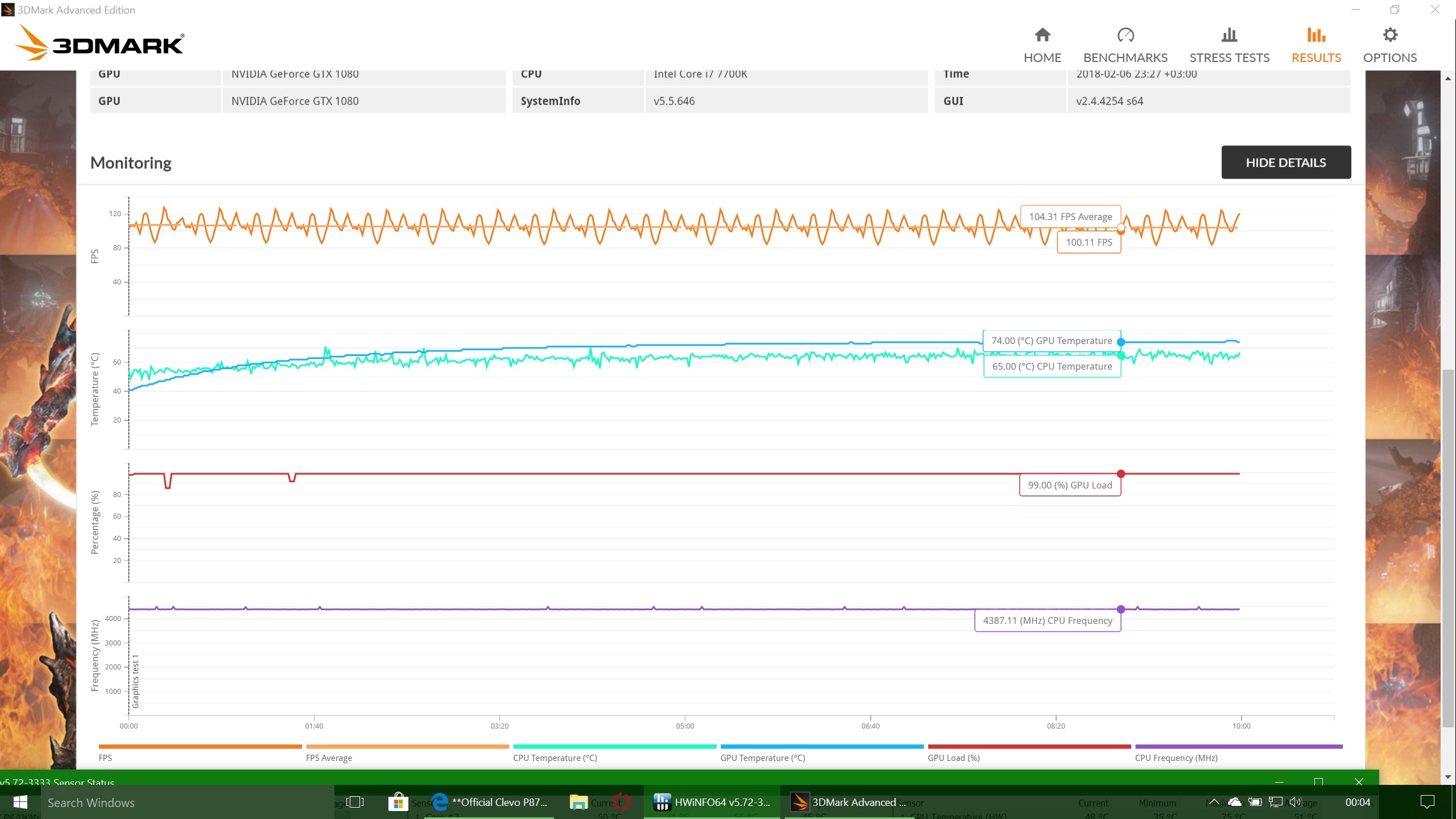
I don't know what to think of this result. Is the temp good or bad? http://www.3dmark.com/fsst/701832
Attached Files:
kfxsti likes this. -
-
-
Well guys, after having some strange issues on my notebook and just hoping for the best, it finally fixed itself apparently and the INTERNAL_VIDEO_SCHEDULER_ERROR is finally a thing of the past (at least for this month haven't seen it) and now I'm trying to undervolt and OC my CPU a bit, so far this is what I have reached, any advice for me?
Last edited: Feb 12, 2018 -
Just map out a frequency/voltage curve to fully characterise your chip to know every point for the future.
-
How do I caracterise it? And I have another question, it looks like the GPU OC utility from sager is not working, had to use MSI Afterburner to be able to control voltage, do you know a good way to unlock all the OC abilities for this computer?
Thanks for your time mate. -
Map the voltage Vs frequency over the normal range of the chip which will give you it's curve.
-
Helllo Everyone
I am having an issue with my KM1. Purchased it from HIDevo and i got the prema bios on it. I have my overclock settings to 4.7. I notice when i am playing heavy cpu games like battlefield 1 or crysis 3 it throttles to 4.2 and it stays there. any suggestions? I am using override voltage of 1100. CPU lock settings is disable already. -
What's the CPU utilization and temperature while you are playing these games? As far as I know at least Crysis is not really a CPU intensive game but a GPU one.
-
The temperature on my CPU stays around low 80s is not a thermal throttle. I notice this does not happen when sli is disable. maybe some kind of power setting somewhere. Can someone try bf1 for 10 minutes see if they stay @ turbo speeds to it throttles to stock 4.2 speeds?
-
What about the CPU utilization percentage? Have you run a stress test on your CPU to see if it runs at full clock speed and then throttles?
-
What throttle reasons are you seeing listed in XTU or other monitoring program?
-
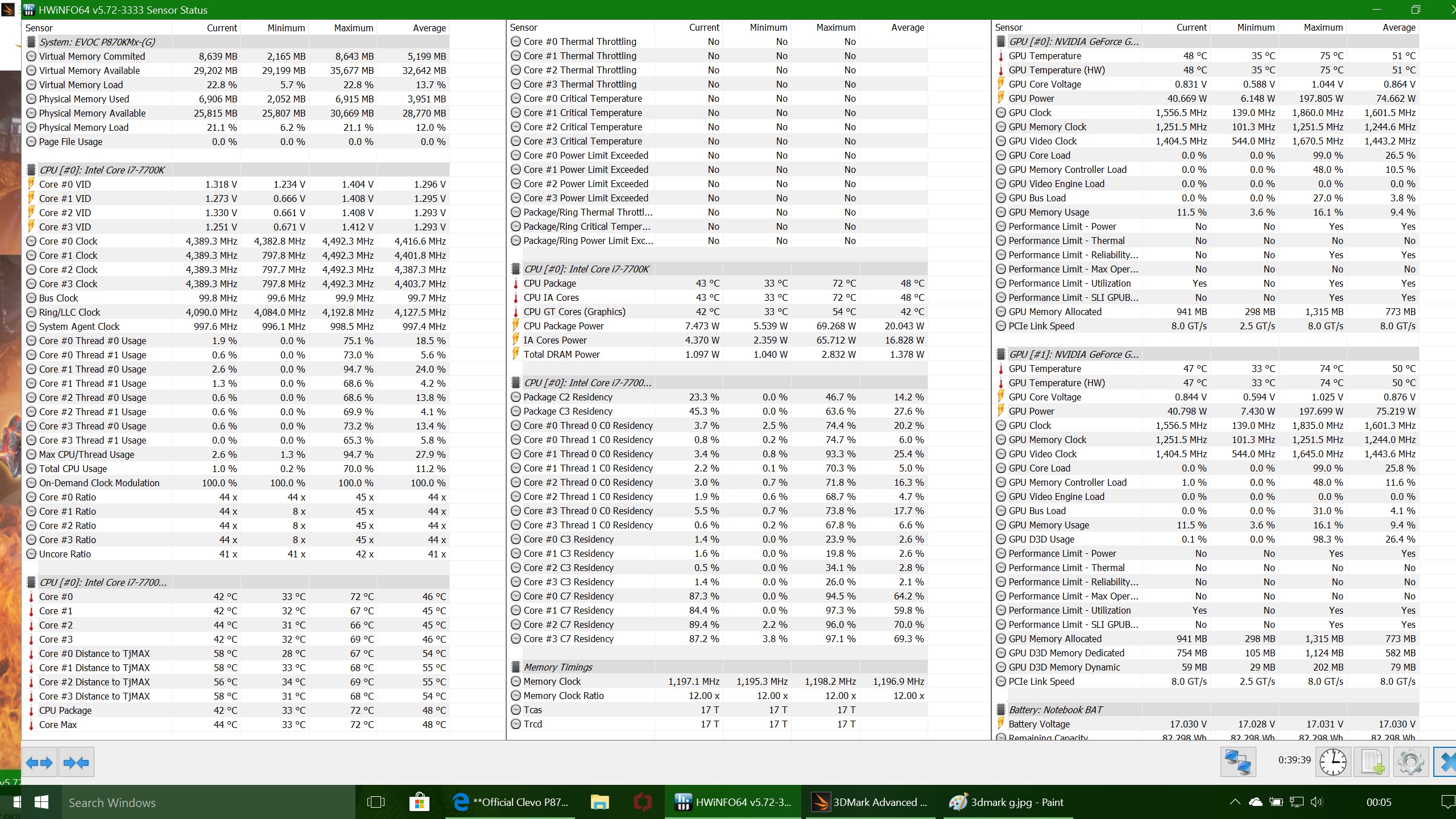
Here is a screen shot. It looks like my Power Phases are overheating or something. Prema is being super helpful trying to figure this out.
the power phases are the ones right above the CPU correct? I recently changed the IHS for the bitspower skylake so the IHS is a bit taller, maybe those thermal pads above the CPU are not making contact due to the taller IHS?Attached Files:
Last edited: Feb 20, 2018 -
-
You need to increase the pads thickness so it is corresponding to what you increased with the Bitspower lid (around 1mm). Remember to check the pads imprint when you disassembles the HS.Zoltan@zTecpc, Donald@Paladin44 and Juang1985 like this.
-
You also have a particularly hot core in the group, check you thermal material application too.
-
Thanks Guys
I will be doing some repasting later this week. I have a feeling my cpu heatsink might be bent. I have Grizzly thermal paste on it. -
Take some pictures of what the pattern looks like on the core and heatsink when you remove it and share it. From the pattern we can help tell if there are any issues.
Zoltan@zTecpc, Papusan and Donald@Paladin44 like this. -
@Meaker@Sager
Hi everyone, this is my first post in the forum, and I hope that I can find someone who had the same problem and solved it to help me out...
I bought my laptop from Sagernotebook site last july, and it was working flawlessly... Until somehow, everything's now acting weird.0
CPU's clock speed sometimes gets locked at 1.4Ghz or 2.4Ghz with no repsonse to the Control Center's changes except a restart (Several times) or sometimes hitting the reset to default in the CPU overclocking menu, and the GPU hasn't been overclocking by any means now (I tried the Control Center, MSI Afterburner, Nvidia Inspector)... Even sometimes it disappears from the Control Center with only the CPU overclocking visible.
I know stuff don't break randomly, I must have installed or fiddled with something I shouldn't touch.
I tried updating all drivers, did the chipset -overall trick, downloaded the latest Control Center from Clevo's site, resetting the CMOS/BIOS settings by pressing FN+D while booting.
I don't want to format and restore the factory settings since I have lots of programs installed and around 50 games so it would take an eternity to install them all again.
I'm attaching a screenshot for the GPU's abnormal behaviour since the CPU didn't have a problem by the time I'm posting this.
Any idea would be of great help.
*I might have some overheating issues, my CPU runs at 97 degrees when it's overclocked to 4.6 Ghz and undervolted by -100 mV, when I stress it using FurMark CPU Stress test using 7 threads and even crashes if I try cranking it up to 4.7Ghz.
**I don't have any heating issues with my GPU, runs at 85 degrees max when it WAS overclocked to 1690Mhz, in full load running a game or a stress test. Now it runs @1556 and the GPU overclocking menu freezes if I try to change anything.
https://drive.google.com/open?id=1Dh1tV3DRXCIi_RzR93f8A_-KDRm5qhBd -
What sort of temperatures and clocks do you see during gaming? Run GPU-Z and a CPU monitoring program and graph the results over a period of odd performance.
-
I've attached some screenshots for the temps and clocks I get while gaming and while rendering a photo.
*I'm testing Ghost Recon Wildland and it's set to QHD Ultra settings. I'm getting ~50 FPS +-5FPS depending on the action.
**For the render part, I'm noticing a lot of throttling on the CPU and the temps are not getting below 98 degrees during the whole process while the clocks dip into the 4.1.
***During the gaming and the render tests, I set the Fans to Overclock, and not Maximum as I wanted to show you how it behaves on this setting.
https://drive.google.com/open?id=1i8oldq9TGPNUNzqT5S7IZvi8caadRz2m
https://drive.google.com/open?id=1BN5FkeZ5Zy7ENBSweo1JZb5iM1nxUlGW
https://drive.google.com/open?id=1Ga9P5x_YmuMqmUA4k15uH9QwDKZiUA4j
https://drive.google.com/open?id=1R6c7o0PMZMAC4wId6srksTu3OHJ18Fut -
A quick look at your CPU max temps (97C) clearly shows overheating.
I would start by re-pasting (reapply thermal paste). That should take your temps to 80sC or below. This in turn should solve the CPU throttling/downclocking issue
For even better temps at high loads, look up De-lidding of your CPU & Mr.Fox's "Bitspower Skylake IHS lapping". -
Yeah, I figured I should de-lid and repaste the processor, and maybe even use LM for the CPU and GPU to cool things even more. Problem is, I live in Niger... So it's really dusty in here even in air conditioned rooms (which constantly blocks the exhaust vents) and everything is just near impossible to order from the US. I'll have to get a full list of all the tools and materials I need to de-lid and repaste. I have already a list but it's my first time ever to do anything like this so I would appreciate any help I can get on this forum for confirming if this list is correct and even add if there's anything missing.
-Rockit 88 Delid & Relid for LGA 1150
-Thermal Grizzly Kryonaut Thermal Paste
-Thermal Grizzly Conductonaut Liquid Metal
-ArtiClean 60ml Kit
-Isopropyl Alcohol cleaner
-Permatex 81158 Black silicone adhesive sealant
-Permatex 82180 Gasket Maker
-Scotch Super33+ electrical tape
-CRC Urethane Seal Coat.
Mind you that I have literally nothing here to help me with this project, so the list has to be perfect :|
Thanks in advance for the help.
*** Official Clevo P870KM1/P870KM1-G/Sager NP9876 Owner's Lounge! - Phoenix 3.0 ***
Discussion in 'Sager/Clevo Reviews & Owners' Lounges' started by Spartan@HIDevolution, Jan 5, 2017.







-preview.png)

