Problems? See this thread at archive.org.
Cheers for the reply !
-
-
No problem, give us a shout if you encounter something else

-
After a quick search I cannot find the info I need.
3 m.2 in raid, windows 10 doesn't find the array after loading the raid driver listed on the sager np9876 site.
Can someone point me in the right direction? -
What m.2 drives?
-
Bpx gen3. I got it though
pulled the 2.5 drive and the array showed up.
-
Does anyone know how to do the powershare from USB? doesn't seem to work by default, and cannot find the settings in the bios?
-
What do you mean by "power share"? That sounds like Dell terminology to me.
-
Sorry - USB providing power when the PC is shut down ? i can see the USB port, just not letting power pass through after shut downLast edited: Feb 12, 2019
-
That rings a bell, did you check the manual on the BIOS?
-
fn + power button !
got it -
Excellent
-
Are there any tools which allow us to make a custom fan curve such as HwInfo64, i downloaded the beta that apparently supports this model but there is no option of creating a custom curve based on temps etc
-
Excellent Fan Control from master John@OBSIDIAN-PC.
-
Generic programs are not going to give you access to a laptops fans usually as they use custom firmware.
-
What an awesome tool, exactly what i was after.
Thank you. -
Can someone confirm if the 870dm2 single gpu heatsink fits the km1?
-
Yes that should fit ok.
-
I don't know if you ever got any resolution to your problem, but I have experienced the exact same thing lately, very intermittent in nature. Unfortunately, I also discovered that one tiny capacitor on my gpu had inexplicably come off the board. I still don't know if that was/is the cause of my issue, but oddly enough, my rig is running fine. I did, out of safety (and some paranoia), back off any overclock I had with the CPU, and since I hadn't had the GPU overclocked, that should still be safe. I'd give my left arm to have access to a circuit diagram for the Clevo/Kapok GTX1080 card, just to have some better knowledge of what that capacitor did/does.
-
That circuit diagram with all the designs being custom now is quite under wraps.
It's a waste of money to put excess parts on so it's safe to assume it is necessary. -
A bit of an update, and probably concluding this thread, I spent the past couple of weeks in discussions with the system builder, and it seemed they weren't fully understanding what i was requesting, which they wound up attempting an RMA and getting it denied. I politely thanked the support member for helping, but followed it up with a rather terse conclusion that i would no longer deal with builders who use Clevo parts exclusively. My reasoning behind that came from the other day, while making the attempt to repair the card by re-soldering the capacitor back on, the other one that was showing signs of coming off, did in fact come off. That capacitor sat next to one of the memory modules, so at this point, it felt like the card just wants to die...two years out, no overclock or mistreatment and it's coming apart.
After thinking about this in depth, the thought of spending $1200 for a new card and still not being 110% sure that this is the cause of the system issues, I thought it best to buy a new system and sell the old one for parts, which still should fetch some decent cash. if anyone is interested in this system, feel free to contact me, but in the meantime, I'm happy to know I have a new system coming that will do even better, have a solid warranty and not made from Clevo parts.
Those interested in my old system, it has a desktop-class i7-7700K cpu, 64gb of DDR4 RAM (Corsair vengeance), a 4k panel (which is STILL beautiful), one SATA III SSD (Sandisk 256gb) and the other a Samsung M.2 SSD (120gb). Battery is still good, though not the greatest for using on this system due to the power requirements. Anyways, further details I can provide to interested parties. -
There is a section called the members market for such stuff.
Now I cant comment on your situation specifically but we have not been seeing g this situation ourselves. Usually some kind of physical damage has caused components to fall off. -
@Meaker@Sager he does not meet 100 posts requirements to do so, unfortunately.
@jmorvay how whole soldering thing went? Is it working?
I would assume it's not since you want to sell your laptop. In this case there are still people that are willing to buy ur broken card and fix it.
About clevo - in my opinion you was just unlucky. Some stuff lasts for years and some not. In let's say BGA scenario - if something like this would happen - you can basically throw everything to trash. With clevo even if card failed - you still can fix it or just sell it for parts and get another rig.Papusan likes this. -
Then users are not eligible to be selling equipment on here if they dont meet the criteria for that section.
-
Sorry for the announcement of the sale. I'll try somewhere else.
I tried to perform a re-solder, but my iron isn't small enough to get into such a tiny space.
As for physical damage, all I can say as that if anything physical happened, it came from the card functionality and not from me personally. I'm a "don't fix it if it ain't broke" kind of person, and wouldn't purposely break something to try and get it replaced for free. i understand that Meaker@Sager is a company rep, and I expect to hear that it was my fault, so I won't argue over who is right or wrong. I came here for help, that's all.
At this point, as well as reading other users dissatisfaction with Clevo/kapok, around the internet, it's best for me to stay away from them, because the cost of the component, coupled with the trouble I've had and then having to do a self-repair is a bit ridiculous, imo. I'm not really equipped for doing such intricate work and trying to ascertain how these things were put on in the first place, I stopped before making things worse.
If I am one of the unlucky ones, then it's a lesson learned. I have quite a bit of history with building systems, and a decent amount of exposure with working inside laptops as well, and I've never seen this issue before, but there's a first time for everything. -
@jmorvay no one says that it's your fault. It might be production defect. But right now it doesnt matters. Warranty is for 2 years, and thats it. Expecting free repair after this period is radiculous.
In my opinion - if you re feed up with clevo - that is ok. But it might take longer to sell this rig in parts than to pass card for repair to specialists and than sell laptop as whole functional machine. Its your call, just my experience .
If you had long history with laptops and stuff, than you should also be aware what is going on at BGA side of rainbow. Paying 2000$ for repair because laptop is not charging and manuals to fix it are not available anywhere. Pay around 90% of laptop price or throw it to garbage. And on the other hand you have clevo - where manuals and technical schems are available and same issue would cost you 200$ for repair.
Just something to think about. -
If I stated I wanted a free repair, I think it's a misunderstanding. To recap, I started to have issues with my system locking up (actually when my warranty was still valid), but didn't act on sending a ticket until later, when i discovered the capacitor had come completely off the gpu board. I cannot stress enough that whatever happened, wasn't due to anythign I physically did to the card. It's a gpu card, not a component that is often removed and thrown around, and as I said before, the only time I ever touched the card, previous to the incident, was to re-paste it, which entailed only removing the heatsink. My further inquiry to the laptop builder was to make them aware that I had a faulty component, quite possibly due to a manufacturing error and I wanted to see if Clevo would be open to accepting a trade...nothing more, nothing less.
My attempt at a self-repair, was more so a last option for me, and in doing so, I discovered more physical problems the card. yeah, Clevo left a bad taste in my mouth because I have heard they were a good company with decent products, but when you invest a large amount of money, you do tend to have an expectation of getting what you pay for.
Since I am not 110% convinced that a repair to the card will resolve this issue, the question of how much more time and money should I spend in troubleshooting, if the card isn't the problem? I just feel that at this juncture, that my money is better spent on a new machine, and currently I have one on order, which I can cancell, if someone here could convince me that staying with Clevo is still a better option, and whatever happened was a one-off freak accident. Yeah, sumping a few grand into a new mainstream brand laptop may or may not be the way to go (still trying to figure out what BGA means), and as for my previous laptop experience, I've owned HP, Dell and Alienware...companies who built a good laptop and I had zero hardware issues with, so when I went with Celvo, it was a leap of faith that an off-brand company could deliver the same quality and performance.
To be honest, a couple other reasons I wanted to get a new machine is that for one thing, getting a 4k screen on a 17" laptop is not beneficial to those with eyesight problems. Scaling the screen helped, but caused a blur. The bigger issue was power delivery. Clevo has a two brick system that attaches to a small converter box, but the cords always liked to come out. I literally had to fashion an attachment to prevent them from doing so (I communicated that to my system builder who concurred that the design was a failure).
Look, the laptop I have served me well from everything from 3D modelling and rendering to gaming, so with this issue now, I came to the proverbial fork in the road, whether to spend the money on a replacement card or get a new machine. A professional repair was an option, but with what i have seen of the card right now, how much more is going to fail on it before the sensible course of action is to investigate the first two options? -
If something was wrong and you was aware that warranty almost gone - you should have send it right away. But past is past. It cant be rewritten.
Better to focus on best options right now. If i remember correctly your issue was random freezes that was forcing you to do hard reset. If its case than i can say that i had same issue - clean Windows fixed that. No freezes since for over year of daily use.
On the other hand - even if GPU is still working. Not fixing it might cause futher damage that might be irreversible.
Handig it to specialist that will solder everything correctly might fix everything there is to fix. In this case its tons of cash saved. Coz you can use it like for past two years or sell it as proper machine and dont bother anymore.
Its not like I and others are fanatic of clevo and everything else is just bad. Its just rational decision to make. If for example Dell would stop to screwing up own customers, start building proper constructions and wasnt trying to milk everyone on every little thing - than many of clevo users might change their machines. But reality is that clevo is just lesser evil than rest of industry . -
Woulda, shoulda, coulda...trust me, I kicked myself for not being up on the warranty, but at the time of the issue, I didn't suspect it was hardware related. With fifty million things to remember these days, computer warranties aren't at the top of my list. That may seem like a bad excuse, but allow me to consider this, if a reputable computer company, who offers warranties as part of the sale, could take the small bit of effort to send a reminder to its customers about an impending warranty expiration and provide an extended warranty option, I'd been all over that and done so. I know, it's not a perfect world.
Historically, I owned about 3 Dell/Alienware laptops in the past, with minor fixes that became a huge issue between the customer service team and myself. After the last go round with customer service, I lost interest in even dealing with Dell any longer, just for that fact alone. Even though I see Alienware popping up often in the trades, for new laptops their putting out, I don't see a lot of bang vs. buck with them, coupled with the aforementioned customer service, I look the other way.
As I said before, I am not 110% sure it's all the gpu's fault. The issues I had with complete lockups was more of an assumption of hardware failure, due to the fact that I recently did a clean reinstall of Windows, but before the discovery of the gpu problem and before the lockups. Yes, you are correct that a repair is cheaper than complete replacement, but consider this: if there are other issues I am unaware of with the system, which may be causing the problems I first recognized, then where does that leave me? i could replace the motherboard, fix the GPU, it could then be a power supply issue...all of this adds up in time and money, and I may or may not be any nearer a solution the problem. Sometimes it's best to cut and run, but if I knew someone who knew exactly what the cause was and could fix it, I'd pay for the repair in an instant. Since I haven't had a "crash" in over a week, it is puzzling, trying to figure out what is causing the freeze at that point in time as well as what is going on at other times to prevent it from occurring again. -
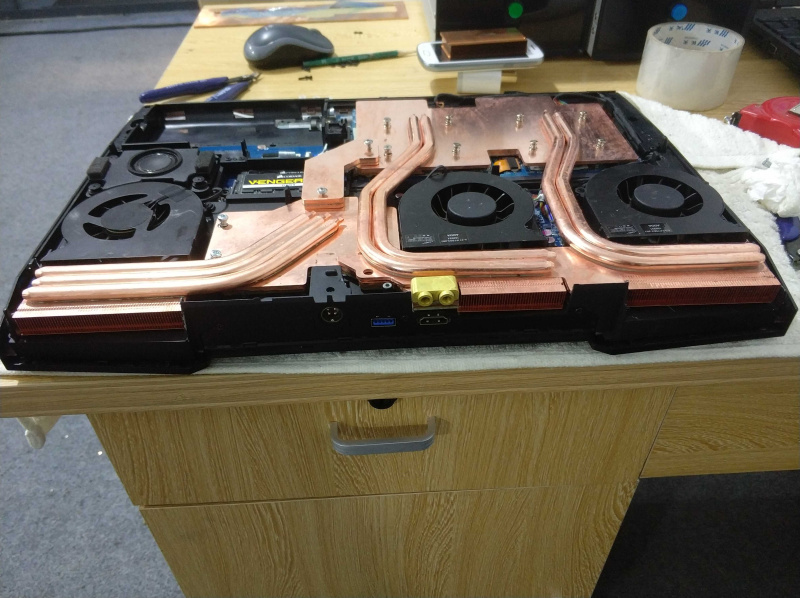
Anyone out there have tried to upgrade CPU P870TM heatsync into P870KM chassis? I almost sure someone did.
Long time i was thinking about getting one of this TM ugprade kits. But they cost too much in my opinion. Another thing is that i have everything that i need right now. I7 9700k works flawlessly with moded BIOS and if somehow i could fit TM's CPU heatsync - it would bring me superior product.
So my question - what kind of modding it requires to fit TM's CPU heatsync into KM's chassis?
And extra one - what kind of modding it requires to fit TM'S GPU VC heatsync into KM's chassis? -
The mounting heights are a bit different so no luck on the heatsink swap IIRC.
-
Rahego
You can swap CPU heat sink. The CPU compartment is identical. KM, TM. You will need (X bracket from CPU P870TM,Last edited: Mar 28, 2019 -
Any proof on this working?
Sent from my SM-N960F using Tapatalk -
The xbracket is what changes the mount yes but it's not easy to get hold of and swap.
-
What you mean by "not easy"? I would need desolder it?
And x bracket - is it part of tm's cpu heatsync? Or i would need to buy extra part that would fit in?? -
Nope. The x bracket aka Cpu backplate is normally following the Motherboard. Not easy to find without have to buy the whole MB.
-
you can contact RjTech or Eurocom and ask them they will help you.
Part number is: 6-33-P870F0-010
Temperature will not drop as much as you think (-5 degree )
if you looking for real temp drop -15 there is seller on Tabaoo he making Liquid heat sink fro p870 KM and TM
Good luck
Attached Files:
-
-
i have this cpu version heatsink. Exellent with watercooling. With aircooling is different, since it is very thick, it keep cool with idle but using the cpu for long session of editing or gaming, it is not so greatfull but still correct.
With 9700k 4.7ghz aircooling gaming for 1h will be btw 65-75 dont remember its variating a lot. With watercooling it stay under 51 -
Would you be able able to link me on where i can buy this custom heatsink?
-
here you go : https://item.taobao.com/item.htm?spm=a21wu.10013406.0.0.473a56b3cwILLt&id=561089705878
RebelStar likes this. -
This panel won’t work unless the bios is modded.Last edited: Apr 24, 2019
-
Do you used 40 pin edp connector?
-
What about the physical diference? Xan 8 put a p870tm-g motherboard in my p970gm3-g chasi?
-
Lol no, no you can't.
-
Hello, I have a big brick problem. The laptop when I press the power button it does the usual withe glow, and for a second the power on led is green but then nothing happens. The last time I used it was behaving as usual but now nothing, anyone have had this problem?
-
Does the battery charge at all? Can it/did it run on battery?
-
Yes it did worked on battery, and when I connect it, it does show both leds in Orange and after a few seconds one of them green(indicating full charge)
-
If the machine is fine then it's likely the brick itself has failed. There is a small chance the charging circuitry on the motherboard is not happy. If you have the two brick setup then test each one.
-
When I said brick I meant, the laptop is bricked like not working, normally when powers on, the first thing it does is a fan cycle. Now only the power led turns on for a second and thats all, apparently it does charge and it's fully charged. But since it doesn't turn on at all only shows what the 2 little power and charging leds shows I wouldn't know anything else -
Then it needs to be inspected if you are a novice that is difficult to do properly.
*** Official Clevo P870KM1/P870KM1-G/Sager NP9876 Owner's Lounge! - Phoenix 3.0 ***
Discussion in 'Sager/Clevo Reviews & Owners' Lounges' started by Spartan@HIDevolution, Jan 5, 2017.