Problems? See this thread at archive.org.
You mean the corona edition?
-
-
Whoops auto correct, animal crossing edition
-
It looks super arcady, not sure if that's for me. Sigil was cool though, Romero really did put the ULTRA into Ultra Violence.Spartan@HIDevolution likes this.
-
It's pretty fun on the harder difficulty settings.
-
Hello All,
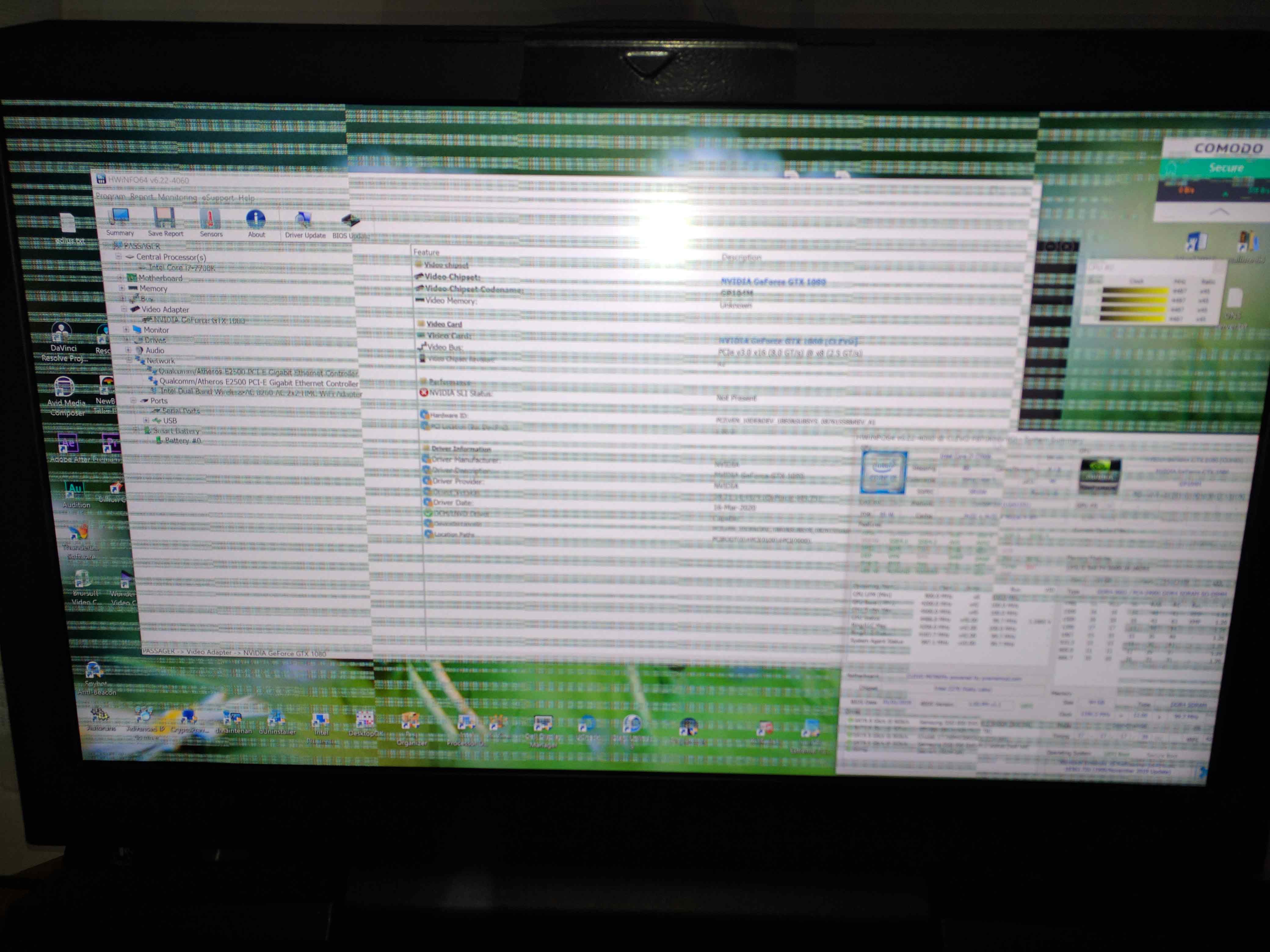
I was playing Ori and the Will of the Wisps on my P870KM1-G (I have a single 1080 GPU) on an external Dell monitor then all shut down...
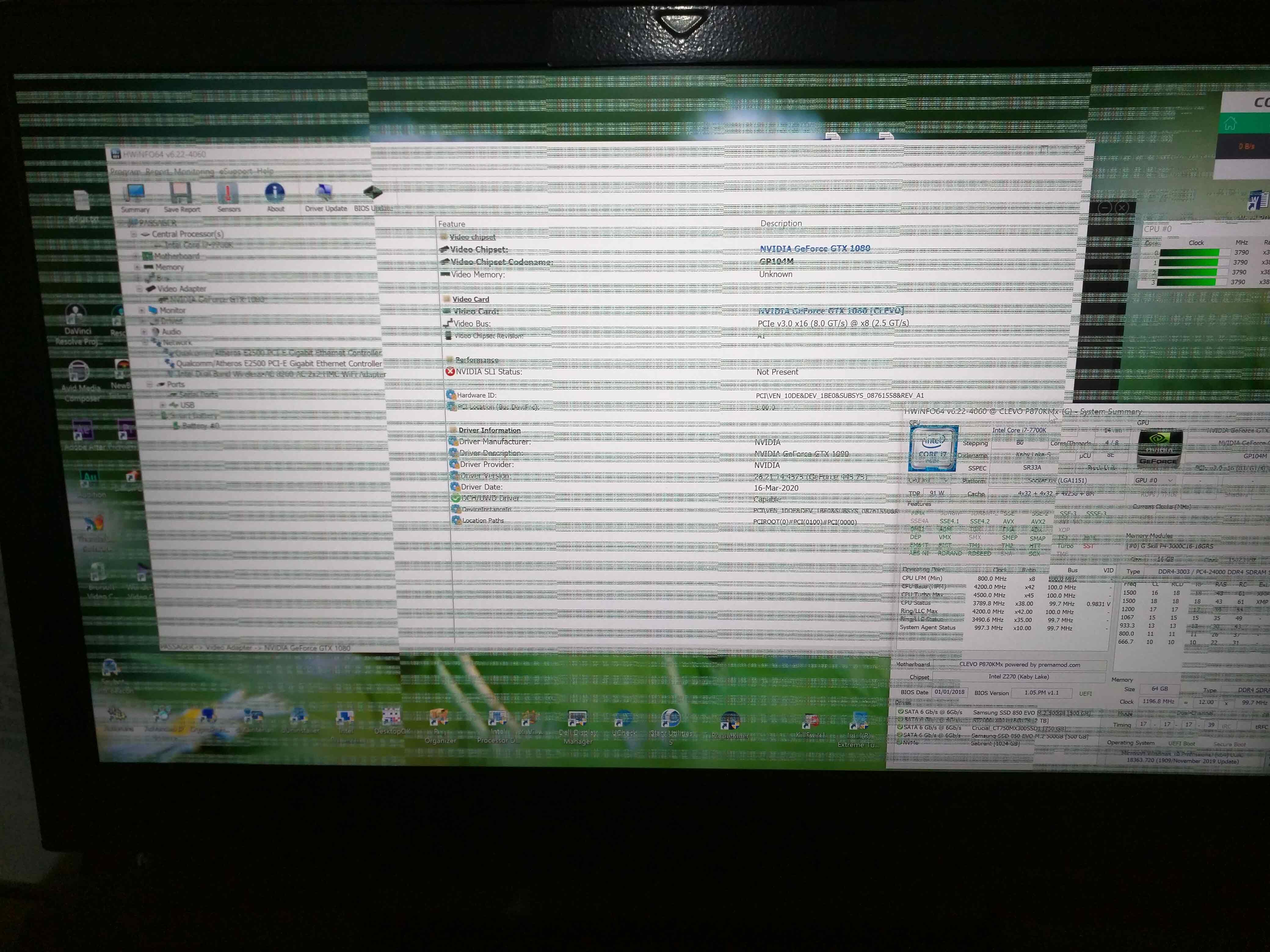
When it boot up, I have a garbled screen and a look like the GPU is disabled . no nvidia control panel.
I took it apart to check and nothing was burned or bad.
When I put all back together it was the same garbled screen thing.
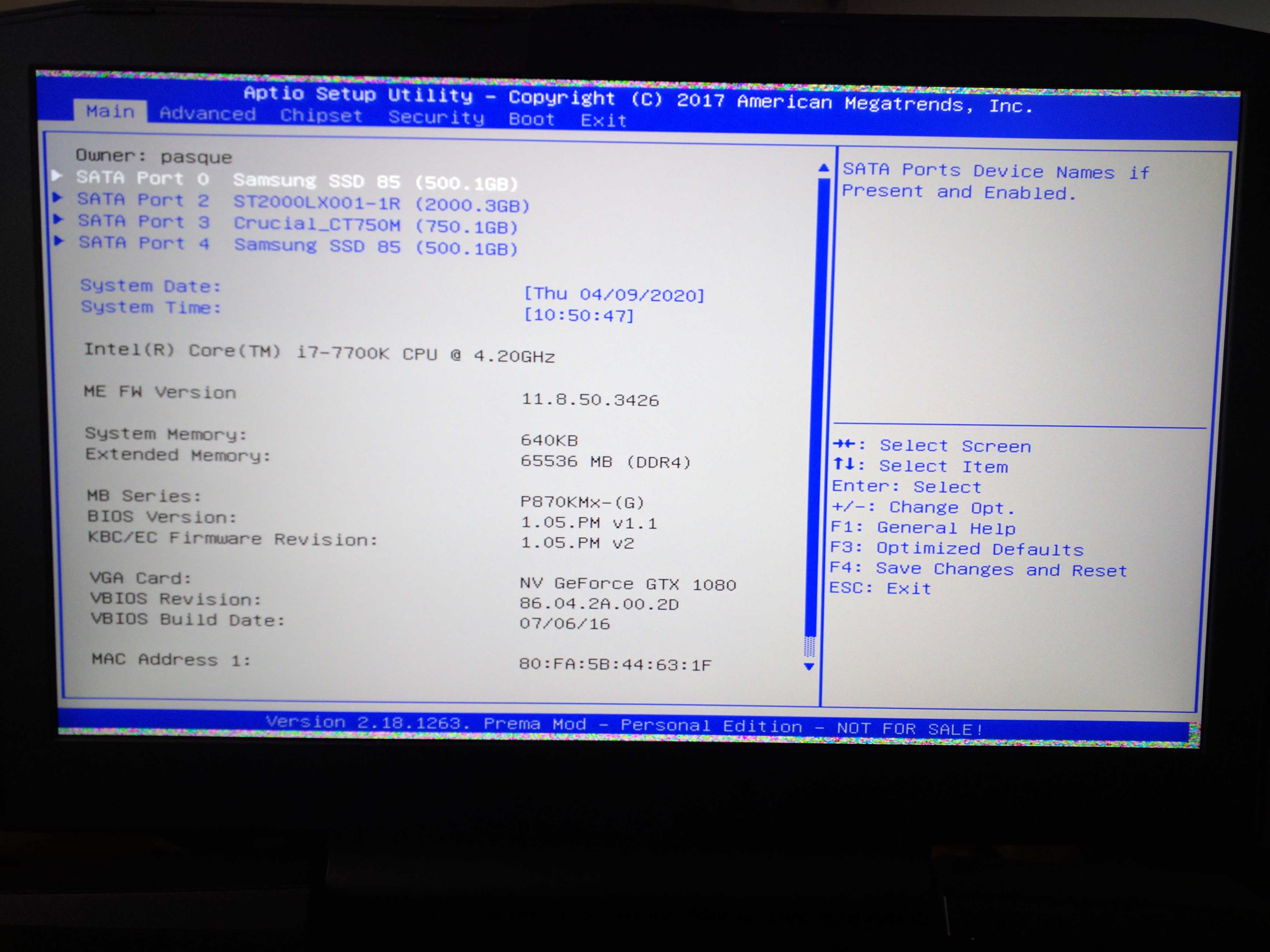
Is there a way in Bios to see if the GPU is not dead?
or any suggestion?
Could it be the power supply?
It's not overclocked, and used casually.
ThanksAttached Files:
-
-
Looks like vram issue, the card is still detected from what I can see in your screenshot. Try lowering the memory by -500Mhz and see if it helps. Are you using regular thermal paste or LM?mhp32 likes this.
-
When I run nvidia inspector it give me nothing, no temp, no clock. I also use Obsidian fan control and it says the the GPU disabled?
the bios screen is clean (borders are garbled), I can see the card in it.
I have a Prema bios in it, where should I adjust memory there?
I use diamond paste right now. I do have LM but didn't use it because I'm not sure about the card.
Also I can check the power brick, what are the voltage on the output pins?
Thanks for helping.Attached Files:
Last edited: Apr 9, 2020 -
-
Have a look here, since your issue sounds familiar. Also check the voltages on the card as mentioned in the thread.
http://forum.notebookreview.com/thr...ibly-dead-nvidia-geforce-gtx-1080-gpu.832439/mhp32 likes this. -
Thanks..... I look definitely look troughout that thread.
Just a quick one, do you know the sequence for a soft or hard bios reset?
I did tweak something and I have a boot loop now.
Thanks jc_denton -
1.Shut the system down
2. Press and hold Fn+D
3. Press the power button once to power on, and only hold fn+d keys
4. System will a cycle a couple timesmhp32 likes this. -
Thanks got the bios back. I will read the other thread and let you know the result..
-
All right, it look like I have bad solder connection on my nvidia 1080 card and I need the processor resolder.
Some try heat gun, some try baking or go to BGA reball services.
Anyone has success doing either one process?jc_denton likes this. -
A proper reball gives the best chance of success. If the die connection to the package is bad then a new core would be needed.
mhp32 likes this. -
I would go to a specialist store instead of throwing it in the oven.
Papusan likes this.
-
Sure, never thought of baking video card...
I found a company near me in Brazil that will do the reballing
Thanks, I will update status when all is done. -
-
Hope you manage to bring it back, GTX1080 is one heck of a card.
-
hi all, i have a 1070 with double heat pipe cooler that runs very cold (around 70° celsius max when gaming) and i would like to know if i can fit a 2070 in it or it has different screw position to heatsink. im asking that because i read that heatsink need to be mod and cut, but dunno how and why. is there anyomne that is able to tell me how it is done ?
to the guy with bad gpu: i see one error commonly for that gpu failure, but to be sure i would ask:
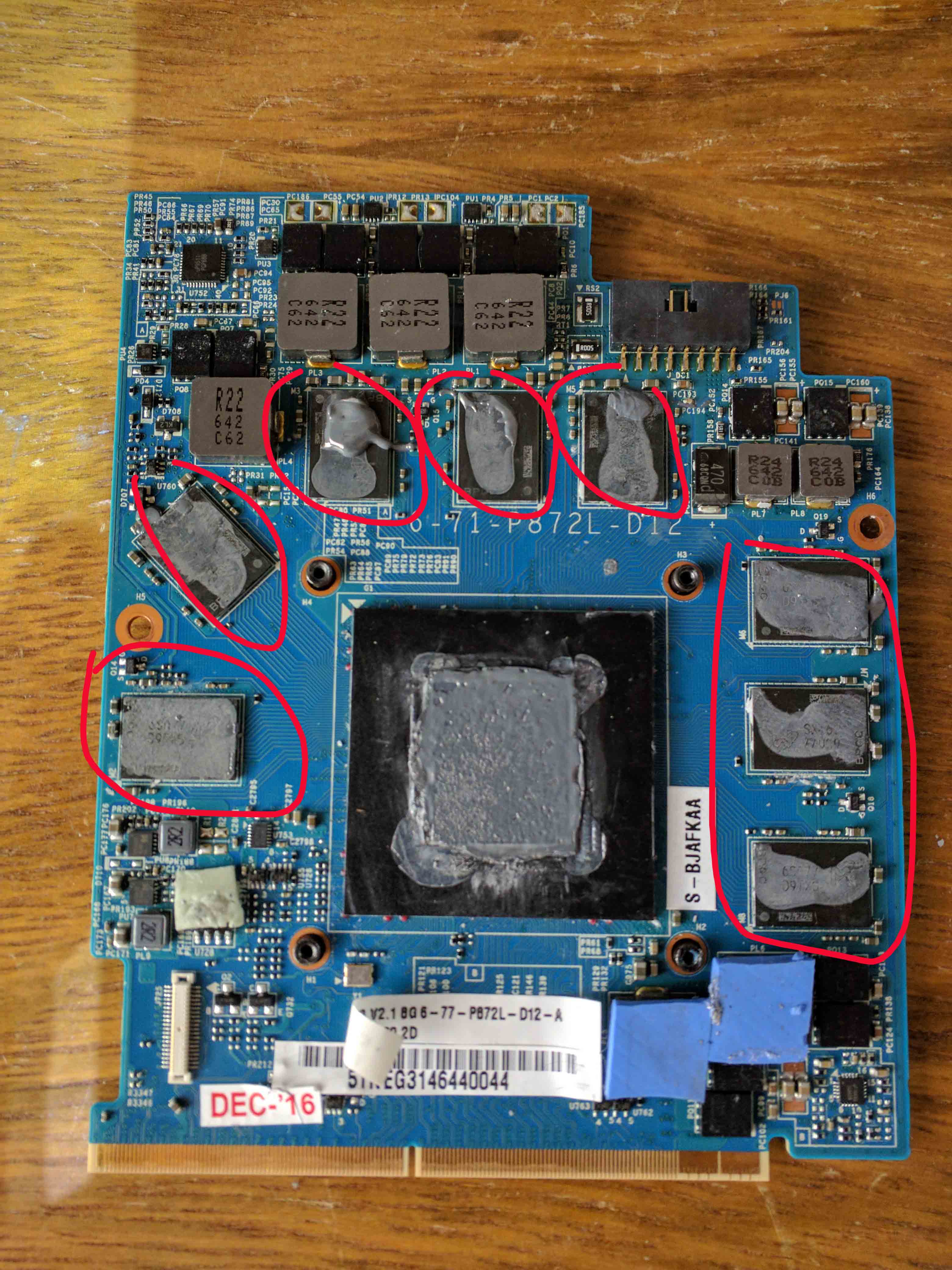
1) i see thermal paste on vram. do u attach them directly to heatsink or are there thermal pads? because when thermal pads are used, never put thermal paste between vram and thermal pads.
example : use thermal paste when component touch directly to heatsink ( gpu bga , cpu and so on) use thermal pads like mosfet , coils vram
2) how much degree u had on that gpu while gaming ? thats not a very hot time to get gpu dead..... it was on a table or some soft object that could cause fan to be obsctucted ?
3) sometimes u can say if gpu is bad by checking in diode mode from GND and coil side ... very low is dead or short ( 001-002 is short) 007 006 005 004 is common on some cpu, gpu.
if ur pc turn on then is probably just some bad bga solder , but its or under bga, or its bga itself. sometimes reballing solver the problem, sometimes it didnt.
i do rework as business, and most of the time some good bga need just rework, but many others need to be changed with new ones, and u know market for them.. some bga sold like new can come not working without any type of refund from supplier.
so: if u can get a rework for 40-70€ give it a try..... if it doesnt work, grab a new gpu and dont spend miuch money tring to fix the old one.
ps: one thing i really dont like about my p870km is the keyboard.... when gaming some key get stuck....
also onboard audio... i miss my old alienware integrated creative sound card -
Mounting remained the same however, different layout for some power delivery components and memory. You'll also need a modded bios for RTX from what I recall.
![[IMG]](images/storyImages/03811ab310cb5156acd43a4ad319e7be.jpg) Last edited: Apr 16, 2020
Last edited: Apr 16, 2020 -
That picture is a poster child for not using thermal paste on ram
bennyg likes this. -
I hope no one follows that practice, it was just to show the layout of the RTX card with a regular Clevo heatsink.
If someone absolutely decides to use a paste, K5 Pro is the only way.Papusan likes this. -
Super thin and hand adjusted pads ftw
-
Man this is a big thread
Anyhow, I've been struggling with my BIOS update coming from 1.05.02 for a while now.
I finally managed to update the BIOS by making a few changes to the original Clevo BIOS package.
The steps I took are described in the gigantically improved readme.txt
So I figured it would be a good idea to drop it here: https://easyupload.io/cyd04g -
So you are saying no thermal paste in theses red circles see pic
Attached Files:
-
-
Exactly. Worst case, use K5 Pro as mentioned by @jc_denton
Always use proper thermal pads on vRam.electrosoft, jc_denton and mhp32 like this. -
You can tell that the paste is not even having good contact, since it's not even fully covering or spreading on the vram. Anyway, paste is not optimal, unless it's the K5 Pro gummy puddy, for long term use.Spartan@HIDevolution and Papusan like this.
-
The VRMs are also probably not connecting properly either.
Papusan likes this. -
-
I recall how the power modded GTX1080 pretty much cooked my P775TM1 heatsink. Since the heatsink has no additional surface area on the VRM/memory areas, expect of the flat copper plate.
Which is not ideal in the fist place and could really have used some airflow over it. The VRMs introduced way more heat after the mod and overwhelmed the heatsink.
Only the dual gpu vapor chamber can keep the OC'd card <60c, as the power delivery runs quite hot.Papusan likes this. -
Yeah if you go power unlimiting it then the VRMs are really going to get a lot hotter.
-
Keeping everything cooled to the best extent also helps with longevity. So far so good. *knocks on wood*
-
Failure rates do drop a decent amount with that kind of drop certainly. The fact that it is swinging less is the main thing.
-
Well this power modded GTX1080 outlived both my 8086K and 9900K, lol.Spartan@HIDevolution likes this.
-
Are there more details of what ended the 8086k and 9900k?
-
I've sent them over to brother @iunlock for an autopsy, that way we will know for sure. My speculations for the 8086K is dead IMC and cracked die for the 9900K.
And yet I still lapped this 9900KF even thinner than that, but was more mindful with mounting pressure this time around.
The 8086K shut down whilst ram training and wouldn't boot after that, at stock voltages for VCCSA/VCCIO.
The 9900K began acting weird throwing up errors ranging from not enough vcore to memory errors, until finally seizing up in a game and refusing to boot.moral hazard and Papusan like this. -
The 8086k and both 1080s still going strong for me. 1080 cards are around 4 years old now which is crazy. These cards has some legs. Beat my voodoo 3 3000 as my longest time between upgrades.jc_denton, electrosoft and Papusan like this.
-
I'd buy a second 1080 in a heartbeat if new DX12 titles supported SLI.
-
Funnily enough, not much incentive to develop for it. It would be nice if something could be offloaded to it with raytracing and the like.jc_denton likes this.
-
Dedicated RT card? Reminds me of the PhysX card days
DreDre likes this.
-
-
Looks like 2080S is still clock blocked to 2100Mhz on the core.
Spartan@HIDevolution and Papusan like this. -
Hmm, still no 2080S MXM pics? Was interested whether the layout remained the same in terms of components.
Papusan likes this. -
This appears to be 2070 "refresh" - layout seems to reimained the same.
http://forum.notebookreview.com/attachments/1cad18f0-9681-493d-86e2-ce24cf9ebccd-jpeg.185449/Papusan likes this. -
Looks very similar
-
The 2070 refresh pcb looks similar to 2080 in terms of component layout. Power delivery from current 2070 to 2070R looks different in that regard.Spartan@HIDevolution likes this.
-
Not a surprise as the 2070 super uses the 2080 core.
-
Hi everyone, hope that all of you are safe and your kind families.
Did anyone try CPU 9th Gen Direct to Die frame kit from Rockitcool on the TM1?
jc_denton likes this. -
Brother @ole!!! did, but the frame needed modding, as there are SMDs near the socket that get in the way.
Have a look here;
http://forum.notebookreview.com/threads/p870tm-2nd-cpu-fan-port.812706/page-10#post-10993736Papusan, Spartan@HIDevolution and Dr. AMK like this. -
Thank you for sharing.
-
you'd need to shave off bits on the bottom. thanks @jc_denton finding link to post i already lost the pictures. basically the mobo isn't standard like desktop and those little things pushes up die frame and your delided CPU wont make any contact.
*** Official Clevo P870KM1/P870KM1-G/Sager NP9876 Owner's Lounge! - Phoenix 3.0 ***
Discussion in 'Sager/Clevo Reviews & Owners' Lounges' started by Spartan@HIDevolution, Jan 5, 2017.