Problems? See this thread at archive.org.
Possibly, have you tried applying gentle pressure around the edge of the internal bezel to see if they change?
-
-
The lines are still there, same spot when applying pressure where you suggested.
Any other suggestion?
Is there a tutorial on how to remove the screen or the plastic bezel for this model?
These lines doesn't bother me as much as the first time I saw then when I replaced my dead card with a brand new one in my system...
Thanks... -
The two rubber bits near the hinge hide screws, then you unclip from the display side of the bezel pulling up (a plastic tool is great for this).
mhp32 likes this. -
Hey Donald! Thanks for your reply, snagged a good deal for the evo 970 plus on Amazon during pre Black Friday sales.
with regards to ram. Currently have the default ram that came with the laptop 16GB (2 x 8GB) Dual Channel DDR4/2400MHz (not sure of the brand). If I would purchase ram that has a higher MHz would that mean that the higher ram speed would go down to 2400MHZ? What exactly happens if I purchase single channel ram and I have currently dual channel? Having a bit of trouble finding ram to work with the current ram I currently have.
With me buying the 970 evo plus does that mean that I need higher speed ram to work better with the ssd?
Thanks in advance -
There is no such thing really as single channel ram, just if you have one or two (or more) sticks.
Ram in a system will slow down to match the slowest in the system though that goes for speed and timings so your timings can end up being a bit worse as well as being at the slower speed.
Use CPU-z to look at the speed and latency of your ram (EG 2400MHz Cas 14) and match that.
Ram speed will not impact your storage drive. -
@Meaker@Sager Nailed it with his answer above.
The only thing I would add is a recommendation to get rid of the 2400, and upgrade to what you want with a matching pair, or pairs.Spartan@HIDevolution and jc_denton like this. -
True you will see nice bumps in FPS going from 2400Mhz to 3000/3200Mhz ram.
Donald@Paladin44 likes this. -
DDR4 kits have gone well down in price making 3200 a very cost efficient upgrade.
Spartan@HIDevolution and Donald@Paladin44 like this. -
Yes finally we are at the bottom of the sine wave of ram pricing

-
Thank you both @Donald@zTecpc & @Meaker@Sager for your replies really appreciate it!
Looking out for those Ram black friday deals as we speak.
https://www.amazon.ca/Crucial-PC4-2...ywords=ram+sodimm&qid=1606360849&s=pc&sr=1-20
I presume Crucial 32GB Kit (16GB x 2) DDR4 3200 MT/s (PC4-25600) SODIMM 260-Pin Memory - CT2K16G4SFRA32A, would work fine for my current laptop? About $40 off on amazon.ca which is the best deal that I could find as of right now. Would I need to tweak any of my settings for this ram to run at 3200?
Is there a difference from this pair of ram? it mentions dual-rank
Crucial 32GB Kit (16GBx2) DDR4 3200 MT/s (PC4-25600) CL22 DR x8 Unbuffered SODIMM 260-Pin Memory - CT2K16G4SFD832A
https://www.amazon.ca/Crucial-PC4-2...s=ram+sodimm&qid=1606360849&s=pc&sr=1-20&th=1
Thanks again! -
Our research has disclosed that Hynix ic is the weakest performer and should be avoided. Try to make sure you are getting either Samsung or Micron ic chips, regardless of the brand on the memory.
-
Might be difference in what chips are used exactly between models.
Papusan likes this. -
Thanks for your reply!
Would you be so kind to let me know where I can locate this on ram pieces? Just to confirm the 2 Rams i posted above are "Hynix made"? Would you recommend any ram that you could perhaps link me to? I am thinking of getting 32gb (16x2) for the time being.
Many thanks!
-
Dual ranked (16gb) is tougher on the IMC controller, but check G.skill or Corsair kits for Samsung b-die/Micron ICs.
Spartan@HIDevolution and Papusan like this. -
You can either query the manufacturer or vendor to get the IC chip they are using, or use CPU-Z once you get the pieces to see the manufacturer of the chips.
If you want to know which die is used (e.g. Samsung B-die or C-die) you would have to use Thaiphoon Burner. -
The free version of Thaiphoon will read it so as Donald said that's a good way to check it.
Papusan likes this. -
thanks for the reply! So the links I posted from Amazon I won’t really know what chip details until I receive it or contact the manufacturer?
-
I am not aware of any other way of knowing for sure.
-
Hello all,
I have a Prema bios Version 2.18.1263.
I'm thinking to upgrade my CPU to a Core i7-970KF from a current i7 7700K.
Is that a good option or, this bios will accept a higher CPU?
Any advice.
Thanks
Pas -
Thanks Donald!
https://www.amazon.ca/Corsair-Venge...nid=7328153011&s=pc&sprefix=ram+ddr4+&sr=1-21
Would you say this 1x32 2666mhz is better then what I posted earlier of the 16gb x2 at 3200mt? -
No, it will be much slower, and you won't have DUAL CHANNEL unless you get 2x for 64GB total.
The Crucial by Micron is probably your best ch0ice as they are probably using only Micron ic.Last edited: Nov 29, 2020jc_denton and Spartan@HIDevolution like this. -
The only downside to 2x16GB is that it takes up another slot, but then again how much ram is required.
-
Not sure if the microcode is in there for 9th gen, but you will certainly feel an improvement in doubling the amount of physical cores.mhp32 likes this.
-
Worth speaking to your reseller about an update to be sure.
mhp32 likes this. -
Thanks jc_denton,
The bios 1.05.PM v1.1 and KBC/EC 1.05.PM v2 .. not sure if the microcode is there for a i7 9700KF. I will ask Prema.
Also when a room temp is about 32c can the 1080 go around 88-90c full fan blast gaming with death stranding?
Thanks -
Just to update on the i7 9700KF, according to Prema, it will require firmware update and also covering pin on the CPU for compatibility with the P870KM1 Z290 MB.
Also there is power draw issue limited to 140A on the P870KM1..
Well I'm sticking with what I have for now and in the future I will upgrade to another model.. -
140a at 1.2v is still a decent wattage to play with.
-
what should my temps be with a i9 9900k in a p870tm1 and a p751tm1 ?? both have a gtx 1080 , wondeirng what ideal temps should be or should i go back to a i5 8600k?
also @Meaker@Sager can you reach out to me i need to find some parts for a older sager machine as well ...
773 769 7290
jay -
I am not the parts guys but our sales team on the website will be happy to help.
Temps are going to be pretty high with a 9900k in the P751tm, and still fairly high in the P870TM1, it's a hot chip.DreDre likes this. -
Depends on chip quality and frequency. For long term use keep it <85c. Delidding, lapping and other mods make a big difference for the 9th gen.
-
Hi everyone, hope you are all having a great weekend!
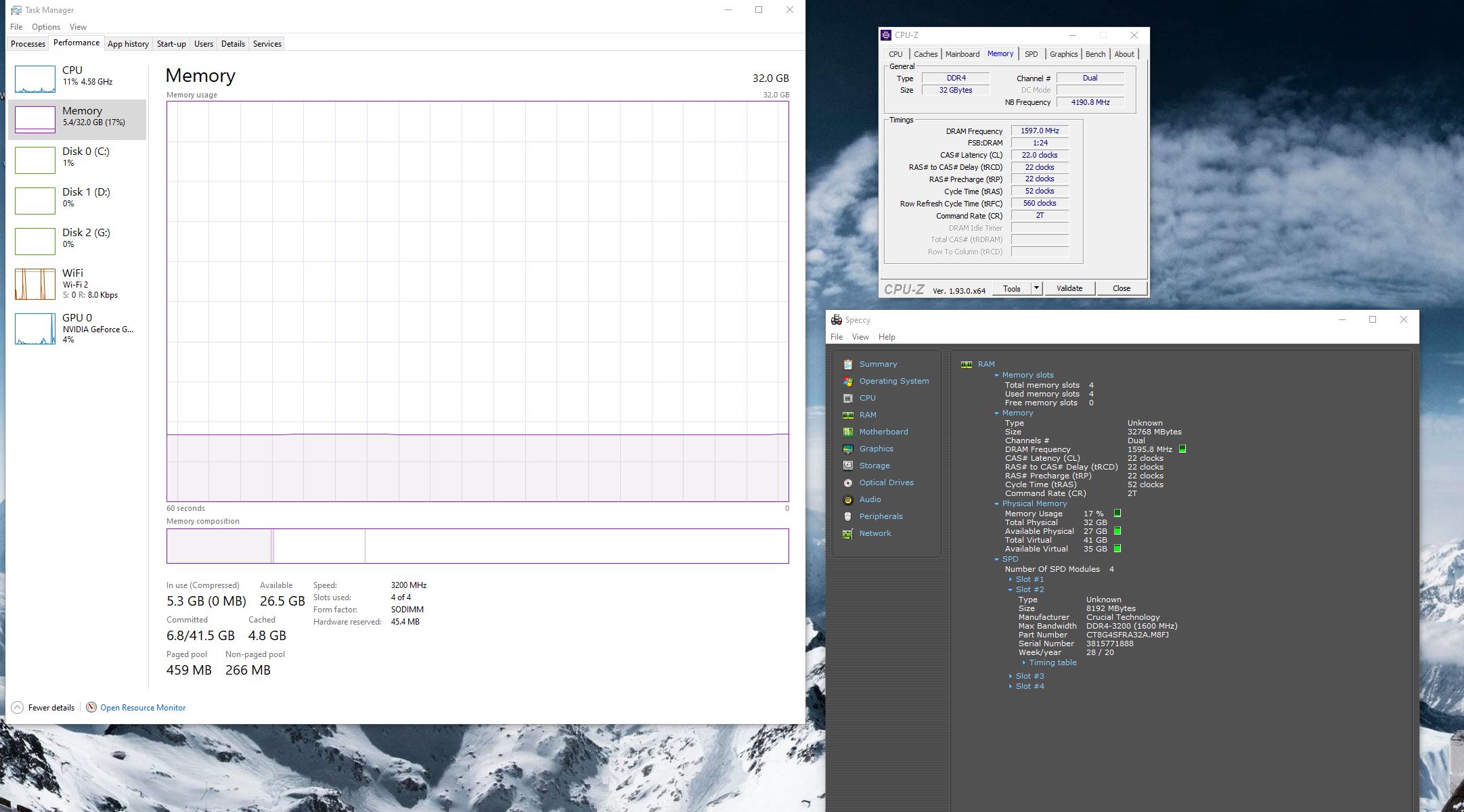
I purchased 4x8gb ram @ 3200 and wanted to check if the specs are alright or I should return them for some better ones?
Would I also need to change anything in the BIOS?
-How can I make sure that all my ram is being used rather then 2 for example?
-My previous ram was 2x8gb 2400mhz it seems now that the current ram brings up the temp higher then what I am used to also?
Thanks in advance
https://www.amazon.ca/Crucial-PC4-2...+3200+mts&qid=1607270228&s=electronics&sr=1-2Attached Files:
Last edited: Dec 6, 2020 -
-
Not great stock, normally check before ordering. Thaiphoon burner will tell you the chips.
-
Hi Meaker, I hope you are doing well.
Thank you for your reply.
I will return these sticks, would you be so kind to perhaps just link me some ram sticks that you would recommend that I could buy up straight, currently in Canada (not sure if amazon.ca is a good choice) etc because it is giving me unneeded stress to figure out what ram to purchase.
Just would like a solid ram that will last me an age.. what I had purchased was 3200 mhz 4x8gb seemed to be good.
Thanks in advance. -
The ballistic 3200mhz CL16 looks ok. The 2x16GB set.
-
Thanks Meaker! Is there a difference if I bought 4x8 gb compared to the 16gb x2
-
With all 4 slots filled you put more stress on the whole system. 4 memory sticks installed means double the amount of signals going between the memory slots and the cpu socket. And double up of everything means double chance for failure. Fill up all slots if you need more ram than what 2 slots can provide.Spartan@HIDevolution, jc_denton and Grizzly13ear like this.
-
Double ranked dimms are still a bit harder to run than single but you leave room to expand and they will retain value better too.
Papusan and Grizzly13ear like this. -
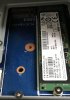
I have recently have had a couple blue screens with the 4x8gb sticks I had from my previous post (not sure if it had to do with the ram) or the evo 970 plus 1tb that I had installed at the same time?.. I feel like my laptop boots up slower compared to my other ssd even tho the evo 970 is by far faster. Perhaps I have put it in the wrong socket? (Attached) I installed it in the data/pcie slot (swapped it to the SSD1)
Thanks in advance
With your recommendation 2x16gb is currently out of stock, would you suggest another or would those be the best option? I did see that Amazon had a new good condition used pair for a bit cheaper but not sure if that is a good idea? @Meaker@SagerAttached Files:
-
-
I forgot to add in... NVMe SSDs boot slower than a standard SATA SSD's. Same if you fill all 4 ram slots. Both affect the boot time.
Edit. See also my older post #5402 here http://forum.notebookreview.com/threads/windows-10.762434/page-541#post-10839492
Last edited: Dec 15, 2020 -
Look for something with similar timings if you want to stay new.
-
Did you clear nvram prior to installing 4x8? It allows the system to purge old settings and train anew.Spartan@HIDevolution, Grizzly13ear and Papusan like this.
-
How would I go about doing that ?
-
-
Sometimes this does the trick, since installing a new kit can sometimes keep old settings and give errors.
Papusan and Spartan@HIDevolution like this. -
Latelly i have issue with one key on my keyboard. Basically its not always type a letter when clicked. When i click directly it always working but during fast typing - when for example i land with finger not exacly in the middle - it doesnt.
Any idea for fix other than replacing whole keyboard? I took of exact key and was looking for physic objects that could cause this but cleaning it didnt help at all. -
Might be the dome contact itself under which would be very tricky to get to.
-
I would presume that this pair of ram you mentioned above I can tweak to overclock to 3200mhz ? It’s compatible with my laptop. Been reading reviews that it’s base 2666 and some laptops can’t tweak in bios.
Crucial Ballistix 3200 MHz DDR4 DRAM Laptop Gaming Memory Kit 32GB (16GBx2) CL16 BL2K16G32C16S4B https://www.amazon.ca/dp/B083W5ZRJ1/ref=cm_sw_r_cp_api_i_kTI-Fb6PYRMWP?_encoding=UTF8&psc=1jc_denton likes this. -
This laptop can use XMP profiles and tweak in the bios, load it up and check it out
-
Yup, usually your limit will be the trace quality on the motherboard and the strength of the IMC.
Donald@Paladin44 likes this. -
Good evening everyone. It’s been awhile since I’ve been on, but I am having some trouble with my P870KM1.
Problem #1 is that the laptop started doing this ‘thing’ where the fans would go to full blast and then the laptop would do a hard shutdown. My temperature monitoring program is only set to show GPU/CPU temps, and they were fine. The last time I had this issue was awhile back when my CPU was overheating due to very old paste. I repasted and the fans are still going to full blast and then the laptop shuts down. The GPU/CPU are not loaded and temps are fine.
I thought the issue might be some kind of logic glitch, so reset the CMOS, did a thorough power drain, etc. That’s when the new problem began, but I think this problem is just something I’m missing.
After the CMOS reset/power drain, she turns on, but nothing happens. Blue keyboard backlight and green lid lights work, but it won’t boot to the M.2 or show me a BIOS.
For some strange reason I feel like this has happened to me before, and I had to hold a certain function key while I pressed the power button. That or some other magical combination of actions that I cannot seem to recall and failed to write down. There are no other devices connected to the laptop.
I know a hot CPU will cause an instant shutdown, but are there any other situations that cause the fans to spin up and the laptop to do a hard shutdown?
Any help is very much appreciated.
*** Official Clevo P870KM1/P870KM1-G/Sager NP9876 Owner's Lounge! - Phoenix 3.0 ***
Discussion in 'Sager/Clevo Reviews & Owners' Lounges' started by Spartan@HIDevolution, Jan 5, 2017.