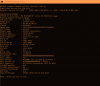
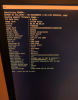
Problems? See this thread at archive.org.
Pull both gpu's and attempt to power on with laptop sitting on it's side. See if it does the same thing or if the fans spin normally. it will not show anything on screen, but you are looking and listening for a different sound. Other wise you seem to be in the same boat as someone else I know right now.
-
Good morning John, and thanks for the response.
I got up this morning and tried to power the laptop on again once more for good measure. Something I didn’t notice before is that the plugged in/power light (front-left of laptop) begins to flash orange at the same time the fans spin up. Machine then shuts down as I described earlier. I don’t know if the flashing orange light is some sort of fault indicator.
Both GPUs removed, and the laptop powers on, but does not boot into Windows or show the BIOS screen. Blue keyboard backlight and green lid lights. The blinking orange light doesn’t appear, fans don’t go to high, and laptop remains on.
With only the master GPU installed, same as above. Just sits with blue keyboard/green lid lights. No boot, no BIOS.
With daughter GPU installed in master slot, same result as above. No blinking orange light or shut down.
And NOW, with the laptop fully assembled again, the fault does not occur. The laptop still will not boot though.
Looks to be an intermittent fault for the time being.
This is the first CMOS reset I have done on this laptop. Is there a special trick for getting it to boot Windows or at least display something?
Another edit. I held FN+D while pressing the power button, and then continued to hold FN+D for an additional 30 seconds. Apparently that’s the correct way to reset the BIOS on these laptops.
Laptop is booted into Windows and acting normal. For now.Last edited: Feb 20, 2021 -
That's good news!
I see I got back to late, but looks like you got the reset figured out. Congrats!
Side Note:
FN+D is the same as removing the cmos battery, main battery and power plug.Papusan likes this. -
Good afternoon John.
I had no idea the FN+D option existed. I just happened to see it during a random Google search. I pulled the laptop and CMOS batteries and then held the power button down for about 60 seconds.
The laptop hasn't done anything strange in the past 1.5 days, and hopefully this issue doesn't come back.
I appreciate all of the help! -
Good day Everyone,
I'm planning to purchase GTX1080 pulled out from P775xx. My question is, do I need to flash VBIOS in order to work or it will work as plug and play? Anyone would like to share their GTX1080 VBIOs. Many thanksLast edited: Mar 3, 2021 -
Depends on xx and if it's pre 6 core or post 6 core vbios.
-
You may need to update for vbios, the old dm3 version starts with black screen (I had that issue once), not a biggie, prior purchase ask the seller to upgrade the vbios, and you are good to go
 Last edited: Mar 3, 2021
 -
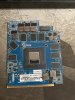
This is actual card from the seller, he cannot update the vbios due to his unit was sold as barebone. @matyee Any idea where I can download the VBIOS in order for it work?Last edited: Mar 7, 2021 -
Might not even need it, what machine did it come from?
-
P775TM.. Anyone would like to share VBIOS for GTX1080?Last edited: Mar 5, 2021
-
Doesn’t need any vBIOS update if it came from a -TM model.
-
It came from P775TM as per the seller.
-
If it comes from a TM1, it should be ok I guess
-
There you go then, should be P&P.
-
Thank's everyone for the inputs. Just an update, the card arrived today with the following part no. and VBIOS
N17E-GS (I guess GS stands for G-Sync), V2.1
6-77-P872L-D12
VB. 86.04.80.00.21
Does anyone experience the system powered on for about a seconds and then shuts down? -
did you try FN+D?
are use using dual power bricks (either 2x230W or 2x330W with AC200) as recommended by Clevo?
I got a KM1 myself. Had no problem plugging in and out the GTX 10xx Cards. But then again, i opted for the Modded bios by Clevo so might have something to do with that, perhaps?Last edited: Mar 8, 2021 -
I did try FN+D, connected to dual power bricks (330W). It powers for a seconds then shutdown.
Would you mind to share your 1080 vbios. -
Are you sure it's not G2?
-
N173- G3 V2.1
Part no. 6-77-P872L-D12-E
VBios: 86.04.80.00.21
Sorry my bad. -
G3 G2 etc is for the exact core spec (1070 vs 1080 sort of thing).
-
There are 3 vBIOS series I've found for clevo GTX 10 series cards.
1.Earliest came with DM2/DM3 , non-OC , GOP (UEFI)version = 0x30002. You can use Mobile Pascal TDP Editor to edit its TDP .
2.Came with late period DM2/DM3/KM and early TM , GOP version = 0x30006 , overclocked . You can use Mobile Pascal TDP Editor to edit its TDP .
3.Came with newer TM ,overclocked , GOP version = 0x30009 .You can not use Mobile Pascal TDP Editor to edit its TDP .
And my provided vBIOS is the earliest , but I updated its GOP to 0x3000B .
GTX 1070 OC with SLI compatible don't rise TDP , still 115W as non-OC . But freq is higher . GTX 1080 OC still is 190W TDP but freq is higher too
Source:
http://forum.notebookreview.com/threads/flashing-p775dm3-gtx-1080-to-work-in-p870tm1-g.823016/
I just ordered a 775TM1 with a gtx1080 for 800$ to test if plug and play does work with vise versa with a P870km1. I will upload my Vbios if swap is successful and working.
Mind you, that my KM1 is not like your KM1. if you are using the i7-7700k still my VBios may brick your gpu so i shall hold off from posting it for now since i know how easily someone can brick his/her system.
I would suggest going to a proper Clevo Dealer and getting it done proper without bricking any systems. Further more you might want to invest into a full bios upgrade so you can use i9 & i7 from the 8th and 9th gen CPUs. Just a heads up from my part. -
Yes the OC models just bumped up the core speed 100mhz.
-
I think your boot problem is linked to this issue:
http://forum.notebookreview.com/thr...m3-g-with-p775tm1-g-motherboard.821560/page-4
As it seems now your have aquired a 755TM version GPU that was running with 8th gen and 9th gen cpus.
You are still on 6th and 7th gen CPU BIOS. The newer GPU wont run with older Versions and probably vice versa (just a guss, no tests were concluded)
Your best bet as it stands is to make a backup of your Bios and your VBIOS then get someone or yourself to upgrade to 8th or 9th gen, then put in a new CPU and GPU and hope it works. Since i am just a IT-Tech guy and not the vendor i cannot guarantee any success and you have to be very careful.
Personally with such an instance i would go to @clevo-extreme (Provided they are fully operational) and have them figure it out for a price ofc.
Better to pay someone to do it professionally, rather than unprofessionally destroy assets because one wants to do everything himself and avoid additional costs.jc_denton likes this. -
Yes you need the right bios and vbios pairing. Either being different will cause issues.
-
1 second power on then off is one ram bank not working. try with one stick of ram only.
-
Thank you and I did the result are the same. I contacted the seller and agreed to return the item as I cannot find the correct VBIOS in order for it work. Many thanks again to all of you.jc_denton likes this.
-
I am trying to find proper thermal pads.
Does anyone have a set up guide for the currectly ones that are in use?
Would these be correct:
0,5 mm EC360 Gold
1mm EC360 Gold
3mmLast edited: Mar 16, 2021 -
The photo you posted, by brother fox is spot on. To get perfect contact you can use a hairdryer on the heatsink and card whilst applying a little pressure for everything to come together proper. But be mindful of the type of thermalpads you use, since higher w/mk ones are of higher OO shore (hardness). Making them both brittle, less flexible and less forgiving of any gaps.Papusan likes this.
-
What i aimed for is ease of use and proper swapping. Since i have never repasted a GPU. Did tons of repasting of servers and Laptops in the past. But never a graphics card and never a vapor chamber with dual SLI.
I could have opted for the option of 16-17W/mK but those are as you say too brittle. the 8-14,5 ones seem to be the middle ground. All i wanna do is run my laptop in 5 Monitor setup without it reaching 60°C so i can actually enjoy a workflow and phone calls in my home office without the "server"-laptop going full take off mode. Thats why i am aimin to replace the 1070 with a 1080 in the hopes that with higher power it wont overheat so fast seeing as the load wont be such a strain on it.
But I am looking forward for any input since i am in the process of ordering the pads.
Already got the 160$ SLI 870TM heatsink from Aliexpess.
And got a 775TM Clevo for around 870$ that has a i7-8700k and a gtx1080 in it. Gonna try to swap the 1080 with the 1070 and hope that the 1080 will run without making my life so miserable
Only thing left to do is figuring out the proper thermal pads without loosing an arm and a leg plus the head in the process. -
I can recommend GP-EXTREME thermal pads, they are 12w/mk and are quite soft and squishy (35 OO shore). And you can usually find them for a very reasonable price.
-
It does seem very hard to come by the 3mm thiccness versions. Would it be sound to just slap two 1,5mm together for the same effect?
Like this one? -
You can stack, you loose some performance. I always say with pads that fit is more important than pad material.
Papusan likes this. -
Ideally you want to use a solid 3mm pad, as they do lose some efficiency when stacked. But that said, I've stacked several 1mm pads before myself. I saw the 3mm ge pads were in stock on amazon.Papusan likes this.
-
So tomorrow i will do a big upgrade path and a GPU swap. And hopefully everything will work out as intended.
Now this is how I have planned it:
My P870KM1 with an i9-9900k and a gtx1070 will have a SLI Vapor Chamber upgrade from a TM1 Model. (VBIOS Code: 86.04.56.00.2C)
Furthermore I got a P775TM1 with an i7-8700k a gtx1080 that I got for 870$ off of ebay and will have its 1080 swapped for my old 1070 in the hope it will all go well: (VBIOS Code: 86.04.80.00.24)
The main goal is to have the P870KM1 stacked out for max noise reduction and to be finally viable for my 5 monitor setup without the fans going off after 30 minutes (Overheating)
Now my main question is if the cards will work vice versa or if I will have to do some special tinkering to make it work properly.
(VBIOS Backup already made but is there anything else to consider?)
I am going to do a Youtube Video on it since this will reflect both laptops and combined some questions may be answered that are crucial for the swap.
I would of liked not too tinker to much for fear of bricking anything so I am looking forward to any intel if I am good to go.Attached Files:
jc_denton likes this. -
-
The main problem with 5 monitors is that 3 or more raise the minimum GPU state so GPU power at idle jumps a lot. Laptops have basically 0 passive cooling.
-
If that were correct I would need a proper explanation why my Acer S7-393 has no trouble running off of 4 monitors with its i7-5500U and only 15W TDP.
Also the Swap was a total success. I also figured out why the hell my System was overheating in idle.
The Behind the scenes here
Took me roughly half a day dissassmebling, videocapturing everything, then cleaning, reassembling and hoping it would work as intended. But now the system is idling at a steady 45°C GPU and 50°C CPU on 3 Monitors.
With 5 Monitors it gets to maximum 55°C on both GPU and CPU and is completely silent in automatic mode. The overheating of the GPU must have had everything to do with the Caked up paste and burned up Thermal paste on the GPU side. its a wonder it didnt take any long term damage with all that oil on the 1070. The Vapor chamber does do wonders thermal wise and if anything i believe that to be the biggest game changer from a thermal perspective.
I must say however that the Pad tutorial was incorrect by the User "Fox". on the lower half you will need 4mm and 2mm pads to have proper contact with the heatsink. Good thing i had enough of the old pads on the SLI Heatsink and the 1 GPU heatsink, so I just made do with whatever looked reusable.Last edited: Apr 4, 2021jc_denton likes this. -
Yup, that vapor chamber has a +400W dissipation capacity. And about the pad guide, tolerances can vary slightly due to manufacturing, many heatsinks are hit and miss with the Clevo QC. And that's not even mentioning the CPU ILM problems that they are plagued by.
-
Ask Nvidia, the clocks raise with 3+ monitors under normal conditions. There might be workarounds out there for it IIRC. Just giving you the heads up.
-
Perhaps setting a volt/freq curve in Afterburner to force lower clocks? I remember nvinspector being able to force certain P states as well.
-
Inspector would be one way to manually override. Single cards may do better than my SLI setup though.
-
Multi-Display Power Saver tool comes with Nvidia Inspector.
jc_denton likes this. -
That's the badger
-
Good morning. I'm looking for a way to use a curve for the cooling fans on my P870KM1-G.
The automatic fan scheme isn't great, and never ramps the fans up to full speed on its own. This doesn't make sense to me.
Alternatively, the FN+1 option obviously works, but I would rather have something that controls the fans based on temperature.
I downloaded the Obsidian fan control program, but it only allows me to run EC controlled mode or fans at full blast. Are the other controls for choosing custom fan curves hidden somewhere?
EDIT: Never mind. I found a thread that says you must purchase a license in order to have access to the fan ramping/curves.
Any help is much appreciated.Last edited: Apr 10, 2021 -
Uhm have you tried running the Obsidian Fan Control in Manual Mode? That being said, the automatic is the sound friendly approach which is useful for anyone recording or doing any light to medium workloads.
If you want to ramp em up full throttle you can either set it through manual mode or set it to extreme cooling speed. But i hope you have no problems with Noise.
The question that you have not asked yourelf though is when was the last time you changed the thermal paste. if your gpu gets hotter than 60°C I would suggest going the TM Vapor Chamber + new Thermal pads/paste route.
Does true wonders to the machine power. I can vouch for it. Upgrade from a constantly overheating GTX1070 to a GTX1080 with SLI Vapor chamber. Took half a day but the work paid of. Next time doe, i would like to pay someone to do that mess.^^ -
Good morning. Obsidian fan control does not show a manual mode option, but I think I must buy a license for that.
I re-paste the CPU/GPUs regularly. The last time I did was last week.
The laptop normally sits on a custom-made cooler I built that has three 120mm fans. It does a great job of keeping the temperatures down.
However, I am trying to sell the laptop, so I have been messing around with it without using the custom cooler. I noticed that the EC controlled scheme isn't making full use of the fans.
When I force the fans to full speed, temperatures are respectable during gaming and benchmarks. This tells me the cooling system is doing its job.
Like I said, I'm trying to sell the laptop, so I am not in the market to do the TM vapor chamber mod.
I just want the buyer to have a trouble-free experience, so I will buy a license for the Obsidian fan control if that's what it takes. -
Unless you know the buyer then that's really their job I would have thought.
-
Probably should be, but I don't want to leave anything to chance.
-
Fans will usually go up to 80% maximum unless you do the manual buttons.
-
You call always tell them the secret button combo for unlimited cooling.
Spartan@HIDevolution and Papusan like this.
*** Official Clevo P870KM1/P870KM1-G/Sager NP9876 Owner's Lounge! - Phoenix 3.0 ***
Discussion in 'Sager/Clevo Reviews & Owners' Lounges' started by Spartan@HIDevolution, Jan 5, 2017.