Problems? See this thread at archive.org.
My 71rf arrived today. I feel like I’m already about to break it trying to get the bottom panel off. Prying the panel off like with any normal laptop doesnt work as it feels like something on the left side (escape key side, opposite the battery) won't allow the panel to release.
Update: I saw that video from earlier in the thread telling how to get the keyboard off but it doesn’t *show* the procedure so much as tell what to do, which doesnt help ease the fear that if i push any harder im gonna have some explaining to do to amazon and prostar. I got the keyboard to lift barely enough (not the *pop* i was expecting) to fit a credit card under but it just didnt feel like i was doing it properly so i stopped for the night. My old AW never gave me such fits just pulling off the bottom.
Any help or advice or even encouragement before i try again tomorrow night?
-
-
Are you attempting to remove the keyboard or the bottom panel? The keyboard doesn't have to come off unless you need access to CMOS.
They recommend a paper clip for pushing into the keyboard hole but I used a very slightly thicker brass punch I had lying around that still fit in the hole. The handle of the punch makes for a secure hold. Popping the keyboard is indeed a little nerve racking but it should come up maybe 0.5" and then the rest you can pull gently with your fingers. -
The keyboard is a bit nerve racking but it does help keep it down and secure when in use.
-
I'm just trying to upgrade the storage and eventually do a repaste. If I don't have to pop the keyboard, great. But still, I'm able to open the bottom enough to see all the components inside but there's seemingly something on the left edge keeping the panel from releasing. I can see the hole where the keyboard screw would be and it's not holding anything.
Every time I get the front left corner to pop up, the left rear corner snaps back into place and vice versa. Every time I had gotten all four corners to release, *something* was still holding it down and the plastic was digging into my fingers trying to keep the bottom from snapping back at one of the corners. Idk how much more I can take bending and flexing the chassis before something breaks--be it the frame or my nerves.
I popped everything back in place and left the screws out. Doesn't look like I've broken anything yet. I'm about to try again but it's maddening that there's no video yet of removing the bottom of this particular model or even of a similar one. -
http://imgur.com/gallery/Re1gBrv
I can lift the battery side as high as I dare. The subwoofer side I can pop the corners but once I get to the ports the resistance grows greatly. I've flexed the bottom panel every which way and it seems like the subwoofer area is the one point that never raises. It's almost as if that edge screw is still in place (it's not). -
http://imgur.com/gallery/6nhPOQR
A couple more images. The screw casing further back and on the left within my poorly drawn circle seems to be the one thing holding everything down (the elevated casing on the right is located next to the second small intake vent, 2 inches from the keyboard screw on the big vent). It appears this final screw is located right on the corner of the first small intake and the subwoofer, underneath the shift key on the bottom left of the keyboard.
Idk if *that's* what's keeping the bottom in place, but that specific area does not flex or bend when I lift the panel, it's the one casing that isn't raised when I look inside, and it's the one area that tries to murder my fingers. And I don't know how to reach that screw, if it's even a screw. -
So is the P71 worth it? Are there any better laptops at this pricepoint? Are the temps ok?
Did anyone write a short review somewhere?
Can someone benchmark CSGO?
-
I've got the 15" model and i think the 17" is the same but bigger so it's practically the same thing
I have the i7 8750H + RTX 2070 and I've repasted the CPU with liquid metal and the GPU with Kryonaut
Personally, I love this thing. It's quiet, runs cool and runs everything I need it to at max settings and high frame rates (Warframe and Destiny 2 mainly). It's a little chunky at around 30mm thick but still, very portable and light. It should have no problem running CSGO at 144 fps -
I've just RMA a Asus G731GW , 9750h + rtx 2070 , there was major screen-tearing, and CSGO was at 100 FPS on High settings, and 160 fps on LOW which was pathetic.
I'm not going to buy anything without g-sync anymore, PB71 seemed like the best option to me, but am affraid of bad performance -
I second TheUberMedic. I got the 15" as well. First Clevo I've owned, since I've always been unsure about the quality and previous models have been quite ugly. I wouldn't have gotten any other model then this though. They finally stepped it up in the looks departmen, build quality concerns have been squashed, and the hardware is the best you can get without spending substantially more.
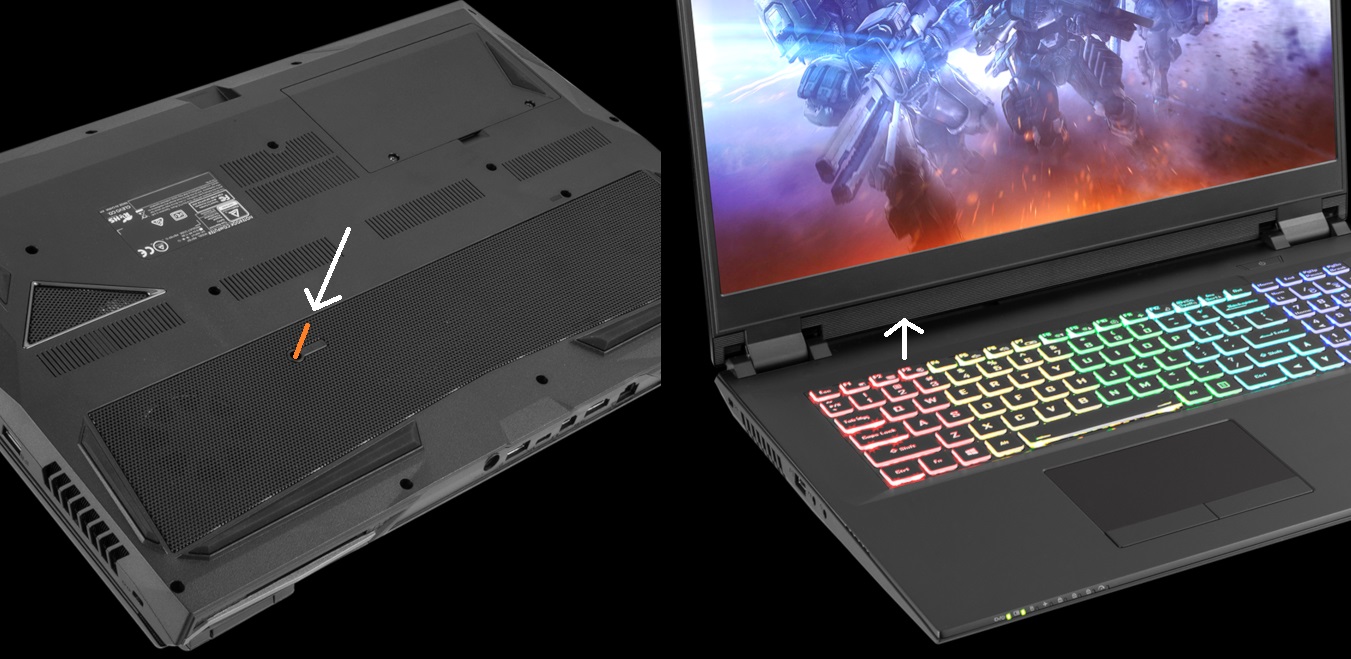
The 15" has 2 screw holding the bottom panel from underneath the keyboard. Sometimes they are installed from the factory, and sometimes not. It's possible there's only one installed on the one side of yours for some reason. The keyboard comes off pretty easy with a toothpick or paperclip through one of the screw holes in the bottom, then just pry around the edges. It's pretty flexible, don't about snapping it.4W4K3 likes this. -
Doesn't necessarily need to have G-Sync, it's just the hybrid or optimus graphics configuration has a big hit on the RTX chips. These will perform about the same when in the hybrid mode, but alot better in dedicated. The ASUS would have performed better if plugged into an external display via HDMI, as that's routed directly to the Nvidia, and so is effectively a dedicated system.
Any model with a dedicated graphics setup (or option for it) will do, regardless if G-Sync is enabled or not. Don't know of any models like that, I think there was a Zephyrus that was dedicated but didn't support G-sync because of the panel. Probably a few others around. Just something to be aware of.Tiber1337 likes this. -
So just to clarify, the PB71 does have proper g-sync and option to use dedicated gpu? Cuz I won't be using an externam display and I want proper fps and no tearing otherwise I'll be super sad.
-
Yes it does. It has both, switchable in the BIOS.
-
There are 17 screws I believe. That might not include the 2 battery screws. For bottom lid removal, once all the screws are out I take a plastic razor blade and slide it alond the side of the laptop where the orange accent is. This pops the sides. I then take the plastic razor and slide it along the front where it pops the front seam. Finally in the rear by the fan vents, I can use finger pressure to pop that off. If not, use the razor along the seam. At this point, the bottom lid pops STRAIGHT off. No turning, bending, or angling. It should simply pull up.
I've had mine apart at least 4 times at this point. If you are struggling with the lid not popping, try using a very thing plastic edge to help you. Absolutely NO pressure should be applied, if it's creakign or flexing you may be at too much of an angle. I think you've almost got it at this point. -
Where would the "orange accents" be on the all Grey model? Can you shoot me a pic and I can correlate where that'd be on mine?
-
-
Are the 9th gen models with the orange accents still a gunmetal grayish color, or are they solid black now as well?
-
http://imgur.com/gallery/Rw6ZwjK
So I bought a plastic razer blade and went back to work getting this thing open. By all means this bottom wants to come off, I can fit almost my entire hand between it and the components. But... That phantom screw continues to hold the panel in place. In the picture, you can see that it's seemingly connected to the small intake vent, there's even a piece of plastic blocking part of the vent. It's almost as if it was put there explicitly to prevent the opening of the laptop! Does anyone else have this? What should I do about it?
Update:
http://imgur.com/gallery/8l1VW3L
Thanks everyone for your help! To anyone who reads this, there's an 18th screw ( plus the battery screws) that you need a PAPER CLIP to access. That original video was correct, and so was the person who suggested a paper clip.
Now to upgrade this storage and get on with the rest of my life.Last edited: Jun 18, 2019 -
Would you mind helping me out and check CSGO FPSs on your laptop for me ? with higherst settings and with lowest settings
-
Yours must be a slightly different model as my vent there is all slotted and I do not have that 18th screw. The PowerSpec 1720 version seems to come apart with less hassle as my lower lid simply pulls straight off after removing the screws and popping the sides. Sorry you had to find that last mystery screw!
-
Sure, here's what I got in the FPS benchmark:
Max settings: min 45, avg 250, max 1024
Low settings: min 60, avg 400, max 1024
The mins and maxs are what I exactly got, the averages I took a guess from what I saw.Tiber1337 likes this. -
You are doing this all wrong. There are TWO SCREWS marked keyboard on them. These have to be removed. THEN, with a fine pick you have to puch NOT on the black plastic part of the hole, but BEHIND the black plastic. Look closely and you will see a silver circle, this is the part that is holding the keyboard on the other side. Push on that and you will be able to stick a plastic card between the keyboard and the frame and use it to crack the keyboard open. You will then access that last screw easily. On your image, we can see that the keyboard is WAY bent and might break.
Best -
Yours may have just not had the top side screws installed to begin with, it's hit or miss whether you get them or not. I RMA'd mine, which had them installed, and the new one had them included in a bag. Others have have had one or the other as well.
Also... ...people, just shove a toothpick, paperclip, etc, through the screw hole in the mesh grill and push the keyboard up from the bottom, then pry the edges with your fingers. It doesn't need to be that complicated. There's literally a piece of metal on the back of the keyboard (which I imagine) is specifically for this purpose.Attached Files:
-
-
I picked up an open box PowerSpec 1720 (PB70EF-G) from MicroCenter the other day and it's pretty sweet so far. The open-box savings paid for the extra stick of 16GB ram and taxes. =) .
The 8750H does indeed run pretty hot out of the box. I undervolted it with XTU and that helped tame it a bit. (1703 XTU benchmark, and 2963 for CineBench R20). Temps seemed to hover around upper 80's, although a long gaming session got it back into the 90's and throttled occasionally (not much, but it seemed to stabilize around 3.88Ghz). I'm thinking about repasting with some Arctic Fox that I have laying around.
The GPU is running really cool, hovering around 70. I did get a pretty good overclock for TimeSpy (8081, 8321 gfx) but it wasn't stable for FireStrike and dropped it back a bit (17227, 20070 gfx). I don't think I'll run it OC'ed, though, as games play just fine without it.
Is there any advantage to undervolt the GPU if it's already running cool?
The one issue I have so far, is that there seems to be an airflow 'whistle". I don't think it's coil whine, as it's only audible when the fan is running (regardless of load) and seems to be directly related to fan speed. I might try running it without the back cover and see if I can further identify it. I'm guessing this was probably the cause of the return/open box.
Edit to add links:
TimeSpy: https://www.3dmark.com/spy/7477492
FireStrike: https://www.3dmark.com/fs/19623598 -
Vantage extreme is also a good stability checker.
-
See update: I figured it out already. And the keyboard is meant to be flexible like that--it snapped right back into place after I my business was finished with that screw. Day three now and everything is working like a peach! Now the question is whether I have to remove the keyboard again to upgrade the RAM which came with only one stick. I wasn't even paying attention to that detail during my initial opening. New RAM should be here tomorrow.
-
If you put the screw under the keyboard back in place, then yes (and see my above post). If not, then you can just remove the ones in the bottom and pull the cover off.Last edited: Jun 21, 2019
-
EDIT: Woops, clicked reply instead of edit on above post.
Last edited: Jun 21, 2019AquaOrenji likes this. -
NOOOOOOOOOOOOOO
The reseller in my country for clevo's, the PB71 is from Dream Machines and has NO g-sync.
I am super sad now cuz I can't buy -
Can you not order from Schenker/XMG? They should be able to ship anywhere in Europe, assuming that's where you are?
The PB51/71RF-G (9th gen with G-Sync) only seems to be available outside the US, is there a reason for this? -
It looks like dream machines is a european based reseller. XMG / Bestware should do for you
-
Curiosity question, is it possible to save undervolt in BIOS? I got my RF-G a few days ago, just been downloading drivers and basic utilities. Was going to do stress tests, just downloaded Throttlestop and according to it, it's already undervolted by -49.8 so I assume this is from the seller's stress test. Forgot to say I ordered the machine without windows so it was (I assume) empty SSD/Hard drive. So where did the undervolt came from? Also, is -49.8 a good undervolt or should I try to lower it even more? If it does come from the reseller then I'd assume he's more experienced on undervolting and probably have picked a good sweet spot? Any thoughts?
-
What is this screw for anyway ?
-
I'm not sure. As far as I'm aware they just hold the bottom panel. Seeing as they often come with them not installed, you're probably fine to just leave them out once you remove them.
-
-
The reseller probably put in their own storage to first test it and applied the UV then in the bios.
Id say at least test if you can go lower. Ive seen a lot of resellers put in a -50mV undervolt out of the box.Samchanchan11 likes this. -
I repasted my 8750H on my 1720 with Arctic Silver 5 and that helped quite bit with temps. After gaming a couple hours, it's peak was 85, and mostly hovered around 75 or so. I repasted the GPU at the same time since the heatsinks are all one piece. That didn't have much effect, but the GPU was running cool anyway, so I'm not suprised.
Another interesting note on the cooling. I hooked my 1720 up my TV to try some gaming at 4K. With a few tweaks, I was able to play at 50-60fps (Witcher 3, FFXV, SOTTR), but because I was GPU limited on the frame rate, the CPU wasn't maxed out and ran nice and cool. (Topped out at 71 after a few hours). The GPU stayed nice and cool as well (70) -
On another note, I turned on MS Hybrid in the BIOS so see what it would do for battery life. At frst glance, it was a bit disappointing. Windows reported the same estimated battery life. But looking into the device manager showed that the Intel driver's weren't installed, and Win10 wasn't interested in updating the "Basic Display Adapter" drivers. So I manually installed the Intel drivers. Once I did that, power consumption dropped nicely. Estimated battery life when from ~3hrs to ~5hrs (in Power Saving mode). I actually worked a little over 4 hours yesterday on battery, and had about 15% left.
-
Did you install the current OS yourself or did your reseller?
-
The reseller. It's Win10 Pro. Although I bought it as an open box, so maybe they reset it before reselling?
-
Probably and did it in dedicated mode. Nor.ally you are recommended to install it in hybrid mode.
-
Oh really? Why should you install windows on hybrid mode? Won't it recognize the onboard intel graphics?
-
Just allows for a smoother driver installation and means it will just behave when you switch.
-
So you recommend installing in hybrid mode, then switching to dedicated in the bios ?
@XMG
When I installed windows 10 in discrete mode, nvidia has a problem locating the device and says that the installer is not compatible with the system. It hangs on the checking compatibility.
Which leads me to deduct that the mshybrid mode needs to be active so that the system sees the rtx 2070. true ?Last edited: Jun 26, 2019 -
Yes if you want to run it in dedicated once installed in hybrid mode it's ready to go.
-
I don't suppose anyone here has been able to roughly compare fan noise on this unit to the GE75 Raider (2070 or 2080)?
-
Gentech does a rough noise reading but it can be a hard thing to compare over the internet.
-
Anyone notice how the sd card reader is waaay inside the laptop and can't be reached easily ? why ? why ???
-
The fans on the PB70EF-G are well within reason to my ears, at full speed they are audible within the room but no high pitch or odd sounds present.
By comparison, I had an Aorus 15 X9 that was way, way louder. Near jet engine loud, if I can exaggerate. It might have pushed more air, but at a very unacceptable noise level. The Clevo is much more tame, and thanks to the chassis still provides good airflow.
I have yet to use the SD card but I did notice is is 'hidden' and recessed from the front center of the laptop. I've never seen one here, but I don't mind it mostly because I don't use it regularly. -
So the card sits flush and does not get damaged.
*** Official Clevo PB7xEx-G Owner's Lounge***
Discussion in 'Sager/Clevo Reviews & Owners' Lounges' started by sicily428, Jan 7, 2019.


![[IMG]](images/storyImages/05-clevo-pb50_3.jpg)