Problems? See this thread at archive.org.
Btw guys what temps are you getting on your unit while gaming? I have an rtx 2070 non max q with 8750h.. i have chosen the kryonaut thermal paste and the laptop is propped up using xstand. Im also playing in a well ventilated room. I have undervolted my cpu to -1.40mV and my gpu to 1750mhz @ 800v..
Im still getting 70'C for the gpu and 90'C for the cpu.. is this normal??
-
-
Did you watch the review by BobOfAllTrades on YT? He's using the xstand and got about 80°C iirc.
Haven't done any real gaming tests yet and have no xstand either but will test it and probably report back.
I'm having the 17" model with a repaste though, so the cooling may be a bit better. -
Can you post pictures?
-
Yep i already watched that. But that is a 15 inches model.. i was hoping for better temps since ours have a 17" chassis (am i wrong to assume better temps with bigger chassis). And i also have kryonaut applied in mine.
-
Yes I'm aware that IPS lean towards this problem in general.
But could you please go into it a little bit deeper and tell us some more about it?
- Even though the camera exaggerates the effect, which areas are areas on the pics are actual backlight-bleeding and what "just" IPS Glow?
- How can I tell if its a good or bad case of backlight bleeding and/or IPS Glow then? -
IPS glow is backlight bleeding, it's the pixels on black unable to stop the backlight coming through.
Usually excessive bleeding is caused by excess pressure from the casing at the edges. You can test out the impact of this by removing the bezel but it's not the most fun thing to do as a beginner. -
Oh alright then. I'd think that too: bigger chassis with same specs = more free space, which should mean better airflow aswell.

I'll test my temps later on.
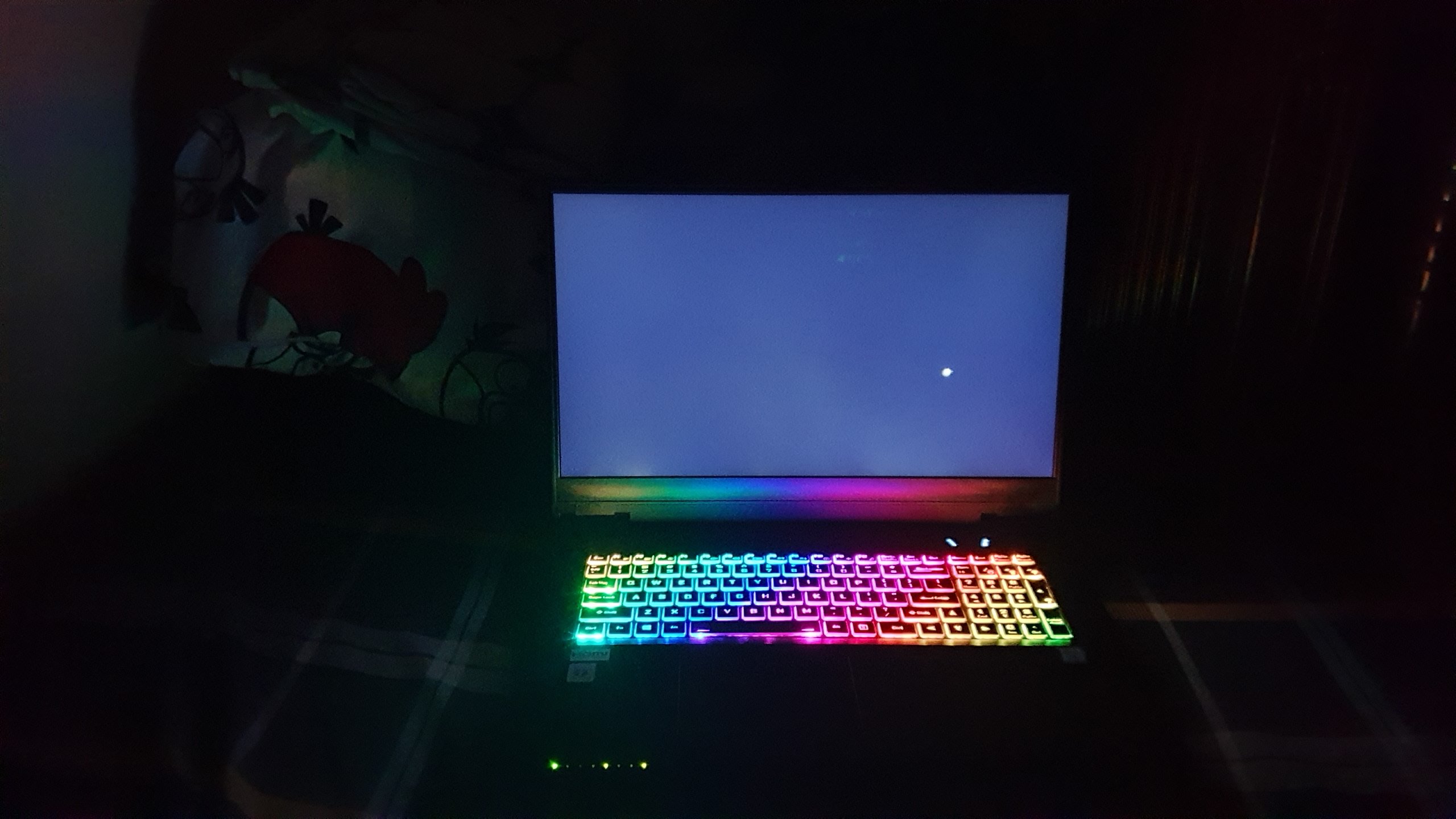
Can you show me some pictures (or even a video?) of your display with a backlight bleeding test (dark room, 100% brightness, black fullscreen background)?
I would like to have some comparison to my backlight bleeding.
Thanks!Last edited: Jun 3, 2019 -
Ill try when i got home. Will send it here afterwards. Please play for 30 mins to 1 hr. State your undervolting and room temps.
-
After quite some research, i think this doesn't seem to be the truth.
Sind IPS-Glow und Backlight-Bleeding das Gleiche?
Source: Asus ROG
...which basically says that its not the same.
Source: limscave
Btw., I made an Imgur album with a video of the display while testing for backlight bleed.
Please have a look:
Awesome! Btw., maybe have a look at this post on notebookchat about the Schenker XMG, it's basically the same laptop - so thats probably another source where you can find further information on the temps. Basically, it seems to be "normal" for the i7-8750H to run hot and to get around to the 90's degree.Last edited: Jun 3, 2019 -
I cant understand the language in that forum hahaha. Btw here it is. I just dont think my camera can justify it. In my naked eye i cant seem to find any bleeding in my unit.
How your testing?Attached Files:
-
-
Can anyone please confirm that you can hard switch between discrete and IGP for NORMAL laptops without GSYNC ?
also, is it possible to have prema bios on these machines ?
Thanks. -
The PB series can switch so long as it is not using an OLED.
-
what about the prema bios, can we have that on the pb series ?
-
I've not seen any plans (that does not necessarily mean anything), just the desktop series.
Mobile platforms have less give in the power system due to size and lower normal power targets (so VRM is tuned for that TDP) -
Thanks, it seems your display has a few spots of BLB on the bottom panel but overall seems pretty good, right?
Alright so I did some gaming and tested the temps:
- Laptop with almost same specs (Clevo PB71EF-G | i7-8750H, RTX 2070 (Non Max-Q), 16GB (2x8gb) DDR4 3000mhz , 500GB Evo Plus SSD M.2)
- repasted CPU, not propped up (no xstand or other laptop stand)
- used performance mode in control center
- automatic fan speed, though fan speed was at max. during the game (btw: wow, it's pretty loud, isn't it?)
- used HW/Monitor to check temps
- Edit: I did not undervolt cpu/gpu yet btw (are you supposed to do it with Throttlestop or can/should you do it in the UEFI Bios?
- tested with Overwatch @ nvidias preset very high graphic settings
CPU
@ Start/Idle: ~45°
@ Game: ~80° | max. was 98° (probably just spiked once)
GPU
@ Start/Idle: ~ 45°
@ game: ~70-80° | max. was 84° (again probably just a spike)
Will test it with Monster Hunter World next. Don't have many games installed yet but I think while Overwatch is pretty easy to run bcause of good optimization, MHW is quite a bit more power-hungry with the new resolution/graphics pack which requires 6 GB of VRAM already (?)
Any other opinions? I'm struggling on this
I want know how bad my backlight bleeding actually is and if I should try to return and get a better one.
I'd love to hear the experiences of other owners, how's your display?Last edited: Jun 5, 2019 -
I ordered 5 of these Babies.
Gonna take pictures when I get them so you get a general idea. -
Here are the Specs by the way for
Clevo PB71RF
Clevo PB71EF
Not much of a difference.Attached Files:
-
-
What is the difference actually? I thought the "RF" instead the "EF" would indicate an RTX 2060 instead.
Edit: is it only the 8th vs 9th gen CPU?
That's exactly what I wanted!
Awesome, I'm looking forward to your report and pictures
(probably don't have to tell you, but please remember to set brightness to max. in a completely darked out room w/out Keyboard lighting to have the best comparison of the worst possible BLB)
(On a side note: why on earth did you order 5 of these)
Last edited: Jun 5, 2019 -
You should read the whole thread or use search. Already discussed here :
PB70RD-G
PB70RD
PB71RD-G
PB71RD
PB70RC-G
PB70RC
PB71RC-G
PB71RC
PB71RF-G
PB71RF
PB70RF-G
PB70RF
PB71EF-G
PB71EF
The E is the 8th Gen Intel and the R is the 9th Gen Intel.
The G is for the G-Sync Option.
D is for 2060 / F is for 2070 / C is for 1660 Ti
1 is for black/grey lines. 0 is for grey/orange lines. (esthetics)
I like to eat them for breakfast. I need a large stock so I don't run out of them....
Only regret is that it has realtek NIC while the HM370 chipset has intel integrated already. A pitty....
Bought them from XMG/Schenker. I will update on how it goes.tobyg likes this. -
Ah yeah, I knew I've seen that somewhere...
Whats the fuss about the realtek? I have the feeling its not well received by a lot of people but I never knew why.
Alright then, thanks!
I'll wait for your update
Last edited: Jun 5, 2019 -
Realtek uses more CPU power than realtek for a little less bandwith. (3-5% more for 2% less)
-
Realtek vs realtek?
-
Yeah realtek seems so bad it can just compete with nothing else than itself, i guess
Well, I'm pretty sure he meant the HM370 chipset as the other one.Last edited: Jun 5, 2019 -
I undervolted the cpu using throttlestop.. its @ -145mV and the gpu using msi afterburner @ 1750mhz@800v.
-
Sorry, I meant Intel LAN is better.
Great, how are the thermals and the speed of the fans on idle now ? Can't you do it with the bios ? -
Thunderbolt 10Gbit lan is always an option
-
Not sure but i dont think the stock BIOS allows you undervolt, which is not a problem since it´s actually very easy to undervolt in Windows with TS or XTU.
Great unit if you crank that CPU Power limit to max, really happy with the power/temperature on this one, was starting to get sick of all the thin model options, this one is a nice change.
Stock Control Center also won´t allow you much control over fans but there are other solutions for full fan control.
Just a side note @SlashNLennon ... make sure those -145mV are stable, because that´s a bit over the regular "stable" value, but hey, maybe you got lucky with it. -
Dropped into the local MicroCenter and checked out their PowerSpec 1720 (PB70EF, I think) and was kinda impressed. I assume that some corners were cut to hit the price (compared to PB71's, which seem to all run quite a bit more.) . Other than cosmetic stuff, is there any difference between a PB71 and PB70? How much customization can be done to the generic Clevo chassises?
-
Just cosmetic, I dont believe there have been any tweaks to the electronics and mechanics.
-
So I'm planning on getting the Prostar pb71rf-g through Amazon when it goes on sale next week but one thing has been bothering me.
I've looked at this model on several different resellers and Gentech in particular lists the panel as a TN.
https://www.gentechpc.com/product-p/sager-np8377.htm
Everywhere else seems fine with calling it a "wide view angle" which I've always synonimized with IPS. I thought I read somewhere that these displays were IPS. And Gentech seems to have like 90% of its laptops listed as having TN panels. Would one reseller go through the trouble of swapping out all their displays or is TN now capable of "wide view angles" and that's what this model actually has? -
-
-
IIRC IPS is actually just kind of a registered trademark Word by LG or so for a particular version of the "wide view panel", hence why sellers label the ips as exactly that.
Edit: yep, see my quick google search for clarification: https://trademarks.justia.com/790/91/ips-79091568.htmlAquaOrenji likes this. -
They are all slight variations on a theme and can concentrate on different elements of display like switching speed, viewing angles, colours etc.
AquaOrenji likes this. -
Okay, I believe I'm satisfied with the answers to my question. As long as it's not a TN panel (been there, hated it) then I'm going to be happy. Looking forward to ordering it Thursday!
-
There are some pretty kickass TN panels though, like the Chi-Mei/Innolux 120Hz 3ms 100% NTSC ones that MSI used to use by default.
-
They do all shift quite badly when looking from below though.
-
@Owners:
What are your Benchmarking results?
I feel like my laptop is underperforming in comparison to others with these specs.
I did undervolt the cpu -.125, gpu curve editor with .800v @ 1500mhz, have a repaste and used a prop up solution.
@ 3DMark Fire Strike
BobOfAllTrades got 16854 (with graphics @ 20318 and physics @ 16762)
Schenker XMG Neo 17 at NBC got graphics @ 19800 Points
Even with all the tweaks I was quite a lot under that with about 18xx points in graphics - just as an example.
How's your performance?Last edited: Jun 11, 2019 -
What benchmarks are you comparing to, looks at the posts but usually its down to overclocking and power settings.
-
Sorry, what do you mean?
I'm comparing my results to the ones of Notebookcheck and Bobofalltrades. 3DMark FireStrike at this example, did other benchmarks too like TimeSpy and Port Royal.
Really wondering why my results are worse since I applied all the tweaks and settings as the guy in the video and even have the bigger 17" chassis so it should have better cooling and as such better performance, right?
No overclocking done there.
Just Undervolting and propping up, rest also the same setting for the test. -
Are you in hybrid or dedicated mode? You should expect a lower graphics score if you're in hybrid. It's in hybrid by default.
-
Dedicated Mode with G-Sync and Performance Mode on.
Can't seem to find any reason for that lower performance
Edit: oh damn, seeing your signature now with highest firestrike @ 17,318 points with almost the same specs hurts man xD
-
That will be overclocked.
-
What are your scores? 1,000 points in FireStrike can definitely be down to tuning/tweaking. Replacing the thermal paste on my model took me from 16433 to 17650. What are your temps while benchmarking?
You said you had G-SYNC enabled. Are you disabling G-SYNC during benchmarking? You should be for optimum score.
I saw a several hundred point increase by taking the PCI-e power scheme from (Maximum Power Savings) to (Off) in Power Settings while on AC power. There are also a ton of power tweaks within ThrottleStop. I used the included PowerSpec Control Center to overclock the 2070 a small bit. With a smear of Noctua NT-H1 the PB70EF-G (or PS 1720?) has not exceeded 80C even after hours. The factory applied paste is okay but I absolutely saw 96C out of the box at times and I knew we could do better.
https://www.3dmark.com/fs/19560907 ( 17650 - 20603 Graphics - 16915 Physics)Last edited: Jun 12, 2019 -
My score was just with an undervolt and repaste, and in the High Performance power plan, no overclocking or other tweaks done.
The 17,3xx was my highest though, I'm usually in the 16,900 - 17,100 range. -
- It was about 18xx constantly.
- termal paste was replaced by the seller already so all benchs with IC Diamond repaste included.
- have to check temps again when I get to do it again, can't really remember right now. But I guess they weren't suspicious.
- power mode was set to performance mode (do I have to manually edit the power scheme for AC?)
Yes G-Sync was enabled in the system by using Discrete-Mode in BIOS and enbled in the NVIDIA control centre.
However, at the test there was no warning that G-Sync is activated for that test, just V-Sync - which I disabled before testing. Thus I assume it was not active for the benchmark.
(how would G-Sync actually even limit performance?)
See, thats what I mean. He's getting 17,3k without any other tweaks/OC
I couldn't reach that value without OC tweaks yet (haven't really touched OC yet, just UV).
Thanks so far. -
Are there really no reviews on this machine still? Not even something on Amazon? Or a NBR user?
-
Its kinda stable. But there are times that a game closes suddenly (not a bsod though) on rare ocassions. But i cant seem to be getting lower temps. Still hitting 70 at gpu and 80 to 90 at cpu. Ive had thermal grizzly applied on mine when i ordered it. Dont know of they did it wrong.
-
If your using the High Performance power plan those temps are pretty normal. Even in balanced mode those aren't terrible, depending on the game.
-
I ordered 5 of these from XMG/Schenker/Bestware and I plan to do a review on them.vegetaeater likes this.
*** Official Clevo PB7xEx-G Owner's Lounge***
Discussion in 'Sager/Clevo Reviews & Owners' Lounges' started by sicily428, Jan 7, 2019.