 Problems? See this thread at archive.org.
For a laptop, I'd consider that normal. You may achieve a closer temperature delta between cores with fresh paste, but I think you will see the values slowly grow apart as the paste 'settles' and time passes. I've experienced the exact same temperatures between cores, at most around 10C difference on stock paste. Idling 30-40C is great, and never seeing 90C is great; I doubt a repaste would improve much there. Unless you go extreme liquid metal or something...
-
Remember two cores are also sandwiched between the others so I would not expect them all to be the same.
-
Ty, appreciated the input. Yeah I think I'm just going to let it be then. I don't really like repasting new laptop anyway lol, mostly because of the thermal pads. Sometimes they'll just peel off, or dirt or lint would get stuck on them when I'm trying to repaste, gahhh xD
-
-
Cover the heatsink with a sheet when working.
Samchanchan11 likes this. -
Has anyone noticed inverse ghosting (coronas) or overdrive overshoot artifacts on Clevo PB71RF-G or similar models fitted with the AUO B173HAN04.0 (AUO409D) display.
http://m.panelook.com/B173HAN04.0_AUO_17.3_LCM_parameter_37192.html
https://laptopmedia.com/screen/auo-b173han04-0-auo409d/
To test the display for inverse ghosting (coronas) or overdrive overshoot artifacts start by playing a familiar game at 140 FPS limit with G-Sync enabled. Then locked at 60 FPS with G-Sync, then locked at 36 FPS with G-Sync (36 hertz is minimum G-Sync range for 144hz screens).
Then do the same with G-Sync off.
Overdrive Coronas (dark contour trails) tend to become evident at 60 FPS locked games (Dark souls/Sekiro series, Nioh, Elder Scrolls series) and extremely visible around 30 FPS (L.A Noire, console emulators).
![[IMG]](images/storyImages/tfu3pFO.jpg)
Credits: AcidArrow
![[IMG]](images/storyImages/bgSAGQBl.jpg)
Credits: AcidArrow
![[IMG]](images/storyImages/NwuGKds.jpg)
This Linus Tech Tips video explains the inverse ghosting issue quite well so you know what to look for (watch until 4 minutes).
Sources on affected AUO B173HAN04.0 panel with pictures for reference, mostly ASUS RoG GX701 and MSI GE75 Raider/Stealth laptops. I'm guessing it's an MSI and Asus BIOS issue enforcing fastest/extreme panel overdrive setting just to reach the marketing 3ms response time, and users can't toggle it off...
- http://forum.notebookreview.com/thr...owners-and-discussions-lounge.825828/page-106
- http://forum.notebookreview.com/threads/the-official-new-2019-msi-gt75-titan-owner’s-lounge-intel-core-i9-nvidia-rtx-2080.826953/page-18#post-10904566
- http://forum.notebookreview.com/threads/asus-scar-ii-gl704gw-i7-8750h-rtx2070-144hz.827321/page-3
- https://rog.asus.com/forum/showthre...)-display-panels-affected-by-inverse-ghosting
- https://forums.geforce.com/default/...g-on-new-laptop-displays-with-nvidia-drivers/
- https://forum-es.msi.com/index.php?topic=7152.0
- http://forum.notebookreview.com/threads/inverse-ghosting-display-issue.826834/#post-10864938
Last edited: Aug 6, 2019 -
I'm surprised the overdrive is not adaptive as well.
-
I guess it depends on BIOS implementation, the consumer is at the mercy of the manufacturer, Clevo's BIOSes might better handle the display overdrive compared to ASUS or MSI.
Does the ClevoCenter 3.0 have display panel overdrive settings?
Crazy to think there might be a lot of RMAs due to inverse ghosting when a simple settings panel would do either at the BIOS level or OEM control center software, just like the OSD overdrive settings for desktop monitors. -
No display/graphical setting in CCC 3.0 v1.24 as far as I'm aware.
On the PB70EF-G with AUO B173HAN04.0 (AUO409D) I have not noticed this issue. Maybe I am just getting old?
I game with G-Sync on, 1080P or higher resolution, no frame limiting. If I enable frame limiting to 144Hz on modern games, no issues. I have over 100 hours in Skyrim, on this one play-through alone, and I never noticed any kind of ghosting while playing (60FPS limit game). I don't play many older games or console emulators so perhaps this is just an issue I am not running into with more current gaming?Frencho likes this. -
So I just opened up my laptop for the first time (no thanks to the 18th screw underneath the keyboard, I hate you mystery screw but a big thanks for all the helpful comments from here that led me to the all powerful paper clip that dethrone the ghost screw and its keyboard accomplice) to install dual-channel ram and I thought while I was there going to repaste the CPU/GPU as well. Alas, a new foe appeared. 3 of the 6 heatsink screws can't be taken off. #3, #5, and #6. Number 5 and 6 is screwed on way too tight and it's been somewhat stripped so I can barely get a grip on the screw. I'm going to try again later after I'm researching ways to get a stripped screws off, with better tools maybe. #3 though is much worse. It's also been put screwed too tight, but the stripping is much worse. It has almost no grip, so loose. I tried every size screwdriver head that I can find, none works. I don't understand how resellers that does this kind of stuff days in days out could mess up and strip a new screw this badly. I'm thinking of contacting them and ask them to send me a new heatsink free of charge, do you think they'll do it? I mean if I can't get the heatsink off, that's pretty much a dead laptop right there, as I can do zero maintenance on it and even if I can manage to take the screws off, putting it back on/off for future pastings are just going to kill it very fast. It really shouldn't have been sent to a customer in this condition. Anyway, any tips anyone can give me on taking off stripped screws is much appreciated. I'll be searching for answers online too, but people in this forum are very experienced so I'm sure they'll have the best ways on things like these. Thank you
-
Use small pliers to unscrew those if you can grab the top of the screw
-
Thanks, I'll try that later. So far the simplest way seems to be using rubber band, which will probably work on 2 of the 3 screws. The worst screw will probably need something more drastic
-
If you want a set of screwdrivers that can mate perfectly in size to avoid issues the Ifixit sets are very good.
-
Can confirm. Previous laptop had really badly stripped screws (may or may not cause I was using crap screwdrivers xD ) so I bought an iFixit Essentials kit which made the screws come out really easily.
Pliers are great if they're FUBAR'd. Just be careful to not hit the motherboard with them
-
Yeah, dont scrape through a trace, it does need those
-
Thanks Meaker, that's what I have actually, and I also tried it with my older screwdriver sets and neither sets works. I'm going to try the rubber band method first. I'm thinking it should work on 2 of the screws, the 3rd one... might have to use pliers, and if I do that, that means screws #3 gone. I don't know if 5/6 screws is good enough to keep the heatsink tight. I'm going to contact my reseller and see if this is covered under warranty. Can anyone confirm though, if the screws aren't the kind that can be taken off? It doesn't seem like it, seems like it's part of the heatsink and can't be replaced
-
-
Last weekend, I took my Powerspec 1720 and a VR headset to a town celebration event and spent the 2 days running kids through VR. It was a pretty fun time, but I was a little worried the heat and humidity might cause some issues. Despite that, the laptop was rock solid and performed really well.
I had a bit of scare at the very end, when frame rates completely tanked, but it turned out that someone had killed all the power to the pavilion tent and I was running on battery. =)4W4K3 likes this. -
Lol, well it carried on at least rather than powering off
-
How risky is it to use power tools on laptop's heatsink? I still can't take off the screws from the heatsink and thinking of taking the laptop to a local computer shop. I think they'll have to use power tools to get the screw out as I've tried gentler method and none of them work. I'm so worry that either the pressure or vibrations from power tool might damage the CPU/gpu. My only other option is to send back the laptop to the reseller and let them work on it. But it took them more than 6 weeks to send me the laptop, so I'm worry about how long it will take for fixing it
-
The kind of tool would be a dremel and if you are applying enough pressure to vibrate the unit then you have other things to worry about.
-
Now you gave me one more thing to worry about xD. Thanks!
-
It needs a careful hand basically. The metal dust is the biggest concern.
Samchanchan11 likes this. -
@XMG @Meaker@Sager
Hello, I've contacted 2 sellers and asked about the cooling solution, they both confirmed that the RTX 2070 Version has a better cooling solution than the RTX 2060.
(Seemingly for both PB5X and PB7X) However, I've gone through both owners lounge threads, can't find any pictures posted to confirm or deny this.
Do you have pictures or can elaborate?
Here's the PB5X picture by Eurocom: https://www.notebookcheck.net/fileadmin/Notebooks/Eurocom/Nightsky_Ti15/m460_11.jpg
and the PB7X picture by Eurcom: https://www.notebookcheck.net/fileadmin/Notebooks/Eurocom/Nightsky_RX17/rx17_euro.png
These pictures also do not say if It's the RTX 2060 or RTX 2070 cooling solution. Do not know the differences.
Also an additional question about cooling:
It would seem like the PB5X has better CPU cooling? Dual heatpipes directly to both fans, whereas the PB7X has better GPU cooling?
Basically want to buy the laptop with the best cooling. It'll be used for work related tasks. (AI Visualisation, Hyper-V, etc). CPU Will be pinned at 100% while GPU will sit at 30-40% (So no need for RTX 2070 actually, but if the cooling solution is better and can help with CPU clocks that's a bonus.)
Any guidance would be very helpful, thanks!
-
Can confirm the intel about the better cooling solution on the RTX 2070 models (information by Schenker/XMG).
Also, the 2nd picture (of the PB7X) shows the RTX 2070 cooling solution, atleast it looks like the one that I opened.
I'm interested too in the question if the smaller 15" PB5X model actually has the better cooling.
Looks like the smaller PB5X one has more heatpipes but the PB7X one has more stuff like "thermal-pads" around the pipes. Don't know if thats only for the 2070 and what would be better, though.
Before seeing the comparison I actually thought the bigger 17" PB7X would definitely have the better cooling no matter what...
because more free space = better air flow and cooling, right? Now I'm not sure anymore.
Edit: talking about better cooling: If you just had one NVME SSD drive, would it have any impact on cooling to actually put it in the 2nd slot (= far away from a potentially hot battery) rather than slot 1 near the battery?Last edited: Aug 22, 2019 -
Glad someone agrees with me!
I wish the PB71 was the same cooling as the PB51 but just larger with larger fans and heatsinks
I'd love a 2060 vs 2070 comparision photo for both PB51 and PB71, but seems unlikely. If anyone has a RTX 2060 model please post a photo in here! -
@lappyluke Btw, can you recall if there was an extra heatpipe in the bottom right corner?
I've seen 2 photos. This one is a 2070: http://forum.notebookreview.com/attachments/img_0572-jpg.175491/
Now let's compare to the picture I previously linked, this one has no config posted. So could be either one.: https://www.notebookcheck.net/fileadmin/Notebooks/Eurocom/Nightsky_RX17/rx17_euro.png
As you can tell there is an extra heatpipe leading from the CPU to the right. I wonder if this could be the RTX 2060 vs 2070 difference or if this is something special to the Powerspec 1720 that the first picture is from.Last edited: Aug 22, 2019 -
That could be an older model picture they used.
-
There you go, I made some pictures when tearing it down
Mainboard Overview:
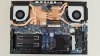
So yeah, theres was actually a third copper pipe on the CPU.
Btw., have a look at the copper cooling system:
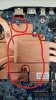
Is it normal that there are black areas? ("gunshot residue", signs/traces from heat)
Removing the cooling system to check on the thermal paste was not possible because of the screws being... screwed lol.
 Last edited: Aug 23, 2019
 -
Looks like smudges from the coating process of the fins.
-
@lappyluke
Thanks! Now we just need someone with the RTX 2060 Version to come out and post one of theirs. Perhaps possible the difference is the heatpipe.
@Meaker@Sager As someone working at Sager don't you guys have any PB51/71s with RTX 2060 Configs? -
We don't have anything that's not listed on the website.
-
Muuke, you can check the polish reseller website they have some pictures of PB51 and PB71 (e.g. https://www.hyperbook.pl/sklep/1008-large_default/hyperbook-sl704-i7-9750h-rtx2060.jpg). SL704 is a PB71RF and SL504 is a PB51RF. Hope that will help you. However please keep in mind that i probably saw other cooling systems pictured in PB71/51 notebookcheck reviews or on the youtube (i'm not 100% sure).
-
@Mateles Thank you for the information! This has been incredibly helpful.
Here are the pictures and they seem accurate due to prior information (PB70/71 pictures)
PB50/51 With RTX 2060: https://www.hyperbook.pl/sklep/817-thickbox_default/hyperbook-sl504-i7-9750h-rtx2060.jpg
PB50/51 With RTX 2070: https://www.hyperbook.pl/sklep/814-thickbox_default/hyperbook-sl504-i7-9750h-rtx2070.jpg
Differences: Only 1 heatpipe through CPU & GPU for RTX 2060 Model, this seems cheap for a 45W + 80W Model. Whereas the RTX 2070 has 2 heatpipes going through both the CPU and GPU as well as an additional heatpipe for the southern part of the GPU heatspreader.
PB70/71 With RTX 2060: https://www.hyperbook.pl/sklep/1008-thickbox_default/hyperbook-sl704-i7-9750h-rtx2060.jpg
PB70/71 With RTX 2070: https://www.hyperbook.pl/sklep/1009-thickbox_default/hyperbook-sl704-i7-9750h-rtx2070.jpg
Differences: One added heatpipe for the CPU. This one seems much better if you're going for a RTX 2060 than the PB51.
TLDR: Don't get PB50/51 With RTX 2060. With PB70/71 RTX 2060 is fine and both look good with RTX 2070.
Thanks you once again Mateles for the valuable information.
Last edited: Aug 25, 2019Frencho likes this. -
The GTX 2060 is a lower power chip so the cooling can be scaled back a bit.
-
Something that is worth nothing, I called my reseller and asked if I could have the PB50/PB51 with a RTX 2060 but with the RTX 2070 cooling solution, they confirmed with Clevo that the part is replaceable, and they can order parts from them. So I was charged an additional $15 for the heatsink/cooling solution. (Nothing... Especially for those improved thermals!)
I could either:
1: Wait 1 month and have them install it.
2: Have the laptop within 10 days and then install the cooling solution myself after 1 month when it arrives.
I chose the latter option.
So for anyone interested in the PB50/PB51 with RTX 2060, check with your reseller, it might be an option to get much better cooling!
Reason I mentioned it here is cause It's perhaps possible with the PB70/71 too. The improved heatsink should have better CPU thermals judging from the pictures earlier in the thread.
Best Regards. -
Hey guys... Anyone was able to scale back the FANs a bit ? Like make them power up and down slower ?
I always get ups and downs in spin times and I was wondering if anyone tackled this problem yet ?
Thanx -
Glad you got your desired 2070 cooling solution applied for you 2060 system!
Remember reading a post by a german manufacturer that they were aware of the different cooling solutions on these but couldn't order the units with the modified cooling heatsink. They didn't mention ordering the spare parts themselfes though... which would be a great option considering the small extra cost of the heatsinks though!
Hmm would be interested too, I have experienced that rarely too.
Did you try to modify the customizable fan curve? You could make the fans start at a higher temperature.
Combine this with a customized power plan (--> core usage options) and it should make quite a quieter performance during idle/standart tasks like browsing.
Looking for an ICC Profile for the AUO409D / B173HAN04.0 display.
Intensive searching the forum has failed me sadly, but I remember that I've seen such a fitting profile somewhere in these forums.
Anyone got one? -
Every panel is different so if you need the accuracy then a calibration tool is your best bet.
-
Would anyone be so kind to post a screenshot of the minimum discharge rate reported by hwinfo on low brightness, powersaving profile (nvidia off) , kbd backlight off, all apps closed?
-
I don't know if the hysteresis values are exposed.
-
@4W4K3
Can somebody tell me if the following repasting job is rather good or bad?

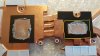
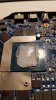
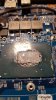
Never really seen it before.
Should the paste be squeezed out at the edges like that?
There seem to be empty spots aswell? -
Looks about identical to the factory paste job from Clevo/PowerSpec. A bit pushed out on the sides is fairly normal from a manufacturer. I would use slightly less paste and ensure EVEN pressure when mounting.
-
A bit too much paste used but generally too much does not have a massive impact.
-
Yeah, I wondered about this too!
This unit is supposed to have a Kryonaut repaste, but if you have a close look at the right side of this picture, it kinda looks like it's actually the stock manufacturers thermal paste (theres residue of a square "thermal paste-pad"):
Or do the resellers have special thermal-paste application "square-pads"? -
There is a bit too much paste around for it to be stock.
-
I'm using Obsidian software (all) and I'm not able to disable touchpad - dosen't work Fn + F1 and dosen't work disable touchpad from Obsidian Control Station.
How to fix it? Where are drivers for touchpad? I'm not able to find it in control panel ... -

The factory Clevo Control Center has Fan Control with a Custom fan option that lets you adjust to your hearts content. Previous versions did not always apply the curve, but the latest version works flawlessly for me and applies the curve on every boot as default. -
Inbuilt windows drivers if not available from your reseller.
-
How to disable touchpad? I'm unable to find this pice of hardware ...
*** Official Clevo PB7xEx-G Owner's Lounge***
Discussion in 'Sager/Clevo Reviews & Owners' Lounges' started by sicily428, Jan 7, 2019.


