Problems? See this thread at archive.org.
Speak to obsidian as you are not using standard drivers.
-
-
I install Control Center 3.0 and I still not able to disable enable touchpad. BTW - can you show me where I can find drivers for touchpad? There is no drivers on offical clevo web site! I try download it from others site but reselers has got only drivers from clevo ...without touchpad ...
-
Speak to your reseller regarding firmware/bios updates but I believe the integrated drivers are used so no such thing as touchpad drivers.
-
I will ask my reseller about drivers for touchpad ... normally this thing are available on webpage
-
Look up windows precision drivers, this sort of thing is changing. A bit like there is no web cam or usb driver to install.
-
So I have sollution for my problem with touchpad via support from my reseller hyperbook (thx!).
You mast re-install 2 drivers: 02_SerialIO and 07_HIDFilter. Now it's working ;-)
After this I have more options in system --> touchpad ;-) -
Speaking to your reseller is never a bad idea

-
Is it normal for PCH temperature to be in 80-90 C under normal loads (ie. web surfing/viewing notebookreview forums).
![[IMG]](images/storyImages/4Yrzrxb.png)
-
It will be pretty hot, especially without any incidental airflow from the fans.
-
About a few cm above the battery is the PCH right? Looks like there are no fans/heatsinks on it.
![[IMG]](images/storyImages/rx17_euro.png)
-
Correct, the chipset is the bare chip you see below the heatpipe.
aznxwill likes this. -
It'll be great if any users out there can post their PCH temperature - just wanted to know what the general temperature is like.
Lowest I've seen on my machine is about 76 C and it usually sit at 84-87 C under normal/light loads. -
-
I am usually 60-70C on battery, and 80-90C on AC power. I've never seen it higher than about 96C after extended load/use. It is a "high" temperature compared to other hardware, but it is designed to operate within that range normally. In the past, TJmax for older generations was up in the 120C range! I believe @Meaker@Sager is correct and the current generation begins over-temp protection of some kind at 108-110C.
-
Actually this model uses a driver called Intel Serial IO.
That´s what will make your touchpad driver work. We bundle it in our Chipset driver.
We assemble this units everyday and our drivers work in the latest Windows Build.
For some weird reason we had one or two cases where we had to do a BIOS "Load Setup Defaults".
Is any driver missing or with a yellow sign in your device manager? -
Their reseller already got this sorted.John@OBSIDIAN-PC likes this.
-
Interseting. Would it help reducing the temperature to apply a thermal pad just like these you can stick onto the SSDs (as in the picture)? Would it reach the alluminum backplate to release heat to it?
-
You would need to be careful of the heatpipe and it would have to be a lot thicker.
-
Make sure you're looking at the bare chip, left side in that picture, and not the wifi controller, which is circled and has the number "1" over it. The wifi doesn't really need any cooling.
-
Got to overclock that transmit power
-
Yeah I actually did that at first and wondered why you're talking about the wifi controller
But no, meant the bare chip for the cooling pad. -
A bit off topic but has anyone managed to get this working with their keyboard? Mine just keeps saying not initialised for the clevo keyboard.
https://www.project-aurora.com/ -
Is that designed for laptops?
-
It says it supports Clevo devices so...
-
Looks like an issue someone else reported, no action on it. You should probably add a 'me too' with logs and such.
https://github.com/antonpup/Aurora/issues/1566 -
So bug report and work with the developer by the sounds if things.
-
Is there an SDK anywhere for the keyboard lighting? Can't seem to find it.
-
Ok, wow, so I have a weird one. A couple of times now I've read folks saying that using Optimus instead of Discrete causes a big performance hit, particularly with Turing GPUs. Since I've had Maxwell/Pascal in my previous Optimus laptops, I decided to test this out. I expected similar results or maybe a small hit to performance under Optimus, but instead I'm seeing a HUGE hit to performance under Discrete! I genuinely didn't believe my results, rebooted, tried again, no change. Then I rebooted a few times, resetting all the Nvidia quality settings to default and rerunning the benchmarks, with same results. I've let the system loop the benchmark for a while to reach max operating temp, then retested, no change. What am I not seeing here? All testing was Unigine Heaven and Unigine Superposition, since my son was using my Steam account and keeping me away from 3Dmark.
First pass, Graphics MSHybrid,
Heaven 4984, Superpos 1080 med 14356, Superpos 4K 8373, Superpos Vive Pro min 10000 (capped)
Rebooted, set graphics to Discrete, powered off, booted, tested;
Heaven 2576, Superpos 1080 med 8373, Superpos 4K 4556, Superpos Vive Pro min 7884.
Shutdown, set MSHybrid, booted Win10, reset all Nvidia quality settings to defaults.
Heaven 5108, Superpos 1080 med 14468, Superpos 4K 6203, Superpos Vive Pro min 10000 (capped)
Shutdown, set Discrete, booted Win10, reset all Nvidia quality settings to defaults.
Heaven 2411, Superpos 1080 med 8322, Superpos 4K 4526, Superpos Vive Pro min 10000 (capped)
Sooo, the Vive Pro minimum test is worthless, and I won't use that one any further, but every other test saw a huge performance *loss* under Discrete. This doesn't seem right, something's screwy, but I can't imagine what. I've been checking everything, but I'd love to hear some ideas on things to check out. I thought maybe it was a bad config or some option somewhere, but the second set of runs matching the first set (within margin of error) was shocking.GGTK likes this. -
![[IMG]](images/storyImages/GJjOfRK.png)
^ Hmmm - around 15min of gaming brought PCH temps in the 100's C. I didn't OC the CPU/GPU, just did core and uncore undervolt of -100mv.
All other temps like CPU and GPU look good to me, just PCH seems very high IMO. -
104C is high but not cause for panic in a PCH.
https://www.intel.com/content/dam/w...datasheets/7-series-chipset-pch-datasheet.pdf
Older chipset, but it says the PCH diode goes from 53C to 134C. Next page mentions hot trip points:
Hot Trip Point should be set to throttle at 108 °C (Tj,max) due to DTS trim accuracy adjustments. Hot trip points should also be programmed for a software response. Catastrophic Trip Point should be set to halt operation to avoid maximum Tj of about 120 °C. -
Ok, replying to myself, but it's got to be something specific to Unigine. Ran 3Dmark on Discrete and MSHybrid just now, scored 7511 and 7521 respectively, which is what I expected.
-
Driver issue perhaps? Might be worth re-installing in discrete mode.
-
But only Unigine? Nothing else is showing weird performance. Can you fire up Superposition or Heaven on a PB70EF-G and see if you see it too? It should be obvious if you hit the same bug, performance in MSHybrid is normal but Discrete is almost half. Like I said, everything else is running great, and performance in Discrete/MSHybrid is almost exactly the same, so I'm disinclined to dig into it too much.
-
I work remotely so I'd have to ask one of the guys to, someone else could give it a try on here but it's odd.
-
Hi there, I have a Powerspec 1720 which is the same model as the PB71EF-G, how do you setup NVME raid 0? I can't find any viable options on the Bios.
thanks! -
Double check your manual, we have a copy hosted if you dont have a copy.
Judge Dredd 3D likes this. -
Hi there, I do not have a copy of the manual, would the Powerspec Bios have the same features as the other manufacturers? thanks again
-
Where can I get the drivers for PB71EF-G I looked on clevo website but that model doesn't seem to be there
-
It will share the drivers of the other pb series, we have a manual and drivers on our website.
Judge Dredd 3D likes this. -
Hi, could you like the manual for the PB71EF-G, and maybe the latest bios for it if possible, thank you!
-
I like them very much but I can't link back to our website under forum rules. Our download section has both clevo and sager designations.
-
When I go to your site under support the only options are: Technical Support, RMA request, Service Authorization, and Warranty.
None of this links have access to the Laptop model files
-
Please use the desktop page.
-
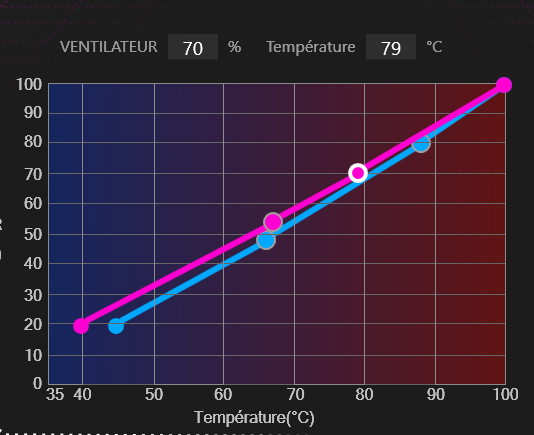
Is there any way to have the fans NOT ramp up like that whenever there is some work going on ?
I don't mind waiting a bit longer. I have tried undervolting in the bios to -100mv on all provessor and memmory... to no avail.
best -
thank you for the reply... can you post your fan profiles and the version of the clevo app please ?
Do you think this profile will lead to constant and regular fan ramp up ? How can i improve the cooling of this unit ?
thanksAttached Files:
Last edited: Oct 2, 2019 -
-
I am on the latest version provided by the Microsoft Store. 1.24 I believe.

That's my current fan profile. It is pretty aggressive and the fans will ramp up to near full speed under a heavy load. Combined with an undervolted MSi Afterburner curve this usually has my GPU in the low 70C's after several hours gaming. The exact undervolt is in my signature for my specific RTX 2070. -
Has anyone been able to get the Package CState to go below C0 on the pb7x series?
I have a pb50 and I see the cores reaching C9 when idle (in powersaving mode), but the package does not go lower than C0, and power consumption while fully idle doesn't drop below 10W, which is high, considering I also currently only have 1 stick of RAM installed and the display backlight is set to the minimum level.
It should be 6-8W, if not less.
If I let the display timer expire, the display turns off and after a few seconds of high power usage, power draw drops to 6W.
This is interesting because it is unlikely to only be because of the display backlight.
Indeed, manually turning backlight off in Linux only decreases power draw by 0.8W (compared to min brightness setting).
So I suspect the 10->6W drop a few secs after the display turns off in Windows is due to some other HW component entering sleep state when the screen turns off.
The Intel GPU is only taking <0.2W on idle, according to HWInfo, so that shouldn't be it.
4W is a relatively big amount of power when idle... I wonder where the culprit might be.
I tried disabling all the unused HW and ports (webcam, bt, TB3, fingerprint reader...) in Windows device manager, but that didn't help (disabling the device doesn't necessarily imply turning it off, unfortunately).
In Linux idle power draw is 13W in idle (mon brightness) , 12W with screen backlight off.
The GPU is off (else idle consumption would be 30+W)
Does anyone have any idea what the culprit for high idle power usage might be?
As a comparison:
Alienware m15 (8750h, 2060, 2x4gb ram, 144hz display) draws 7W iirc.
Lenovo p1 (8750h, p1000, 2x8gb ram) draws 5W.
Dell Precision 7530 (8750h, p2000, 2x16gb ram) draws 9W (we can assume 8W or less with only 1 stick of ram) -
Is there a way to undervolt the RTX2070? Tried Afterburner even enabling the extended MSI config but dont get any control over the Voltage slider. Control Center only allows OC Mem and GPU...
-
You have to use the voltage/frequency curve editor (Ctrl+F).
-
Hi guys im using control center 3.0 as seen in the screenshot. This just happened lately. I cannot seem to run the CCC when i press the fn+esc key. even if i click on run the CCC in the lower right screen of the laptop i cant seem to run the CCC. do you have a fix for these? whenever im trying to run it the arrow pointer just loads for a while and nothing happens. HELP!
Attached Files:
-
*** Official Clevo PB7xEx-G Owner's Lounge***
Discussion in 'Sager/Clevo Reviews & Owners' Lounges' started by sicily428, Jan 7, 2019.