Problems? See this thread at archive.org.
For the latest official bios you would contact support.
-
-
Seriously thinking about repasting with liquid metal since I'm about to open my PB71RF-G up for only the second time since I purchased about a year ago. You can max the ram now for just $200 on Amazon btw. Two things if anyone would be so kind:
- What's my best bet/practices for applying liquid metal to this thing? I'm a bit worried about doing it but I really want to. Temps matter in a laptop.
- I haven't updated BIOS since purchase. I see the repo mirror has updates: http://repo.palkeo.com/clevo-mirror/ . Anyone have anything good/bad to report about the BIOS updates?
- What's my best bet/practices for applying liquid metal to this thing? I'm a bit worried about doing it but I really want to. Temps matter in a laptop.
-
Most important thing is getting contact perfect, if it's not LM won't do much.
-
My new RAM arrived today. I installed and it's working perfectly, 64GB in dual channel at 3000mhz. If anyone else is interested, it says there are 9 sticks left: https://www.amazon.com/gp/product/B086GKC5FH
Was such a good deal to max out my RAM IMO. Here's the RAM specs for these sticks: https://assets.website-files.com/5c...1_PVS432G300C8S_Sku Sheet_041620 Copyable.pdf
even has low latency compared to other sticks of higher speed I found! -
Weird the listing does not mention Patriot at all.
-
Latency is decent but there is better. My set of Crucial Ballistix can do 3000Mhz CL15 which is pretty good (it's labelled as 3200Mhz CL16 but I couldn't run it at that speed, the latency is still the same as if it were at that speed anyway)
-
Yeah the traces will likely limit the raw frequency you can achieve. They matter less for overall latency.
-
The plates aren't copper, are they?
-
The whole heatsink is copper.
-
Does everyone run their Clevo laptops 24/7 or do you shut it down regularly?
Personally, mine is off about 10 hours of every day even though I use it as a desktop replacement and rarely move it. -
I would shut it down when not in use. Most OSs do not do well with being up 24/7.
-
Did the high pitch whistle noise ever go away for any of you?
It's driving me crazy honestly. I'm just praying dust build up fixes the issue.
Also considering finding a replacement bottom panel to see if I can modify it or something but I'm not sure that's where the problem lies. Having trouble even finding somewhere that sells spare parts for the PB71DF2-G. -
Is it more of coil whine?
-
No it directly correlates with the fan speed. There is the normal whooshing of the fans and alongside it is this high pitch whistling which is very distracting and annoying. It gets worse as fan speed increases so the closest I can get to deal with the problem is a custom fan curve, undervolt and turbo limits.
I also have very noticeable sizzling coil whine which seems GPU related as well as an intermittent buzzing when using the touchpad. But these two sounds don't bother me really.Last edited: Oct 19, 2020 -
Ah, that would need a new fan module to sort probably given how new it is.
-
Thanks for the response. Unfortunately I doubt a new fan module is the solution. I've read a quite a few complaints about this noise and it appears to be an issue with airflow/fan design of this particular chassis. I don't think it is something that can be fixed by replacing parts.
Even XMG's promotional material for the 2020 refresh of this chassis claims: "Thermal innovations in the XMG PRO 17 include an improved cooling system, which improves the acoustic profile of the fans at the same speed ( less high-frequency noise)" -
Usually that's more on fan sizing and looking at the frequency of the fan itself.
-
Hello what do you think is better for this laptop 2x8 GB RAM 3200 MHz CL 18 or 3000 CL16? For i7-10875H + RTX 2070 Super
-
Any way to tell which bin the memory is? Samsung, Hynix, etc?
I’d gravitate to the higher frequency 3200 and either run it tighter CL (if possible) or bump up to 3600/3800 if possible. -
That is quite the bump. My 3000mhz CL16 is Samsung bdie so as above you never know.
-
My 3000Mhz CL15 is Micron (it's rated for 3200Mhz CL16 but my laptop won't run it that high with a 8750H)
-
Can I use 1,35v RAM in this laptop? I buy 2x8 3200 CL19 1,2v to be sure it works
and another question
RAM with xmp profiles will work?
I wonder if this RAM will work it is XMP 2.0
CRUCIAL Ballistix SODIMM 2x8GB 16GB Kit DDR4 3200MT/s CL16 Unbuffered SODIMM 260pin BlackLast edited: Nov 28, 2020 -
I'm planning to buy a 65W universal usb-c charger.
Now, I know that PB71RF uses a 230W charger, but I'm wondering if the 65W usb-c charger will charge the laptop when turned off? Does the usb-c/tb3 port on this laptop support power delivery TO the laptop? -
I don't think it does.
-
Hey all, I've been a Powerspec 1720 owner for about a year and a half now. I generally got 3-5 hours of battery life upon purchase, with a normal, slow and light battery degradation over the course of a year. Just before I started having battery problems, I was still getting a few hours easily. Then out of nowhere, overnight, my battery performance dropped from several hours, to about like, maybe 10 minutes!
The computer will seem "fine" for those first 9 minutes or so (with the estimated remaining battery life still displaying over an hour) and then out of nowhere give me low battery warnings and then just shut off. It happens quickly. As in, from the time the low battery warning comes on, to the laptop powering off, I have a few seconds (not minutes) to grab the power cord and shove it in.
I'm fine with sourcing a replacement battery, but I'm concerned it might not be a battery issue due to it just suddenly dying out of nowhere overnight rather than slowly degrading to where it's at now. Could there be some other issue? Bios, mobo, etc? -
The charge level is based off the voltage, if the chemical cells are a bit wonky their discharge profile will have changed and the charge reading will be meaningless.
-
Well I figured the charge reading was meaningless, but I wasn't sure if that was due to the battery itself or something else like a bad mobo. Does what I'm describing sound like a wonky battery then? I'd actually prefer that as buying a new battery is a relatively easy fix; I genuinely have no idea!
-
Sounds like a battery chemistry issue yes so a replacement should be ok.
-
Are there any recommended reliable websites to purchase from? A search of this thread doesn't provide any concrete leads other than "sketchy websites" and checking with Microcenter. I bought this Powerspec 1720 from Microcenter but I'm out of warranty; plus they want me to come in to the store with my laptop just to figure out if they can special order one. I'm ok with that being a last resort but I'd rather just order online right now!
-
You could contact our or other resellers sales to see if they will sell you the part, if we can get it can't see why we would not.
-
Any chance you know the particular part number, or is that going to depend on who the reseller is?
-
The battery should be info enough.
-
Does anybody know the thickness of the factory thermal pads on the PB71EF-G?
-
To all of you PB7xEx-G owners. Another user on this forum showed me the light. And that light grants you access to the elusive holy grail that I've seen many of you ask for, a completely unlocked BIOS
Click HERE to download a piece of software from INSYDE (you may recognize them) called H2OUVE UEFI Variable Editor. After you extract all the files, you want to run H2OUVE-W-GUIx64.EXE
After the program opens, click on FILE at the top left, and then select LOAD RUNTIME. This will load the BIOS you are currently running on your laptop.
Within the left hand panel, you want to click on the YELLOW button titled SETUP. This opens the BIOS to the main menu within the INSYDE H2O SETUP EDITOR. You may now change settings in your BIOS from here just like you normally would when accessing the BIOS on system boot...but now you can access a special door that will open up into a magical world. Follow me a inside! I promise, I won't bite.
Select ADVANCED from the list of categories on the left, and then go into ADVANCED CHIPSET CONTROL.
You will now see an option you've never had access to before. It's titled, SETUP MENU INSYDE FULL SHOW. Right now it's set to HIDE.
Change it to SHOW.
Almost there...
Select EXIT on the left side.
And finally, click on SAVE CHANGE WITHOUT EXIT.
UN
LOCKED
BIOS
BOOM
CELEBRATE YOUR FREEDOM
LOOK AT ALL THOSE SETTINGS...drool...
![[IMG]](images/storyImages/M2JyZhQ.png)
IamTechknow, Mr. Fox and 4W4K3 like this. -
I was playing around with some of the undervolt settings in the BIOS and now I'm stuck in a bootloop.
The laptop turns on, but the screen is black for some minutes and then it reboots. While it's on, the Fn+1 key combination to set the fans at max speed actually works.
This is what I've tried so far.
- Taking out the RAM sticks and checking them one by one.
- Replacing them with other RAM sticks completely.
- Removed the CMOS battery (under the keyboard) and left it out for 5h.
- Replaced the CMOS battery with a fresh battery.
- Plugged it in to an external monitor.
Please, if anybody has any suggestions I am willing to try them out
-
^I have an identical laptop stuck in the same scenario after entering a bad memory timing. CMOS, NVRAM reset do nothing. No hardware recognized, no USB peripherials work, but the fans come on and it will blink the lights occasionally before shutting down. Corrupt BIOS/EC my guess, which will not reset.
Reached out to 1-2 local repair shops and have heard crickets in return. Made a post on here as well but after hours of searching am still stuck with a "dead" laptop that just boot loops. Pretty depressing situation given I know all the hardware is good. It's been sitting for weeks...
http://forum.notebookreview.com/threads/clevo-pb70ef-g-no-boot-help.836475/Last edited: Aug 30, 2021 -
Well ****. That sounds exactly like the same symptoms and experience. Not reassuring at all then. But at least we have each other in shared misery
I'll reach out to my local Clevo supplier and see if they have an easy fix for this, or if it's bricked beyond repair, which I refuse to believe4W4K3 likes this. -
Getting a ram stick if a different speed to your ones can force it reset.
-
Unfortunately this did not work either.
[Edit]
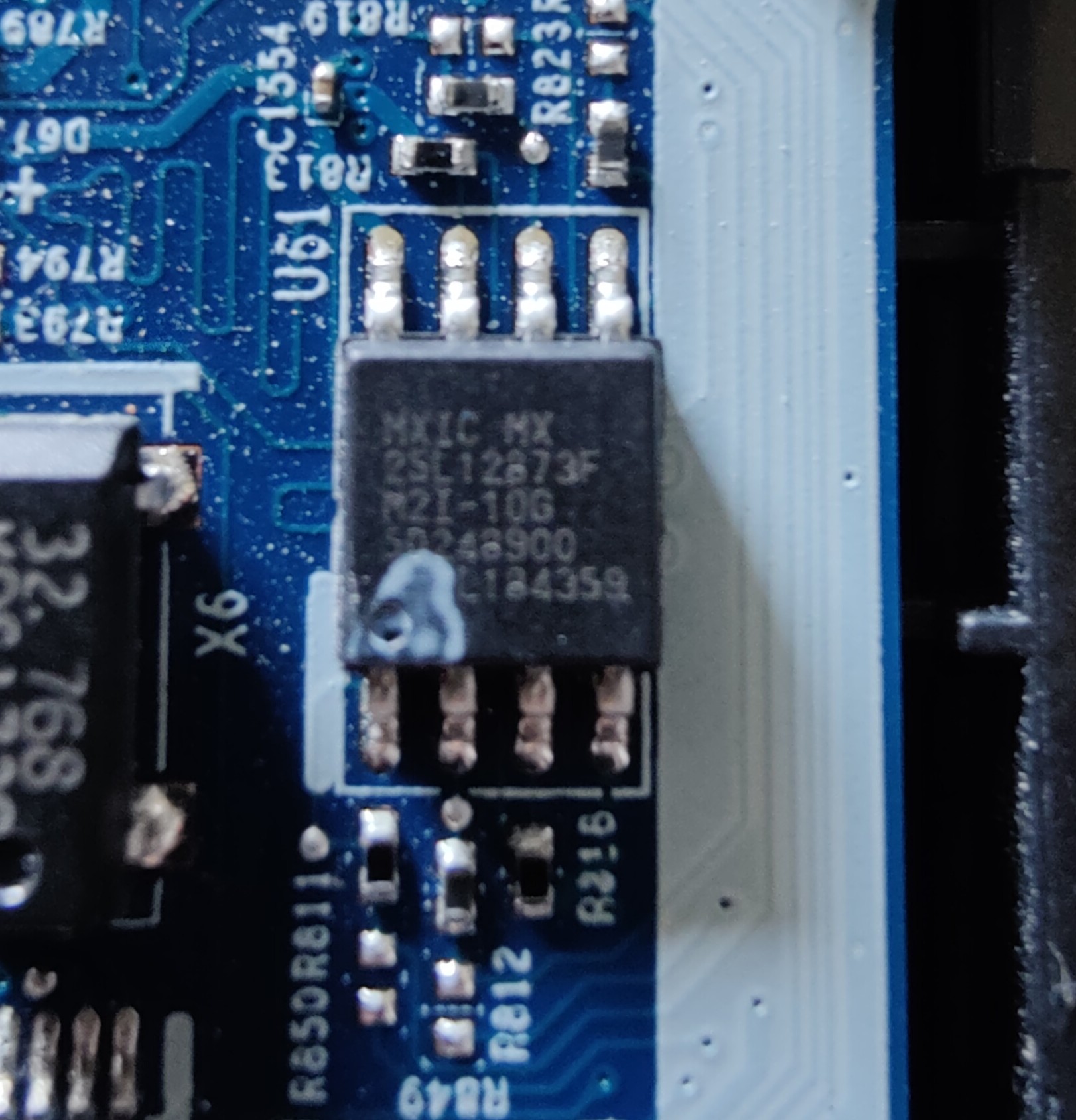
So, I think I'll stop troubleshooting for a bit. This should be the BIOS chip right?Attached Files:
Last edited: Aug 31, 2021 -
-
Yeah that should be the chip.
-
It doesnt look too good. Not sure what that spot is. I did order a new programmed chip tho, and I also ordered a CH341A to try and flash the current one. Would either of those methods work in theory you think? I don't have that much hardware knowledge.
[Edit]
With that said. Could someone provide me a dump of PB71EF-G BIOS in .BIN format? That would be amazingly helpful.Last edited: Aug 31, 2021 -
I believe this is it? https://my.hidrive.com/share/yze8mg-wf8#$/BIOS and EC Firmware/CLEVO/P_Series/PBxx_Series/PBxxExx
Also try - https://repo.palkeo.com/clevo-mirror/PB5xED_EFG/
Appreciate your pictures and info regarding the BIOS chip. Will look at mine with a magnifier and see if it looks similar.Mr. Fox likes this. -
The white spot is the factory marking it as programmed.
-
Well bless you @HenryCase ! We may have broken laptops but together I think we’ve found a potential solution. Have a look at my BIOS chip which I was too blind to notice. I even combed over the board front and back many times. Just too small for my eyes. This is with a magnifying glass and macro lens attached to my phone.
ordering a programmer and looking around for a new chip as well. Fingers crossed! I’ve done it on 3D printer mainboards with a USB chip programmer, seems similar. Let me know how your efforts go.Attached Files:
-
-
It's always an 8 pin SOP with a mark like that which helps.
-
@Meaker@Sager Do you think they look normal or bad? I think there is a hole in mine on the corner but it's pretty hard to see such small detail.
-
The depression you see is the universal marking for pin 1. It's used everywhere
-
Ah, then maybe it's just fine. Any insight as to this type of behavior on a standard Clevo? Does Sager repair fairly new Clevo's or could you put me in contact with someone who may be able to diagnose the boot looping? I'm willing to ship it if necessary! A bad memory timing seems to have bricked it.
EDIT - In the meantime still gonna give the programmer a shot. This is new to me but it may be that nothing is "fried" and it's simply corrupt BIOS and a reflash will fix it all which I can learn to do. In my head I've been convinced I cannot fix it; for no real reason.Last edited: Aug 31, 2021 -
Thank you for clearing that up!
Yeah, so I probably jumped the gun a bit last night. The marking, not the depression, looked super odd to me so I'm glad to hear that I didn't fry anything at least.
In any case, I do think re-flashing it with a programmer could be a potential solution. The only thing I can't figure out is how to get a .BIN bios file to use with said programmer. I've checked both of your links, and those are just the .EFI files provided by the vendor. Maybe I'm not understanding something correctly about the procedure though, so we'll see. Let's keep in touch about that and we can help each other out.
Also, I noticed a fun coincidence yesterday when I was looking at your signature
4W4K3 likes this. -
Yeah they don't tend to provide full BIOS images. If someone has a similar model they can dump the contents.
*** Official Clevo PB7xEx-G Owner's Lounge***
Discussion in 'Sager/Clevo Reviews & Owners' Lounges' started by sicily428, Jan 7, 2019.