 Problems? See this thread at archive.org.
Is it because it is defective?
-
Can you find a spec sheet on the model number? You could see if the connector pinout was the same.
-
Hi All,
I have upgraded screen to IPS recently. As LP116WH4 was out of stock i been advised to buy LP116WH6 SLA1. I do not advise to choose that panel! It is working very well but to fit it i had to remove left side of frame that keep panel in place. Screen is bit wider so its impossible to fit it with complete frame. Also i have had problems with light bleed as without frame is hard to position screen in correct place.
Screen is working, picture quality is very nice but fitting can cause issues.
Hope this help someone.Prema likes this. -
You say a comms issue!? This is good news

This means that I can potentially modify the pinout.
Could you guys be really awesome and see if you could help us find a spec sheet for the WH4? I've scoured the internet but don't really know where I might be able to find one (other than Panelook where I can't physically download it without paying like £400). Since you guys have your super secret Chinese suppliers and all haha. -
so it looks lik this is th only plac onlin you can buy a rplacmnt w110r kyboard/ i ask bcaus suddnly min dosn't hav working '' or 'shift' kys anymor. th dlt ky dosn't work ithr. ;9
-
You can also call/email Mythlogic and they will sell you one. I think most of the other builders will also. (not the resellers)
-
Do you have a recommendation on the correct LVDS extension cable? I'm going to give this upgrade a try and I recall you mentioned the need for an extension cable in your initial description of the process. This seller does not include one with the screen and I am unsure of the exact specifications required.
-
I had contacted the seller when I first saw the original post. They will include the extension cable if you request it.
From the seller:
We have regular extension cable for 40pins brown color (will supply free of charge - leave a note in the order pls). -
Uploaded a bunch of pictures to panelook. Hoping I can get my hands on that documentation. This p-coin system is dumb.
-
Could you elaborate on this and maybe take pictures? Unlike the LP116WH4 SLN1/2, your LP116WH6 SLA1 looks physically similar to W100ER's stock panel. It looks like it would fit properly since its screw holes and LVDS connector seem to line correctly. No idea if laptopscreen's picture is correct, but it would be interesting to hear more about this screen.
-
I have gained half of the p-coins I need, with one of my pictures rejected. There are two more pending that may or may not get accepted.
-
If any of you European Union chaps are interested in selling their w110er, please send me a message. Thanks
-
Well, I found out the answer to my question. Laptopscreen's customer support told me that the LP116WH6 SLA1 is a bit wider than the other 11.6" screens so that the screw holes won't match, as aircooler said himself.
How difficult was it to remove the screen mounts? I'm thinking about buying this panel, but I'm not certain if I'll be able to deal with the screen mounts.
Also, you mentioned that the LP116WH4-SLN1 (glossy version) is easier to install, but doesn't this also have screen mounts to be removed? -
Yes, thats true. Here is a compare photo between original and LP116WH6:
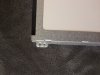
I am still very happy with picture quality. Its just difficult to install.SInC likes this. -
I have experienced my first random shutdown lol The watt meter spiked to 135 and the laptop just cut the power. It seems to have happened when the GPU was using 100% of it's memory interface bandwidth. Must be a power hungry portion of the chip. I lowered the clocks to 920Mhz and it's settled to around 112 watts from the wall and seems find now.. Very easy to replicate. Guess I'd let everyone know if they too are having issues with the random shutdown.
EDIT: I am also a member of folding@home + multiple BOINC projects and this little guy has been running them for about 9 months straight during the day and at night. maybe I'm stressing it too much.. -
DEL : double post
-
A follow up to my GPU overheat post a couple pages above but would like knowledgeable advice.
I finally took time to order Arctic Silver and changed my Thermal Paste an hour ago or so. Now my Idle Temps for CPU went down to 65C which is my all-time low I think.
Playing demanding games doesn't cause the GPU to overheat and shut down my computer within a minute anymore, however it still shuts off on especially demanding games like Far Cry 3. I tested it three times and every time it shut off on me. The temps were CPU: 80-ish, GPU - stable 79C. Why it keeps shutting off is beyond me, if it's not overheating. Any advice?
Thanks.
EDIT: could have been due to what ha1o2surfer mentioned above. I'm using my laptop the first time at my new apartment building, and two times mentioned above it shut off as I was turning the lights off in the bathroom, where the outlet is weird. Not sure that could be that, since I skipped every single Physics class in high school and still don't know anything about electricity. -
I'm curious, what voltage is your adapter? I have 2 adapters, one is 19volts and the other is 20v. The 20v one seems to causes more issues...
EDIT: I think it's just a defect or something in the GPU.. idk what to think man. I have had lots of ideas and ran lots of tests. The only one I can replicate is the GPU memory load test. The minute the load percent hits 100% for maybe 5-10 minutes the computer just shuts off. -
Here is what I have ruled out so far as far as the random shut downs go..
Here is what it's NOT:
Power Consumption from the 120 watt adapter. The power consumption can be 99-130 for prolonged periods without any issues (running BOINC)
Overclocking. I overclock +400mhz and it does great with no throttling and it's been running this way for quite some time (think when the BIOS mod that enabled overclocking came out)
BIOS mods, DEF not Happens on stock BIOSes as well.
Here is what I think it is:
The GPU memory controller and/or memory chips (nvidia card obviously). I am making a video that will be up today at some point that shows me replicating the issue -
Thanks for you your concern, ha1o2surfer. I "fixed" the issue actually. Thanks to your previous post I just unplugged the laptop from that outlet and shut offs stopped. Tested both by playing on battery and by plugging into the power strip, played more than 2 hours on several sessions and it works just as well as it had had before I dropped it.
Also my output is 19V. -
Sure, I am also curious as well. I can no longer replicate the issue! ugh! lol Glad it's working for you now!
-
It's like cutting nails. Just take a fine and sharp scissor and chop'm off.
SInC likes this.
-
My W110ER recently stopped posting. When I press the power button nothing happens, and the charging light has stopped working. I have tried 2 different PSU's with the same result. Has anyone else had this issue?
-
Not sure it will help, but what if it does: happened to me once when some water was spilled on the keyboard and power button. The power button didn't work at all for two weeks. I would turn the laptop on by taking out the battery, then plugging it in and pressing the power button at the same time. Very unique method. And granted that the battery did charge when connected to the wall. After two weeks the power button started to work again.
EDIT [syntax] -
For once a non-screen related question.
My W110ER is demonstrating what I think is some weird performance.
When using the GPU in a game like Crysis 3 for instance, whether at stock clock or heavily overclocked, in MSI afterburner the GPU usage fluctuates quite dramatically and never really hits the 100 mark, which I believe is causing micro stuttering when playing the game. I thought at first I'd damaged the GPU through overclocking but I don't think that is the case. Someone else in this thread mentioned an issue with 90W power bricks, is it possible that my W110ER GPU isn't getting enough power and isn't able to fully utilise the GPU or something? I mean, that usually means down clocking but in this case the clocks are staying constantly high as they should. I have managed to completely kill my W110ER a few times using a very high overclock on both CPU and GPU in Crysis 2, the power just cuts out.
I was getting this horrible stuttering in both Crysis 3 (particularly in a sequence when I was being shot or something) and GRID 2 when I played them.
I only have a 3632QM, but is it possible that I'm up against the power barrier and that this is my issue? -
Great, thanks for the answer. I was worried I would need to borrow a dremel or something, haha.
I also went ahead and bought the SLN2 laptopscreen.com, hopefully it works out. -
Looking forward to pictures of your results. The SLN2 is back upto $120 before I gave up looking for a SLN1. I would have been willing to mod for a $60 screen but at over a hundred I want something that just fits.
-
Hey, the screencountry/ebay price did go over a hundred, but the LP116WH4(SL)(N2) is still $60 at laptopscreen.com (although including the extension cable, sales tax, and shipping cost, the final price was $88).
Also, I'm actually replacing the screen in a different 11.6" laptop, but I'll update you guys nonetheless. Hopefully this isn't too off-topic for this forum.steberg likes this. -
The same principles should still apply since I believe they mount the same type of panel normally.
-
When I used a 95W adapter with demanding games or benchmarks my GPU performance was also fluctuating up and down, Throttle Stop was randomly turning on and off or locking multiplier at 12x and naturally FPS was really unstable or downright locked at very low levels. With a 120W adapter everything runs much smoother. Mind that I don't have any logs with numbers for proof from back then, so my issues might have been different, but it sounds pretty similar to your problem. -
Ahah so it was you! Any recommendations for a 120W brick? I don't particularly want to spend the earth, I must say.
-
I too said a 90watt wasn't enough but that CPU is only 35 watts so it may be just fine. I had the same issues as described + weird shutdowns. But off topic
-
I can't see how 200MHz in clock makes a 10W difference. I very much doubt there is a big difference in the quality of the silicone either.
-
you'd be surprised... It all depends on the voltage
-
It's a LiteOn brick that came with my W110ER. When I say "Brick" I mean it too (see pics) Not sure where you'd find one these days, a quick look at ebay didn't bring many results. Maybe one of the resellers, like Mythlogic or Xotic still carry these.
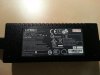
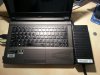
-
Is it possible to upgrade to a nvidia 760m+ on this laptop? If so where can i get one?
-
Not possible, GPU in the 6110 is not upgradable.
-
For those who were waiting, the LP116WH4(SL)(N1) is back in stock on laptopscreen.com
It is, however, more expensive than the SLN2, and I'm not sure if there's an advantage in buying the SLN1 over the SLN2. -
you'd be amazed, jumping from 3.1ghz to 2.9 ghz results in a difference of about 5W (i.e. the difference separating a 3610m and a 3612m). So factoring conversion losses from the PSU, VRMs etc, it may magnify to a difference of 10w at the brick
-
It does depend on the voltage, but you should still see mostly linear gains with frequency.
-
Thank you!
Isn't the SLN1 much easier and safer to fit? -
I'm not too sure. From what I understand, Prema thought the SLN1 is easier to install because in these photos, the panel comes with the proper mounts attached to the sides. The SLN1 from laptopscreen.com doesn't come with those mounts, so I think it would be "equally" difficult to install as the SLN2.
Not completely sure though, I'd wait for one of the SLN1 owners to post about this.
As a side note, some of the posters here had issues with the SLN1 not having a correct image. Not sure if this could be an issue with the SLN2 as well. -
So, is anyone who ordered the SLN1 from laptopscreen.com willing to tell us how it is?
-
I have 2 panels of the SLN1 and it doesn't work!!!!!!!!!!!!!!!
-
What do you mean, doesn't work?
Displays an incorrect image? Shows no image at all? You can't fit it into the chassis?
So does the SLN2 have a higher chance of success? -
I just received my LP116WH4(SL)(N2) from laptopscreen.com, and it works great on my 11.6" Samsung Series 3 Chromebook. Viewing angles, contrast, colors, etc are all very good and significantly improved over my laptop's previous B116XW03 v.1, which had particularly bad viewing angles.
Unfortunately vertical lines started to show up on my screen... which I think is a defect with the panel and not an LVDS incompatibility or anything like that. The issue started after I had already cut off the side brackets, so not sure I'll be able to get this exchanged...
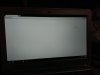
edit: All of the vertical lines have somehow faded and haven't reappeared in the past week.
I'm guessing the SLN2 may have a higher chance of success than the SLN1. IIRC, Studie and Razyre both had this issue, but Prema and I (although for a different 11.6" laptop) haven't had that kind of image problem. A guy with a glossy SLN1 had it working though, so Studie/Razyre might just be unlucky, or Prema/I may be lucky. Hard to say for sure. -
If you ended up with a faulty unit, that means you weren't lucky after all, right?
-
Right, I meant lucky in the context of the screen not having the washed out colors issue.
Otherwise, I'm pretty unlucky.
edit: As I edited in my earlier post, the vertical lines have faded. I have no idea why/how, but I'm pretty relieved. -
Did you move the connector or jog the display?
-
This may or not be possible but I'd like to change the "Long Duration" boost limit to higher than 96 Seconds. While I am on BOINC, the CPU will draw 51 watts for a little bit then eventually dip to around 43-45 Watts. I'd love it to stay at 50watts all the time because my that is where I get around 90gflops. When it settles it stays around 83-85. Any Ideas? Throttle stop doesn't do anything since I believe my CPU is already in turbo mode.
*** Official Clevo W110ER / Sager NP6110 Owner's Lounge ***
Discussion in 'Sager/Clevo Reviews & Owners' Lounges' started by Ryan, Apr 7, 2012.


