 Problems? See this thread at archive.org.
Anybody looking to sell their w110er let me know! ;P
-
I'd keep an eye on the members market then

-
I ve got one W110er from Eurocom comp with a power supply of 120w (output: 19v 6,3A) since one year.I recently update my configuration from: i7 3840qm (45watts) and 8go DDR3 1600 to i7 3940XM(55watts) and 16go DDR3 1866 and now it doesn't charge my phone anymore or it takes me a couple of hours (i think because of the increase of power req from the cpu).So i would like to know if it's possible and safe for the motherboard to use a 130w power supply (19v 6,8A from eurocom website or even a 150W power supply output:19v 7,8A). Is it possible to put a WD VelociRaptor Desktop 1 To 64 Mo SATA 6Gb/s hard drive 2.5 1 To 10000 RPM 64 Mo Serial ATA III - WD1000CHTZ inside of the W110er/np6110? I m not sure because of the power req too. I don't want an SSD because it will be always full of movies and games which is really bad for the life expectancy of the SSD and hybrid SSHD aren't as good as this one.
-
You can plug in a higher rated adapter, it may help.
-
I doubt it, my 3840QM is overlcocked and uses ~60 watts for days on end + full GPU load (mining) with no power issues.
-
Just because your adapter can cope does not mean that every one will.
-
I haven't used the stock 90W supply much at all. I generally use either a 120, 150, or 160 watt supply from various other laptops I have owned. These days, almost all laptop (and thin client) PCs use 19v supplies. The only caveat is finding the correct plug size.
-
It's the plug sockets that are annoying but yes at 180W and below there are a few options, above that and it becomes a nightmare.
-
ok i just got my w110er and i love it, can't figure out how to overclock the gpu though.. I tried msi afterburner and nvidiainspector and none of them let me change the 835mhz core clock, they only show me 135mhz core clock and doesn't let me do anything....
Any idea's why? im on the latest nvidia drivers, do I need to go to a certain old driver that allows overclocking? -
I don't believe you can change the values on that 650m the machine uses.
-
All im trying to do is overclock the GPU, many people have done it, why can't it?
-
You must've called your computer names or something...
jk, I don't know what I was recalling before but yeah it seems as though it should be pretty easy to do with those programs. Is it giving you any sort of error message that we can use, or is it simply not letting those values be adjusted? Screenshots you can provide for the people familiar with this can use to see if you may have a setting checked that you shouldn't? -
I too have ordered an IPS panel for my W110ER, a LP116WH4(SL)(N2) from laptopscreen with an order note requesting an appropriate 40-pin LVDS cable be added. It cost me £65 and I'll report back with how the fitting goes.
It'll be nice to upgrade the one truly unsatisfactory part of this laptop, everything else is fine but that LCD panel is just horrible, no viewing angles, no contrast, practically no gamut and the brightness could be better. -
No error messages but here are some pics showing what I see


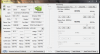
-
Im also having another problem where my processor wont turbo boost when playing games, I see the prema bios allows for cpu turboing when running dGPU which is awesome but does anybody know if his bios works on all varients of the w110er? I have the eurocom monster 1.0 and I don't want to brick it because I didn't ask first
-
Have you verified the CPU is bottlenecking your performance? Often times the GPU will bottleneck before the CPU. It won't Turbo when it doesn't need to.
-
Yeah im pretty sure the cpu is bottlenecking, i got the 2670qm processor and it wont go above 2.2ghz - 2.4ghz no matter what game I play and no matter what I do, even when trying throttlestop it wont allow the cpu to go above 2.4ghz , thats trying prime95 as well. I read that prema bios allows for cpu turboing when the dGPU is enabled so I will give that a try soon and hopefully it will fix that problem and maybe fix the GPU overclocking problem im having right now as well
If anybody has had this GPU overclock problem please let me know! -
Have you checked your temps? If the machine is already hot and needing to turbo but doing so exceeds the thermal cap it has for protection, it won't turbo. These smaller machines often will reach that point without having it pretty clean.
-
The machine is running very cool, gpu hasnt really gone above 70 degrees and cpu usually hovers around 75ish but can go up to 85's is stressed enough
I think eurocom made the bios so it just doesn't turbo the cpu when gaming because it is still a very fast laptop but there will be quite a lot less heat which any manufacturer will take over a slight bit of performance -
Do you know if the Western Digital WD VelociRaptor WD1000CHTZ 1TB 10000 RPM 64MB Cache SATA 6.0Gb/s 2.5 is suitable in W110er laptop?
Im looking for this hard drive because of his high capacity and because it will be always full of movies and games which is really bad for the life expectancy of the SSD and hybrid SSHD aren't as fast as this one.
I m not sure first because of the height of the hard drive15mm/0.59inches instead of normal 9.5mm. I don't know if the laptop can fit a hard drive of this height and i m not sure too because of the power consumption of the hard drive. There are always two lines on pictures for the power consumption:
5VDC with 0.95A
12VDC with 0.35A
Does it mean that the two options are possible and that it can run with only 5volts?
Physical Spec are:
Form Factor
2.5"
Length
100.45mm/3.94 Inches
Width
69.85mm/2.75 Inches
Height
15mm/0.59 Inches -
It won't fit, too thick. Fastest and highest capacity will be the 1tb 7200RPM HGST drives.
-
Yes needs to be 9.5mm to fit properly.
Also the raptor needs the 12v line to be delivered to the SATA slot and I don't think notebooks tend to do that. -
Hi all, thought I would throw my hat in the ring for the LCD replacement conversation. I have been following this thread and loving the little w100er enough to try and get a real screen in there to replace the awful stock nonsense. I went with the LP116WH4(SL)(N2) from laptopscreen as well as the LVDS extension cable (invoice read: 1) Laptop LCD Screen 11.6-inch WideScreen (10.08"x5.67") WXGA (1366x768) HD Matte LED compatible with p/n LP116WH4(SL)(N2) / 3 Years warranty. 2) Screen Cable Transfers LED connector from LEFT to RIGHT. 8.9...15.6 LCD) I went with the matte display as that is what I prefer as well as the better viewing angles/overall color quality. (The stock screen really is crap)
1) Here's the little bugger before shenanigans.
![[IMG]](images/storyImages/IMG_1512.jpg)
2) Bezel removed (the 4 black sticky bumps have 4 phillips screws beneath. just carefull when prying off the plastic bezel so it doesn't break (this was the hardest part due to the excitement)
![[IMG]](images/storyImages/IMG_1514.jpg)
3) what the back of the old screen looks like
![[IMG]](images/storyImages/IMG_1515.jpg)
4) attach new screen (the bubbles are protective plastic covering). and this was the result:
![[IMG]](images/storyImages/IMG_1516.jpg)
5) the back of the new screen
![[IMG]](images/storyImages/IMG_1517.jpg)
6) here is the LVDS cable up close. I noticed the right side had 3 cables that seemed soldered together which couldn't be right, so I carefully and miraculously was able to re-solder them with a too-large and unwieldy radioshack soldering gun (it was impressive) but that didn't help.
![[IMG]](images/storyImages/IMG_1521.jpg)
7)So I spent another $48 and bought a new LVDS cable (from RJTECH.com they shipped fast, and would use them again for parts for sure). I re-wired the LVDS exactly the same way the original was (snaking through the hinge was tricky, but not too hard) and here it is... new LVDS cable and new LCD! ugh...
![[IMG]](images/storyImages/photo_2.jpg)
Finally, the WORST part is.. .my orginal LCD doesn't work anymore either!?! The backlight on both work like a charm, but there is no LCD activity. I have connected it to both an external LCD with the VGA output, and an HD tv with HDMI and both work like a charm! So, the graphics cards aren't an issue. I have tried with an without the extension cable with no luck. I have disconnected the power supply and battery and pressed the power button for 30sec and reconnected.. nothing. So it seems I have either blown TWO LCD monitors in this experiment, or there is something wrong with the internal companant that routs to the internal display wiring? I'm truly at a loss here. I hope the images help, and if anyone has suggestions or questions, have at it! I am dying to make this little monster live to its full potential! -
I'm gonna wait for some answers to this, my panel has been shipped but because they were out of a previously mentioned cable (or at least out of that specific item number) I have no extension cable, I'm going to wait before ordering but as a UK resident it looks like ebay might be my best bet.
-
It may be your new cable is not correct and your soldering broke the old one.
-
With the original LVDS cable, the original screen worked, when I put in the IPS screen, backlight, no LCD. Then I switched back to the original screen and it didn't work now! So the original cable was good, but I assumed it might have a problem, so I then tried the soldering, then the new one came- which is a very particular part and exhibits the same issues as the original cable that I knew worked. So I'm ruling out the LVDS cable for now...
I did try removing the cmos battery and all power and letting it sit tight for 60 sec then rebooting. no luck with that either
-
The cable may have shorted something then or static from yourself.
-
After installing all the drivers I still have a yellow on "PCI simple communications controller"

Anybody know what thats for? -
-
Update on my IPS LCD upgrade:
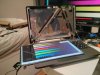
That's right, it's here, it works perfectly, now all I need is a cable so it can go in the right way round
-
Graphics drivers usually have a flip screen option
-
I somehow don't think that'll help I guess I could replace the lid with glass and make it a tablet
Seriously though if anyone happens to know where I could get an appropriate cable in the UK that'd be great, laptopscreens do sell an appropriate one (which I should have added to my order, whoops!) but with shipping it's $35, $55 if I want to see it soon
*edit* never mind, found one on ebay (really hard to work out if it flips the connector or just shifts it from side to side) for £3.55, should be here by Tuesday -
Well at least the end of the cable should be standard to extend rather than getting a whole new cable.
-
Yeah, you're right there. I'll demonstrate the problem in pictures just for anyone else looking for this information.
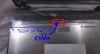
This is what you see when you remove the front bezel (4 screws under the round covers, clips holding front and back together, use a nylon spudging tool so you don't mess up your plastic, take out the battery and close the lid to pry along the bottom of the screen from the rear of the laptop)
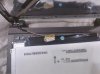
When you unplug the cable it looks like this, note the direction the cable comes in from, the connector on the LCD is facing the edge of the LCD.
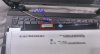
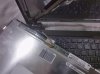
This is what the back of the new IPS panel looks like, note that the connector is reversed so it's facing towards the middle of the LCD, also note that it's further across from the point where the LVDS cable comes through the hinge.
So you have to twist the cable a bit to get it to connect
The extra distance combined with the twisting means this is as far across as I can get the LCD and it certainly won't go into place with the existing cable alone
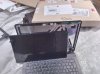
So, to get the panel fitted properly you need an extension cable, ideally one that also reverses the connector direction so it's facing the edge not the centre of the panel (I forsee some problems folding an LVDS cable if you don't reverse the direction). You will need a 40 pin to 40 pin cable. On the plus side it really is a beautiful panel, amazing contrast, brightness, viewing angles, it's also matte without obviously being so (I actually had to check). Here it is at full brightness vs my 27" 2560x1440 cheapo korean IPS monitor and my P370EM with an LG matte panel with aggressive sparkly anti-glare.
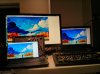
And finally to round off this pile of images, here's the original panel in the same test, look at the trees, one of them can manage a brilliant orange and the other can do... brownish yellow I guess?... nope I'm out of image allowance, here's a dropbox link:
https://www.dropbox.com/s/sihbnilzv85oixf/2014-01-18%2000.21.16.jpg -
Folding the extension cable works fine as the IPS screen has much less depth and gives enough space (provided, you are using double sided foam on the sides and center to keep the screen pushed to the LID.
DUDE! What did you do to that keyboard...LOL
-
That is one well used input device lol.
-
I'm fine with bending the extension cable but the original one I'd be a bit nervous about. Well I'm gonna find out on tuesday I guess, more pictures then when the cable turns up
That keyboard is my trusty IBM Model M from 1991, it came in beige but I preferred black, and then I preferred beige when I found out you can't just spray-paint a keyboard black and have it look good Plus having visible keycaps is pretty helpful when you switch keyboard layouts (Colemak, woo!)
-
G'day all!
I've had a Clevo W110ER for about 2 years now, probably a bit more. The last year it has been running as a media centre for my big screen tv, however I've recently started travelling and thus have recommissioned it as a portable gaming machine.
That said, I am having a lot of dramas with it! Every time I run a game that is relatively heavy on graphics, such as Crysis 3, Saints Row the Third, etc. Or occasionally even games of lower demand for a longer period of time, it will just power off after a few minutes of gameplay.
At first I thought I'd give it new thermal compound (the original was quite crusty), so I bought some expensive stuff that I use on my desktop, removed the old thermal on both CPU and GPU and replaced. Temps dropped a bit now, but go to game and the same thing happens.
Power supply seems to be giving stable levels of around 18.9V and 4.69amp, which is close enough to its stated 19v 4.74amp.
Not really sure what else could be causing it to do this. Even swapped out the ram in case it wasn't keeping up. I find it odd, as so many people in this forum seem to overclock and get much higher temps than I am getting at full load.
Ideas would be greatly appreciated!
Thanks! =)
P.S. I have played both mentioned games a few times whilst the laptop was acting as a media centre, and that was on 1920x1080, albeit at slightly lower settings, it didn't crash out then. I'm starting to wonder if the GPU is faulting, as CPU under full load is fine, ran Prime95 on it for 12hrs straight, no probs. The CPU in this is the 3720QM. -
What are the temps when you are playing games? its possibly your fan is dying after two years -
For those who bought the lg panel, the holes for the bracket does not match. I had to bend them in and then use double sided tape to hold the panel. I replaced 3 panels already(2 for friends and 1 for me). Only one gave me a problem. The screen is blank but the screen is on as I can see the lights. I had to unplug and carefully replug everything in again to make sure it was correct and properly in. After a few power on and off and messing with the cable, it turns on. Before the IPS upgrade, all 3 screens have different brightness and color. Now they are uniform.
-
CPU doesn't get much past 75C, GPU is around 80C, before the new thermal past the GPU would get up to 95C and then crash.
-
Update, no pictures this time but the cable arrived today and I got the panel fitted properly. It took a few attempts to get everything related to the cable the right way up, and required an immense amount of sticky pads from poundland
Chalk me up on the successful matte IPS screen list! Now to see if anything else can be upgraded, a light for the keyboard would be nice or perhaps a better camera, 5 pins on the header for the existing camera module confuses me though.
-
I find it weird that the GPU is getting hotter then the CPU, it seems as though the contact with the heatsink and the GPU might not be perfect and bent a little bit which would cause this problem you are having, try to play a game in window mode and keep a good eye on the GPU temp while you are playing, if the connection is not good between the heatsink and the GPU it will rise very quickly and get to 95C and shutdown, its hard to tell unless you are paying attention to the GPU temps while gaming
which model cpu are you using? dual or quad core? -
Ok I got a question that most likely nobody will have an answer for but I will give it a shot.
When using HDMI out I dont get the option to change color saturation in my intel drivers which sucks!!! it only lets me adjust color saturation when I am using my built in display... my tv needs more colors badly it is very dull even with its color set to max.
I tried searching so much and did not find any solutions online, preying for a genius to help me out
-
Not sure if this will help but I had somewhat of the same problem. My computer will shut off during game and sometimes prime95. It shuts off when games are loading where the CPU and the GPU will both max. I bought a 120w power supply and the problem seem to be gone.fr0dzy likes this.
-
There are some good slim 3rd party 120W PSUs out there too.
-
Hey. I m looking for a good 130W (INPUT: 100-240V / OUTPUT: 19V 6.8A) universal power supply with the correct plug size for the W110er to replace my actual 120W ( OUTPUT: 19V 6.3A) power supply.
Can you give me some advices please?
I find a couple of 130 PSU on google with a large choise of plug size but they cannot support 6.8A , most of them work at 19.5V 6.5A or worst (up to 22V 5A).
I need these specs 130 Watts = 19V x 6.8A because I don't want to damaged the motherboard.
Current Notebook:
EUROCOM MONSTER W110er/i7-3940XM/Phobya HeGrease Extreme/16GO DDR3 1866Mhz Kingston HyperX PnP/Travelstar 7K1000 1to 7200rpm SATA III 6 Gbs /120W PSU/windows 7 pro & Ubuntu 12.04 LTS -
0.5v is fine in difference but 150w bricks are likely easier to find.
-
I have been doing some CPU testing the last couple of days between my dual core and quad core processors. i5-3210m(2.9ghz dual core turbo) and i7-3610qm(3.1ghz quad core turbo) and I can tell you for sure the i5-3210m is the better of the two for gaming. running the latest prema OV bios, gpu core overclocked 340mhz, memory overclocked 265mhz
I tested these games - crysis 2, crysis 3, GRID, GRID 2, COD 4 modern warfare, modern warfare 2, modern warfare 3, battlefield 3, diablo 3, skyrim, far cry 3
The 3610qm ran very hot in comparison to the i5 and there is literally 0% difference in fps between the tested games, but because the i7 ran like 12 degrees hotter the w110er was throttling a lot causing my fps to drop compared to the i5 and causing my games to run like , that was with throttlestop as well, the i5 doesn't need throttlestop enabled and it will always run at full 2.9ghz speed and stay very cool, the i7 needed throttlestop enabled or it would throttle right away but even with throttlestop enabled it would throttle after a few minutes of gaming when the temps reached 85-90 degrees, there was nothing I could do to stop this from happening, disabling IEST in bios also didn't help
When running prime 95 with the 3610qm hwmonitor says its using 44W of power and temps rise to 85-90 degrees fast, doing the same test with the 3210m it only uses 17W of power and the temp only went to 71 degrees....
Yes there are apps that can take great advantage of 4 cores but sadly there is next to no games that do, games just aren't cpu dependant anymore all cpu's are pretty much overkill, the 650m gpu just isnt powerful enough to see any real gains from quad core like a desktop pc with a high end gpu would see, so my conclusion is to stick with the dual core i5's unless you do hardcore video converting and stuff like that
Anyways just thought I would share my findings -
Run 2 prime threads on the quad to make it a fair test.
Also those games are not highly threaded like bf4 for instance.
The duals are not bad, they just tend to not save you much.
*** Official Clevo W110ER / Sager NP6110 Owner's Lounge ***
Discussion in 'Sager/Clevo Reviews & Owners' Lounges' started by Ryan, Apr 7, 2012.


