 Problems? See this thread at archive.org.
Thanks. I just read a similar solid recommendation on the NP7330 / W230ST here from someone who went from the NP6110 to the NP7330. They stated;
"it was a night and day upgrade. The GPU on this is way more powerful and the CPU will turbo when gaming (the NP 6110 wouldnt do that unless you used throttlestop) The keyboard and LCD size are way better and I dont have the squint to play games. The LCD quality is 100000x better than the NP6110."
That pretty much settles it for me, and it's only about 1lb heavier from what I am reading. I have enough reserves to buy the NP7330 and then sell the NP6110 after, so no worries there, if I can find a buyer, as you said.. :/
Cheers.
-
Still a decent amount of people looking for them. I don't think you'll have too hard of a time finding a buyer for the right price.
-
It is a bit bigger but it carries and even higher weight/performance ratio.
-
I got mine from RJTech since that's where I bought the system in the first place. It's was more expensive but I didn't have to wait and I figured I could return it easier if it didn't work.
-
Hey Derek. I purchased the NP6110 through XoticPC, and will most likely grab the NP7330 through you as well. Does XoticPC offer any sort of discount for repeat/returning customers?
As a suggestion, it would be awesome if XoticPC offered a step-up upgrade/trade-in option (the NP6110 is still covered under the XoticPC 2-year warranty btw). Basically I just don't want to deal with EBay at all, just way too many scams there, and I don't have a high enough post count to use the marketplace here.

-
Woah! Was about to pull the trigger on the NP7330 (Clevo W230ST) last night.. but it has been withdrawn from XoticPC and from Sager websites... apparently to be replaced by the W230SS, which from what I can gather is a very similar machine except it runs an 860M instead of the 765M. Wonder when this is coming out..? Derek can you shed any light?
-
The silence is deafening. Would love a firm release date on the Clevo W230SS via Sager or XoticPC (not sure what model number Sager will give it - NP7330S maybe, or NP9330?)
Sorry for multiple posts.. was just about to pull the trigger on the NP7330 to upgrade from my NP6110, but now the NP7330 is gone from both Sager & XoticPC, lol... kinda anxious to get an order in before I talk myself out of it. -
Unfortunately you won't get an answer because of NDA and Embargo agreements. Once we are allowed to say things then we will but until then we just cant.
-
Awwww..

I understand the reasoning, I'm just being impatient - kid in a candy store mentality I guess.
I will continue to hope it will be any moment now, since the NP7330 has been removed. :thumbsup:
Thanks for at least throwing me a bone of sorts, Hutsady. :hi2: -
The W230SS is going to be my next notebook.. It's settled lol
-
So despite the string of failed upgrades documented in this thread I feel compelled to try my luck moving my beloved W110ER up to a "real screen" in the form of a LP116WH4-SLN2 or LP116WH4-SLN1. I've replaced plenty of laptop panels so the physical part of it isn't scary at all but I'm not a huge fan of the double-stick tape method the SLN2 requires...
I read in Prema's Tech Inferno thread about the switch that it was possibly his updated BIOS that let his IGP deal with the firmware in the panel where others have had problems. Do you think that makes the SLN1 a possibility? I forget which version of his BIOS I'm running but I don't recall anyone making the switch in this thread mentioning if they were on the Prema BIOS or not (I would assume at least some were).
Thoughts? I'd love to help nail this process down for people that are still on the fence, it seems like we are missing 100% confirmation of what works and what doesn't. -
Good point DrFish. I was using the stock BIOS, not Prema's BIOS.. and my attempt failed. Actually it worked for a few minutes, but then the vertical lines started and it just went downhill from there. It was awesome for the short time it did work though - very significant improvement.
Someone mentioned there might have been an issue with the extension cable.. that is certainly possible, but I cracked the new IPS screen trying to remove it so I never got to retest without the extension (I attached the screen using some industrial strength double-sided tape.. my bad.. I strongly suggest using velcro dots fwiw).
Good luck, and please let us know your experiences and hopeful success. -
Pretty much same here. Rumor was that the new W230SS model would be out at the end of February. Today being the 1st March I've been refreshing the Sager/XoticPC sites every 30 minutes, lol, but it doesn't look like it's going to happen today
 Maybe Monday?
Ok I need to stop posting about the update on the NP7330 on this NP6110 thread, it's off-topic. Sorry people. :x -
hahahah I know the feeling man...
-
Yes, do let us know how your experiment works out. I'm very interested in it myself and if there was a good, confirmed source of the Matte version with the correct mountings I would have sent mine off to Mythlogic to be upgraded. I just did not want to risk trying to deal with a third party exchange if there was any issues with the panel supplied.
-
offtopic again but i feel a lot of people here are looking to upgrade fromthe W110ER to the W230SS.. I found this page of the manual intersting.. Maybe I can finally get 3 monitors from the W230SS??
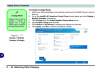
Attached Files:
-
-
Impressive if it can... GPU will probably burn a hole through the casing doing it lol.
-
You can do 3 displays on intel GPUs either using 2 display port based displays or using the intel wireless display tech.
-
but the W230SS does not have display port nor does the W110ER. I can do 2 displays with the W110ER currently but I would love to have a third even if it was just the laptop screen.
-
Which is why I said or intel wireless display.
-
not to be picky but you said 2 display port based displays OR intel Wireless display.. you are correct but that's not the only way.. There is HDMI and VGA + Intel WiDi.
But anyways, Intel WiDi is ok but it's laggy. I was really thinking about going back to it since the last time I tried it was on my sony vaio like 3 years aho -
Which does not use a display port.
So you need either wireless display or 2 display ports. That's why I put "or" rather than "and".
Always pays to read my posts carefully as I am usually very choosy with what words I use so that it is precise in its meaning. -
Might be time to swap out my W110ER for a W230SS, all of a sudden I've been thinking "I wouldn't mind if it were just an inch or two bigger, maybe with roughly 6x the pixels". Shame really as I just gave it an IPS LCD
-
Well regardless, I want 3 displays so whatever your saying about "display port" doesn't apply to me. If you meant to say an external monitor connection and not "Display Port" ,which term is actually a certain kind of display output, then it would apply to me
anyways, reading up on the WiDi spec, it says extended display is supported no problem so thats awesome news. Im picking up a PTV3000 today and will see if I can use HDMI and VGA along with WiDi at the same time
EDIT: Works perfectly... HDMI and VGA monitors connected and another HDMI via WiDi. so in total 3 monitors. Little issue I ran into though is the connected display to the netgear device needs to have HDCP enabled on it or it will result in a black screen (some of my old dell monitors don't support it) -
Hey guys, my w110er keyboard is starting to poop out on me. the alt keys wont work, the left shift key doesn't work, and a few others.
I'm not quite sure why they stopped, but, I now am in need of a keyboard. They no longer produce these laptops so I dont know where I would be able to get one. If I am getting one, is there any better alternatives? The stock one wasn't all too good.
Please let me know as im laptopless lol -
parts are kept for the machine, contact your reseller as they should be able to order you one.
-
Double Post
-
Are there any other alternatives? The stock one isn't all too great.
Also, how does one go about replacing the keyboard? -
Behold my post from a few days ago!
I don't think there are any alternatives. FWIW my new keyboard seems better than my old one ever was, a little at least. -
No alternatives I know of (not a normal thing for a laptop) but feel free to correct me. Replacement is as easy as pushing 4 tabs in those little holes at the top of the keyboard, then disconnecting a ribbon cable. Takes all of 30 seconds, did it myself to swap the keycaps around to make learning colemak easier.
-
I've been looking into this but don't have the technical chops to do anything but theorize, do you think that something in the Eurocom BIOS allows Windows to turn ASPM on and could be the explanation for the crazy battery life the Monster gets vs. all other W110ERs out there?
-
I am been trying to figure out that same thing for a while now..
-
i talked to my reseller and a replacement keyboard is roughly 50 bucks. surprising for a small little keyboard ;(
-
Sounds about the same price we see from most.
-
I have tried to enable ASPM via rweverything and it seems to improve power consumption a tiny bit but nothing earth shattering. If I leave my laptop plugged in all night with the lid closed and it's idling, I wake up and see it drawing 10-12 watts on my power meter. I also recently started to use my G46VW and that machine draws 7 watts when idling AND the screen on! I don't get it....... that G46VW has a 65Wh battery and gets roughly 7 hours of medium use with the same specs... I also have an mSATA SSD + backlit keyboard and much large screen. SO either Clevo doesn't care or they cause the W110ER to have bad battery life on purpose.
I have tried comparing rweverything of ACPI and different devices and busses and this is how I found a way to enable ASPM and also change the brightness of my LCD since that is always broken..
When I was thinking about theories I had one that I wanted to investigate. I know the W110ER supports 2nd and 3rd gen CPU's but the 2nd Gen CPU's don't have a USB 3 chipset built into the CPU. That means the W110ER has a potentially power sucking chip that is not properly turned off when a 3rd Gen CPU is being used. I figured this out because of the drivers used when I upgraded to my 3840QM. The Chipset used for the 2nd gen CPU's is some sort of via 3rd party one and the 3rd Gen is obviously Intel. I really want to take my laptop fully apart and find a way to cut the power to that USB 3 chipset. (unless the BIOS needs it for some reason?)
If you download the W110ER spec sheet, the USB chipset's model number is TUSB7320. It's on page 80. Am I chasing the wind or could that chip be sucking a large amount of power if it wasn't disabled properly? -
I did a complete re install of my Asus G46VW and now get a 5-6 watt idle power consumption with the screen at 50% brightness! My Macbook Air 2013 idles at 4 watts! This is incredible for a full fledged gaming notebook......... I think Clevo can easily work on the power consumption of these machines if they really wanted to.
-
It's to do with the number produced and limited demand.
-
Ordered my LP116WH4-SLN2 from laptopscreen.com, wish me luck! Will post all the details here. Now I'm debating replacing my Samsung 830 with an EVO to see how much it helps battery life, the 830 would go into my desktop which is a little pressed for space on the 830 it already has...
-
Good luck - I hope you have more success than I did!
-
FedEx brought my screen yesterday but didn't leave it since it needed to be signed for. "Signed" online for it today though so I should have something to share later tonight.
-
At least they tried to deliver it, I have had cases of the postman here just bringing the card for "you were out" and not even bringing the parcel lol.
Prema likes this. -
So my w110er has been shutting down a lot while gaming. Read through the post's and see its possible due to my power supply failing. But there is another issue is see. In HWMonitor, I see my batteries wear level is at 23%. Is this caused by the failing psu or do I need to replace my battery also?
-
Please do! Don't be afraid to post even poor pictures. A well documented effort would be a great help to the community even if you don't succeed.
-
Darn it! So close to perfection. Everything went perfectly fine, the screen looks awesome, none of the crazy problems other people have had! Just a new one instead...

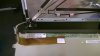


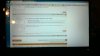

So I'm thinking maybe a bad panel instead of a firmware issue? I don't know, it's so weird that it's symmetrical... Everything else is so perfect. I guess the best course is to exchange it?
Edit: OMG, my old screen makes me so sad now...
-
Gonna make your day now : that little red series of dots is a sticker.. it comes off. I think it's a cover on the entire screen if I remember correctly.. just peel it off. I made the same mistake
-
LOL, yeah you kept the sticker on, remove it!
Not only will the purple stuff vanish the entire screen will look even better.
steberg likes this. -
OMG, that's amazing. I will try it right now. I intentionally left the sticker on when I tested it because I wasn't sure if it would work, then I kept it left on after I thought it didn't.
Thanks guys! Embarrassing...
-
Alright, done!
I forgot a couple pictures but I still think most of the important stuff is covered. I love the last picture because I know that on my old screen you couldn't see anything in it.
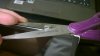
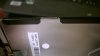


It's awesome. The only flaw is the 2 or 3 pixels of unevenness from right to left,but I'm going to leave that alone because I'm too afraid to make an adjustment to my double stick tape (I should have used Velcro, oh well). It's not bad though, and my 27" Korean monitor has a similar problem so my OCD can just deal with it that way.
I'm super happy. So I guess the thing to try for others that have gotten the same screen from laptopscreen.com and not had success is to make sure you are using the V3.0 Prema BIOS.hydra, Prema, Baenwort and 1 other person like this. -
Congrats DrFish, glad it worked for you, and that looks way better than the original screen. Amazing what a difference it can make. Enjoy!
*** Official Clevo W110ER / Sager NP6110 Owner's Lounge ***
Discussion in 'Sager/Clevo Reviews & Owners' Lounges' started by Ryan, Apr 7, 2012.


