 Problems? See this thread at archive.org.
It is strange because I'm pretty sure the m11x and the W110er sold well. Both of which I owned! I do hope they bring them out again. They're perfect for travellers.
-
Not sure if this was already discussed.
Has anyone tried upgrading their w110er from i3 to i5 or i7? If so, how easy/difficult it is? Is there anywhere you can buy i5 or i7 processors only? I got an i3 and would like to boost it up to i5 or i7 or will it be overkill if I put in the i7 3940xm?
If I put in the i7 3940xm, how will I deal with the heat/battery issues, when gaming and NOT gaming? I mostly don't do games but mostly uses GPU activities (hashing, etc.). Will upgrading from i3 to higher CPU will make a significant difference?
Any quick advise?
Thanks.
-
http://forum.notebookreview.com/sag...dual-core-vs-quad-core-gaming-benchmarks.html
Might be of interest to you.jaug1337 likes this. -
I originally purchased an i5 for my WR110E. Within a month I upgraded to an i7 mobile quad-core. It's easy; just open the bottom, release the screws around the heat-sink, release the CPU, install (carefully!) the new CPU, re-paste, reattach heat-sink, replace bottom cover, and enjoy!
On a side note, I now have an i5 sitting around, taking up space. Not a selling post, just a mention.....
-
Lol, maybe worth listing on ebay.
-
lol, that's where it came from originally. Same with the i7. As it was inexpensive enough, I haven't really worried about the dollars sitting around. Only paid like $80 for it originally....
-
Thanks for the info. Finally got my w110er. Will order an i7. Since I'm new to this forum, i'm wondering if Calibre is still up to that cooling mods he was doing. I'm not yet allowed to send PM's. Saw his old posts and there a couple of guys who were able to get that mods. Or will Prema's Bios mod will enough to keep my w110er cool?
-
An issue I have when playing CS:GO:
I will be running around with my finger switching between w, a, s, and d, and I will take my finger off all of the keys, but despite this fact my character will continue moving. This is both extremely crucial and frustrating, especially during a competitive match.
How would I go about solving this issue? Or any issue revolving missed keystrokes?
EDIT: I figured out my W key is the issue. I will press it down and take my finger off it but my character will move forward for an extra second.
This is strange because when I am not playing and I hold down W and then release, it will not continue typing.
Not sure how this can be possible. -
Depending on how you wish to proceed...
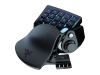
I found the keyboard just a bit too cramped for gaming. I purchased a Nostromo game pad on sale. Now I have no issues with keyboard gaming; in fact, I rarely touch the keyboard anymore for gaming.
-
Has anyone tried replacing the keyboard with a luminous one? or is it even possible?
-
It wouod need a header on the motherboard to do it without a mod.
-
I've seen luminous stickers somewhere on this thread I think. Obviously not quite the same as a backlit keyboard, but...
-
Got a w110er arriving in the post over next couple of weeks. Standard config (i5 with 750gb platter drive, 8gb ram). Not expecting miracles by any means, but how are people finding gaming on this thing by today's standards? I'll only be using it once a fortnight on my trip away for work. Would be quite happy checking out some older games on it. But out of interest, has anyone had any success with Guild Wars 2 on the Clevo? I understand the CPU might be limiting? Any other advice for a new w110er owner?
-
You can upgrade the CPU if you find you are limited by it fairly easily, the 750M will be able to do titles at the native res still, with some details lowered a little depending on the title.
-
Thanks Meaker. Mine comes with the 650m, not the 750m?
-
Same chip, makes little difference especially if you tweak it.
-
This machine doesn't have a 750, just 650. And it performs quite well on most games with decent settings.
Regarding my keyboard issue; it is still ongoing.
-
It's all of a 6% clock difference between the 750M and 650M ^-^.
-
I've been using mine while my new laptop is in for RMA. It's surprisingly powerful. Will play most games at high on native resolution or med to low at 1080p.
-
The resolution of the screen is a good match for the size and power, always was going to give the GPU a bit of extra longevity.
-
The TV in the bedroom is 1366x768 as well so it still looks decent when I have to hide in there if Mrs is hogging the big TV watching trash haha.
-
I want to clean under my keyboard. How can I do this? Do I just prop it up with a flathead screwdriver?
-
Removing the keyboard entirely will likely be the best option if needing to clean under there. Propping up with something is likely to snap a key or else off.
-
Alright, how would I do that?
-
Talked to one of our veteran production techs and he seems to recall that they had a bezel along the top of the keyboard with screws underneath. Couldn't recall if it was the top specifically, but there is a bezel that does pop off with screws under. You can look for the telltale lines that will indicate where. Once off, just unscrew, then you can lift up with a straight edge carefully and disconnect the ribbon when visible.
-
You have to push in 4 clips on top of keyboard, flip over, then remove cable. VERY easy to break something if your careless! There is a take down PDF I and others have posted in this thread or search with Google for W110ER service manual.pdf. Section 2-15 is what your looking for.
-
Anyone encoding with Quick Sync? There are a few reports saying our third generation CPU is better than Haswell as Intel dropped the ball. Very hopeful they get back in the game on next try.
I find that software still does a little better than Quick Sync but mainly in the shadow details. However, with full encodes of 20 minutes vs 3 hours, I'm loving it! -
My W110ER suffers from that hinge issue by the side where the ethernet port is. Whenever I close the lid, the left side opens up and the lid hinge goes out of alignment, i need to slide the lid back to get it to its original place. Anyone knows where I can get this repaired? Originally bought this from PCSpecialist. I'm not that person whos got the patience to tinker with this kind of issues.
-
Pc specialist themselves. In the uk you could make an argument that's it's a manufacturing defect and should be repaired for free under European law.
-
Thanks Meaker, I will try to contact them and see if this can be repaired. Will keep you guys posted.
-
Well, unfortunately, I called them and was told that they will charge me to get this repaired. Anyone can suggest any other alternatives?
EDIT: A £20 + £25 (labour) charge will cost me on this as per PCSpecialist -
Spoke to PCSpecialist again today, and was told that the labour is free. There will be an estimated 7-9 working days to get it repaired...
-
Other non resellers are going to find it hard getting the parts.
-
which warranty did you have.
as ive stated on here many times their misleading warranty sucks.
you could try clevoweb, the one stop source for all clevo and clevo brankded product spares and repairs in Birmingham but no idea what they would charge. -
I just got these portable bluetooth speakers ( http://www.amazon.com/gp/product/B00D6OHHEE/ref=oh_aui_detailpage_o00_s00?ie=UTF8&psc=1) that work great, but when I play CS GO they are silent. I don't hear anything.
How could I fix this? -
I don't have the speakers or the game, but do you have to select the audio output device from within the game menus? Or, do you have to select the speakers as your Windows default playback device?
-
Make sure they are set to the default as I don't think GO has audio selection in the game.
-
Still no luck :/
-
What happens if you temporarily disable the other sound devices before launching the game?
-
Another problem arose with my little sager...
And it's a rather odd problem. you see, all of a sudden, my GT650M decided to stop working. Under device manager, it gives me the error code 12, that it can't find enough resources to use. this is weird, as i did not change anything to my setup in a while.One thing that is even more curious, is that this only happens if the video settings in the bios are set to use the EFI driver/rom. After reinstalling windows and noticing the same problem again, i decided to downgrade from 8.1 to 7. The same issue reared it's ugly head. once again, only EFI caused that issue, reverting to legacy makes it work once again. It's been driving me insane for a few weeks now, because it worked fine in either mode before. What could have caused this, i wonder? -
What bios are you running?
-
i'm using a modified version of prema's V3 bios that he made for me, in order to make the wd black2 work with the laptop. i also considered that the bios could have been the issue, so i tried his uv, ov and ouv versions too. no difference. (now using a samsung evo instead of the wd black2).
-
Is it possible to explain why Sager/Clevo laptop brand can be purchased online only?
-
That is because Clevo doesn't sell directly to consumers, only to builders, and Sager does not partner with retail chains. They sell their machines directly and through their various resellers who are typically online only.
-
Yes they work on delivering customised machines tailored to customers and saving on the price increases involved in maintaining a physical store.
-
I need to replace my adapter. If I get a 150W one would that bring any potential benefits above a 120W one?
-
Maybe cooler running at load with less noise on the DC depending on quality of the adapter. At the wall max gaming current was posted in some of the early posts. So depends on cost and quality of adapter and what you want to lug around.
-
Yeah it may be a little more efficient, but unless you push past 120W with an OC, nothing really to performance.
-
I'm having the same issue with my GT 650M. Ever since the beginning of September, that is, and I received mine from OriginPC. Basically the same specs as yours though. Have you managed to find anything? I think it's something with overheating issues for me though. Haven't officially stress-tested it but I was playing Guild Wars 2 (low quality, by the way to be safe) and it would cause a Blue Screen of Death around 70 degrees C. I have the same issue regardless of the driver version-from 327.xx all the way to the current one as of October 2014. No fix.
-
Have you talked to your reseller? 70C is not a dangerous temperature so I would be surprised if that specifically was the cause.
*** Official Clevo W110ER / Sager NP6110 Owner's Lounge ***
Discussion in 'Sager/Clevo Reviews & Owners' Lounges' started by Ryan, Apr 7, 2012.


