Problems? See this thread at archive.org.
Sorry to hear that HT
-
-
Me too DUDE! :'(
I bet Myth gives you a special deal to cheer you up!
-
Ouch, I'm sorry to hear about that.
I guess it's safe to assume if I order the W110ER with the Sandy Bridge dual core, it will be upgradable to the 3610QM in the future if I feel I need it? -
Yes. The chipset/socket/BIOS are the same.
-
No deal, but if I can escape work tomorrow for an extended lunch hour, I am going there to buy one, they got me set up. I should be able to return the LCD I bought, even though I pay restocking and shipping, still get about $45 back.
-
UPS TRUCK IS HERE now moments from owning my SAGER
-
I wish I could just go over there and pick my machine up!
Let me cheer you up then, the one you bought earlier is no longer in production, because it is old (2009).
Maybe fate wanted you to have the latest & greatest.
-
If you mean set to use the integrated GPU for everything but selected 3D games then that is what I did, along with using the power saver level in windows 7. It didn't help with the GPU-Z and others reporting it still running at 835Mhz and power draw being higher then the amount I got on the stock drivers and a balanced power setting.
I did like the Adaptive Vsync and really look forward to a version that supports our dGPU properly. -
So what IS the correct screen to get if not purchased through mythlogic?
-
Even though it didn't fit how did that Matte version look in comparison to the Glossy?
-
Wait, you can ask Mythlogic to send their screen to you, or do you have to drive all the way there?
-
They will mail it or install it for you if you like but HTWingnut lives near them so why wait for shipping?
-
Oh, OK. I wanted the matte screen but with the starting price being 200 dollars higher in Myth's buy screen I couldn't afford it. Maybe I'll order this screen if HT says good thing about it.
-
Just to check back in with you guys. I did a fresh install of windows off of the USB drive and installed the correct drivers, especially the SATA 3 drivers. Haven't had any BSODs yet! Thanks for the help, and I'm loving my lappy! I'll report back if I run into any more trouble.
-
I am surprised it only has 1 USB 3.0 port. This day and age with back words compatible it should have 4 ports.
-
I hear ya, I would have also liked to buy from Mythlogic but they're just way too expensive.. I know they do "extra stuff" but in my opinion it doesn't justify the exorbitant prices they are charging and I would have liked the option to choose not to have those extras in exchange for a realistic and proper price.
-
GPUz will keep your GPU active. you can't be running any GPU monitoring software when trying to disable your GPU, as the software thinks you are trying to use it and so it keeps it on. Also in the control center software that comes with this machine make sure the GPU is set to power saver.
-
Awesome! glad to hear that! enjoy your new laptop
-
It has two usb 3 and one usb2/charging combo
-
I know, but with the stock drivers before I tried the newer ones, it would down clock to 135Mhz when it was only GPU-Z running. If I had just HWinfo running it would actually turn off and not display on HWinfo till I started something that used it.
Now it runs at 835Mhz if being monitored(GPU-Z MSI A, HWinfo) and although I can't see it when I don't have monitoring software running my power draw is still high even when I have them all turned off. This is with the windows power settings in power saver (The control panel it comes with just toggles the windows power settings to pre defined profiles. I did try it just in case but it results in nothing different.)
I'm puzzled why this has persisted even though I uninstalled the new drivers and did the cleaning routine before installing the factory drivers. I'm going to try restoring my initial backup tomorrow if I can't find some setting or no one manages to think of anything else before then to try. -
Oh ok I see what you mean. yeah mine does that too, but Im not to worried as I probably won't be using the GPU while on battery anyways.
-
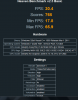
Is that with the 4000HD? I got a much higher score stock.
Attached Files:
-
-
No that was the dGPU. But i was running 1920x1080 with normal tesselation.
-
Well hopefully that piece of locking up crap MX11 Dell will sell on ebay .
I just bought this.
Order Details
1 x Sager NP6110 / Clevo W110ER () = $1,360.00
Xotic Gear No Xotic PC Gear
Outside of U.S. Shipping Coverage No Outside of US Shipping Coverage
White Glove Premium Packaging No thanks, standard double boxed packaging is okay with my order
Warranty Sager 3 Year Parts & LIFETIME Ltd Labor Warranty w/ Lifetime 24/7 DOMESTIC Toll Free Customer Support - Special! (SKU - S9P211)
Software Bundle (Not Installed) No Software Bundle
Microsoft Office Software No Office Software
Operating System No Operating System Standard - Drivers & Utility Software Only
OS Redline Boost No Operating System Redline Boost
XOTIC PC Redline Boost™ Extreme Performance No Thanks, Please do not Overclock my system (Overclocking will add 3-6 business days to build time)
Notebook Cooler Regular Size Notebook Cooler - Dual Fans - USB Powered (For up to 15.4" Laptops)
Mouse Accessories No External Mouse
Keyboard (External) No External Keyboard
Headsets No Headset
Fingerprint Reader No Fingerprint Reader
Port Replicator / Dock / Adapters No Dock/Hub/Adapter
Spare AC Adapter Sager 90W AC Adapter with Intel 2nd Gen. i5-2450 / Sager 120W AC Adapter with Intel 3rd Gen. i7-3610
Car Adapter No Car Adapter
Battery Smart Li-ion Battery (6-Cell)
Case No Carrying Case
Sound Card Sound Blaster Compatible 3D Audio - Included
TV Tuner No TV Tuner
Camera Built in 1.3Megapixel Camera
Wireless Network Accessories No Network Accessory
Wireless Network Sager - Intel® Advanced-N 6235 - 802.11A/B/G/N Wireless LAN Module + Bluetooth (SKU - S8R111)
Bluetooth Bluetooth Included (See “Wireless Network” Section Below)
Back Up Software No Back Up Software
Memory Card Reader Internal 9-in-1 Card Reader (MMC/RSMMC/SD/Mini SD/SDHC/SDXC/MS/MS Pro/MS Duo)
External USB Optical Drive External USB 2.0 Slim Blu-Ray Reader + 8X DVDRW/CDRW Super Multi Combo Drive
External Hard Drive (Back Up) No Back Up Hard Drive
Primary Hard Drive 750gb (w/ 8GB SSD Memory) Seagate XT 7200RPM NCQ Hybrid (Serial-ATA III 600 - 32MB Cache) (SKU - S5R421)
Exterior Finish Standard Finish
Branding Sager Branding
Ram 8GB - DDR3 1600MHz Dual Channel Memory (2 SODIMMS) (SKU - S4R378)
External Mobile Display No External Mobile Display
External Display Video Adapters No Video Adapter
Graphics Video Card nVidia GT 650M 2048MB PCI-Express GDDR3 DX11 with Optimus™ Technology (SKU – S3R523)
Thermal Compound IC Diamond Thermal Compound - CPU + GPU (Cools better than all Compounds)
Processor Sager - 3rd Generation Intel® Ivy Bridge Core™ i7-3610QM (2.3GHz - 3.3GHz, 6MB Intel® Smart Cache, 45W Max TDP) (SKU - S2N224)
Dead Pixel Warranty Standard Dead Pixel Policy
Monitor Calibration NO Professional Monitor Color Calibration
Display 11.6" HD "Glare Type" Super Clear Bright Glossy Screen (1366x768) (SKU - X1R001) -
Great, didn't know that, you cut out the part that says what res you ran it on.
At least that makes sense now.
Can you run it with my settings for comparison? -
Hey IKAS, did you get your W110ER yet, and if so, how is the matte screen?
-
I can't OC my core speed with these drivers but I did OC my memory at your settings and these were my results:
Stock
![[IMG]](images/storyImages/h6tYJ.jpg)
Plus 100Mhz
![[IMG]](images/storyImages/Qc3Rw.jpg)
Plus 150Mhz
![[IMG]](images/storyImages/JzByz.jpg)
-
How high can you guys get the VRAM? If the VRAM OCs well then it might mitigate a good amount of the memory bottleneck.
-
Got it yesterday and the matte screen is pretty good, viewing angles are OK but nothing to brag about.
Pros:
Sharp and pretty vibrant
It's Matte!
Cons:
Not the brightest
Overall I'm pretty happy with the screen, I haven't seen the glossy screen in person to compare it to but best part is I don't have to stare at my ugly mug or get reflection from lights.
Great scores! you running stock drivers? So 100Mhz more seems like a good balance. -
Yes, this is with the stock 295.93 drivers from Clevo/Sager. I'm still having the problem with the dGPU not clocking down but it is turbo boosting to 950 core continuously with no problem but it won't go above 950Mhz. Both MSI and EVA will raise the regular core upto the turbo limit but does not go above it.
I saw no artifacting to +150Mhz on the vRAM with OCCT but I haven't done extensive testing at that speed. It may have more room or it may not, but when I noticed the drop off in the score increase per mhz I stopped pushing the OC. -
Was it really worth spending $150 extra on 3-year (vs 1 included) warranty? Paying with Visa/AmEx cards already increases your manufacturer warranty by 1-year (through the CC), and you can add on multiple additional years of coverage for less than half what Sager is charging. Are you really planning on holding onto this machine for 3+ years? I seem to "upgrade" at least once every year... every 2 years at the most.
-
just got my laptop TODAY, after about an hour and half messing around and getting my games onto my ssd, i played LOL, D3, and they run flawlessly.. on 1080p, about to run BF3, doubt it can run on 1080, i might just run it on the laptop screen to finally see what high looks like hopefully. The screen is neither good nor bad, i went from a m14x to a acer 4820tg and you can deffinetely see the difference however, i dont think the screen should be a deal breaker, sure the colors are washed out but its the same compared to my acer 4820tg, having a high quality lcd is just a luxury and can live without and already compensated by the asus monitor.
-
BF3 runs fine at 1080p with medium/high detail. See my FPS graph in my reivew: http://forum.notebookreview.com/sag...er-np6110-clevo-w110er-first-look-review.html
![[IMG]](images/storyImages/8JFHL.jpg)
-
Notebookcheck review:
Review Clevo W110ER Barebone Subnotebook - Notebookcheck.net Reviews -
I thought the warranty was very cheap vs Dell.
they get 200.00 a year.
i usually keep a laptop 4 years.
with everything i have read about the heat problems and they pay for shipping both ways, Yep i thought it was a good deal.
My experience after 2 years they usually have a major breakdown.
just 1 repair and you have gained your money back.
And then as many kids as i have my laptop are usually hand me down.
I am happy with the buy. -
I figured since my dGPU power saving features are all screwed up and no one has had any new ideas on how to restore them I'm going to update to the 301.42 and then to 302.59.
With the 301.42 (I used the NVCV.inf file from the stock drivers to overwrite the one in the newer drivers to allow their installation) I was able to overclock both the core and the memory using MSI Afterburner. The Turbo boost Mhz went from 950 to 965 and 1000Mhz as would be expected and the dGPU ran at full boost the entire benchmark. The CPU is still limited to the non-boosting 2.3Ghz during all this.
As is to be expected with a new chip there are some improvements in performance even at stock as the driver guys get used to the new architecture.
Stock speeds 301.42 Drivers(all these are with this driver)
![[IMG]](images/storyImages/zsN99.jpg)
Plus 100Mhz vRAM, Plus 15Mhz Core
![[IMG]](images/storyImages/g7C9G.jpg)
Plus 150Mhz, Plus 50Mhz Core
![[IMG]](images/storyImages/bplbA.jpg)
![[IMG]](images/storyImages/bQn2u.jpg)
I ran a 1 hour OCCT:GPU error test at the highest OC and it passed with no errors at shader level 8.
I'm going to restore my initial backup as I don't like how the dGPU is locked to 835Mhz and doesn't throttle down, resulting in higher battery consumption. Before I do that though I'll do the same tests with the 302.59 drivers. -
Thanks for pointing out the NotebookCheck review, they are certainly one of the better reviewers. They seem very confident that the high power consumption is due to the need for a BIOS update. If that is true, do you think Clevo are going to update the BIOS? It would be nice to compare the power savings of a BIOS update when compared to Prima's modded BIOS.
-
Just saw this review on Kotaku:
The Origin EON-11s is an Impressive Gaming Machine Masquerading as a Netbook
They claim a battery life of 5 - 6 hours, and they tested it with the i5-2520 Dual-Core. I wonder if this increase is due to the hardware, or if they just did a weird battery test? -
I bet he didn't do a real battery test. There are mistakes in his article as well such as him stating there are 5 usb ports and this:
That doesn't make any sense. A "starting" M11x is the lowest, cheapest Alienware machine. I think he meant to compare the M11x and the Clevo. -
Well, got my replacement screen from Mythlogic. Only had time to do a quick look but looks nice. Will get it installed tonight. They were going to do it for me but I forgot my screws at home. d'oh!
Mythlogic also has an alternate backlit keyboard for the 9150/9170. Very nice.
I also don't want to scare anyone from swapping their screens. If you have the right screen with the right attachments it only takes five minutes to swap. Just don't try to be adventurous like me and screw it up. -
What would you guys recommend between the Crucial M4 803 (256gb) and Intel 520 series (180gb) for a SSD.
The extra size isn't as important but Crucial cost is not that much more. Performance/speed is more important to me.
Thanks in advance for your help...your posts (esp. HT WingNut) have helped so much in choosing a laptop. -
Between those two, Crucial M4.
IMHO, for performance and reliability, my vote goes in this order: Samsung 830, Crucial M4, Intel 520 -
Man. The BIOS problem is really irritating me. A BIOS flash isn't something as simple as a driver update - do you guys really think it's a BIOS problem that's causing the high power consumption?
-
Yeah, I'm thinking a BIOS update is in order as well. Too many funky things going on that shouldn't be. There's no reason the laptop shouldn't be able to idle at 12W.
i5-2520m could help reduce power consumption. But there's still a disconnect between many machines that some are getting 3.5 hours some getting 5 or more. I hope Clevo or Sager address it with a BIOS update. I still believe it's an issue with the 650m and not shutting down properly. -
I didn't get that from the article. From what I understood they were talking a BIOS update to remove the CPU limitation when the GPU was active. Just my take on the article.
Problems
We had major problems in retrieving the full performance actually expected from the processor in a series of benchmarks. As it turned out, Turbo Boost refused to work when the GeForce GT 650M was active and thus the clock rate throttled to 2.1 GHz. It resulted in performance losses between 20 and 30 percent depending on the application. This affects all benchmarks with combined graphics and CPU load, even if prevailing GPU limits often cover the largest part of the losses. We have already contacted Schenker so that this problem might be fixed with a future BIOs update. -
They mention it when in the power consumption section.
-
I was looking at SSD drives and this one (Kingston HyperX) popped out, partly because of its high IOPS score in comparison to other drives like the Crucial and Samsung. What do you guys think?
Max Sequential Read
Up to 555 MB/s
Max Sequential Write
Up to 510 MB/s
4KB Random Read
Up to 85,000 IOPS
4KB Random Write
Up to 74,000 IOPS
Link: http://www.newegg.com/Product/Product.aspx?Item=N82E16820239044 -
So you're thinking the variation in battery life seen so far is actual variation in laptop power draw, rather than inconsistencies across the board between how reviewers measure battery life? This laptop meets nearly all of my needs, except the battery life is just a tad shorter than I had hoped. It seems to me that if there is an inconsistency across machines (rather than just poor battery life in general), the more likely it is we'll see some BIOS fix in the future.... aaaaannnd the more likely I will buy it
-
I don't know why battery life varies so much. It could be from testing, but as I noted before, that's a huge variation in power consumption especially for just a browser test. 3.5 hours to 5.5 hours. That's something like 12W vs 18w. 6W doesn't seem like much but that's still 50% power difference. 2W max is what I might expect due to number of web pages open, hdd/ssd power, etc but 6W is extreme. Even at idle I can barely get 4 hours, so it can't be how tested. So it can be either something BIOS, GT 650m power config, not full battery drain testing, or just plain making it up.
-
Well, here are the 302.59 driver results. Unlike the 301.42 drivers I was not able to use the stock driver INF and had to use the modified INF from LV2G to install them.
302.59 Drivers
Stock speeds
![[IMG]](images/storyImages/YmVqj.jpg)
Plus 100Mhz vRAM, Plus 15Mhz Core
![[IMG]](images/storyImages/3UsoR.jpg)
Plus 150Mhz, Plus 50Mhz Core
![[IMG]](images/storyImages/d1agj.jpg)
It seems the 301.42 WHQL driver support this chip a bit better as the stock scores are greater then the 302.59 drivers. This is likely due to them being newer as the 301.42 drivers have a file date two weeks later then the 302.59 drivers.
I also ran another out of OCCT:GPU Shader Level 8 error checking with these drivers and it did not produce any errors.
It seems all we need to be able to OC the GPU is for a properly supported driver to be released. The 301.42 seem to be the best if you want to reuse the NVCV.inf file from the stock drivers.
*** Official Clevo W110ER / Sager NP6110 Owner's Lounge ***
Discussion in 'Sager/Clevo Reviews & Owners' Lounges' started by Ryan, Apr 7, 2012.