Problems? See this thread at archive.org.
Strange thing is after a while my system with i7-3610QM will run at about 45C. But that's when I realize the fan is running at a very slow speed. Not sure what triggers it to turn on because right now its idling but not running at all and temps are around 60C.
-
That is strange. I just checked mine and the fan indeed is running on very low speed. I have to put my ear right next to the fan to hear that air is moving but I have never see mine idling at 60C.
-
I found out my voice was nasally today. I did a short size comparison between the W110ER and P151EM here:
Short Clevo W110ER / P151EM Comparison - YouTube -
Awesome size comparison. I especially liked the differences in power bricks. Thank you

-
No one with a Dual can give us benchies? *sad face* I guess I was the only one who thought this little monster would be better off with a high clock Dual than a Quad...
-
NBR User Vally brought this to my attention:
AnandTech - Intel Dual-Core Mobile Ivy Bridge Launch and i5-3427U Ultrabook Review
Mobile dual core Ivy released yesterday? Anyone see them in the wild yet? i3's not available until Q3, and ULV chips are all BGA so no hope for a socketed 17W CPU to go in these machines. Wonder if anyone makes a BGA to socket conversion.
![[IMG]](images/storyImages/IOSwP.jpg)
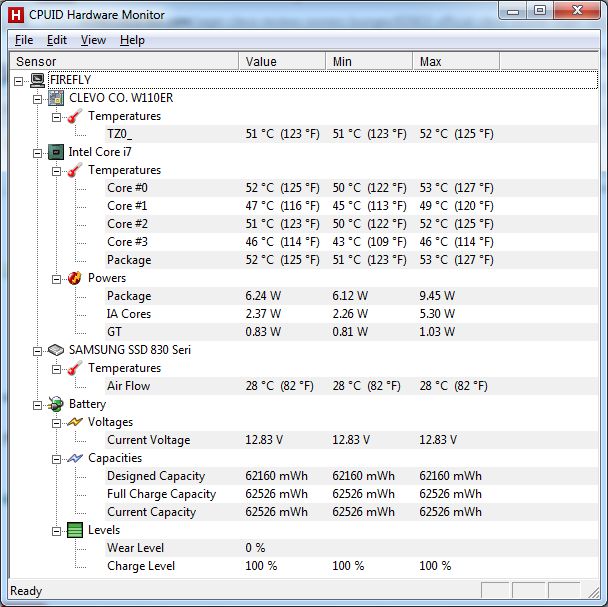
And here's my idle temps this morning, well with some CPU activity, but fan is moving now. I don't get it:
-
nevermind, nothing to see here
-
Great video thank you very much!! I'll rep when I can
-
very little bench, since i m not used to it,
3d marks06 at 1280x1024:
13411 3DMarks with NVIDIA GeForce GT 650M(1x) and Intel(R) Core(TM) i7-3520M CPU @ 2.90GHz
i added Heaven bench no tesselation
I am to repaste cpu using another methodAttached Files:
-
-
Prema
Can u briefly discribe what features will be included into ur modified bios
thanks -
For Everything regarding the bios mod, watch the Forums during the weekend and bookmark the link in my sig.
EDIT: The blog is not yet launched...you may bookmark it just to be ready once it goes live.
EDIT2: Yes I'll have a small flashing tutorial there. -
i can't open the link in your sig, it's a protected wordpress...?
-
same for me
-
Should be soon, very very soon.
-
Sorry for being a complete n00b, but when you guys post the new BIOS, can you also post a quick how-to on a way to flash it? Looks like you guys have to do it in dos - do I have to do the F11 thing and boot in dos, navigate to a plug-in USB drive and flash it that way? Or is there another way?
-
Prema noted he will do a tutorial on how to flash the BIOS. Yes, it will have to be through DOS and with a bootable flash drive.
-
I found this panel being made in china
11.6" LED panel LP116WH2(TL)(B1) Here are the specs
Response Time: 2ms
Brightness: 400cd/m
Interface Type: DVB, DVI, S-Video
Contrast Ratio: 10000:1
Resolution: 1366 x 768
Panel Type: TFT
Pixel Pitch: 22mm
Packing: Antistatic bag and box
Item includes: LCD Panel without inverter or b...
So even if they are a bit off with thier stats .. even if this goes from 10000 to1 to 1000 to 1 and that the beightness is more 350cd/m It sounds like it's a WAY better screen than what's currently being offered?
Would that panel fit in our laptops? -
Is it an LVDS or eDP and is the bracket a top/bottom or side mount?
-
I have no idea, I could forward those questions to the manifacturer? I got that from Alibaba.com
supply 11.6" LED panel LP116WH2(TL)(B1) grade A products, buy supply 11.6" LED panel LP116WH2(TL)(B1) grade A products from alibaba.com
they have TONS of 11.6 Panels there, most seem pretty bad tough. -
It should be LVDS, but the other specs dubious. No chance that it has a 10000:1 contrast ratio.
-
Yeah but even if it's only 500:1 it's still way better than the current ones, to top that off brightness specs can't be too far off and it's twice as bright as the current panel options we have.
-
By the way, could someone send me his professionnal calibrated profile for the display please, if applicable. Thanks
-
Hmm, maybe I'll calibrate my matte screen and share that. Should have done that with the stock one before I broke it.
-
Would be nice, but i have the glossy screen...no luck i guess
-
I have calibrated the screen but am trying to figure out a way to export the profile, mine is the gloss
-
@Clevernerd
How's the CPU? still running hot?
Any benches yet with tht cpu? -
Hi, i did not have much time to do some tests, but from what i did, yes this is pretty hot, at least at idle(around 65C,68C), while benchmarking and little gamimg (legend of grimrock), around 85C, room is around 26C.Sorry not to be more precise.Also, i repasted and made cleaning of the heatsink, whatever the method, still hot, i'm using HeGrease compound, and tried both spreading and line on the CPU+reposition heatsink.Grease is pretty thick and it's hard from me to put the right quantity.Maybe IC diamond is easier to apply, but from what i've heard it's abrasive.Should i worry with such high temps? I miss my desktop and the possibilities to run at low temps while overclocking.
Laptop is not propped up.I think i'm good for another repaste, arf, feel so nOObish.Attached Files:
-
-
Alright I don't know if I'm just being stupid, but I don't think my W110ER is recognizing my dGPU or something. I tried playing Skyrim a few days back and it ran fine the the 650M and now Skyrim will only play with the Intel HD3000. I downloaded HWinfo64 and looked at that and it only shows the HD3000 as my graphics card, not the 650M. Any help?
-
Did you check in the GPU driver if skyrim is put on the GT650?
-
Yes, I added Skyrim in the Program Settings then set it to use the "High Performance NVIDIA processor". No luck, still uses the HD3000.
-
Just checked on mine.
HWinfo64 also only recognizes hd4000. I think that is just one of these optimus thingies... Skyrim runs fine so far. -
Ah, I found my problem. Seems the ENB I was using was making me use the HD3000. Not sure why but when I uninstalled it worked fine.
-
Is there anybody tried Max Payne 3 on this w110er? I mean, I did and it didnt work with GT 650m, only Intel hd4000 :/ Any idea how to solve this problem?
-
Okey, back again to troll with my temps, these are total idle,laptop not used for couple hours,and temps after using with web browser and such.
Attached Files:
-
-
I think there are several problems regarding MP3... typical for Rockstar
Did you try to set the global default to the dGPU? -
Anyone else try the i7-3820qm?
-
Which Bios version are you running? I think the latest version 03 has updated fan table and CPU microcode updates. Maybe the microcode updates will help......just guessing..... -
Latest version, thanks anyway
-
Just got mine yesterday!
Strange thing I've noticed though, when alt-tabbing back into Diablo 3, it starts off brighter then flashes back a bit darker after a few seconds? Anyone else notice something like that or would know why I'm getting that?
-
Hey Clevernerd (or anyone else that sees this), what temp monitoring program are you using? CPU-Z and HWMonitor isn't seeing the GT650M...
-
I did NVidia CP - Global Settings - High Performance Nvidia Processor and even make own profile to this game and start the game "Play Max Payne 3" --> normal auto updating menu but then comes "send problem to Microsoft" or nothing happens.
Its wierd that if all setups are set to Integrated Graphics, the game will start like there arent any problems. You guess, how does it works with hd4000.... Not good at all, even the all settings are low and DX9 and main menu the mouse cursor lags/moves like Max Payne Bullet Time
Btw this is still with FHD screen, I dont know how does better it works without it, dont care....
Nvidia drivers are the latest 302.59.
E: This game works fine with my desktop pc where is GTX 680 but this is offtopic And yesterday I played Diablo III about 11h with w110er and there were nothing problems =)
-
ENB? I'm not sure what your talking about with that acronym.
-
Yop ! I'm using HWinfo64- HWiNFO, HWiNFO32 & HWiNFO64 - Hardware Information and Analysis Tools,HWmonitor needs Pro version i guess,also note GPU-Z.
-
HWmonitor will monitor the GPU temps but only if the card is active. You have to start the program when its active and it will then work.
-
^This^
I usually start an app like MSI Kombustor make sure it's set to use nVidia GPU and then fire up HWMonitor. Kind of a pain, but I guess that's Optimus at work for you. Hopefully though HWMonitor and other monitoring programs will become "Optimus aware" so you don't have to do this. -
Don't worry mate. I don't like these temps either, but there are still alright. There are a few ways however to lower the load temps a bit.
1. Try a cooling pad or if you want to save the cash, get two books and put them under the laptop's feet. So the air intake works better.
2. HTWingNut modded his heatsink by attaching little sticky RAM Heatsinks onto it. This in combination with a cooling pad should do a good job
3. Get Nvidia Inspector and go to Advanced Settings. Here you can set a frame limit. For slow games (Strategy, RPG and that sort) you can easily set it to 30FPS (Enable VSync however). Now the GPU will only render at low workload, which should keep it cool and quiet
Can't get MP 3 to run on my desktop and notebook. Still, I am not going to mess around with my drivers and stuff, as my Windows runs perfect at the moment. I just wait for these Rockstar fools to release a patch, which will make it possible to even start the game.
PS:
Got my Clevo (Schenker XMG A102) on Friday and instantly had to send it back, as it was faulty. :C The GPU was heating up and cooling down within seconds even when idling (40-80°C). And when I started a 3D application it would go up to 95°C in less than a second. It would then throttle down to 100MHz and still have 95°C. The fan however didn't care too much about it.
The service guy said, I will get it back by the end of next week. This is killing me. :C
What do you guys think was wrong with it? Could the heatpipe have been broken? -
Does anyone know if getting a cooler will quiet the computer? The load fan noise is bothering me.
-
ENB is a HDR mod that makes the game look a much better. I'm so used to using an one that playing Skyrim without one looks kind of odd... Guess I'll have to get used to it.
-
Oh, then you may have to set the mod to use Optimus as well.
edit: see here: ENBSeries • View topic - Nvidia Optimus related bug (SKYRIM ENB patch)
http://enbdev.com/doc_skyrim_en.htm
Mod does not support optimus. They recommend turning off IGP (HD 3000 / HD 4000) but you can't do that because the GT 650m is fully muxed to the IGP. -
@HTWingNut
About an earlier post, here is a selection of mini fans that might do the job, tell me what you think... Fans, Thermal Management | Fans - DC | DigiKey
*** Official Clevo W110ER / Sager NP6110 Owner's Lounge ***
Discussion in 'Sager/Clevo Reviews & Owners' Lounges' started by Ryan, Apr 7, 2012.