Problems? See this thread at archive.org.
Well if you dont care about the battery life, and if you are going to pay the extra for the 3612, you are way better off with the 3720.
-
-
actually, because of the different places I have to buy from, its actually the 3610 that is cheapest. I would be paying another 200 for the 3612 (and since battery life doesn't worry me, thats not worth paying for) but to order from origin with the 3720 it will cost 400 dollars more.
While I do have the money, I'm not sure I want to spend so much on a marginal CPU upgrade. Given that extra money is enough that I could get a large SSD and double the RAM.
I may still go for the 3720, but right now i'm leaning toward the 3610 -
Check Mythlogic, epic service, they give you IC diamond and calibrate your screen so you don't have to and to top it off they burn it your PC so you are sure to not receive a lemon that's DOA. The 3612 and the 3720 are the same price.
-
I'll check them out, but do they ship international? Thats the main reason i was deciding between those above. I live outside the US so need somewhere htat will ship to NZ. will head to their site now.
EDIT: I definitely like their setup, I can get the Matt screen as well as the 3720 and its less than 1400 (so i'm getting the same setup as origin plus the matte screen), but i can't see anything about international shipping on their website. I have sent them an email but it certainly seems like a good choice if they will ship. -
Signed. And even though professional reviews state otherwise, it's being perfectly cooled while remaining comfortably quiet. Especially in direct comparism to the M11x R3.
-
I'm from AUS myself, they do ship here (they are open to alternative ways to ship as well if UPS is too pricey for ya)
-
Good to know. Thanks.
Now its a case of deciding weather to save 400 dollars and get the glossy screen and lower end CPU from xoticPC... -
Id like to know if there are a sellers which can sell swe/fin keyboard to w110er and if, how much it cost?
-
mythlogic has the option to switch to another language keyboard. 60 dollars.
-
Hey, I'm not sure if this was already asked, but can the 3610QM version work fine with a 90 watt adapter? Mine is coming with the 120 watt version, however I was thinking about getting one of those Targus slim 90 watt adapters so it would fit in my bag. I also thought about just buying a second battery to extend my usage on the go. Any recommendations?
-
90W will work fine, but it can run near peak power draw during gaming, depending on game of course, which is bad for the PSU if it does it frequently or for long periods at a time (like a few hours). Also, the PSU could limit performance at load if its efficiency is pretty bad.
Although I was looking at my 120W HP PSU and it's about 1/3 smaller in volume, makes me realize the Clevo one IS huge. It would be nice to have a slimmer one. I may buy a 90W slim and keep it in my laptop bag and the stock one at home when I'm plugged in since I won't be likely to stress the system as much on the road as I would at home anyhow.
HP adapters SHOULD work if you can find one at 19V since that's what the Clevo ones are. I might try to pick up a slim HP one like this: http://www.amazon.com/HQRP-DV7-1128CA-DV7-1129WM-DV7-1130US-DV7-1132NR/dp/B001SHKS92
edit: That AC adapter won't work with this machine. Different plug type. Although all those HP adapters say 19V, mine for the DV6 is 18.5V. -
Is the difference of viewing quality between a matte screen and putting a matte screen-film on a glossy screen minimal?
Been waiting ages for MySN to sort out a matte screen option but nothing yet. Its this and predictably the battery life that is making me hesitant at the moment. -
It depends on how much time and how much effort you're willing to put into a matte film. Some people say if you're willing to do the soap and water trick that it is the same.
I went with the Matte screen as I've never had much luck with the films and I'm not willing to put a wet film onto the LCD to get the film to be perfect. I've tried films on a off the last dozen years and never ended up keeping them on any of the PDAs/Laptops/Phones I've put them on.
You should be fine. I'm running a 90W brick with the 3610QM and except during deliberate stressing (prime+kombuster or similar CPU + GPU 100%) I don't come near the limit of the PSU. You might want to look at something like the 95W Continuous/ 120W peak (< 5 min) Innergie 95W Slim or one of the HP adapters HTwingnut mentioned. I know the type A tip fits our laptop as I have the Innergie car adapter. -
It can look good, but as Baenwort states, it can take some effort and patience. I frequently end up buying a second protector because I botch up the first. But it can typically be a lot cheaper still than a matte screen option, or in many cases, matte screen is not offered at all so you don't have much choice.
-
So you are saying it won't damage the notebook under heavy load, but could damage the power brick? But it should work fine and charge the battery fully while browsing the Web, right? So you don't recommend the Targus slim adapter?
-
ok, thanks for the advice guys. Will wait a while longer, as I'm still pondering about whatever Apple come up with their new range, even though that and the Z are kinda a different breed to the w110er.
-
No, it shouldn't damage the notebook but that does depend on the failure mode of the PSU. If it is a well built one that has the proper safety features built in no damage should be done to the laptop when the adapter dies as it should open a fuse and protect the laptop.
The damage is going to be done to the adapter because it is the one doing all the work converting AC to DC and many of its components are rated to handle only so much current and/or heat(generated when converting AC to DC) and will die if push to long and to hard. This is why we mention getting a high efficiency adapter as they tend to run cooler when generating the same amount of DC power and so last longer when running full tilt.
I can't say if I recommend the Targus one or not as I haven't researched and compared it to the other options. I mentioned the one I did to alert you to the number of different options you need to compare. If you don't feel comfortable comparing them I'd recommend you ask the company who supplied and now warranties your laptop what they think. I don't say exactly which one to get as that is a quick path to lots of anger on a forum if you turn out wrong and I haven't done enough research to be certain enough to say "This one is the best and we should all buy it".
A 90W adapter will certainly be fine charging the battery while browsing the web. The only time you need to worry when you have a 90W instead of 120W adapter with a 45W Quad is when you're running the CPU and dGPU at 100% at the same time.
That 100% on both simultaneously is a rare combo as most programs will stress one or the other more and that one will be at 100% while the other is at 80% or less. You normally only see it when stress testing both at the same time. -
If you notice the power consumption chart I did: http://forum.notebookreview.com/sag...110-clevo-w110er-first-look-review.html#power
The power draw from the wall ranged from about 70 to 90W. Peak power draw with an artificially high load (prime95 + Komustor) drew 105W or so. That tells me peak 90W from the device is about 105W from the wall which translates to about 85% efficiency at peak load. Even the 120W PSU is limited to the 90W draw, it's implicit in the system and not adjustable, so it still won't charge when running at peak load or near it. Prema and I tested it. The advantage of the 120W though is that you won't be stressing the AC adapter as much, but 90W will be fine except for extended BF3 sessions (which is what I do )
)
-
Hmmm... I asked mysn for a 120w psu too, but I wasnt willing to pay 75€ for that, as I thought they were taking my 90w in return and I'd just pay the difference. I am not fond of the fact that my laptip could theoretically draw more power than the psu is able to supply.
I got the 3612. If you guys happen to know a well priced 120w psu please share. -
I just bought the Targus Compact Laptop Charger (90 Watt) at Fry's for $15 (they gave me 60% off due to the tips not included - open box). It's incredibly slim and easy to throw in a slim bag, but I am trying to figure out what tip adapter I can get for it. Targus doesn't have the NP6110 in their database yet. Is there another model or two I can try in their database that would be compatible with the np6110 adapter tip?
-
It won't draw more than 90W regardless of what PSU you have.
-
One thing I didn't note nor have I seen it noted by anyone else yet, although may have missed, is the 3 key limit. If you press more than 3 keys simultaneous the fourth key won't register. This is quite disappointing. It would be really nice if an aftermarket keyboard was available that allowed for more than 3 and also USB power for backlit.
I can dream can't I?
-
Its fairly standard with notebook keyboards to not have 4kro, but i admit since this is more gaming focused it would have made a nice inclusion.
Luckily I have to mechanical keyboards, one for the study and one for the living room. At least at home it won't be a problem.
Now Lets hope they make some sort of miniature mech keyboard for laptops...
EDIT: this has got me thinking about how awesome a laptop designed mechanical keyboard would be. I'm thinking island style keys, with an actuation point almost directly where the key sits. Similar to MX blues, except as soon as you hit 6g of force the key lowers and actuates immediately. it can then have a further 1/1.5mm travel before bottoming out. would be amazing for laptops if designed... -
Been wanting to get something like this ever since I gave away my netbook last year, and now the only thing that has me hesitating is the battery life.
I remember someone many pages ago suggested a portable external laptop battery, but I can no longer seem to find the post. Has anyone tried this as a solution? If so, is there any particular brand you would recommend? (I would be looking to extend my battery life by at least an hour while gaming.)
Would also vey much like to know if anyone familar with the M11x R3's fan noise could advise how the W110ER compares. -
@Welshmousepk - Yeah, MX keys would be nice. It is a bit disappointing from Clevo though. They usually skimp on the keyboard for whatever reason. Give us backlit and 4kro.
@rennervision - If you are going to invest in an external portable battery, you're almost better off buying a second battery for the laptop. Although the convenience with the portable battery would be you could charge it independent of the laptop. -
I understand that this laptop does seem to run a little hotter for the sake of reducing the fan noise, however, is this something to really be worried about is my question? Will overheating be a big issue with this laptop? I'd be alright with the small amount of heat as long as it won't damage the hardware in the long run.
-
No it won't damage hardware. It's designed to do this, all temperatures are within specification.
-
I had considered a second battery, but the hassle of keeping both batteries charged and also having to switch them mid-game didn't seem too appealing to me. I found this external battery which might be perfect...
Super High-Capacity Rechargeable External Battery Pack - BP170
I say it's perfect because it's practically the same size as the laptop, and so I could set it underneath the notebook to prevent it from slowly cooking my lap. If my calculations are correct, this external battery will give me about 3 hours of gaming on the go.
Would anyone have the specs for the 120w power adapter? If the output is 19v then this will seem to work. -
Nice idea. Here's that same one at amazon for $199
Amazon.com: High-Capacity (100 Wh) Slim External Rechargeable Battery Pack Compatible with Apple MacBook, MacBook Air, MacBook Pro and iPad- MAC100: Electronics -
Does anybody know what kind of tip that the W110ER uses? I sold my universal laptop adapter a few laptops ago otherwise I would check :/
Edit: Oddly phrased question. I meant what kind of tips is compares to, such as HP/Dell/Acer etc. (yes dell uses a proprietary one but you catch my drift) -
I find the tip is compatible with the ASUS N61JQ PSUs, so basically any ASUS laptop with a full voltage IVB CPU + dGPU will have a compatible adapter so I've repurposed my old 90w one for travelling, 120W one permanently at Uni in a locker and the 130W beast at home
-
The 3612 doesn't need a >90W PSU. Clevo certified it to run at <90W draw. That is the reason why the 3612QM is the only quad core that is certified by Clevo to run in this laptop.
The concern about >90W draw is for those people, like myself, who chose a 45W quad like the 3610 or the 3720.
You need a 5.00mm outer diameter and 2.5mm inner diameter tip. -
I ordered my W110ER from XoticPC with the following specs on May 20th and it will be arriving this Tuesday.
i7-3610qm
650M w/ 2gb GDDR3
8gb of 1600mhz RAM
256gb Crucial M4 SSD
Intel Advanced-N 6235
Spare Battery
I have a couple questions:
1. Could anyone recommend a good matte screen protector for this laptop? I would hate to buy a crappy one that leaves residue on the screen.
2. Should I be worried about using Prema's bios? How much battery savings are to be had simply by disabling turbo boost?
3. What was the ultimate decision on solving the Nvidia Optimus switching problem?
4. This being my first laptop that is truly portable, what settings do i need to be wary of (power wise for use with light gaming but mostly word processing etc)? Specifically, options such as hibernate and screen savers etc...
Thanks in advance! -
Yo guys, really bored so I did an analysis of the W110er's Graphics sub system
According to Anandtech, our 650m ( which is a 640 on the desktop) is severely Memory bandwidth and ROP bottlenecked.
AnandTech - Bench - GPU12
I don't know what the scaling is at 1366*768 plus the review assumed no CPU bottleneck. The 640's performance dropped like a brick at even modest resolutions of 1680*1050 never mind 1920*1080.
I suspect even the 560m (which is equal to 550Ti) is slightly memory bandwidth bottlenecked too even with GDDR5 because the performance according to NBC is about 7% more than out 650m in bandwidth heavy games like BF3.
Another assumption in place is that our Kepler cores are the same as the Fermi cores. However, when doing the rough math, our core is indeed similar.
384 Kepler@ 900mhz = 192 Fermi@ 1800mhz because NVIDIA haven't altered the contents of the shaders, only doubled stuff and dropped the hot clock
32 kepler texture units vs 32 fermi texture units
16 kepler ROPs vs 24 Fermi ROPS, a deficiency of 50% so I think this may be the culprit but I think memory plays a massive role due to the closeness of the 560m data to ours. Plus I read that ROPS consume obscene amounts of bandwidth so 50% more ROPS may indeed need more that 50% more BW to fully utilise.
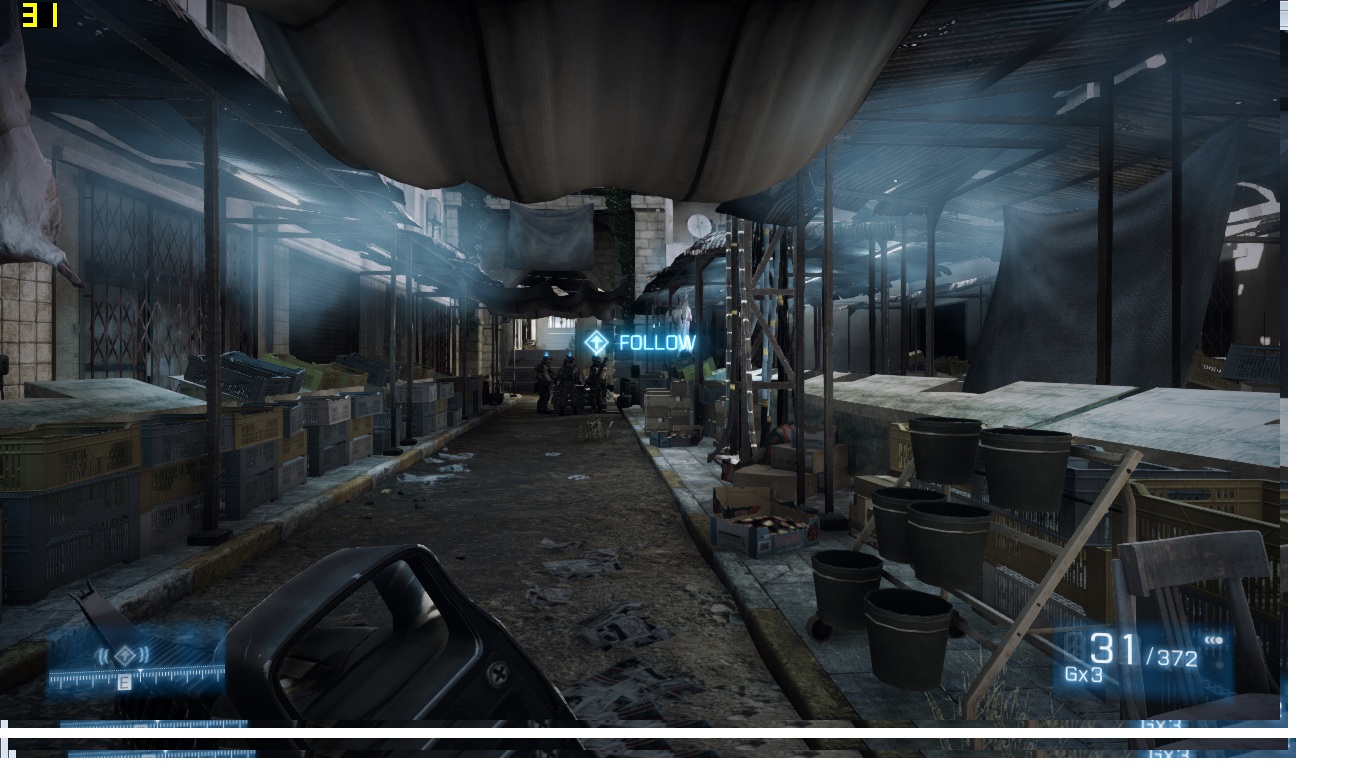
I tested out my theory on BF3
In operation swordbreaker, I went to the market scene and used MSI afterburner to change the parameters
my results were:
at 1366*768 Resolution
634mb VRAM memory used
All High settings with HBAO
stock: 38 FPS
Stock +100mhz RAM: 40 FPS
Stock +200mhz RAM: 41 FPS
Stock +300mhz RAN: 43 FPS
1085mhz Core: 40 FPS
1085mhz core +100mhz RAM: 41.5 FPS
1085mhz core +200mhz RAM: 44.5 FPS
1085mhz core +300mhz RAM: 46 FPS
Stock
Bandwidth: increase by 33%
FPS increase: 13.15%
Scaling: 39.8%
Bandwidth/Mflop ratio=1:9500
Core Clock increase with same bandwidth
Core: 14.2%
FPS increase: 5%
Scaling: 35.2%
Bandwidth/Mflop ratio=1:14466.66
therefore overclocking only core increases bandwidth to mflop ratio by 52.3% leading to a scaling of 35.2%
increasing both core and bandwidth 1:10850 ratio therefore only 14.2% increase resulting in scaling of 21%
In a nutshell, we're severely gimped, its not as noticeable because most games @ 1366*768 res there is more of a core processing power bottleneck but the memory bandwidth limitation definitely rears its head in BW heavy games or AA settings (which I will test, but i suspect the impact is much more than if we had GDDR5).Attached Files:
-
-
Thanks for that analysis. But I guess any machine with DDR3 video RAM will be severely limited at higher resolutions. I did test at 1080p as well and results were a little disappointing, but expected.
I think the whole expectation was that users would run on the notebook at max 1366x768 so DDR3 wouldn't be a bottleneck. I think thermals were also a consideration since the GDDR5 might require active cooling or at least some copper, so that also means cost. -
its sucky though, we do very well (up to 560m standards) with "light" games for now and in the forseeable future but as soon as the GPU starts needing more texture/complex shader work, the BW issue comes to light. I guess this will put the issue of high res monitor to rest since the 650m really can't drive anything larger than 1366*768
I'm more afraid of games in the future, to be honest, it was a lousy excuse not to use GDDR5, they could've given us half the RAM and the cooling would pobably only amount to only a slightly bigger GPU plate plus some thermal pads for the RAM units beneath the fan. The overall cost difference probably would've been $25 at best as Desktop GFX cards charge about $40 more for TWICE more RAM on the same models -
Would be nice to see the absolute maximum VRAM OC and Gb/s Bandwidth increase you can get on the DDR3 650M.
-
i wouldn't go >1000mhz. About 15% extra is the absolute safe limit, even for GDDR5 (perhaps 25% with the freaky GTX 680 mem OC)
I actually killed my N61jq with a 1000mhz OC (up from 800mhz) threw up artifacts after BIOS towards the end, i think the mem chips were Samsung Rated for 1000mhz so it was surprising. I don't think the cause of death was heat, just raw electrical degradation, so much electromigration occurred my mem chips were probably like swiss cheese.
However, I read somewhere for VRAM oc its usually the memory bus that dies first something about electrical trace degradation from working too hard, then the Mem controller then the RAM itself. -
holy s*** is this still valid? I though Clevo would fix anti-ghosting once and for all... come on man what the hell
-
You can't FIX anti-ghosting.
Even USB keyaboards cant give nkro (unlimited key rollover) over a single USB port (most only offer 6kro). The ribbon connectors in laptops are certainly not designed to offer more bandwidth. its just not economical.
I'm not saying I wouldn't love to have the option, but 99 percent of users won't miss it. For gaming at home most of us will be using an external keyboard anyway -
Here are the temps of the i7-3520M idle and full load(standard intel burn test round), naturally propped up with notepal u1 and 2 fans.HT is disabled(...not you HTwingNut
)
Attached Files:
-
-
Since I will be putting a SB 2720QM into m W110ER that means no USB3.0 correct? I can't find anywhere if the W110ER has a 3rd party USB3.0 Controller or not.
Anybody on this forum with a SB could do a test for me? -
USB 3.0 is built into the chipset (HM76 IIRQ) not the processor. This was the same for the P150EMs that were first offered with Sandy Bridge and not Ivy....USB 3.0 will work just fine.
Graphics are built into the processor however, so you'll get HD3000 (Sandy Bridge) not HD4000 (Ivy Bridge) -
So is this issue with the CPU not hitting the 3.1 GHz turbo with GPU active only limited to the NP6110 and NP6165? Does anyone know whether that's a typical thing with other brands / manufacturers also?
-
Well for the new Ivy Bridge it is built in..
as with my other laptops with Ivy Bridge and USB 3.0, when I popped in a SB those ports would only work in 2.0 mode. But thanks for the Info. -
![[IMG]](images/storyImages/LyVUL.jpg)
I found this fan on an old GPU that might fit directly on the bottom so it blows air in without sticking out. I could use some adhesive to fix it. It's a 12volt fan but at 5volts it pushes some crazy air. And best of all, super quiet. -
At 1366x768 it should be able to max out or at least run 90% of games on high pretty easily without AA, the lack of bandwidth wont be much of an issue gaming on the laptop itself. For anything other than that it will get a bit bogged down depending on the game, but considering the bandwidth limitations of GDDR3 I'm still quite impressed with how the 650M runs games at 900p and 1080p.
-
Nice. I was looking for a slim fan, but best I could get that moved any decent amount of air was 10mm. You could probably get by with 3mm protruding from the bottom without it being propped up depending on where you placed it and its size of course.
So that fan runs at 5v no problem then? I'm sure I have a couple old GPU fans laying around. Will have to see if there's any opportunity there. -
So what is the max fan height that we can fit in there.
1. From top of heatpipe
2. From top of copper RAM cooler -
I did find a few fans from old GPU's but they all blow air out the side not top, although they do push a decent amount of air and quite silent.
And Prema here's what I measured:
Top of heatpipe is less than 2mm.
Top of copper RAM cooler is touching with the ones nearest the palmrest, and just clearing the further ones.
About 6mm to the main copper flat heatsink.
From motherboard, 11mm.
Pretty freaking tight.
*** Official Clevo W110ER / Sager NP6110 Owner's Lounge ***
Discussion in 'Sager/Clevo Reviews & Owners' Lounges' started by Ryan, Apr 7, 2012.