Problems? See this thread at archive.org.
+1 Rep. I owe you at least 2 more. One for your awesome review and another because your review was what helped me decide to get this.
-
Sounds reasonable. Still I am wondering, why other machines, with the same CPU, do not shut down, but throttle.
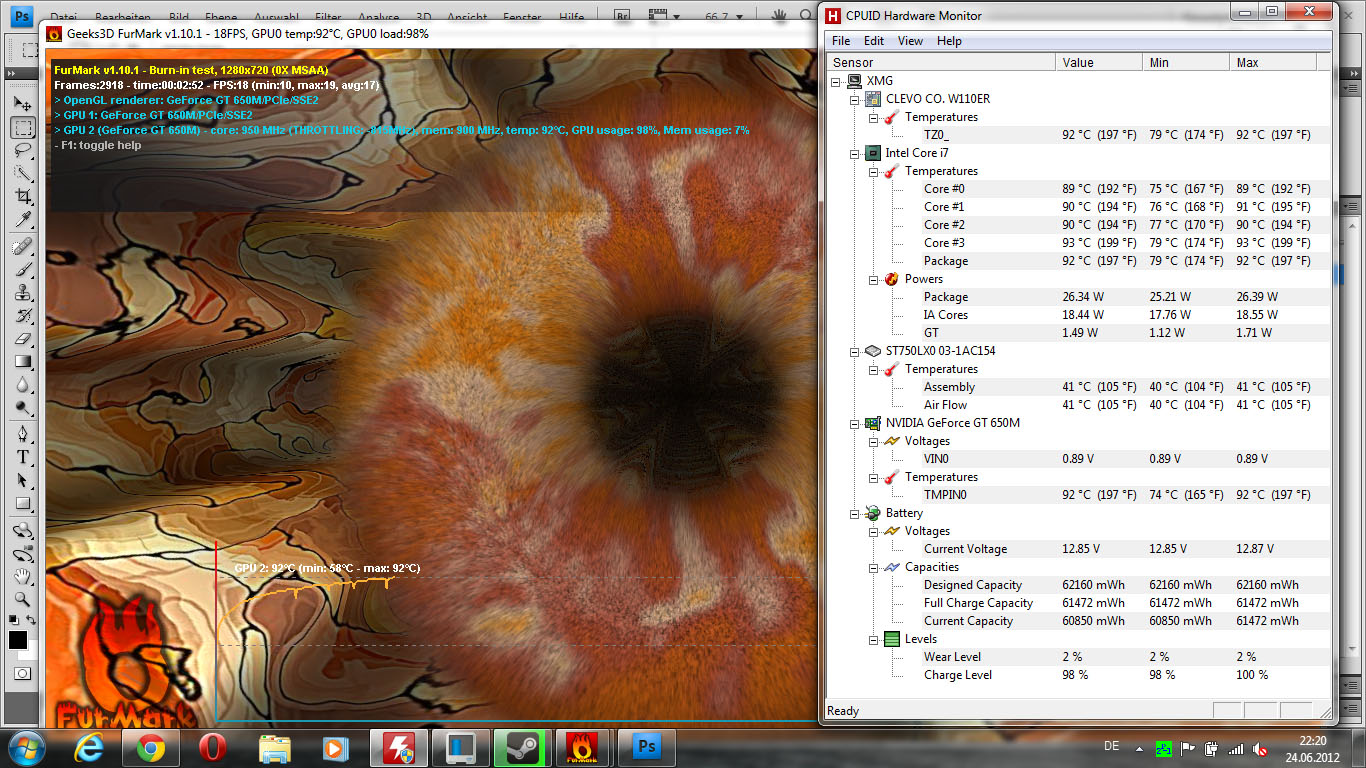
[EDIT] Ok now I used Throttle Stop to manually set the CPU Clock to 1200MHz and still the notebook will shutdown after about 90°C. Also the fan never runs really loud. I am wondering if I have different fan table, that keeps it quieter?
Is there a way to manually adjust the fan speed? -
the fan should go loud as soon as 75° for gpu if I remember well, can't say for cpu but definitely before 90° !!
you may want to try to reflash the bios ?
it only occurs while benching ?
----
as for the keyboard, some keys won't register on a regular basis (like once per sentence), and I even had 2 keys that inverted (the latter being registered earlier) once or twice, both things that do not happen to me with other keyboards, even small ones.. -
Have been reading this thread, starting from the beginning (I'm on post #1655). I was wondering, I want the best, most portable laptop money can buy, that will allow me to game with virtually no lag. From what I have seen, the i7 3610 I ordered is perfect for that but is it necessary? If I got a IVB i5, will performance suffer? Like I said, from where I am in the thread, it seems the i5 provides similar performance while giving better temps and battery life. Of course, in the stress tests, the i7 does better but most games will not stress the CPU to that limit. Am I misunderstanding something? Any help would be appreciated.
-
Well, only when benching the temps rise up this high. In games I have pretty good temps. I'll try reflashing the BIOS then. Is there a possibility to extract the old BIOS in order to preserve it?
Well the 3610 is a hell of a CPU for such a small machine. It is faster than almost any Phenom II Desktop, for instance. But the i5 are also pretty fast, due to their higher clocks. Since the 650M is not an über graphic card, I would say, that you wouldn't notice a difference in gaming at all, since the 650M will limit FPS before the CPU. Except for games that use only one thread. With these you should be even better of with an i5. -
After seeing your problem, I also tested mine yesterday with your method. We have the similar configuration while my cpu is 3610qm with 7200r hard disk. The PSU of mine is 150w. My computer shut down after about ten minitues while the cpu was 95 ℃ and the graphic card was 91℃. I am in sweden and the temperature here is about 20℃. I have no other cooling device. You said other notebooks do not shut down. What do you mean about other notebooks. Are they the same model or different models? Otherwise, I am also curious about your settings in both of the two test softwares and the your shut down temperature.
-
I got my computer last week. But I noticed that the win 7 did not give the estimated battery life time when I was using the battery. Anyboy meet this problem?
-
I bought those, my hope is they won't make the heatpipe higher so that I can fit a fan on top of them.. didn't measure precisely though, if anyone did, I am tool-less hehe
-
As I said above, before repasting I had exactly the same problem (shutting down after 3-4 min without exceeding 95C on cpu or gpu) - with an 120W charger and an i5 Ivy. After repasting, the problem disappeared.
-
There is only about 2mm clearance above the heatpipe to the bottom panel. See my mod. A 5mm fan has to protrude below because there is just no room.
-
It is exactly 3mm on my system.
You can backup your BIOS with this (use standard values):
afuwin64.rar
It will also keep your Fan on max once the software is started.
-
Yep I knew I'd had to, but what I meant was the room between the lower part of the heatpipe (heatreceiver), and its top (the pipe itself). I wish the heatsinks height won't be more than that.
Thanks Prema, I'll have to sand them a bit then =) -
I am very glad you said that, Bing Han, so it doesn't necessarily mean that my unit is broken.
With other laptops I basically mean other W110ER. Like the one Notebookcheck.com tested. It didn't shut down after one hour of stresstesting. Instead it throttled a little bit. Also another user, who has the exact same configuration as mine, says it doesn't shut off.
Thanks Prema. I'll give it a go. -
Right now I'm running Prime95 4 threads with furmark 8x AA 1280x800
It's been 20min, temps are 97 cpu (i5 2410m) and 89 gpu. Seems stabilized by now.
Full fan speed started at 95 cpu and 78 gpu I think. Furmak was minimized at that time, I didn't realized that would make the gpu works less.
I'm monitoring temps with throttlestop, and the cpu is locked on turbo.
Turbo mode throttled from 2.7Ghz to 2.3/2.4 along with temps reaching dangerous levels, but I guess the trigger was power consumption, not temps. That's a nice behavior, ThrottleStop* rocks =)
When I unchecked the "set multiplier", the cpu stood on whatever it was set before, though.
I have the 90W PSU and still the stock paste.
@unclewebb: could you add a feature to enable a profile on gpu activity ?
also, minimize to taskbar would be really nice, there's already an option to minimize to tray on close
-
97*C are very high! You should not keep temperatures like that, apply MX2 or another thermal paste! These high temperatures are of course not gaming temperatures, but very critically! These temperatures are not healty (cpu)
-
Well, for 100% stressing GPU and CPU + Turbo I'd say the temps are still alright. Since this was just for benching.
-
lastnikita: ThrottleStop already has a feature that lets you switch profiles based on CPU or GPU temperature. Unfortunately I don't have the time or money to work on ThrottleStop anymore. The user community chose not to support ThrottleStop in any meaningful way so development has ended. All I have time for now are a few minor tweaks whenever Intel releases some new CPUs.
ThrottleStop will not get in the way of your CPU throttling when it gets too hot. That safety feature is built in at the hardware level and no software can prevent the CPU from throttling if it really needs to. 97C is a big number but it is still within the Intel design specification. -
Yep I see it now, didn't realize I could use it that way, thanks.
Correct. The power consumption reported by TS was 32W @2.7Ghz, what's yours ? Do you use the original power adapter ? -
After one hour of playing Diablo 3 with 4 Players, my max CPU temp was 76°C. My GPU got 69°C@ 23°C in my room.
So i think i don't need to repaste
I also use a cooler (Magic Pad 4G Titan, but ventilators were off).
Maybe i will buy the chopper heat sinks for 1-3 more degrees
Best regards, bikerboy
M -
hello , first of all , i wish to telling you , i'm french and i'm a bit bad in english.
I'm interresting by the clevo W110ER , but i have some question about it.
Is it possible to put I7 quad core 45 TDP in it ? like the 3720QM ?
Is there a solution to keep the turbo during gaming with this cpu and gpu ?
Can i put a 3612QM (35W) on it and save the turbo capabilities during gaming ?
Is there some throtteling ? I am puzzled by the temperatures of lastnikita ...
I don't realy understand the difference between the original bios and the bios of prema ...
Is it possible to extend the battery life by reducing the power comsuption of the cpu ? with Throttlestop for example ?
Is it possible to O/C the cpu ? and for the gpu , which frequency can i approximatively expect ? 900 mhz for gpu is possible ?
No issue for the screen ? to set up a mat better screen ?
To lastnikita , i'm a bit afraid by the thickness of this laptop , is it larger than your old one ? i've the 4820TG and i wish that the clevo is no larger than mine.
Once again , i'm sorry if i've made mistakes ( i've made i'm sure ) !
thanks all
-
Here you see my temps 20 seconds before shutdown. When Core#3 hit 94°C and GPU hit 93°C it turned off.
Attached Files:
-
-
noob question:
How do I use turbo mode? I want to increase the speed of the cpu...
thanks -
Turbo mode is automatic. It will boost to peak turbo speed as long as temperature parameters (and other parameters not shared with us) are met. It's like Intel's boost feature.
-
@HTWingNut
This one moment off topic: Don't you think the Samsung player 5.0 is the most usefull tool you have ever bought for about $230.00! -
Yes, pretty decent. Only thing I wish was that it had a much better camera. But otherwise a great little device that does everything except a phone!
-
Hey Grichka
-
Sorry, I overread this part before. I use a 130W Third Party adapter, as well as the 90W original one.
-
For people who have this laptop, At what temperature does the laptop shut down at? did anybody experience a shutdown in the middle of a game? Do you experience downclocking while playing a game?
Currently:Macbook unibody 13.3 late 2008.
Getting a 6165 or a 6110 as soon as i see reviews when playing games! -
First of all, not every unit shuts down, just some. Also it only happens when both CPU and GPU are stressed 100% with special tools and temperatures go up beyond the 90°C. But this is purely theoratical, as no game or program, except special stressing tools, could ever cause such a high simultaneous CPU&GPU load.
Playing games will not rise the temps this much, so it won't shut down, not even after hours. Also there is no throtteling when playing games. Only the Turbo Mode will be deactivated. -
Thanks for the quick reply. I take it you have this monster, what games do you play on it and what temps do you get?would you recommend this to a college student who likes playing games and bringing it to school?
Currently:Macbook unibody 13.3 late 2008.
Getting a 6165 or a 6110 as soon as i see reviews when playing games! -
I play mostly Anno 2070, Settlers 7 as well as a lot of RTS and RPG. MyTemps are alright. Like if I play Civ V for an hour GPU will max at 82 °C. When I use a 30FPS Frame Limit I get 77°C and with an FPS Limit + Notebook Cooler it will max at 69°C, which is only 12-15°C above idle.
If you need a laptop at college for productive work with great battery life and a fair bit of gaming, I would not recommend the Clevo. The keyboard is not made for long typing and the battery life is poor. When you're looking a small notebook to take away every day, which has serious gaming power then go grab one of them gaming dwarfes.
-
thanks for the answer lastnikita
In which shop have you bought your clevo ?
I think , for me (french) , the most interresting shop for mine , is eurocom , i can expect I7 3820QM , non glare LCD , no HDD ( i put M4 later ) , intel centrino 6320 , 4 go PC3-12800 (i already have 8 gigs of ddr 3 in my timelineX) , azerty keyboard , 120W PSU , french power cord .... for less than 1000€ with student and cashback reductions ...
It seems to be a good deal ... what do you think about the configuration , for this price ?
For the HDD/SSD i think i will let my seagate 750 go 7,2 krpm ( or my vertex 2 160 go ) until having more € for a M4 512go ... -
That's a very good price. Mysn.de would charge you 1034,- for the same config, except they only provide the 3612QM as a quad core. (Which is more than enough, in my opinion) However they provide two years of warranty and it will be way quicker for you to send yours in, if something happens. I didn't look for student discounts though.
-
i don't really know if i want to take the 3820QM or an other model ... i'm a bit confused about the turbo and possibly throttle effect during gaming , when both gpu and cpu are stressed ...
I mean that i want to escape throttling during gaming and to keep the turbo mode in each number of activated core when i'm playing some recent game and old ( which demanding high frequency on 1 or 2 cores).
I don't know if i was enough clear :/ -
From what I've gathered, as long as you have at least the 3610QM the CPU will never be the bottleneck in games. If you aren't planning on compiling source, or another CPU intensive task, anything higher than 3610QM seems redundant, if even that.
-
So is the absolute max battery time still around 5 hours or have there been any tweaks (locking it down to 1 core, disabling the GT 650m) to get it to last longer? Say for a long plane ride, just to watch a movie or surf the web? Also can anyone recommend a good slice battery? Is the matte screen worth it for +$189? Thinking from purchasing from XoticPC today.
-
Well said. Also I am not really sure if the statement, that older games demand higher baseclock on each core is true. Ivy Quads should handle them perfectly, as the games are older and the CPU architecture is way more powerfull than its predecessors.
-
How do you get 5 hours? Is this only with an i5. I have an i7 have locked the cores to 1.2ghz and parked half of them and I still only get 3.5 hours
-
I finished setting up my W110ER and I decided to try my external monitor to watch a movie, but when I plug it in through HDMI, nothing happens. I tried the same cable with my m11x and it works fine. I tried the Fn+F7 button (which looks like the monitor swap) and that didn't do anything either. I went through all graphic display properties, and my external monitor isn't detected. Even when I plug in the cable, no sound acknowledging new hardware is played. I went through BIOS and saw no option to enable or disable HDMI, and my Device Manager shows no errors with drivers.
Anyone have a solution? -
i think the same. But in my case , i think that 200-300mhz will not be useless for me , because i use some log for reconverting photos every weeks , and other heavy logs for my works , but also FSX which demanding a huge power of the cpu.
@magic man , with a I7 quad core , i can't expect a batery life higher thant 4 hours ? that it is the minimum for my works ? ( management of a high number of pcs , scanners , printers ect .. )
thanks for all your answers
-
Parking cores? Does this mean you can temporarily disable cores? How to do that?
-
I think $189 is steep. If you're adept at upgrading or fixing computers, then you can buy the same panel for about $90 and install it yourself. Personally, I enjoy the matte screen.
Yeah, 3.5 - 4.0 hours is about normal for this laptop.
Try using Win+P key. -
Do you know where can we buy it ?
-
I don't see how everyone complains of the keyboard so much, All I heard is that the x and y of the keys are 1.4x1.4cm My current keyboard is 1.5x1.5cm (perfect square) and It is pretty comfortable to type on, I have no errors at all.
If 1.4x1.4 is wrong, then how small are these keys (letters such as A, Q, W, Z)
Can someone measure a key accurately with metric mm? I'm kinda concerned whether or not to get this laptop if it is so difficult to type on. -
I personally don't have an issue typing on it. Just the ?/ key is problematic (key just left of the right SHIFT key). I quite like they keyboard to be honest.
-
That is good to hear, My keyboard is from some unbranded amazon retailer. I like having no brand names on anything I have, but it is annoying to have keyboard layouts with extra or smaller keys, like mine has a useless macro key, and a tiny left shift. Fortunately I use the right shift, and not the left. That will be a problem for this laptop.
I'll get to use the new laptop sometime after Tuesday. -
Yeah, small right shift, and small arrow keys. They had room to bring the keyboard out another 10-12mm each side allowing more than enough room to offer a keyboard with full size right shift and arrow keys.
-
You need to do what I posted in this post:
http://forum.notebookreview.com/sag...ger-np6110-owners-lounge-204.html#post8595062 -
Still concerned what gaming is like on such a tiny screen. I have set 1080x590 (same dimensions for a 11.6 screen) on my 1366x768 15.6 inch laptop for games in windowed mode, it seems pretty playable. But it isn't accurate, as pixel density on the 11.6 is a lot higher.
*** Official Clevo W110ER / Sager NP6110 Owner's Lounge ***
Discussion in 'Sager/Clevo Reviews & Owners' Lounges' started by Ryan, Apr 7, 2012.