Problems? See this thread at archive.org.
Something doesn't seem right. I've had two WD externals hooked up to my USB 3.0 and they worked like a charm.
-
Are there any benchmarks/comparisons between the i5 and the i7? Considering getting this little beast and I like the idea of some extra battery life, lower temps, and saving a little cashmoney if the real world gaming performance isn't much different. May still go with the i7 though to get the most life out of this machine.
-
Depends on the games you play. Some are more dependent on a fast single or dual core while others are optimized for multiple threads where a quad core will just stomp on a dual core. I honestly think the quad core is simply the way to go. It's very fast for games even for single or dual threaded games, and will be even better for multi-threaded games.
-
When additional cores and threads are not needed, the Core i7 automatically turns them off so additional power consumption and heat is close to zero. You will appreciate having them available some day when they are needed.

-
Just to update my HDMI issue - I'm now having no problems whatsoever with connected this to my TV. I really don't know what I was doing wrong, because I spent at least a good hour last night plugging/unplugging my HDMI cable, checking my settings, and rebooting. Now it automatically displays my desktop on my TV as soon as I plug it in, just like I would expect it too.
As soon as I got it working I started gaming on my big screen. This little notebook definitely beats any console you can buy right now.
-
Does anyone know if I can put this screen into the W110ER?
WXGA (1366X768) HD N116B6-L04 REV.C2 mini laptop touch screen - Detailed info for WXGA (1366X768) HD N116B6-L04 REV.C2 mini laptop touch screen,mini laptop touch screen,WXGA (1366X768) HD N116B6-L04 REV.C2 mini laptop touch screen,N116B6-L04 REV.C2 L
It would be great if I can make it a touch screen for my art projects. -
Also if you go with a 3720 you get a faster base clock than the i5 anyway. So it's win/win.
-
Just thought I would share how I was able to increase my battery life. I was getting a little over 3 hours on a fully charged battery with just internet usage and installing/moving files. That seems to be about in line with what others were reporting.
Then I recharged it and plugged it into this, which arrived yesterday...
Super High-Capacity Rechargeable External Battery Pack - BP170
I was able to get 9 hours of usage off this external battery (doing pretty much the same things I did previously). All the while, your laptop acts like its plugged into its charger so when this battery is gone, that means I still had my original battery fully charged - (which I already know would last an additional three hours) for a total of 12 HOURS. So this battery will increase your usage four times what you normally get.
Also, since this battery is the exact same dimensions as the laptop, it also makes for a convenient way to place it on your lap.
-
I may have screwed up my Y470 beyond repair (and simultaneously voided the warranty). If I have to replace it, it will be with one of these. If I do this, I will already have an i7-2630qm (is it compatible with this laptop), 8gb DDR3, and an SSD from the old laptop. I also have a spare Windows license. I've found a barebones version of the W110ER with no HDD/CPU/RAM from RJTech for $499, and I see that it comes with a warranty - I'm assuming this is not voided when I install my own parts?
Also, can anyone confirm if the 2630qm would work in such a laptop? -
The warranty would only cover the barebones machine of course: chassis, lcd, mainboard, keyboard, battery, power supply, GPU (since it's soldered on the mainboard). As long as the issue is with one of those then it should be covered. Just you may have to provide evidence it wasn't your hardware that caused the problem.
Technically, all 35W/45W Sandy Bridge CPU's Socket G2 are backwards compatible in an Ivy Bridge machine so yes your i7-2630QM should work fine. Curious to see thermal results if you do go this route. -
Just ordered mine, Unfortunately xoticpc did not have the killer networks wifi card. Total $969
-
It's still a 45W CPU, the difference in architecture is balanced out by the slower clock speed. I'd expect it to run about the same temps as the 3610, which people don't seem to have too much trouble with.
I'm hoping I don't have to go this route, though. I was getting either a hard shutdown or a freeze with accompanying screen corruption whenever I would flex the body of my Y470 by picking it up by the front or corner. Suspecting some sort of short/grounding issue, I took the laptop apart and found a screw attaching the motherboard to the plastic shell was loose and allowed it to flex (probably from the last time I opened it up to replace the CPU). Tightened it down, powered it up, grabbed it in a way that made it crash before, and no crash. Problem hopefully solved.
EDIT: Spoke too soon. Y470 is still having problems. If I buy the barebones, how easy is it to add my CPU? I'm assuming its accessible via a bottom panel, and does not require taking the machine apart? I know the RAM and SSD should not. -
There could be no easier way in a notebook. It's elementary and takes the whole of 3 min.
-
I would have assumed Clevo made it easy, as they are geared to enthusiasts, but Lenovo made it ridiculously easy too on my old Y560 but on the 470 I had to literally take the motherboard out to change the CPU.
-
your y570 is a special model ?
I have a y570 and it is very easy to change the CPU
![[IMG]](images/storyImages/aaydYEIX.jpg)
you just tak out the cooler, like any notebook.
i have the both, sager np6110 and lenovo y570, and lenovo is best than sager.
This NP6110 / clevo w110ER is my first and last sager.
BR -
It's a Y470, and there's a damn single piece of plastic in the way of pulling everything out from the bottom. 570 very well might be different.
-
Anyone know how long it takes for LPC Digital to get one of these out? I ordered mine on the 22nd of June and it is still in the "Sent to factory for build" stage.
-
Just wondering, are you displeased with your clevo? Appreciate your views as I'm currently thinking about buying this.
-
Yes would like to know what you found much better in Lenovo than the Sager? I'm not defending, but you're comparing an 11.6" vs a 15.6" machine. You're best to compare with a Sager NP6165, NP9130, NP9150.
-
Thanks for that link.. that's pretty impressive battery life. My NP6110 is still en route, so I'll wait and see if I will need something like this. 3.1lbs weight though, lol nearly as heavy as the NP6110
-
HTWingNut added a few adhesive copper heatsinks and apparently it did drop the temps by a couple of degrees. Not huge, but still, any drop in temp is a good thing. I have ordered some from Amazon [ link] but I'm still waiting for my NP6110 to arrive. Here's one of the pics from HTWingNut with the heatsinks added:
*edit* sorry just realized you said copper shims, not the same thing as heatsinks. My bad.![[IMG]](images/storyImages/ePhzt.jpg)
.. -
Very interesting, could you take even a low quality cellphone picture of the laptop ontop of it and another with the laptop upside down and it ontop?
-
I have ordered a sager np6110 and am very excited about it. I was wondering if anyone can recommend a 12 volt adapter for this laptop. I don't want a 120 volt inverter i want to go from 12v straight to the laptop. I live on a sailboat and all my systems are 12v and efficiency is really important so any suggestions will be appreciated.
-
Just one more question I'm hoping you can answer before I go ahead and buy this. The barebones from RJTech has an option for no wireless card, which is fine because I have an extra sitting around. I assume that the antenna leads would still be installed and in the right place if I went this route, but I want to make sure before I potentially do something stupid.
Also, the 90W adapter is cheaper than the 120W one with the barebones. I've read that 120W is necessary for a quad core, but also that the system is prevented in BIOS from drawing more than 90W. Both of my previous laptops, a Y560 and a Y470, both with quad core CPUs and dedicated GPUs, have come with 90-95W adapters and never had a problem. Also, I have read in this thread that the 120W is a bit larger than I would like, considering that this is a 11.6" laptop. Is the 120W really required, or do I only need the 90W?
Sent from my Tricorder using Tapatalk -
Sure. This is what it looks like on top and underneath. I saved enough money with Xotic where I decided I could just go ahead and order an external battery as well.
![[IMG]](images/storyImages/dcp1660.jpg)
![[IMG]](images/storyImages/dcp1654.jpg)
![[IMG]](images/storyImages/dcp1657.jpg)
I originally thought I would need a laptop cooler, but so far this has been working out great - sitting on top of the battery while I keep it on my lap. I'm really surprised at the temps I've seen while gaming. Just low to mid 70s for both the CPU and GPU. (That's according to RealTemp, so I was very surprised since others are seeing temps at least 20 degrees higher.) I've been playing with settings on low and I also purchased this with the IC Diamond compound, so not sure if that's why I'm seeing such a difference. -
This is the one I have for use in my car and when I'm on a long flight mCubeMini90 Overview it is very small and supposedly is high efficiency, which is how it can be so small and not overheat or blow when delivering 90w continuously. If you aren't intending to OC you should be fine with a 90w adapter.
One of the included tips fits the W110ER very well. -
Thank you for the pictures. It really does fit nearly perfectly. If it wasn't for the bottom air intake it would work as a slice battery.
Thats about normal for gaming. Its really surprising but unless you are running certain loads (games like BF3 with high CPU and GPU usage) I've found that I tend to run in the mid 70s depending on the game. Its really only when I run a stress test that I hit the 90s as I don't play any games similar to BF3. -
really seems like the bottom of the laptop might heat up the battery, which in turn heat on batteries doesn't really have positive effects.
-
I do not like the keyboard size, every time I tipe a wrong key, mainly the right shift, much time I press UP and the text go to the line up. I hate it in the keyboard layout, temperature, weight for the size and batery duration.
it is a +- machine. good performance, but with lot of problens.
is like you have a special hot rod car. you can burn the road, but not is equal to have a normal car. need more attention to use.
BR -
I can use it im my lap the lenovo y570. I can use it playing with note worry about temperature. can write a text more fast.
I have just the np6110. can not compare the y570 with the other 2 models NP9130, NP9150.
BR -
Wow that thing is small. It would be great for charging and basic use in a car though. Good find.
-
Yep, the right shift key is a major annoyance. I think the good on this machine far outweighs the bad, but I'm frequently mistyping on the keyboard. It's strange because I had absolutely none of these issues prior on my same-sized HP netbook. (Somehow HP was able to cram a seemingly full size keyboard into a small form factor.)
-
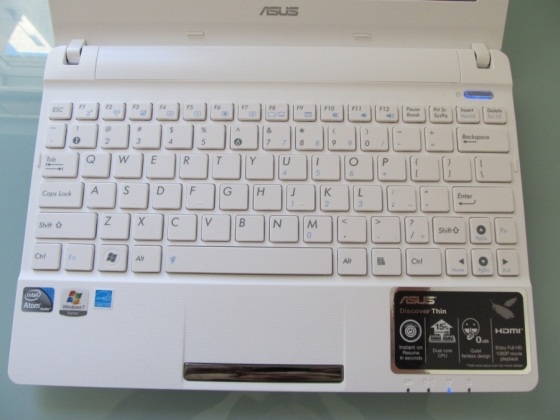
That's because clevo is useing a 10" Asus eee netbook keyboard. Small but still useable to type on with practice.
-
Interesting. Are there mods for the asus eee keyboard ? Backlit, or even better another replacement ? Maybe the original keyboard is not the same and responds better ?
After spending almost half a day bending the heatpipe over and over, I could finally manage to get more correct temperatures. GPU is still a bit hotter though, I'll try to fix that today. But yesterday I tried benching again, and while temperatures were lower than the other times (90/80), computer shutdown after 2 mins of torture test. I just had a 1h Max Payne 3 session just before. The PSU wasn't hot at all. I tried again after 2 minutes, and it lasted for 5 min... Both cpu and gpu were full turbo at that time (cpu turbo did not throttle anymore because of the lower temps), thus consuming a little more power. I don't really understand the feature involved here, I guess the BIOS is limiting power drawn within a time range ?
What I understand even less, is how I could run that test for 20 minutes the other day... and then again for +5min at least twice !
Let me self-quote my previous advice, which I'd like to re-iterate, may save you the trouble I've been through !!
-
are they really using someone else's keyboard? They sure don't look exactly similar to me.
I saw a their 10 inch. And felt like the keys were only a centimeter wide. I hope that won't be the same when I receive my w110er.. My desktop is only 1.5 and the 110er is suppose to be 1.4 -
Keyboard is not the same as the Asus. It's unique to the Clevo.
-
Just about to pull the trigger on one of these monsters, can anyone comment on the fan noise in comparison to the M11 R3?
Currently if I game I get a hairdryer noise kick in at 7100rpm which annoys the mrs and stops me from gaming grrrrrr. I understand it will be louder but is the noise similar to the larger clevo variety? I find my 170HM quieter than my M11x because of the sound of the noise it produces.
Also really struggling between the 35w I7 2 core against the 45w I7 quad. Is the heat going to be a major difference?
Thanks -
If not exactly the same would'nt you say they were seperated at birth?
asus 10" keyboard at bestbuy.
better image

whole asus 10"netbook.
Attached Files:
-
-
In comparison to the M11x R3 the Clevo is dead silent. No seriously it is not even half as loud. Also the sound it produces is not a high pitch hum, it sounds more like a mild wind, so it's way nicer in terms of annoyance.
-
This is what I thought...swapping a backlit keyboard for less noise is major and so many pro's it is pushing me hard to go for one. On top of the fact I can do finance and keep the money from my M11x. Decisions Decisions.
-
Hmmm this could be bad. I intend to get this for gaming and work. I type a lot in my line of work so this is making me second guess now lol.
-
Aside from the insane performance, the noise is the biggest plus for the Clevo. But anything else about this machine is just mediocre. I will definitely miss my M11x R3.
Ice2642 had the best words for it:
I just got myself a slim external keyboard with a Logitech Unify Dongle and now I am fine.
-
Well, I finally bit the bullet and placed my order w/RJTech for the cheapest and barest of bare-bones units. I'll be using my own CPU/RAM/SSD/Wifi card, and selling my Iconia Tab W500 to hopefully make up part of the difference. I can hide the credit card charge from the wife until I pay it off, but I'm not terribly sure how I'll hide the laptop itself. Any suggestions?
Then again, she paid $700 for a turtle and I didn't complain so we'll see... -
lolwut?
10char -
Something about it being a rare species that's difficult to import into the US or something like that. All I know is it has just about the cutest face a turtle could possibly have. We pretty much live in a zoo; don't ask.
Sent from my Tricorder using Tapatalk -
What problems do you speak of? apart from throttling, no backlit keyboard, simple design and heat?
I am fine thinking about buying it till I get home and sit in front of my M11x and it opens itself with facial recognition and the backlit keyboard turns on hahaha then I dont go through with the purchase so I know what you mean. My 540M GT handles itself well with the ULV it is just the bloody fan noise is brutal.
-
I had the 540M just before... It's night and day.
Couldn't play many games correctly, now I can play them in high quality even in full-hd for most of them.
This is the best design I've had on a laptop till now, simple, no brand, mat, perfect. But I would hate a flashy alienware, so..
There is no throttling problem.... you must be confused with another model.
Heat isn't an issue either, especially given the size and weight.
My issues are the poor screen, keyboard, touchpad.
A bit on the heavy side too, could use some lighter material I guess.
My 2 cts. -
My order is "in process," now comes my least favorite part, waiting. And after that is my other least favorite part, installing/configuring everything
-
This is the best thread ever!
-
Please post pic of $700.00 turtle face, I just have to see
After spending for turtle, buying a computing tool should be easy to swing. Paint the computer to look like a rock and sit it next to the turtle.
*** Official Clevo W110ER / Sager NP6110 Owner's Lounge ***
Discussion in 'Sager/Clevo Reviews & Owners' Lounges' started by Ryan, Apr 7, 2012.


![[IMG]](http://imageshack.us/photo/my-images/10/dcp1660.jpg/)
![[IMG]](http://imageshack.us/photo/my-images/405/dcp1654.jpg/)
![[IMG]](http://imageshack.us/photo/my-images/819/dcp1657.jpg/)